


惯性聚合 高效追踪和阅读你感兴趣的博客、新闻、科技资讯
阅读原文 在惯性聚合中打开

推荐订阅源

L
LangChain Blog
S
SegmentFault 最新的问题
V
Visual Studio Blog
J
Java Code Geeks
宝玉的分享
宝玉的分享
美团技术团队
博客园 - Franky
酷 壳 – CoolShell
酷 壳 – CoolShell
H
Hackread – Cybersecurity News, Data Breaches, AI and More
有赞技术团队
有赞技术团队
量子位
Martin Fowler
Martin Fowler
MyScale Blog
MyScale Blog
Google DeepMind News
Jina AI
Jina AI
博客园 - 叶小钗
月光博客
月光博客
P
Proofpoint News Feed
D
DataBreaches.Net
Blog — PlanetScale
Blog — PlanetScale
博客园_首页
腾讯CDC
Microsoft Azure Blog
Stack Overflow Blog
Stack Overflow Blog

博客园 - 我也是个傻瓜

ArcGIS Pro新建地图底图加载慢 ArcGIS属性表搜索查找字符串长度限制bug Win11浏览器鼠标光标变白看不见解决方法 IIS 未能加载文件或程序集XX或它的一个依赖项 ArcGIS显存缓存路径修改 Python卸载Config.Msi权限问题 ArcGIS中对“被完全包含”的理解。 ArcGIS中NULL空值的特殊性 Cesium加载本地离线影像南北空洞缺失问题 IIS中W3SVC、WAS服务无法启动问题 Navicat连接Oracle报错ORA-28547问题 您必须有许可证才能使用此 ActiveX 控件0x80131901 Visual Studio Installer 2022正在进行准备 C#修改已根据框架版本自动选择语言版本 打开工作空间时,但未在 DTD/架构中声明 Word表格1.5倍行距居中问题 CAD安装Error 1402权限问题解决 ArcEngine10.2中融合工具Dissolve的bug lQueryDef查询Evaluate报该几何不包含M值问题。 Visual Studio 离线安装0x80131509 如何快速向Windows安全中心添加排除项 VMware复制无法扫描本地目录,您可能没有执行此操作的权限 如何判断ArcGIS界面语言是中文还是英文 Visual Studio批量删除Token注释 解决Authentication method 'caching_sha2_password' not supported的问题 7zip压缩Updating for multivolume archives is not implemented SVN设置强制提交日志 ArcGIS AddIn插件开发断点调试
WebService调用创建应用程序事件日志权限问题
我也是个傻瓜 · 2026-01-08 · via 博客园 - 我也是个傻瓜

问题描述

在维护老项目时,调用WebService接口返回500,响应内容如下:

{
    "Message": "The event source ExceptionManagerPublishedException does not exist and cannot be created with the current permissions.",
    "StackTrace": "   在...",
    "ExceptionType": "System.Security.SecurityException"
}

原因分析

ASP.NET应用程序运行的账户没有权限创建和写入 Windows 事件日志源(Event Source),在Windows Server 2008 中事件日志的创建、写入需要管理员级别的权限,而默认的 IIS 应用程序池账户(如 IIS AppPool\应用池名称Network Service 等)权限不足。

解决方案

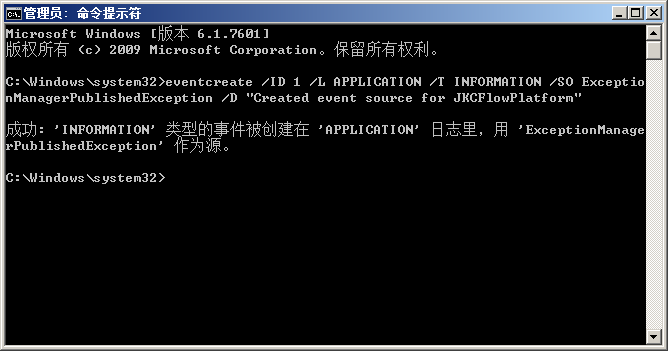
(1)以管理员身份运行命令:

eventcreate /ID 1 /L APPLICATION /T INFORMATION /SO ExceptionManagerPublishedException /D "Created event source for JKCFlowPlatform"
image

 执行成功会提示 SUCCESS: An event of type 'INFORMATION' was created in the 'APPLICATION' log with 'ExceptionManagerPublishedException' as the source.

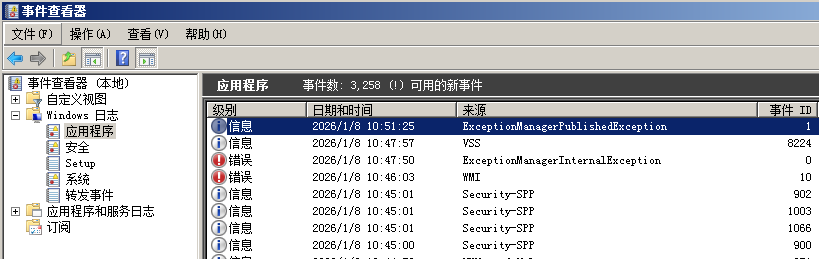
(2)在事件查看器“Windows 日志”→“应用程序”查看ExceptionManagerPublishedException,能看到刚创建的信息事件即表示成功。
image