

惯性聚合 高效追踪和阅读你感兴趣的博客、新闻、科技资讯
阅读原文 在惯性聚合中打开

推荐订阅源

S
SegmentFault 最新的问题
Google DeepMind News
G
Google Developers Blog
Martin Fowler
Martin Fowler
MongoDB | Blog
MongoDB | Blog
月光博客
月光博客
Jina AI
Jina AI
宝玉的分享
宝玉的分享
人人都是产品经理
人人都是产品经理
D
DataBreaches.Net
V
V2EX
WordPress大学
WordPress大学
T
The Blog of Author Tim Ferriss
Last Week in AI
Last Week in AI
B
Blog
博客园 - 叶小钗
小众软件
小众软件
Stack Overflow Blog
Stack Overflow Blog
P
Proofpoint News Feed
A
About on SuperTechFans
J
Java Code Geeks
Cyber Security Advisories - MS-ISAC
Y
Y Combinator Blog
Microsoft Security Blog

博客园 - MSSQL123

timescaledb 扩展 PostgreSQL 18+ 版本下源码编译安装 ubuntu24下 ext4和xfs类型磁盘以及PostgreSQL实例性能对比测试 PostgreSQL 18 新特性 skip scan,一个鸡肋的功能 PostgreSQL 17 流复制中开启逻辑复制槽同步,以及逻辑槽的故障转移 记一次PostgreSQL交叉表crosstab行转列导致的OOM TiDB 扩容与缩容 PostgreSQL 高可用集群 patroni 自动故障转移测试 Ubuntu 20 环境下 patroni 自动化安装,一分钟快速搭建 patroni 集群 Ubuntu 20 环境下 pg_auto_failover 自动化安装,一分钟快速搭建pg_auto_failover集群 PostgreSQL的消息队列扩展pgmq 磁盘IO延迟和队列深度的关系 TiDB 最小拓扑架构集群安装 PostgreSQL 逻辑复制中的同步和异步模式以及其表现 prometheus 的 altermanager Silences静默告警,优雅地抑制告警 “世界上百分之99的博士和他们的论文都是垃圾”,原本以为这个观点偏激 pg_auto_failover 在多种场景下自动故障转移的验证 pgbouncer连接池设置与压力测试的最大连接数测试 pg_auto_failover 自动故障转移参数 博文阅读密码验证 - 博客园 pg_auto_failover 高可用中,PostgreSQL实例配置文件的加载步骤 pg_auto_failover集群monitor节点的高可用 prometheus监控Linux Server node_exporter代理安装和配置 prometheus监控windows window_exporter代理安装和配置 Prometheus 和 Grafana 监控 PostgreSQL 记一次MySQL binlog日志导致磁盘空间占满的问题 SQLServer 2019 标准版在虚拟机上无法充分利用CPU的问题诊断 pg_auto_failover 环境变量导致的show命令错误 SqlServer 事务复制(transaction replication)的复制位点信息 SqlServer 事务复制的两个参数immediate_sync,allow_anonymous MySQL,SqlServer,PostgreSQL中,如何实现锁定一张表
Windows Failover Cluster集群中的EventId 1196错误日志
MSSQL123 · 2025-11-28 · via 博客园 - MSSQL123

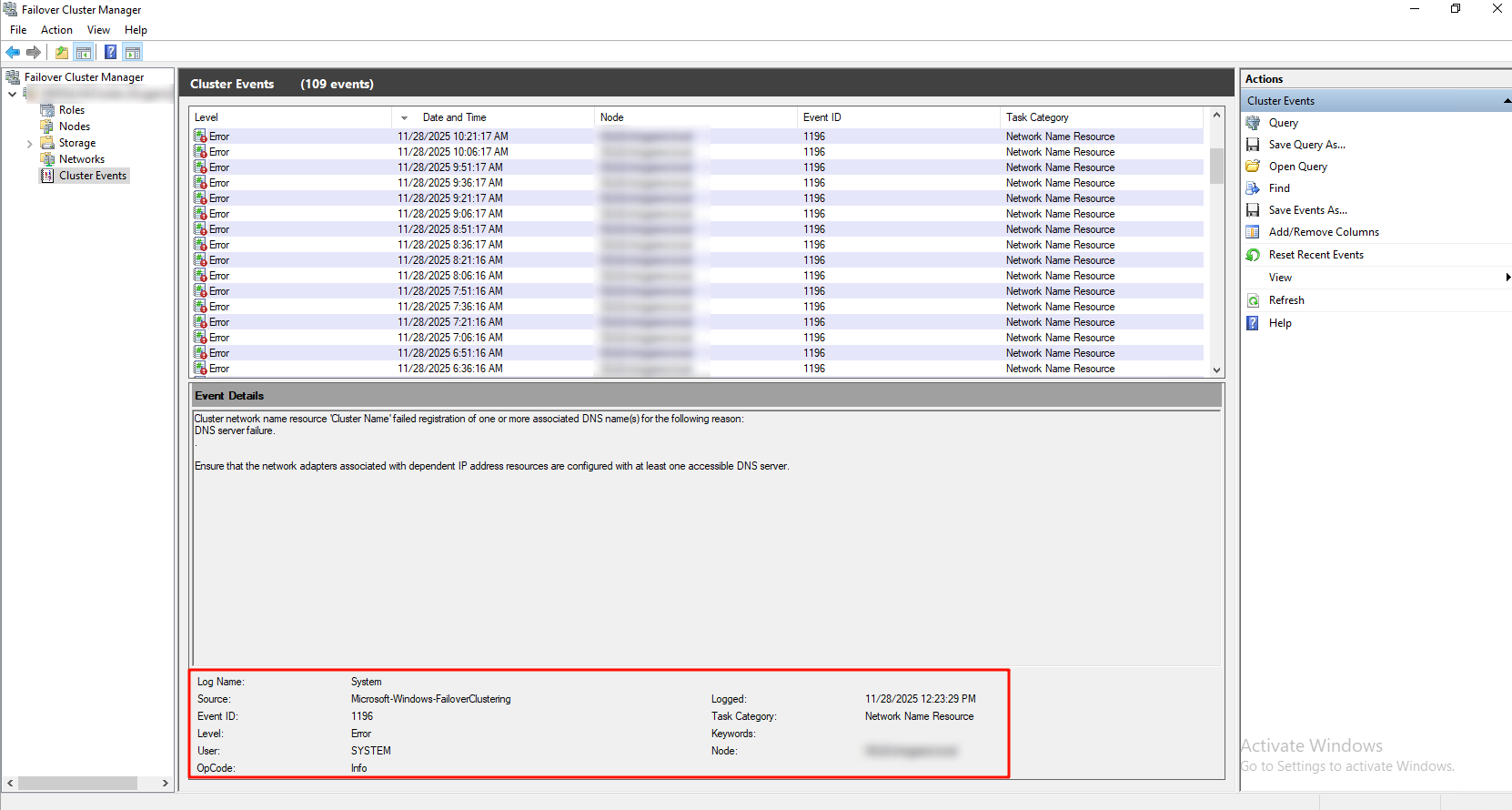
如图,EventId 1196错误日志每个15分钟出现一次,错误日志的详细内容如下:

Cluster network name resource 'Cluster Name' failed registration of one or more associated DNS name(s) for the following reason:
DNS server failure..
Ensure that the network adapters associated with dependent IP address resources are configured with at least one accessible DNS server.
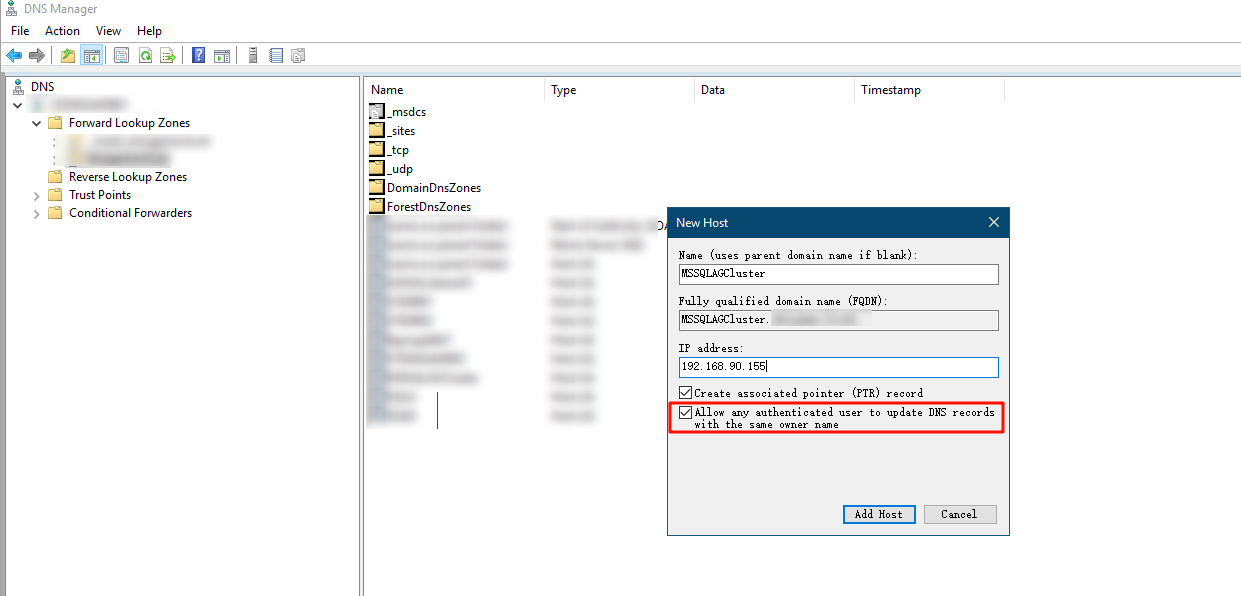
image

image

如果上述方式完成之后,依旧有EventId 1196错误,参考如下链接:https://learn.microsoft.com/en-us/archive/msdn-technet-forums/4cec496a-9a08-4afd-979a-109a557699ea

Hi All,

Problem was solved. I did following;

- Open DNS Management and find CLUSTER Host A record. Right Click on it and go Properties / Security

If above doesnt work , please do following

- Open Active Directory Users and Computers and find CLUSTER computer object. Right click - Move to Computes OU

Open Failover Cluster Management - Core Cluster Resources right click / More Actions / Simulate Failure

- Then click More Actions / Repair

Restart All Nodes again. It should be work.