







所谓时间旅行(时间回溯),指的就是可以从先前的检查点恢复执行。
这个特性核心就是利用 checkpoint 来实现的。
如下图所示:
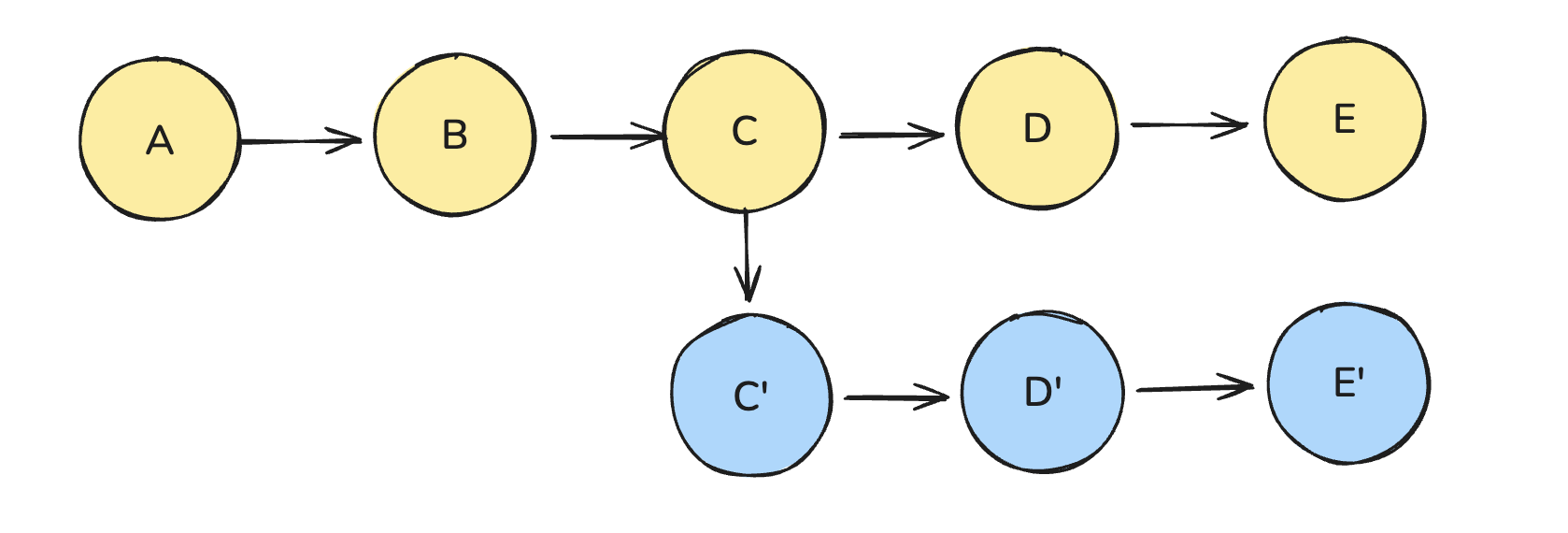
假设我们执行一张图,要经历 A -> B -> C -> D -> E
在执行 C 节点的时候,状态还可以有 C' 的可能性,但是又不想从头开始执行整张图,因为 A 和 B 是没有变化的。这个时候就可以利用 checkpoint 的特性,只回到 C 节点,然后修改 C 节点的状态,然后再继续执行下去。
另外需要注意的是:无论是重放相同的状态,还是修改状态以探索其他可能路径。在所有情况下,从过去的某个执行点恢复都会在历史中生成一个新的分支。
时间旅行操作步骤
invoke 或 stream 方法运行图。getStateHistory 方法,传入指定的 thread_id,获取该线程的执行历史,并找到目标的 checkpoint_id。updateState 方法,在指定检查点修改图的状态,以便从不同的状态继续执行,探索其他路径。invoke 或 stream 方法,传入 null 作为输入,并在配置中指定合适的 thread_id 和 checkpoint_id,即可从该检查点恢复执行。实战案例
flowchart TD A[START] --> B[checkpoint-1<br/>Graph 启动] B --> C[checkpoint-2<br/>generateTopic 执行完成<br/>topic = 程序员] %% 原始时间线 C --> D[checkpoint-3<br/>writeJoke 执行完成<br/>joke = 程序员笑话] %% 时间旅行分支 C --> E[checkpoint-4<br/>updateState<br/>topic = 猫] E --> F[checkpoint-5<br/>writeJoke 执行完成<br/>joke = 猫笑话] %% 样式 classDef original fill:#E3F2FD,stroke:#1E88E5,stroke-width:1px; classDef branch fill:#FFF3E0,stroke:#FB8C00,stroke-width:1px; class B,C,D original; class E,F branch;
Code:
import "dotenv/config";
import { ChatOpenAI } from "@langchain/openai";
import { MemorySaver, StateGraph, START, END } from "@langchain/langgraph";
import { z } from "zod/v4";
import readline from "readline-sync";

const Schema = z.object({
  topic: z.string().optional().describe("笑话的主题"),
  joke: z.string().optional().describe("生成的笑话的内容"),
});

type TState = z.infer<typeof Schema>;

// checkpoint类型
type CheckpointState = {
  values: TState;
  next: string[];
  config: {
    configurable?: {
      checkpoint_id?: string;
      thread_id?: string;
    };
  };
};

const checkpointer = new MemorySaver();

const model = new ChatOpenAI({
  model: "gpt-4.1-nano",
  temperature: 0.5,
});

// 节点1: 生成主题
async function generateTopic(): Promise<Partial<TState>> {
  console.log("正在运行节点1:生成一个主题");

  const res = await model.invoke(
    "请给我一个有趣的笑话主题,只返回一个简短的中文词汇,不要有任何标点或其他文字。",
  );

  return {
    topic: res.content as string,
  };
}

// 节点2: 根据主题生成笑话
async function writeJoke(state: TState): Promise<Partial<TState>> {
  console.log("正在运行节点2:根据主题生成笑话");

  if (!state.topic) throw new Error("没有笑话主题,无法生成笑话");

  const res = await model.invoke(
    `请根据这个主题写一个简短的中文笑话: ${state.topic}`,
  );

  return {
    joke: res.content as string,
  };
}

// 构建图
const graph = new StateGraph(Schema)
  .addNode("generateTopic", generateTopic)
  .addNode("writeJoke", writeJoke)
  .addEdge(START, "generateTopic")
  .addEdge("generateTopic", "writeJoke")
  .addEdge("writeJoke", END)
  .compile({
    checkpointer,
  });

async function main() {
  // 定义一下配置 thread_id
  const config = {
    configurable: {
      thread_id: "demo" + Date.now(),
    },
  };

  console.log("\n=================================");
  console.log("🚀 开始运行时间旅行");
  console.log("=================================\n");
  console.log(`Thread ID: ${config.configurable.thread_id}\n`);

  // 1. 完整运行一次图
  console.log(">>> 第一次运行 (生成主题 -> 生成笑话)...");
  const result = await graph.invoke({}, config);
  console.log("result>>>", result);

  // 2. 获取检查点历史
  const history: CheckpointState[] = [];
  for await (const cp of graph.getStateHistory(config)) {
    history.push(cp);
  }

  // 3. 需要从检查点历史里面找到回溯点
  const targetCheckpoint = history.find(
    (c) => Array.isArray(c.next) && c.next.includes("writeJoke"),
  );

  if (!targetCheckpoint) throw new Error("没有找到回溯的checkpoint");

  const currentTopic = targetCheckpoint.values.topic;

  // 4. 告知用户当前的主题是什么,并且询问是否需要改变
  console.log("\n---------------------------------");
  console.log("👀 历史回溯点检测");
  console.log("---------------------------------");
  console.log(`在生成笑话之前,AI 确定的主题是: "${currentTopic}"`);
  console.log("\n您现在有机会进行「时间旅行」!");
  console.log("1. ⏳ 保持现状 (继续生成原主题的笑话)");
  console.log("2. ⏱️ 修改过去 (修改主题,让 AI 重新生成笑话)");

  const choice = readline.question("\n请输入您的选择 (1 或 2):");

  if (choice.trim() === "2") {
    // 要修改主题
    const newTopic = readline.question(
      "请输入新的主题 (例如: 猫, 程序员, 披萨): ",
    );
    console.log(`\n🔄 正在执行时间旅行... 将主题修改为: "${newTopic}"`);

    // 关键的一步:需要修改图的状态
    const newConfig = await graph.updateState(targetCheckpoint.config, {
      topic: newTopic,
    });
    console.log("✅ 状态已修改,正在从修改点继续执行 Graph...");

    const result = await graph.invoke(null, newConfig);
    console.log("\n=================================");
    console.log("🎉 时间旅行成功!最终结果:");
    console.log("=================================");
    console.log(`最终主题: ${result.topic}`);
    console.log(`生成的笑话: ${result.joke}`);
  } else {
    // 不修改主题,拿到最后一个检查点的状态
    const finalState = await graph.getState(config);
    console.log("\n=================================");
    console.log("✅ 流程结束 (未修改)");
    console.log("=================================");
    console.log(`最终主题: ${finalState.values.topic}`);
    console.log(`生成的笑话: ${finalState.values.joke}`);
  }
}
main();
此内容由惯性聚合(RSS阅读器)自动聚合整理,仅供阅读参考。 原文来自 — 版权归原作者所有。