








Timer同步使用
using System;
using System.Collections.Generic;
using System.Linq;
using System.Text;
using System.Threading.Tasks;
using System.Timers;

namespace TestTimerConsole2
{
    class Program
    {
        private static System.Timers.Timer timer;
        static double timejige = 5000;//5秒

        static void Main(string[] args)
        {
            SetTimer();

            Console.WriteLine("\nPress the Enter key to exit the application...\n");
            Console.WriteLine("The application started at {0:HH:mm:ss.fff}", DateTime.Now);
            Console.ReadLine();
            timer.Stop();
            timer.Dispose();

            Console.WriteLine("Terminating the application...");
            Console.ReadKey();
        }

        private static void SetTimer()
        {
            // Create a timer with a two second interval.
            timer = new System.Timers.Timer(timejige);
            // Hook up the Elapsed event for the timer.
            timer.Elapsed += OnTimedEvent;
            timer.AutoReset = true;
            timer.Enabled = true;
        }

        private static void OnTimedEvent(Object source, ElapsedEventArgs e)
        {
            timejige += 5000;
            Console.WriteLine("The Elapsed event was raised at {0:HH:mm:ss.fff}",
                              e.SignalTime);

            Console.WriteLine(timejige);

            if (timejige >= 120000)//120000
            {//2分钟退出

                timer.Stop();
                timer.Dispose();
                Console.WriteLine("结束... ");


            }
        }
    }
}
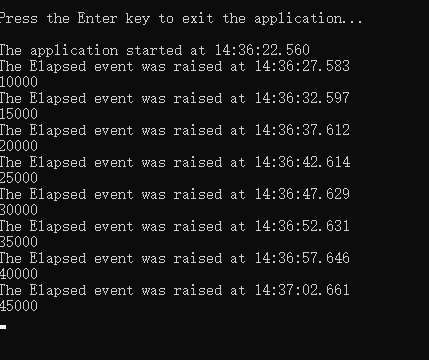
Timer异步使用
using System;
using System.Collections.Generic;
using System.Linq;
using System.Text;
using System.Threading.Tasks;
using System.Timers;

namespace TestTimerConsole2
{
    class Program
    {
        private static System.Timers.Timer timer;
        static double timejige = 5000;//5秒

        static void Main(string[] args)
        {
            SetTimer();

            Console.WriteLine("\nPress the Enter key to exit the application...\n");
            Console.WriteLine("The application started at {0:HH:mm:ss.fff}", DateTime.Now);
            Console.ReadLine();
            timer.Stop();
            timer.Dispose();

            Console.WriteLine("Terminating the application...");
            Console.ReadKey();
        }

        private static void SetTimer()
        {
            // Create a timer with a two second interval.
            timer = new System.Timers.Timer(timejige);
            // Hook up the Elapsed event for the timer.
            timer.Elapsed += OnTimedEvent;
            timer.AutoReset = true;
            timer.Enabled = true;
        }

        private static void OnTimedEvent(Object source, ElapsedEventArgs e)
        {
            timejige += 5000;
            Console.WriteLine("The Elapsed event was raised at {0:HH:mm:ss.fff}",
                              e.SignalTime);

            Console.WriteLine(timejige);

            if (timejige >= 120000)//120000
            {//2分钟退出

                timer.Stop();
                timer.Dispose();
                Console.WriteLine("结束... ");


            }
        }
    }
}
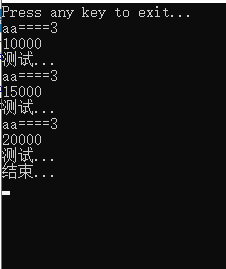
此内容由惯性聚合(RSS阅读器)自动聚合整理,仅供阅读参考。 原文来自 — 版权归原作者所有。