


惯性聚合 高效追踪和阅读你感兴趣的博客、新闻、科技资讯
阅读原文 在惯性聚合中打开

推荐订阅源

IT之家
IT之家
aimingoo的专栏
aimingoo的专栏
H
Help Net Security
L
LangChain Blog
M
MIT News - Artificial intelligence
The GitHub Blog
The GitHub Blog
H
Hackread – Cybersecurity News, Data Breaches, AI and More
C
Check Point Blog
P
Proofpoint News Feed
J
Java Code Geeks
大猫的无限游戏
大猫的无限游戏
博客园_首页
Blog — PlanetScale
Blog — PlanetScale
U
Unit 42
I
InfoQ
月光博客
月光博客
爱范儿
爱范儿
Stack Overflow Blog
Stack Overflow Blog
V
Visual Studio Blog
Y
Y Combinator Blog
Microsoft Security Blog
博客园 - Franky
D
Docker
B
Blog

博客园 - ParamousGIS

VS中CMakePresets的Path环境变量设置 VTK 类结构图 VSCode的C++项目缓存目录 VMWare Workstation 17.6安装Windows7 awesome-cpp 矢量切片工具--SparkVectorTileTool dll生成lib 自动布局 C++第三方库 QT + CMake环境配置 UE5--022--2D Blend Spaces UE5--025--SuperSideScrollerGame--004--AnimBP--AnimMontage UE5--024--SuperSideScrollerGame--003--AIController UE5--023--SuperSideScrollerGame--002 UE5--022--SuperSideScrollerGame--001 UE5--021--Animation Montage UE5--020--Material Instances UE5--019--LayeredBlendPerBone UE5--018--BlendSpace--AnimGraph
应用clang-format对c++代码时进行格式化
ParamousGIS · 2025-04-22 · via 博客园 - ParamousGIS

1. VS Code

settings.json文件

{
  
  // "C_Cpp.clang_format_fallbackStyle": "Google",
  "C_Cpp.clang_format_path": "D:/GreenSoftware/CPlusPlus/ClangLLVM/bin/clang-format.exe",
  "C_Cpp.clang_format_style": "file:D:/GreenSoftware/CPlusPlus/ClangLLVM/format-styles/.clang-format-microsoft",
  "clangd.enableCodeCompletion": false,

......
}

2. Qt Creator

帮助 –》 关于插件
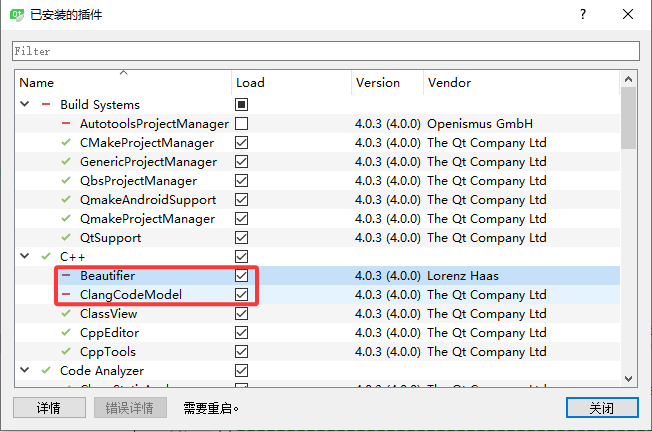
image

重启Qt Creator

image

将.clang-format-microsoft重命名为.clang-format,放在.pro或.sln同目录下