惯性聚合 高效追踪和阅读你感兴趣的博客、新闻、科技资讯
阅读原文 在惯性聚合中打开

推荐订阅源

P
Proofpoint News Feed
D
DataBreaches.Net
雷峰网
雷峰网
WordPress大学
WordPress大学
Microsoft Security Blog
云风的 BLOG
云风的 BLOG
Google DeepMind News
Blog — PlanetScale
Blog — PlanetScale
MongoDB | Blog
MongoDB | Blog
F
Fortinet All Blogs
B
Blog
让小产品的独立变现更简单 - ezindie.com
Engineering at Meta
Engineering at Meta
月光博客
月光博客
V
Visual Studio Blog
美团技术团队
I
InfoQ
Stack Overflow Blog
Stack Overflow Blog
Hugging Face - Blog
Hugging Face - Blog
爱范儿
爱范儿
博客园 - 【当耐特】
V
V2EX
Microsoft Azure Blog
博客园 - 聂微东

博客园 - googlegis

npm install 指定安装源 windows 下 CodeX 提示 Computer Use plugins unavailable 使用gzip压缩3dtiles Cesium 加载 3dtiles 优化方案 Bad owner or permissions on /var/lib/jenkins/.ssh/config docker 删除 容器和镜像 docker 下安装 gitlab EE docker 在 linux 下的安装及使用 npm/npx 指定源 根据经纬度获取地形数据高程 GeoServer加载shp文件后中文乱码 Cesium中glb模型颜色暗淡解决 mongod.service failed with result exit-code npm、pnpm系统禁止了脚本的执行 当前计算机配置不支持 wsl2--已解决 hexo 推送需要github的用户名 el-switch 初始化时触发切换 使用vim修改linux中的文件 在 wsl2 中安装redis wsl 安装 Module '"element-plus"' has no export memeber 'ElMessage'. Did you mean to user 'import ElMessage from "element-plus" CALL_AND_RETRY_LAST Allocation failed - JavaScript heap out of memory Error message "error:0308010C:digital envelope routines::unsupported"
CodeBlocks window下安装后找不到编译器
googlegis · 2023-04-18 · via 博客园 - googlegis

Can't find compiler executable in your configured search path's for GNU GCC Compiler

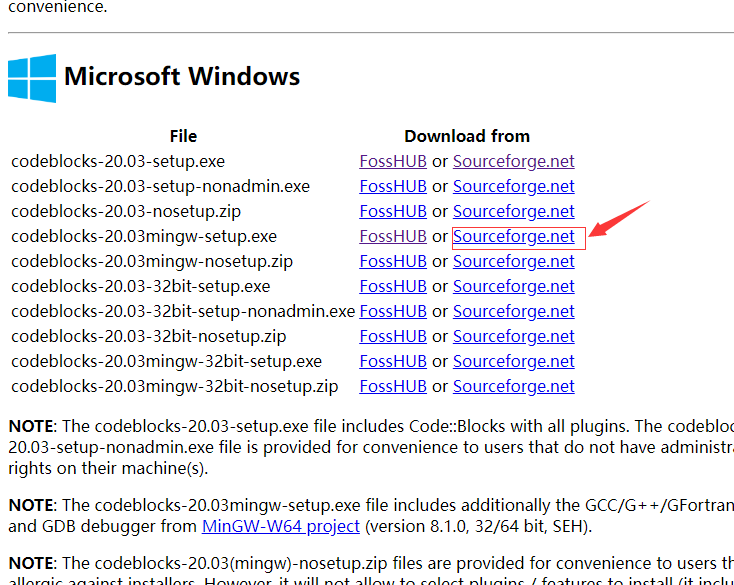
首先确定下载的文件是 codeblocks-20.03mingw-setup.exe(145M), 而不是 codeblocks-20.03-setup.exe,
如果安装之后,新建c++文件时,点击编译按钮,没有任何反应,很有可能是没有找到对应的编译器。

How to solve the CodeBlocks environment error.

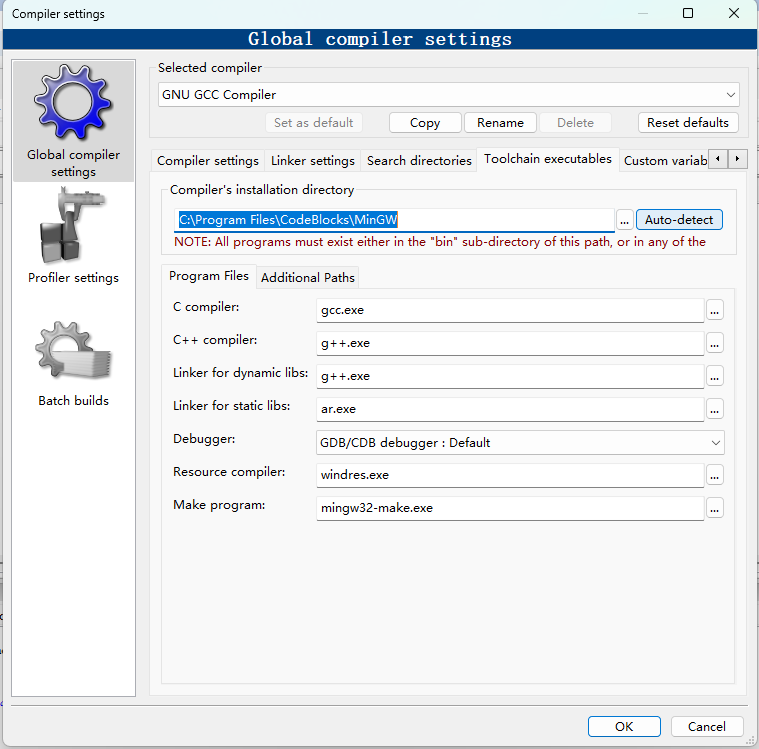
  1. Go to "Settings"----"Compiler"----"Selected compiler"( GNU GCC Compiler ).

  2. Then, Selected "Toolchain executables". clicke Auto-detect

  3. Now, "( C:\Program Files \CodeBlocks\MinGW )"