







开始使用gRPC之前,需要先准备好gRPC,可参考博主另一篇博文 Win10下编译gRPC 。
本文主要记录使用gRPC做一个简单的HelloWorld实例的过程以及其中遇到的一些问题;
HelloWorld实例的代码借用了官方例子代码,博主稍微做了一点改动。
下面从创建VC工程开始讲述完整过程。
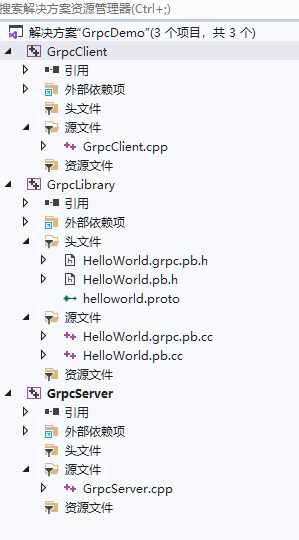
1,新建三个VC项目,如下图,其中GrpcServer, GrpcClient 为控制台(console)程序, GrpcLibrary为静态库

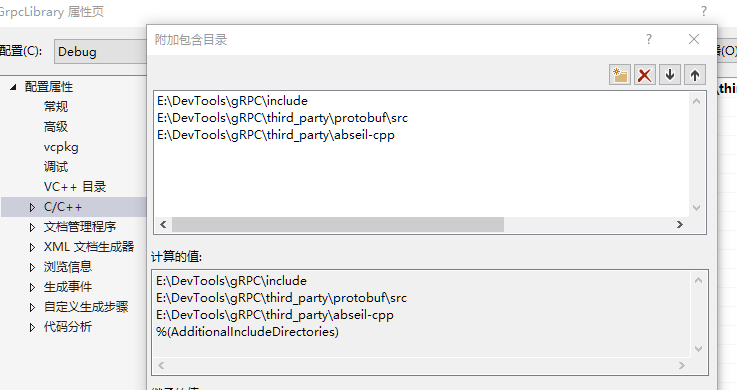
2,编写proto并编译,在GrpcLibrary项目添加文件HelloWorld.proto,编写如下内容
syntax = "proto3";
package GrpcLibrary;

service GrpcService{
    rpc SayHello(HelloRequest) returns (HelloReply) {}
}

message HelloRequest{
    string name = 1;
}

message HelloReply{
    string message = 1;
}
把相关grpc和protobuf的exe文件以及helloworld.proto放到同一个文件夹,则可以使用以下指令编译proto。
博主的做法是把protoc.exe和相关DLL文件拷贝到grpc的可执行程序文件夹下(例如....\gRPC\mybuild64\Debug)。
protoc.exe --cpp_out GrpcLibrary HelloWorld.proto --grpc_out GrpcLibrary --plugin=protoc-gen-grpc=grpc_cpp_plugin.exe
编译成功,生成HelloWorld.pb.h,HelloWorld.pb.cc,HelloWorld.grpc.pb.h,HelloWorld.grpc.pb.cc四个文件,
将这四个文件复制到grpcLibrary项目的文件夹,并加入VC项目中。
最后GrpcClient、GrpcServer分别引用类库GrpcLibrary。
3,编写server和client的代码,分别如下:
// GrpcServer.cpp
#include <iostream>
#include <memory>
#include <string>

#include <grpcpp/grpcpp.h>

#ifdef BAZEL_BUILD
#include "examples/protos/helloworld.grpc.pb.h"
#else
#include "HelloWorld.grpc.pb.h"
#endif

using grpc::Server;
using grpc::ServerBuilder;
using grpc::ServerContext;
using grpc::Status;
using GrpcLibrary::HelloRequest;
using GrpcLibrary::HelloReply;
using GrpcLibrary::GrpcService;

// Logic and data behind the server's behavior.
class GreeterServiceImpl final : public GrpcService::Service {
    Status SayHello(ServerContext* context, const HelloRequest* request, HelloReply* reply) override
    {
        std::string prefix("A Hello World demo, echo client request name: ");
        reply->set_message(prefix + request->name());
        return Status::OK;
    }
};

void RunServer() {
    std::string server_address("0.0.0.0:50051");
    GreeterServiceImpl service;

    ServerBuilder builder;
    // Listen on the given address without any authentication mechanism.
    builder.AddListeningPort(server_address, grpc::InsecureServerCredentials());
    // Register "service" as the instance through which we'll communicate with
    // clients. In this case it corresponds to an *synchronous* service.
    builder.RegisterService(&service);
    // Finally assemble the server.
    std::unique_ptr<Server> server(builder.BuildAndStart());
    std::cout << "Server listening on " << server_address << std::endl;

    // Wait for the server to shutdown. Note that some other thread must be
    // responsible for shutting down the server for this call to ever return.
    server->Wait();
}

int main(int argc, char** argv) {
    RunServer();

    return 0;
}
// GrpcClient.cpp
#include <iostream>
#include <memory>
#include <string>

#include <grpcpp/grpcpp.h>

#ifdef BAZEL_BUILD
#include "examples/protos/helloworld.grpc.pb.h"
#else
#include "helloworld.grpc.pb.h"
#endif

using grpc::Channel;
using grpc::ClientContext;
using grpc::Status;
using GrpcLibrary::HelloRequest;
using GrpcLibrary::HelloReply;
using GrpcLibrary::GrpcService;

class GreeterClient {
public:
    GreeterClient(std::shared_ptr<Channel> channel)
        : stub_(GrpcService::NewStub(channel)) {}


    std::string SayHello(const std::string& user) {
        // Data we are sending to the server.
        HelloRequest request;
        request.set_name(user);

        // Container for the data we expect from the server.
        HelloReply reply;

        // Context for the client. It could be used to convey extra information to
        // the server and/or tweak certain RPC behaviors.
        ClientContext context;

        // The actual RPC.
        Status status = stub_->SayHello(&context, request, &reply);

        // Act upon its status.
        if (status.ok()) {
            return reply.message();
        }
        else {
            std::cout << status.error_code() << ": " << status.error_message()
                << std::endl;
            return "RPC failed";
        }
    }

private:
    std::unique_ptr<GrpcService::Stub> stub_;
};

int main(int argc, char** argv) {

    GreeterClient greeter(grpc::CreateChannel(
        "localhost:50051", grpc::InsecureChannelCredentials()));
    std::string user("world");
    std::string reply = greeter.SayHello(user);
    std::cout << "Greeter received: " << reply << std::endl;
    system("pause");
    return 0;
}
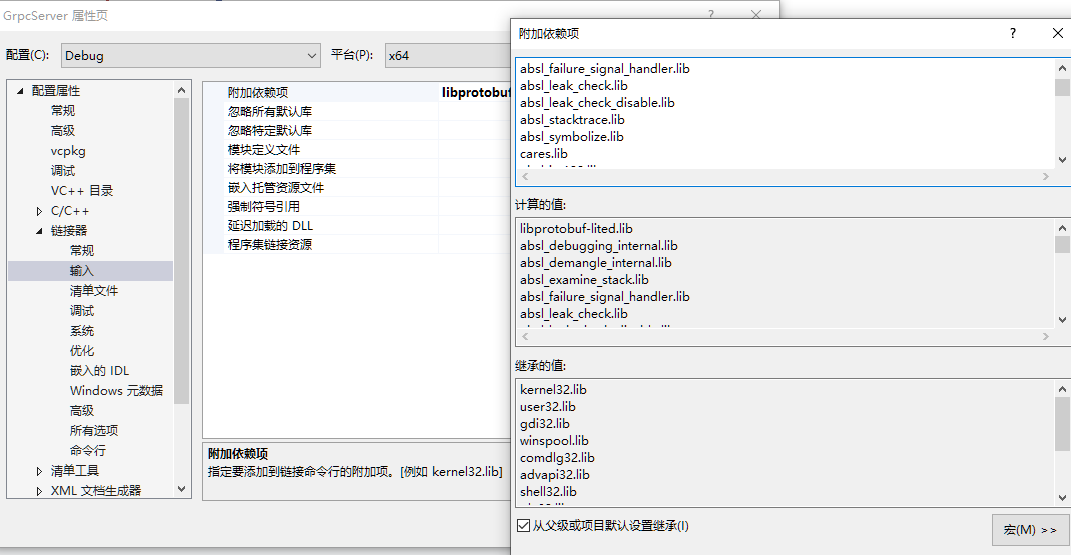
4,配置项目所需的输入库(gRPC以及相关的第三方依赖库)
以grpcServer为例,grpcClient的相关配置项与grpcServer相同。
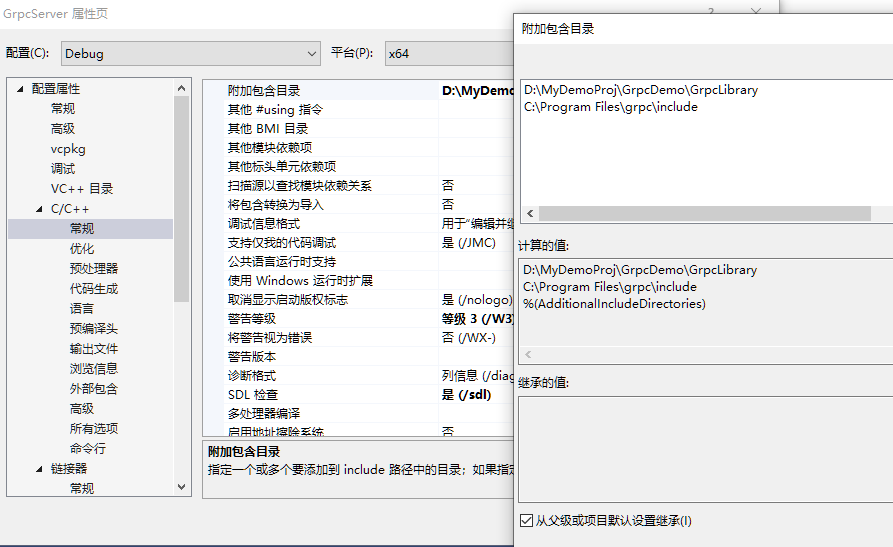
C++附加目录:
D:\MyDemoProj\GrpcDemo\GrpcLibrary;
C:\Program Files\grpc\include (编译gRPC时,默认安装到C:\Program Files\grpc)
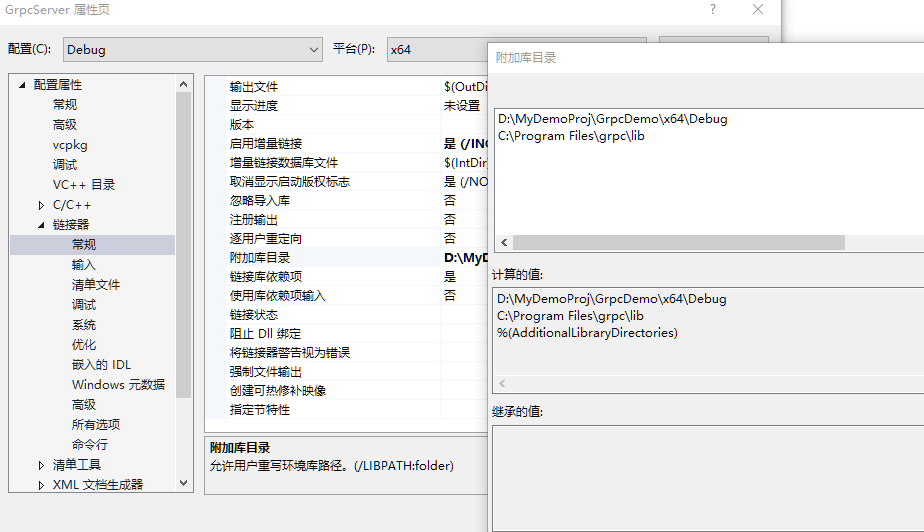
链接库附加目录:
D:\MyDemoProj\GrpcDemo\x64\Debug;
C:\Program Files\grpc\lib (编译gRPC时,默认安装到C:\Program Files\grpc)
附加链接库有这么多(可能有部分不需要,没有逐个核对):
grpc_unsecure.lib;grpc++.lib;grpc++_alts.lib;grpc++_error_details.lib;grpc++_reflection.lib;
grpc++_unsecure.lib;grpcpp_channelz.lib;libprotobufd.lib;upb.lib;re2.lib;ssl.lib;crypto.lib;GrpcLibrary.lib;
absl_debugging_internal.lib;absl_demangle_internal.lib;absl_examine_stack.lib;absl_failure_signal_handler.lib;
absl_leak_check.lib;absl_leak_check_disable.lib;absl_stacktrace.lib;absl_symbolize.lib;cares.lib;absl_int128.lib;
absl_city.lib;absl_hash.lib;absl_low_level_hash.lib;absl_random_distributions.lib;absl_random_internal_distribution_test_util.lib;
absl_random_internal_platform.lib;absl_random_internal_pool_urbg.lib;absl_random_internal_randen.lib;
absl_random_internal_randen_hwaes.lib;absl_random_internal_randen_hwaes_impl.lib;absl_random_internal_randen_slow.lib;
absl_random_internal_seed_material.lib;absl_random_seed_gen_exception.lib;absl_random_seed_sequences.lib;absl_status.lib;
absl_statusor.lib;absl_bad_any_cast_impl.lib;absl_bad_optional_access.lib;absl_bad_variant_access.lib;
absl_graphcycles_internal.lib;absl_synchronization.lib;absl_civil_time.lib;absl_time.lib;absl_time_zone.lib;absl_cord.lib;
absl_cord_internal.lib;absl_cordz_functions.lib;absl_cordz_handle.lib;absl_cordz_info.lib;absl_cordz_sample_token.lib;
absl_str_format_internal.lib;absl_strings.lib;absl_strings_internal.lib;absl_base.lib;absl_log_severity.lib;
absl_malloc_internal.lib;absl_raw_logging_internal.lib;absl_scoped_set_env.lib;absl_spinlock_wait.lib;
absl_strerror.lib;absl_throw_delegate.lib;zlibd.lib;gpr.lib;address_sorting.lib;grpc.lib;grpc_plugin_support.lib;
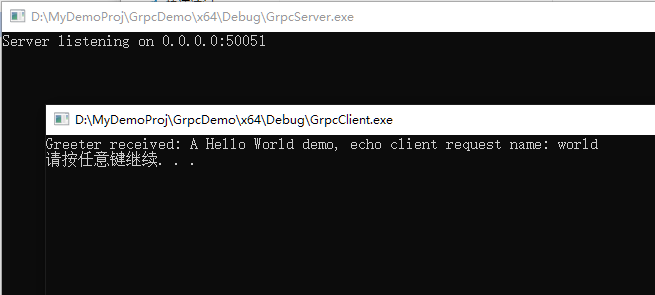
5.编译VC项目,成功后先执行GrpcServer.exe, 再执行GrpcClient.exe, 简单的helloworld就完成了。
此内容由惯性聚合(RSS阅读器)自动聚合整理,仅供阅读参考。 原文来自 — 版权归原作者所有。