



惯性聚合 高效追踪和阅读你感兴趣的博客、新闻、科技资讯
阅读原文 在惯性聚合中打开

推荐订阅源

T
Tailwind CSS Blog
博客园 - Franky
钛媒体:引领未来商业与生活新知
钛媒体:引领未来商业与生活新知
Y
Y Combinator Blog
Hugging Face - Blog
Hugging Face - Blog
博客园 - 聂微东
L
LangChain Blog
博客园_首页
Recent Announcements
月光博客
月光博客
酷 壳 – CoolShell
酷 壳 – CoolShell
奇客Solidot–传递最新科技情报
奇客Solidot–传递最新科技情报
H
Hackread – Cybersecurity News, Data Breaches, AI and More
爱范儿
爱范儿
博客园 - 叶小钗
博客园 - 【当耐特】
The Cloudflare Blog
J
Java Code Geeks
G
Google Developers Blog
云风的 BLOG
云风的 BLOG
Blog — PlanetScale
Blog — PlanetScale
博客园 - 司徒正美
aimingoo的专栏
aimingoo的专栏
A
About on SuperTechFans

博客园 - 蜡笔小旧

linux kernel complie + QEMU elon musk's 5 steps work method sqlite rollback journal vs. wal cmd/powershell frozen issue Cursor ai network issue workaround in Ubuntu 22.04 android app network monitor with mitmweb zsh vs. bash 在gitlab中使用fastlane编译ios 记一次gitlab artifact问题 Cursor in Ubuntu 22.04 Manual install .NET SDK 9 on ubuntu with .NET SDK 8 记一次阿里云主机被挖矿 防御性编程 hyper-v ubuntu 22.04 Configure oh my zsh Setting up development environment with Ubuntu 22.04 WSL linux reset password Windows 10 access ext4 IP Offline install net driver in ubuntu
MTU issue in Ubuntu 22.04
蜡笔小旧 · 2026-01-30 · via 博客园 - 蜡笔小旧

2026-01-30 18:18  蜡笔小旧  阅读(9)  评论()    收藏  举报

最新一直在Ubuntu 22.04 desktop中上网很慢,经常超时如下图:

Screenshot from 2026-01-30 11-33-29

但是刷新下后面又能正常用,也不是每个网站都这样。这两天在用nuget上传package到私有registry发现也有问题了, 如图:

Screenshot from 2026-01-30 11-31-51

 受不了了, 用tshark capture了下:

sudo tshark  -f "(host x.x.x.x or host x.x.x.x) and tcp port 443"  -w /tmp/nuget.pcap

然后用WireShark打开(注: 因为deb的版本没有装上, 用的flatpak, 只能在sanbox中运行不支持capture)
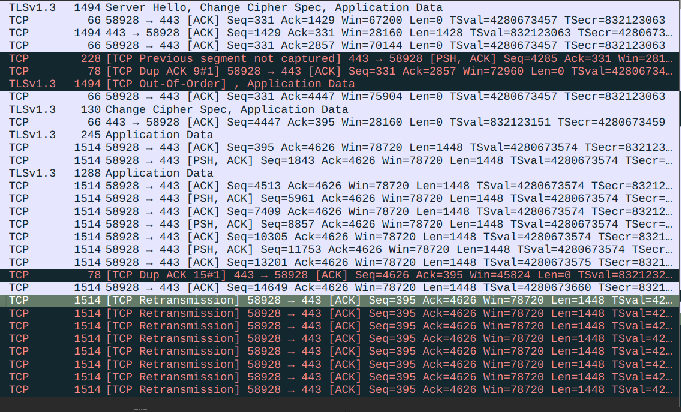
Screenshot from 2026-01-30 18-05-24

 可以发现有大量的重传. 把数据丢给AI. 他告诉我可能是Len的问题。

ping -M do -s 1400 {IP} # 没问题
ping -M do -s 1472 {IP} # 有问题
# ping: local error: message too long, mtu=1480

这就找到问题所在了, 然后查了一下NetworkManager的默认值是1500, 把他改成1450把

sudo nmcli connection modify "Wired connection 1" ethernet.mtu 1450
sudo nmcli connection down "Wired connection 1" 
sudo nmcli connection up "Wired connection 1"
# 用nmcli确认是否还有1500

然后可以正常push了。 后面找了网管他说可以改下DF, 我研究了下不好改, 算了。 后面他说那改一下路由器上的MSS到1410,相当于MSS 1410 + TCP header 20 +IP header 20 = 1450 MTU。问题更严重了, 连ACK后一堆问题。 我就又改回来了。

还顺道查了下Windows,因为Windows一直没有问题:

Screenshot from 2026-01-30 11-36-22

 发现Windows也是1500, 这就不合理了.

Ubuntu 1500 超时

Windows 1500 正常

后面查了AI, AI丢了一句话:

Windows: “I’ll try 1500, but if it hits a low tunnel, I shrink automatically.”
Ubuntu: “I’ll try 1500, and if I don’t get the message, I just keep banging against the wall.”

看来还是Windows人性化.