惯性聚合 高效追踪和阅读你感兴趣的博客、新闻、科技资讯
阅读原文 在惯性聚合中打开

推荐订阅源

T
Threatpost
Jina AI
Jina AI
S
SegmentFault 最新的问题
博客园 - 【当耐特】
阮一峰的网络日志
阮一峰的网络日志
IT之家
IT之家
让小产品的独立变现更简单 - ezindie.com
aimingoo的专栏
aimingoo的专栏
博客园 - 叶小钗
The Cloudflare Blog
MyScale Blog
MyScale Blog
F
Full Disclosure
T
Tailwind CSS Blog
Recent Announcements
云风的 BLOG
云风的 BLOG
B
Blog
Apple Machine Learning Research
Engineering at Meta
Engineering at Meta
P
Privacy & Cybersecurity Law Blog
H
Help Net Security
A
Arctic Wolf
T
Tor Project blog
WordPress大学
WordPress大学
Cisco Talos Blog
Cisco Talos Blog
D
Darknet – Hacking Tools, Hacker News & Cyber Security
Project Zero
Project Zero
V2EX - 技术
V2EX - 技术
C
CERT Recently Published Vulnerability Notes
L
Lohrmann on Cybersecurity
CTFtime.org: upcoming CTF events
cs.AI updates on arXiv.org
Hacker News: Ask HN
Hacker News: Ask HN
有赞技术团队
有赞技术团队
Y
Y Combinator Blog
S
Securelist
OSCHINA 社区最新新闻
OSCHINA 社区最新新闻
博客园 - 三生石上(FineUI控件)
PCI Perspectives
PCI Perspectives
雷峰网
雷峰网
J
Java Code Geeks
G
GRAHAM CLULEY
D
DataBreaches.Net
C
CXSECURITY Database RSS Feed - CXSecurity.com
Attack and Defense Labs
美团技术团队
Security Archives - TechRepublic
奇客Solidot–传递最新科技情报
奇客Solidot–传递最新科技情报
D
Docker
Cloudbric
Cloudbric
L
LangChain Blog

博客园 - 华安

asp.netCore中给动态请求路径加客户端缓存 netCore中获取客户端真实的IP引起的思考 Unity 相机:正交 (Orthographic) vs 透视 (Perspective) - 华安 unity中的button中的onclick控制面板中四个参数的意思分别是什么 - 华安 微信小程序开发中触发 onshow的几种特殊情况 SQL Server备份心得 MYSQL 备份数据库 微信与支付支付功能开发 微信小程序中页面配置下拉刷新 unity中 相机没有视锥效果线框了,如何打开 JSONPath表达式 C# 中的操作JSON类 JObject cookie中的 HttpOnly 、Secure、SameSite 解释 Spring-boot 中基于 IP 的限流和自动封禁 Filter 登录 用 HMAC-SHA256 实现 TwoFA(二重验证)的坑 利用Spring Boot的 filter 结合ConcurrentHashMap 实现“同一IP每分钟最多允许300个404请求,超出后禁用30分钟访问” pixi-filters中的BackdropBlurFilter使用注意事项 legend隐藏不想显示的图例 spring-boot HttpServletResponse response.sendRedirect是会跳转到 http而不是https springboot获取post请求参数 Javascript如何判断是触摸屏还是PC端 JavaScript获取鼠标点一个元素,获取鼠标点击的元素内的位置 spring-boot中配置Mongodbd的问题小结 Rest Template中添加 PATCH请求。 CSS实现修改CheckBox样式 SpringBoot+Thyemleaf报错:Error resolving template Template might not exist or might not be accessible div display flex 如何出现横向滚动条
PixiJS中的 SplitBitmapText.chars中的每个 BitmapText的x值分析
华安 · 2026-01-09 · via 博客园 - 华安

最近在学习 pixijs,看到官网上的demo.

import {
  Application,
  Assets,
  BitmapText,
  Container,
  SplitBitmapText,
} from 'pixi.js';
import { gsap } from 'gsap';

(async () => {
  // Create a new application
  const app = new Application();

  // Initialize the application
  await app.init({ background: '#1099bb', resizeTo: window });

  // Append the application canvas to the document body
  document.getElementById("pixi-container")!.appendChild(app.canvas);

  await Assets.load('https://pixijs.com/assets/bitmap-font/desyrel.xml');

  const scene = new Container();
  scene.position.set(app.screen.width / 2, app.screen.height / 2);
  app.stage.addChild(scene);

  const _text=`Break apart text into characters, words, and/or lines for easy111111111111111111 animation.`;

  const bitmapFontText = new BitmapText({
    text: _text,
    style: {
      fontFamily: 'Desyrel',
      fontSize: 60,
      fill: 'white',
      wordWrap: true,
      wordWrapWidth: app.screen.width - 100,
    },
    alpha: 0.5,
  });
  const splitText = new SplitBitmapText({
    text: _text,
    style: {
      fontFamily: 'Desyrel',
      fontSize: 60,
      fill: 0x0,
      wordWrap: true,
      wordWrapWidth: app.screen.width - 100,
    },
    alpha: 1,
  });
  bitmapFontText.on('mousedown',(event)=>{
    console.log(event,'111');
  });
  bitmapFontText.interactive=true;

  bitmapFontText.x = splitText.x = -bitmapFontText.width / 2;
  bitmapFontText.y = splitText.y = -bitmapFontText.height / 2;
  scene.addChild(bitmapFontText, splitText);

  console.log(splitText.chars,splitText,bitmapFontText);
   gsap.from(splitText.chars, {
    x: 50,
    alpha: 0,
    duration: 2.7,
    ease: 'power4',
    stagger: 0.04,
    repeat: -1,
    yoyo: true,
  }); 
})();

运行效果:

image

image

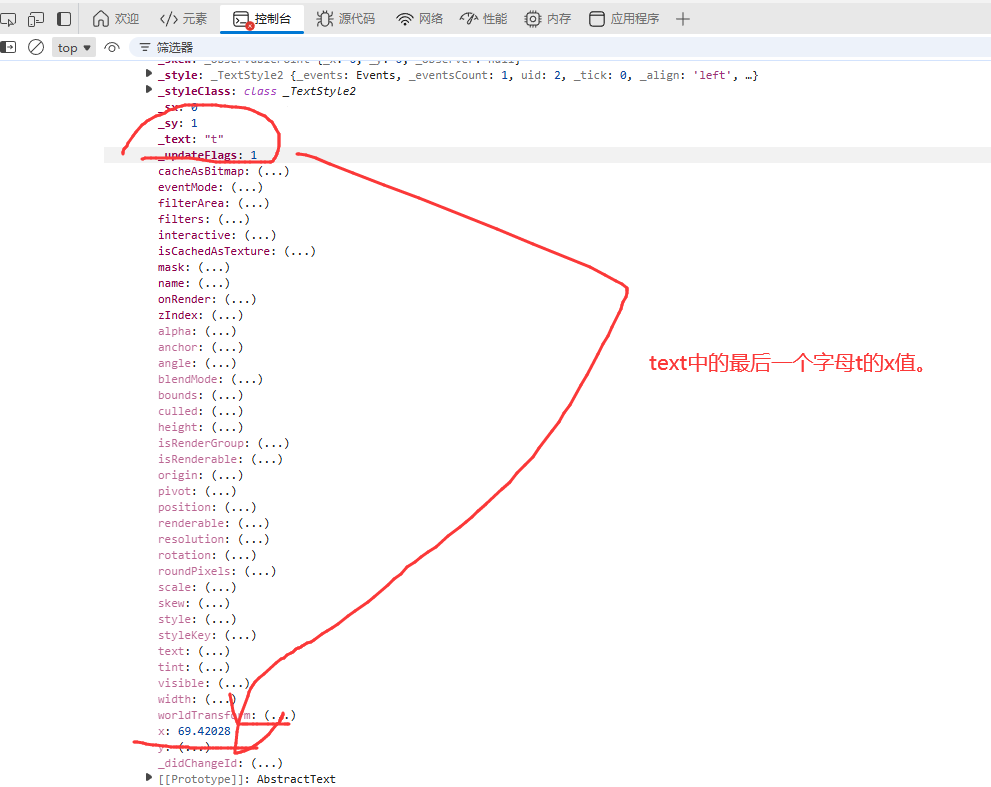
 仔细观察发现:

gsap.from(splitText.chars, {
    x: 50,
    alpha: 0,
    duration: 2.7,
    ease: 'power4',
    stagger: 0.04,
    repeat: -1,
    yoyo: true,
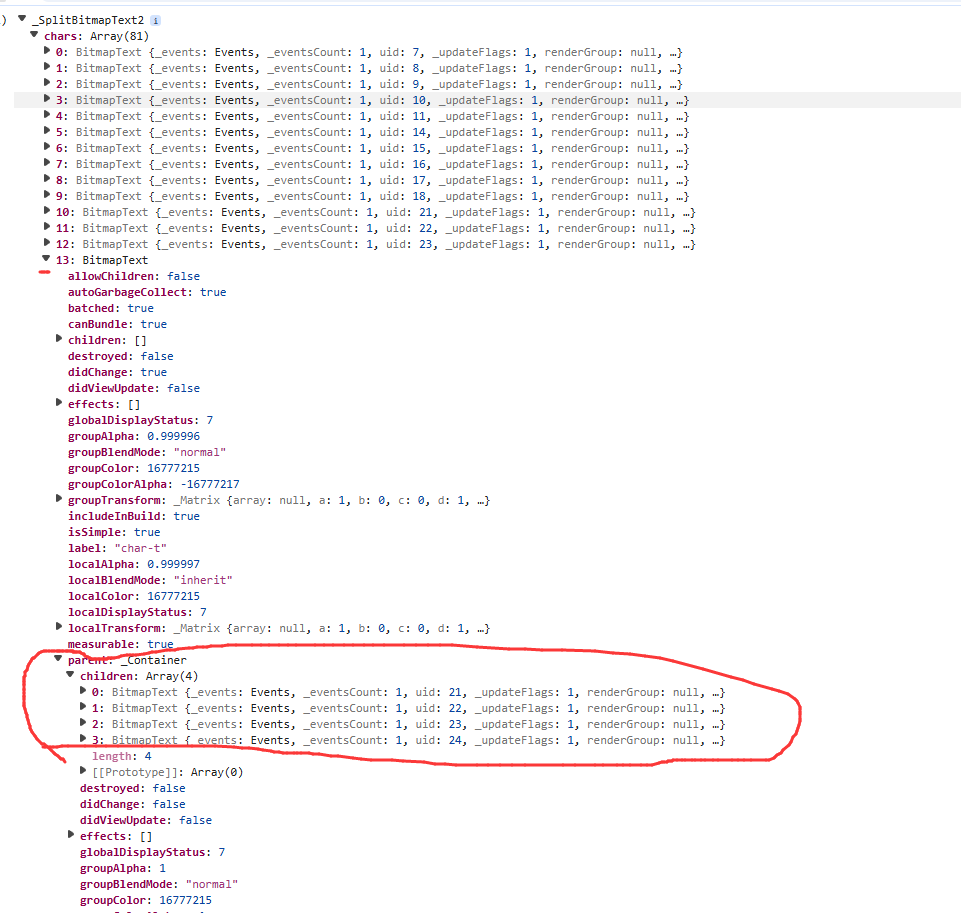
  }); 中的 x:50 是以空格为分隔符分割出来的一个大对象为container的位置,而不是整个 canvas 的位置。

image

image

image