



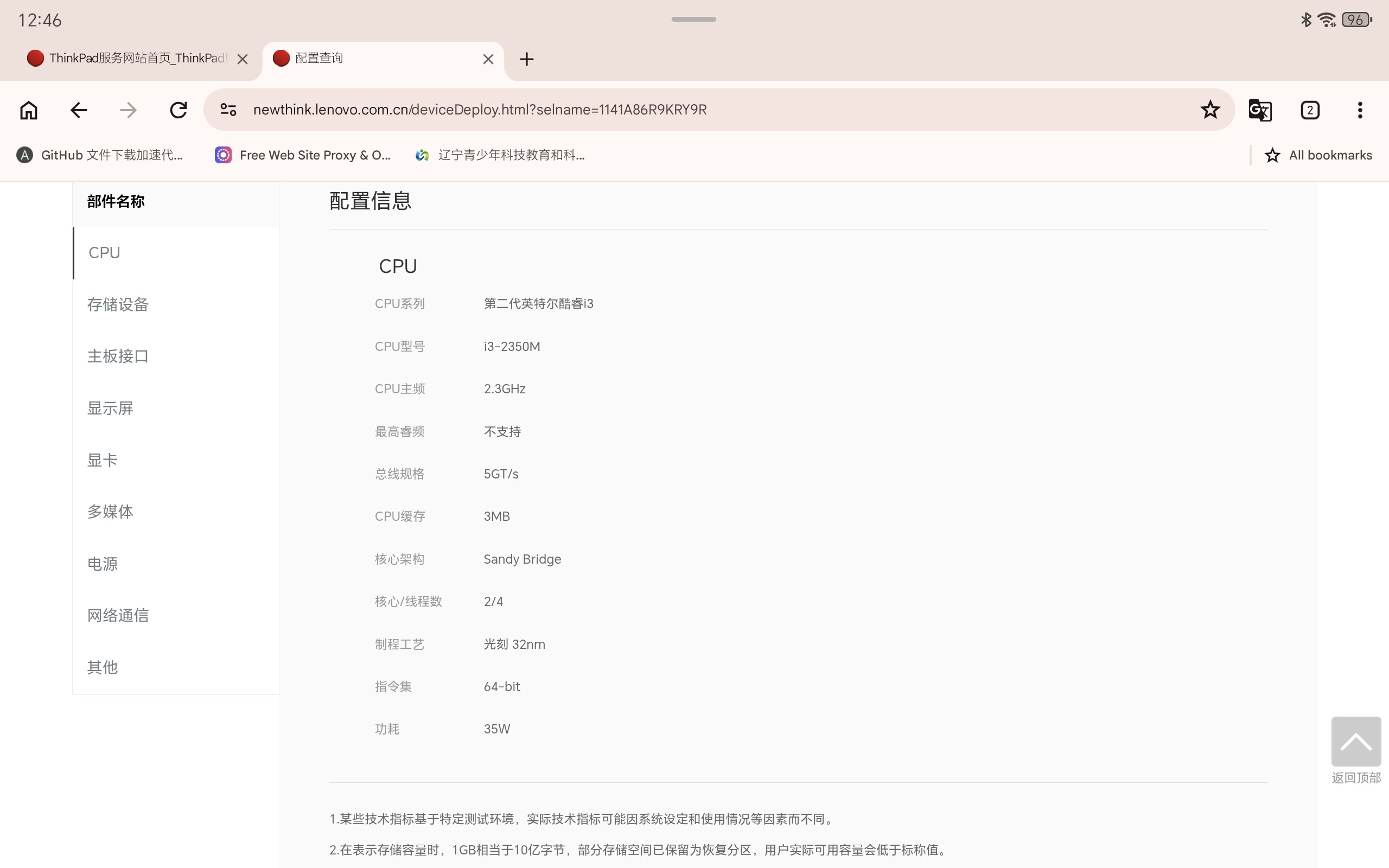
我最近安装了debian最新版本系统,使用的是ThinkPad E240(老爷机),使用xfce桌面,今天从flathub安装了camera软件,软件报错说无法检测到摄像头,请问该怎么办,谢谢。下面是电脑配置
lilydjwg (依云) 2
那你不用flatpak呢?比如mpv av://v4l2:/dev/video0这样试试。
可以先安装一个 Flatseal(它是 Flathub 软件的权限管理器),
# 安装命令:
flatpak install flathub com.github.tchx84.Flatseal
然后到里面检查一下 Camera 软件是否已经被授予使用摄像头的权限。
刚才试了一下,感觉 Flatpak 版的 Gnome Camera 似乎有点问题,即使给了相应的权限,也无法使用摄像头。
但使用 dpkg 版的 Gnome Camera 就没问题。安装 dpkg 版的 Gnome Camera 可通过如下命令:
sudo apt install gnome-snapshot
或者使用 COSMIC 桌面环境的 Camera 应用,这个也是没问题的:
这是我的系统信息
System:
  Kernel: 6.17.0-19-generic arch: x86_64 bits: 64 compiler: gcc v: 13.3.0 clocksource: hpet
  Desktop: MATE v: 1.26.2 wm: marco v: 1.26.0 with: mate-panel tools: mate-screensaver
    dm: LightDM v: 1.30.0 Distro: Linux Mint 22.3 Zena base: Ubuntu 24.04 noble
Machine:
  Type: Laptop System: HONOR product: NMH-WCX9 v: M1040 serial: <superuser required>
  Mobo: HONOR model: NMH-WCX9-PCB v: M1040 serial: <superuser required> part-nu: C233
    uuid: <superuser required> UEFI: HONOR v: 1.15 date: 01/11/2024
Battery:
  ID-1: BAT1 charge: 22.4 Wh (47.2%) condition: 47.5/54.9 Wh (86.5%) volts: 7.5 min: 7.6
    model: Sunwoda-H HB4692Z9ECW-22T type: Li-ion serial: <filter> status: discharging cycles: 267
CPU:
  Info: 6-core model: AMD Ryzen 5 5500U with Radeon Graphics bits: 64 type: MT MCP smt: enabled
    arch: Zen 2 rev: 1 cache: L1: 384 KiB L2: 3 MiB L3: 8 MiB
  Speed (MHz): avg: 1689 high: 2046 min/max: 414/4057 boost: enabled cores: 1: 2039 2: 2046
    3: 1398 4: 1481 5: 1569 6: 1668 7: 1114 8: 2046 9: 1114 10: 2046 11: 1704 12: 2046
    bogomips: 50302
  Flags: avx avx2 ht lm nx pae sse sse2 sse3 sse4_1 sse4_2 sse4a ssse3 svm
Graphics:
  Device-1: AMD Lucienne vendor: QUANTA driver: amdgpu v: kernel arch: GCN-5 pcie: speed: 8 GT/s
    lanes: 16 ports: active: eDP-1 empty: HDMI-A-1 bus-ID: 03:00.0 chip-ID: 1002:164c class-ID: 0300
    temp: 36.0 C
  Device-2: Quanta ov9734_techfront_camera driver: uvcvideo type: USB rev: 2.0 speed: 480 Mb/s
    lanes: 1 bus-ID: 1-4:3 chip-ID: 0408:1040 class-ID: 0e02 serial: <filter>
  Display: x11 server: X.Org v: 21.1.11 with: Xwayland v: 23.2.6 compositor: marco v: 1.26.0
    driver: X: loaded: amdgpu unloaded: fbdev,modesetting,vesa dri: radeonsi gpu: amdgpu
    display-ID: :0 screens: 1
  Screen-1: 0 s-res: 1600x900 s-dpi: 96 s-size: 423x238mm (16.65x9.37") s-diag: 485mm (19.11")
  Monitor-1: eDP-1 mapped: eDP model: ChiMei InnoLux 0x1415 res: 1600x900 hz: 60 dpi: 132
    size: 309x173mm (12.17x6.81") diag: 354mm (13.9") modes: max: 1920x1080 min: 640x480
  API: EGL v: 1.5 hw: drv: amd radeonsi platforms: device: 0 drv: radeonsi device: 1 drv: swrast
    gbm: drv: kms_swrast surfaceless: drv: radeonsi x11: drv: radeonsi inactive: wayland
  API: OpenGL v: 4.6 compat-v: 4.5 vendor: amd mesa v: 25.2.8-0ubuntu0.24.04.1 glx-v: 1.4
    direct-render: yes renderer: AMD Radeon Graphics (radeonsi renoir ACO DRM 3.64 6.17.0-19-generic)
    device-ID: 1002:164c
  API: Vulkan v: 1.3.275 layers: 3 surfaces: xcb,xlib device: 0 type: integrated-gpu driver: N/A
    device-ID: 1002:164c device: 1 type: cpu driver: N/A device-ID: 10005:0000
Audio:
  Device-1: AMD Renoir Radeon High Definition Audio vendor: QUANTA driver: snd_hda_intel v: kernel
    pcie: speed: 8 GT/s lanes: 16 bus-ID: 03:00.1 chip-ID: 1002:1637 class-ID: 0403
  Device-2: AMD ACP/ACP3X/ACP6x Audio Coprocessor vendor: QUANTA driver: N/A pcie: speed: 8 GT/s
    lanes: 16 bus-ID: 03:00.5 chip-ID: 1022:15e2 class-ID: 0480
  Device-3: AMD Family 17h/19h HD Audio vendor: QUANTA driver: snd_hda_intel v: kernel pcie:
    speed: 8 GT/s lanes: 16 bus-ID: 03:00.6 chip-ID: 1022:15e3 class-ID: 0403
  API: ALSA v: k6.17.0-19-generic status: kernel-api
  Server-1: PipeWire v: 1.0.5 status: active with: 1: pipewire-pulse status: active
    2: wireplumber status: active 3: pipewire-alsa type: plugin
Network:
  Device-1: Qualcomm QCNFA765 Wireless Network Adapter vendor: Foxconn driver: ath11k_pci v: kernel
    pcie: speed: 5 GT/s lanes: 1 bus-ID: 01:00.0 chip-ID: 17cb:1103 class-ID: 0280
  IF: wlp1s0 state: up mac: <filter>
  IF-ID-1: virbr0 state: down mac: <filter>
Bluetooth:
  Device-1: Foxconn / Hon Hai driver: btusb v: 0.8 type: USB rev: 1.1 speed: 12 Mb/s lanes: 1
    bus-ID: 3-2:2 chip-ID: 0489:e0df class-ID: e001
  Report: hciconfig ID: hci0 rfk-id: 0 state: down bt-service: enabled,running rfk-block:
    hardware: no software: yes address: <filter>
Drives:
  Local Storage: total: 476.94 GiB used: 149.56 GiB (31.4%)
  ID-1: /dev/nvme0n1 vendor: Hynix model: YMTC PC210-512GB-B size: 476.94 GiB speed: 31.6 Gb/s
    lanes: 4 tech: SSD serial: <filter> fw-rev: YM013214 temp: 33.9 C scheme: GPT
Partition:
  ID-1: / size: 47.68 GiB used: 28.89 GiB (60.6%) fs: btrfs dev: /dev/nvme0n1p5
  ID-2: /boot/efi size: 196 MiB used: 75.4 MiB (38.4%) fs: vfat dev: /dev/nvme0n1p1
  ID-3: /home size: 46.63 GiB used: 21.33 GiB (45.7%) fs: ext4 dev: /dev/nvme0n1p6
Swap:
  Alert: No swap data was found.
USB:
  Hub-1: 1-0:1 info: hi-speed hub with single TT ports: 4 rev: 2.0 speed: 480 Mb/s lanes: 1
    chip-ID: 1d6b:0002 class-ID: 0900
  Device-1: 1-3:2 info: Logitech Unifying Receiver type: keyboard,mouse
    driver: logitech-djreceiver,usbhid interfaces: 2 rev: 2.0 speed: 12 Mb/s lanes: 1 power: 98mA
    chip-ID: 046d:c534 class-ID: 0301
  Device-2: 1-4:3 info: Quanta ov9734_techfront_camera type: video driver: uvcvideo interfaces: 2
    rev: 2.0 speed: 480 Mb/s lanes: 1 power: 500mA chip-ID: 0408:1040 class-ID: 0e02 serial: <filter>
  Hub-2: 2-0:1 info: super-speed hub ports: 2 rev: 3.1 speed: 10 Gb/s lanes: 1 chip-ID: 1d6b:0003
    class-ID: 0900
  Hub-3: 3-0:1 info: hi-speed hub with single TT ports: 4 rev: 2.0 speed: 480 Mb/s lanes: 1
    chip-ID: 1d6b:0002 class-ID: 0900
  Device-1: 3-2:2 info: Foxconn / Hon Hai type: bluetooth driver: btusb interfaces: 2 rev: 1.1
    speed: 12 Mb/s lanes: 1 power: 100mA chip-ID: 0489:e0df class-ID: e001
  Hub-4: 4-0:1 info: super-speed hub ports: 2 rev: 3.1 speed: 10 Gb/s lanes: 1 chip-ID: 1d6b:0003
    class-ID: 0900
Sensors:
  System Temperatures: cpu: 38.1 C mobo: N/A gpu: amdgpu temp: 36.0 C
  Fan Speeds (rpm): N/A
Repos:
  Packages: 2306 pm: dpkg pkgs: 2288 pm: flatpak pkgs: 18
  No active apt repos in: /etc/apt/sources.list
  Active apt repos in: /etc/apt/sources.list.d/official-package-repositories.list
    1: deb https: //mirrors.bfsu.edu.cn/linuxmint zena main upstream import backport
    2: deb http: //mirrors.cqu.edu.cn/ubuntu noble main restricted universe multiverse
    3: deb http: //mirrors.cqu.edu.cn/ubuntu noble-updates main restricted universe multiverse
    4: deb http: //mirrors.cqu.edu.cn/ubuntu noble-backports main restricted universe multiverse
    5: deb http: //security.ubuntu.com/ubuntu/ noble-security main restricted universe multiverse
Info:
  Memory: total: 16 GiB note: est. available: 14.96 GiB used: 2.71 GiB (18.1%)
  Processes: 471 Power: uptime: 14m states: freeze,mem,disk suspend: s2idle wakeups: 0
    hibernate: platform Init: systemd v: 255 target: graphical (5) default: graphical
  Compilers: gcc: 13.3.0 Client: Unknown python3.12 client inxi: 3.3.34