










使用Azure Relay服务,可以帮助服务器与客户端无法直接访问的情况下,提供牵线搭桥中转的沟通方式,俗称“中继”。
它是一种单对单的通信方式,需要对服务端和客户端代码有一些改动才可以,需要定义服务端侦听器(Listener)来接受消息,客户端(Caller)来发送消息。

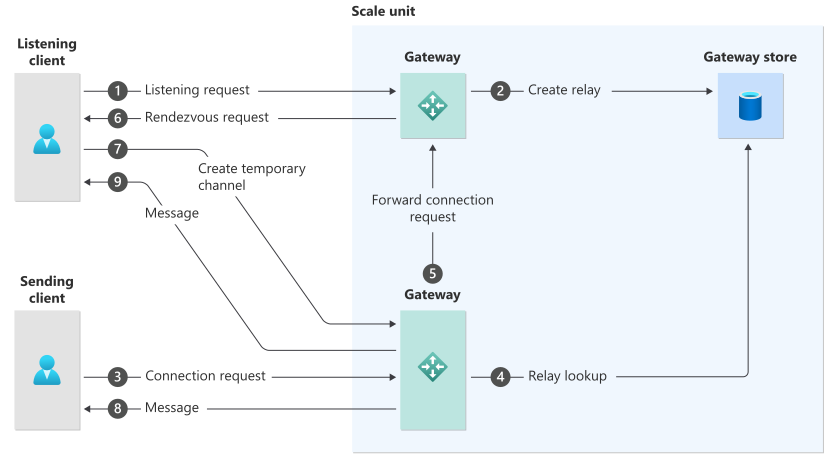
- Listening client sends a listening request to the Azure Relay service. The Azure load balancer routes the request to one of the gateway nodes.
- The Azure Relay service creates a relay in the gateway store.
- Sending client sends a request to connect to the listening service.
- The gateway that receives the request looks up for the relay in the gateway store.
- The gateway forwards the connection request to the right gateway mentioned in the gateway store.
- The gateway sends a request to the listening client for it to create a temporary channel to the gateway node that's closest to the sending client.
- The listening client creates a temporary channel to the gateway that's closest to the sending client. Now that the connection is established between clients via a gateway, the clients can exchange messages with each other.
- The gateway forwards any messages from the listening client to the sending client.
- The gateway forwards any messages from the sending client to the listening client.
基于以上的理解,当Listener 或 Caller 都突然中断的时候, Listener端会记录什么异常日志呢?Caller端会记录什么异常日志呢?
在Listener的日志中,会输出如下的错误消息。
如果不对异常进行处理,会导致整个进程奔溃,Listener退出。
Exception in processing connection:
Microsoft.Azure.Relay.RelayException: The remote party closed the WebSocket connection without completing the close handshake.
TrackingId:xxx-xx-xx-xx-xxxx4_G8_G9,
Address:sb://xxxxxxxx.servicebus.chinacloudapi.cn/xxxxxxxt01,
Timestamp:5/17/2026 8:48:56 AM---> System.Net.WebSockets.WebSocketException: The remote party closed the WebSocket connection without completing the close handshake. at System.Net.WebSockets.WebSocketBase.WebSocketOperation.<Process>d__19.MoveNext() --- End of stack trace from previous location where exception was thrown --- at System.Runtime.CompilerServices.TaskAwaiter.ThrowForNonSuccess(Task task) at System.Runtime.CompilerServices.TaskAwaiter.HandleNonSuccessAndDebuggerNotification(Task task) at System.Net.WebSockets.WebSocketBase.<ReceiveAsyncCore>d__45.MoveNext() --- End of stack trace from previous location where exception was thrown ---
分别启动Listener 和 Caller,在正常通信两次后,直接关闭Caller窗口

在Caller的日志中,会输出如下的错误消息。
Microsoft.Azure.Relay.RelayException:
The remote party closed the WebSocket connection without completing the close handshake.
TrackingId:xxxx-x-x-xx-xxxx5e79e2e,
Address:sb://xxxxxx.servicebus.chinacloudapi.cn/xxxxxxst01, Timestamp:5/17/2026 9:29:11 AM
---> System.Net.WebSockets.WebSocketException: The remote party closed the WebSocket connection without completing the close handshake.
   at System.Net.WebSockets.WebSocketBase.WebSocketOperation.<Process>d__19.MoveNext()
--- End of stack trace from previous location where exception was thrown ---
   at System.Runtime.CompilerServices.TaskAwaiter.ThrowForNonSuccess(Task task)
   at System.Runtime.CompilerServices.TaskAwaiter.HandleNonSuccessAndDebuggerNotification(Task task)
   at System.Net.WebSockets.WebSocketBase.<ReceiveAsyncCore>d__45.MoveNext()
分别启动Listener 和 Caller,在正常通信后,直接关闭Listener窗口

对比两种情况下的日志,都是 Microsoft.Azure.Relay.RelayException: The remote party closed the WebSocket connection without completing the close handshake.
微小的区别在异常消息中的TrackingId格式不同:
以上内容,供您参考。
什么是 Azure 中继?https://docs.azure.cn/zh-cn/azure-relay/relay-what-is-it
开始在 .NET 中使用中继混合连接 WebSocket : https://docs.azure.cn/zh-cn/azure-relay/relay-hybrid-connections-dotnet-get-started
此内容由惯性聚合(RSS阅读器)自动聚合整理,仅供阅读参考。 原文来自 — 版权归原作者所有。