


惯性聚合 高效追踪和阅读你感兴趣的博客、新闻、科技资讯
阅读原文 在惯性聚合中打开

推荐订阅源

A
About on SuperTechFans
GbyAI
GbyAI
I
InfoQ
C
Cisco Blogs
T
Tor Project blog
NISL@THU
NISL@THU
N
Netflix TechBlog - Medium
C
Cyber Attacks, Cyber Crime and Cyber Security
The Hacker News
The Hacker News
T
The Exploit Database - CXSecurity.com
H
Help Net Security
Cisco Talos Blog
Cisco Talos Blog
The Register - Security
Microsoft Azure Blog
G
Google Developers Blog
A
Arctic Wolf
Stack Overflow Blog
Stack Overflow Blog
C
CXSECURITY Database RSS Feed - CXSecurity.com
P
Palo Alto Networks Blog
aimingoo的专栏
aimingoo的专栏
Microsoft Security Blog
P
Privacy International News Feed
L
LINUX DO - 热门话题
Know Your Adversary
Know Your Adversary
L
LangChain Blog
AWS News Blog
AWS News Blog
Security Latest
Security Latest
T
Threat Research - Cisco Blogs
U
Unit 42
P
Privacy & Cybersecurity Law Blog
Spread Privacy
Spread Privacy
WordPress大学
WordPress大学
Latest news
Latest news
L
Lohrmann on Cybersecurity
小众软件
小众软件
阮一峰的网络日志
阮一峰的网络日志
Simon Willison's Weblog
雷峰网
雷峰网
Threat Intelligence Blog | Flashpoint
奇客Solidot–传递最新科技情报
奇客Solidot–传递最新科技情报
Y
Y Combinator Blog
S
SegmentFault 最新的问题
Recent Announcements
C
Cybersecurity and Infrastructure Security Agency CISA
Martin Fowler
Martin Fowler
S
Schneier on Security
C
CERT Recently Published Vulnerability Notes
B
Blog
Project Zero
Project Zero
Recorded Future
Recorded Future

Ubuntu blog

Canonical announces the Enterprise Store as part of Ubuntu Pro | Ubuntu Tracing a memory leak bug in PID 1 and contributing an upstream fix: a Linux support story | Ubuntu MAAS installation: bare metal provisioning is easier than ever | Ubuntu Januscape vulnerability CVE-2026-53359 mitigations available | Ubuntu Managing Ubuntu on bare metal at scale | Ubuntu Ubuntu Server: a platform made for enterprise scale | Ubuntu Building an open source chain of trust: new research uncovers key blockers and ways forward | Ubuntu Beyond safety and security: Why automotive open source demands dependability  | Ubuntu DirtyClone Linux kernel local privilege escalation vulnerability fixes available | Ubuntu pedit COW kernel local privilege escalation vulnerability mitigations | Ubuntu Canonical becomes Gold Sponsor of Trifecta Tech Foundation | Ubuntu Challenges designers face in open source (and how to fix them) | Ubuntu Hunting a 16-year-old SQLite bug with TLA+: is dqlite affected? | Ubuntu Anbox Cloud on C4A metal: Android, at scale, without friction | Ubuntu Canonical announces live kernel patching for Arm64 | Ubuntu How to use RISC-V custom instructions with Ubuntu | Ubuntu Ubuntu Summit 26.04: connected by open source | Ubuntu So you need to add microcontrollers to your fleet: now what? | Ubuntu Validating real-world skills through Canonical Academy | Ubuntu Virtualized Android comes to Anbox Cloud | Ubuntu Template: Streamlining open source design contributions | Ubuntu Beyond Mythos: responding to a new threat landscape | Ubuntu A look into Ubuntu Core 26: Building a local AI inference appliance in a virtual machine | Ubuntu A decade of Ubuntu on IBM Z and IBM LinuxONE | Ubuntu AI at the edge: simplifying infrastructure with Cisco and Canonical | Ubuntu The next era of telco clouds: get open infrastructure choice with Sylva and Canonical Kubernetes | Ubuntu What is RDMA over Converged Ethernet (RoCE)? | Ubuntu Beyond tokens per watt – using Ubuntu 26.04 LTS for AI | Ubuntu A look into Ubuntu Core 26: Deploying AI models on Renesas RZ/V series for production | Ubuntu RISC-V profiles – why is RVA23 significant? | Ubuntu AI with AMD ROCm on Ubuntu: your questions answered | Ubuntu Ubuntu and Ubuntu Pro on Azure Cobalt 200 VMs | Ubuntu What is InfiniBand? | Ubuntu How Canonical Support solves hard Linux performance bugs  – even in 12-year old code | Ubuntu Securing AI agent workflows on Ubuntu with the new NVIDIA OpenShell snap | Ubuntu Canonical announces optimized Ubuntu images for TPU virtual machines by Google Cloud | Ubuntu VMware hypervisor deployment using MAAS | Ubuntu Migrating from Apache Spark 3 to Spark 4 | Ubuntu Introducing Workshop: launch sandboxed development environments on Ubuntu with a single command | Ubuntu Run agentic workloads on Arm and Ubuntu | Ubuntu Decoding design: How design and engineering thrive together in open source | Ubuntu Developing web apps with local LLM inference | Ubuntu PinTheft Linux kernel vulnerability mitigation | Ubuntu Canonical announces fully Managed Kubeflow AI operations platform on the Microsoft Azure Marketplace | Ubuntu A look into Ubuntu Core 26: Cloud-powered edge computing with AWS IoT Greengrass and Azure IoT Edge | Ubuntu CVE-2026-46333 (ssh-keysign-pwn) Linux kernel vulnerability mitigations | Ubuntu Finding the blind spot: How Canonical hunts logic flaws with AI | Ubuntu Fragnesia Linux kernel local privilege escalation vulnerability mitigations | Ubuntu Rethinking BYOD security: protecting data without trusting devices | Ubuntu Dirty Frag Linux kernel local privilege escalation vulnerability mitigations | Ubuntu Three weeks to go: A sneak peek of the Ubuntu Summit 26.04 experience | Ubuntu How to use Ubuntu on Windows | Ubuntu Fixes available for CVE-2026-31431 (Copy Fail) Linux Kernel Local Privilege Escalation Vulnerability | Ubuntu Run NVIDIA Nemotron 3 Nano Omni locally in a single command | Ubuntu Why Web Engineering is great | Ubuntu Ubuntu 16.04 LTS has reached the end of standard Expanded Security Maintenance with Ubuntu Pro. Here are your options. | Ubuntu Understanding disaggregated GenAI model serving with llm-d | Ubuntu From Jammy to Resolute: how Ubuntu’s toolchains have evolved | Ubuntu Hybrid search and reranking: a deeper look at RAG | Ubuntu Canonical expands Ubuntu support to next-generation MediaTek Genio 520 and 720 platforms | Ubuntu Intentional leadership at Canonical | Ubuntu Ubuntu Pro comes to Nutanix bare-metal Kubernetes | Ubuntu RISC-V 101 – what is it and what does it mean for Canonical? | Ubuntu Ubuntu Summit 26.04 is coming: Save the date and share your story! | Ubuntu How to manage Ubuntu fleets using on-premises Active Directory and ADSys | Ubuntu Simplify bare metal operations for sovereign clouds | Ubuntu How to Harden Ubuntu SSH: From static keys to cloud identity | Ubuntu The “scanner report has to be green” trap | Ubuntu Modern Linux identity management: from local auth to the cloud with Ubuntu | Ubuntu Canonical welcomes NVIDIA’s donation of the GPU DRA driver to CNCF | Ubuntu Hot code burns: the supply chain case for letting your containers cool before you ship | Ubuntu
A day in the life of an Android developer with Anbox Cloud | Ubuntu
anusha-c · 2026-07-24 · via Ubuntu blog

Meet Alex, an Android developer. Like many developers, Alex would rather spend the day building applications than managing devices, maintaining emulators, or hunting for the right test environment. Thankfully, Alex is using Anbox Cloud, which simplifies their workflows and keeps them focused on development.

In this article, we’ll follow Alex through their day to show you how it works, from feature development to release. Alex’s focus for today is building a ride-tracking feature for their ride-sharing app. It’ll need to be developed, tested, reviewed, and released. 

9am: Building the feature

Alex starts their day by launching an instance in Anbox Cloud. Within seconds, they have a running Android environment. They connect the Android instance to their local development environment using Connect ADB. After authorizing the connection, they are ready to start building the feature using the development tools they are already familiar with. 

The ride tracker relies on location data, so Alex needs to verify how the application behaves in different cities. They use the Set location feature, search for “London”, and select the place they want to test. The moment they send the location update, their application immediately responds to the change, just as if they were right there! Alex clicks directly on the map to refine the exact pickup spot.
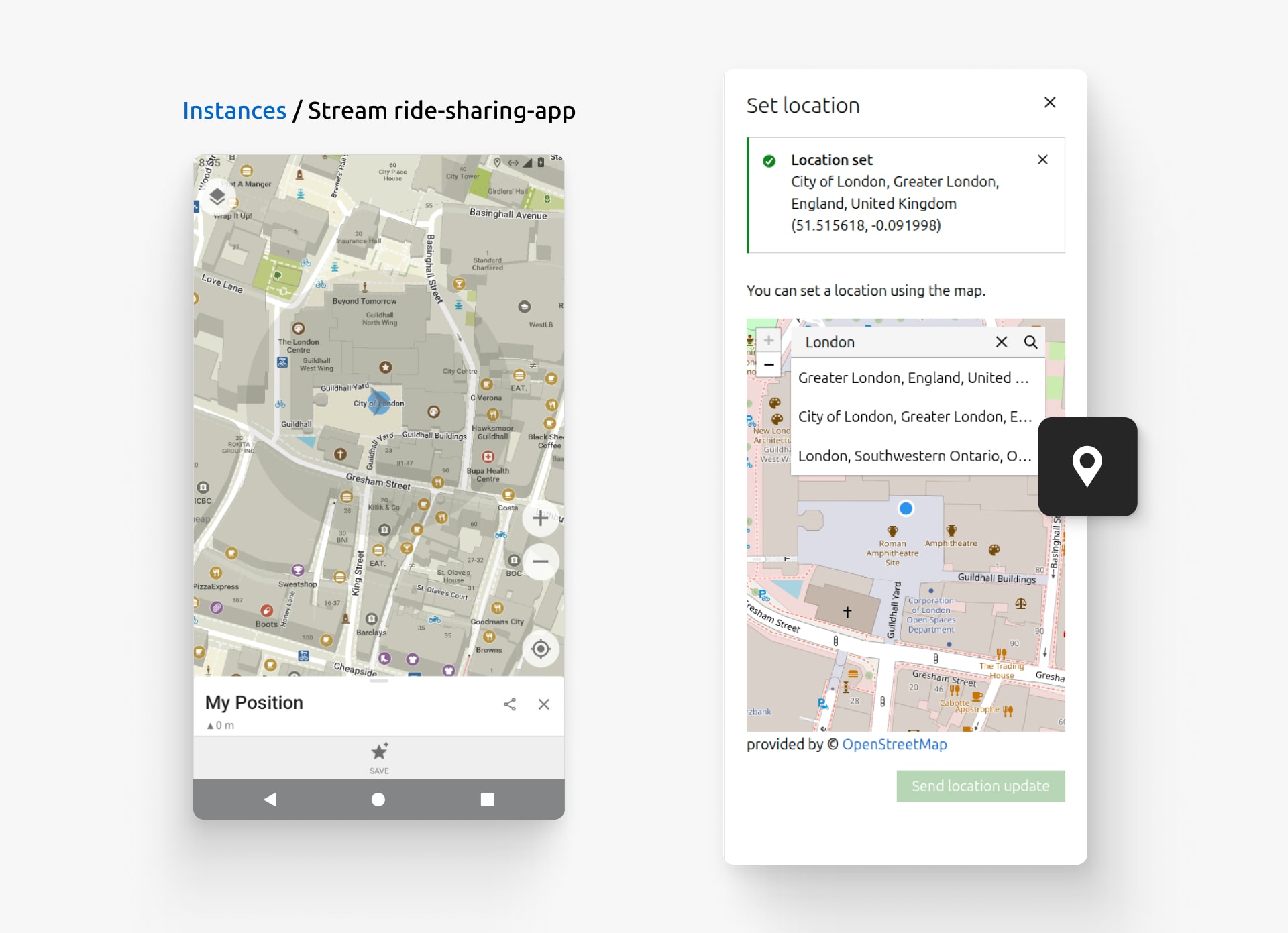
Search for a location or select a point directly on the map to update the device’s GPS location.

Alex also wants the ride-sharing experience to stay consistent across different devices. They rotate between portrait and landscape mode, confirming that the map, ride details, and action buttons remain easy to use regardless of how the device is held. 
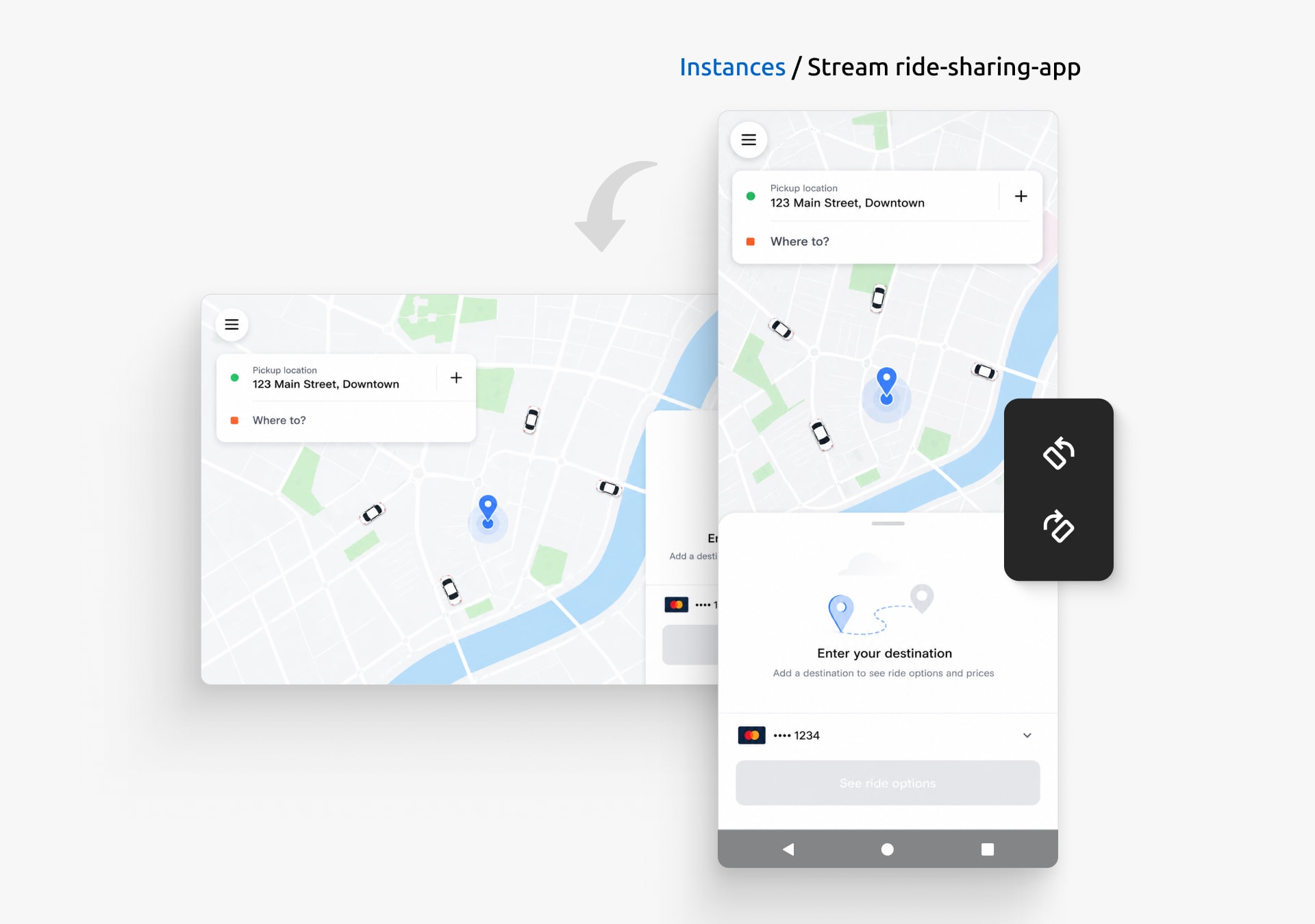
Quickly switch between portrait and landscape to verify the experience in both orientations. 

They then resize the Android device to test the ride-tracking feature across different screen sizes, switching to full screen when they want a closer look at the overall experience. Alex can use the interface to test a full range of devices their users carry.
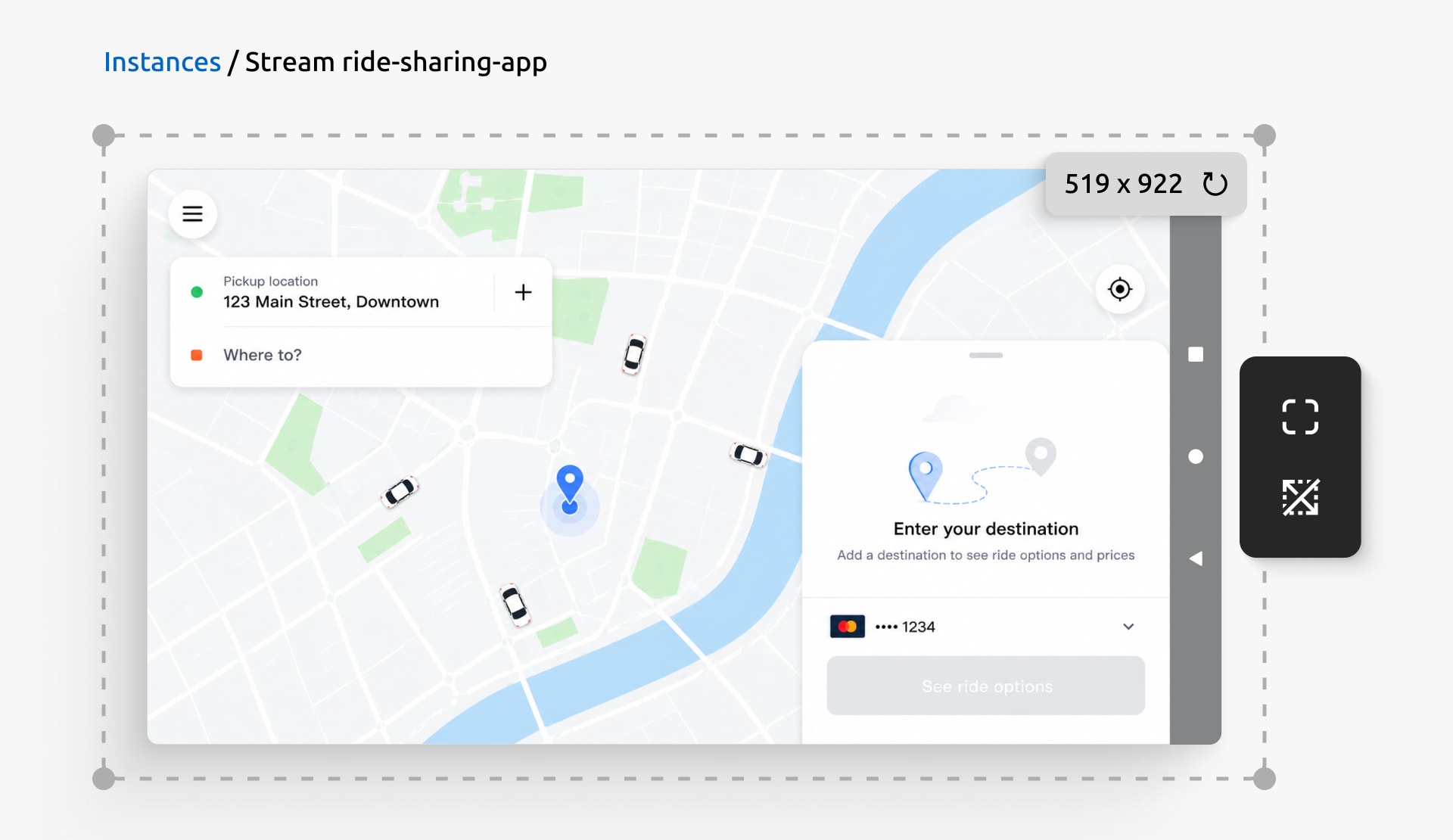
Resize the Android instance to validate the application across a range of screen sizes.

Exploring the different user journeys, Alex navigates the app using the device controls built right into the stream page. They tap Back to step backward through the booking flow, retracing the steps a rider takes when they change their mind about a destination. They press Home to jump straight back to the main screen where a rider requests a ride. And they use Power to put the device to sleep, then wake it again: the ride-sharing application resumes exactly where the user left off. 

12pm: Feature review

Confident the feature is ready for review, Alex sets up a shareable link. They click the Set up sharing button, set a title and expiry for the shared stream. Within seconds, they have a link ready to send. The designer and the rest of the team open the running Android application right in their browsers to try the new ride-tracking feature for themselves.
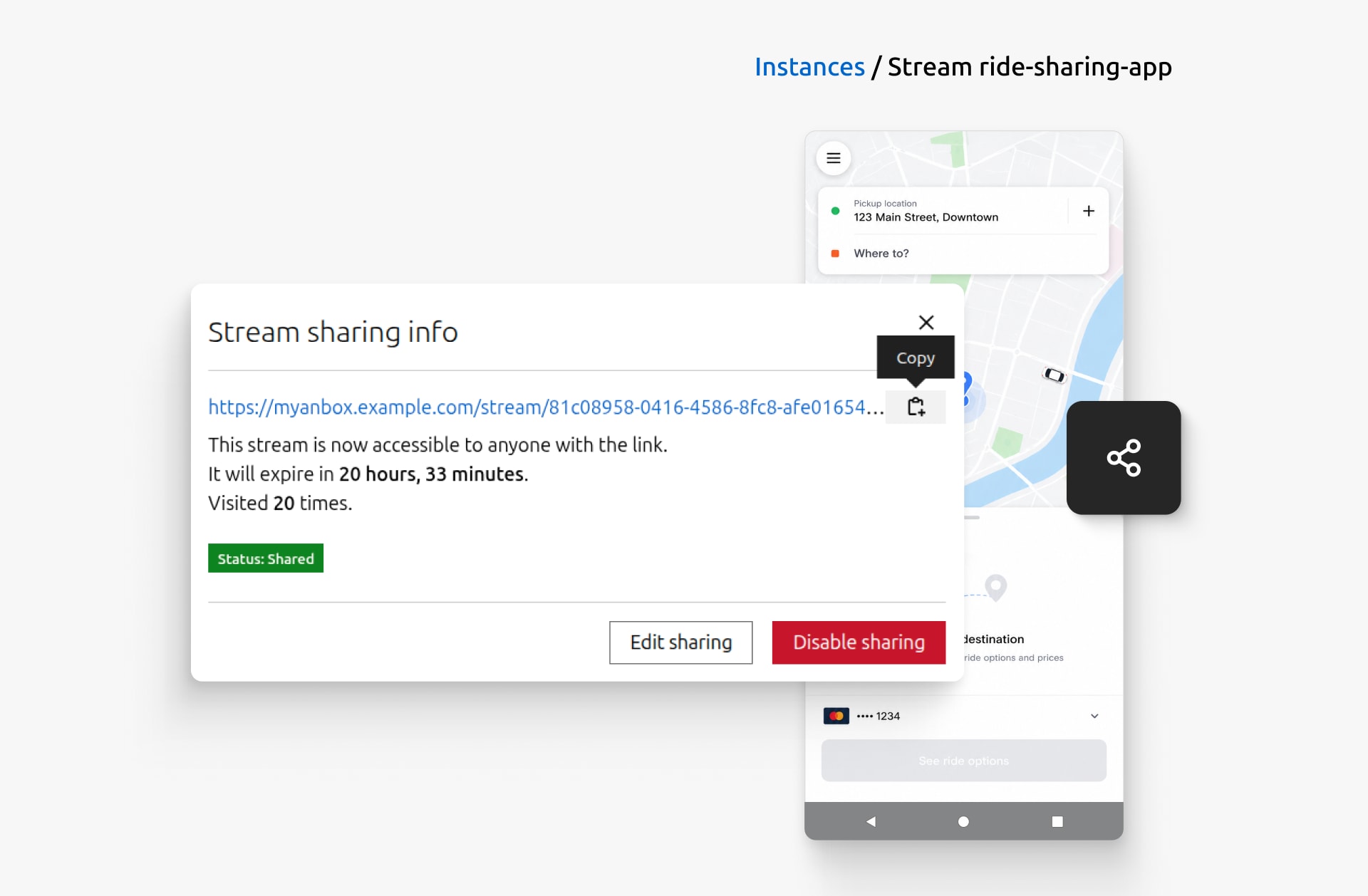
Create a shareable link so others  can access the running application directly from their browsers.

As feedback starts coming in, team members interact with the Android instance in the way that suits them. Keyboard-first users, for instance, can navigate the streaming interface and access its controls using built-in keyboard shortcuts, making common actions faster and more accessible. When they need to use browser-native shortcuts, such as Ctrl+R, they can temporarily disable the keyboard capture using a keyboard shortcut. This lets them seamlessly switch between interacting with the Android instance and using browser-native shortcuts, all without reaching for the mouse.

3pm: Fixing bugs and setting up automated testing

The hands-on testing pays off: the QA team reports a bug that only appears when switching between locations during a ride. Alex opens the Developer tools and inspects the application logs to understand what’s happening behind the scenes. They filter log entries by severity, search for specific messages, and pause the live log stream while investigating the issue. Once Alex identifies the root cause, they export the relevant logs and share them with the team, resolving the issue and restoring the expected behavior.
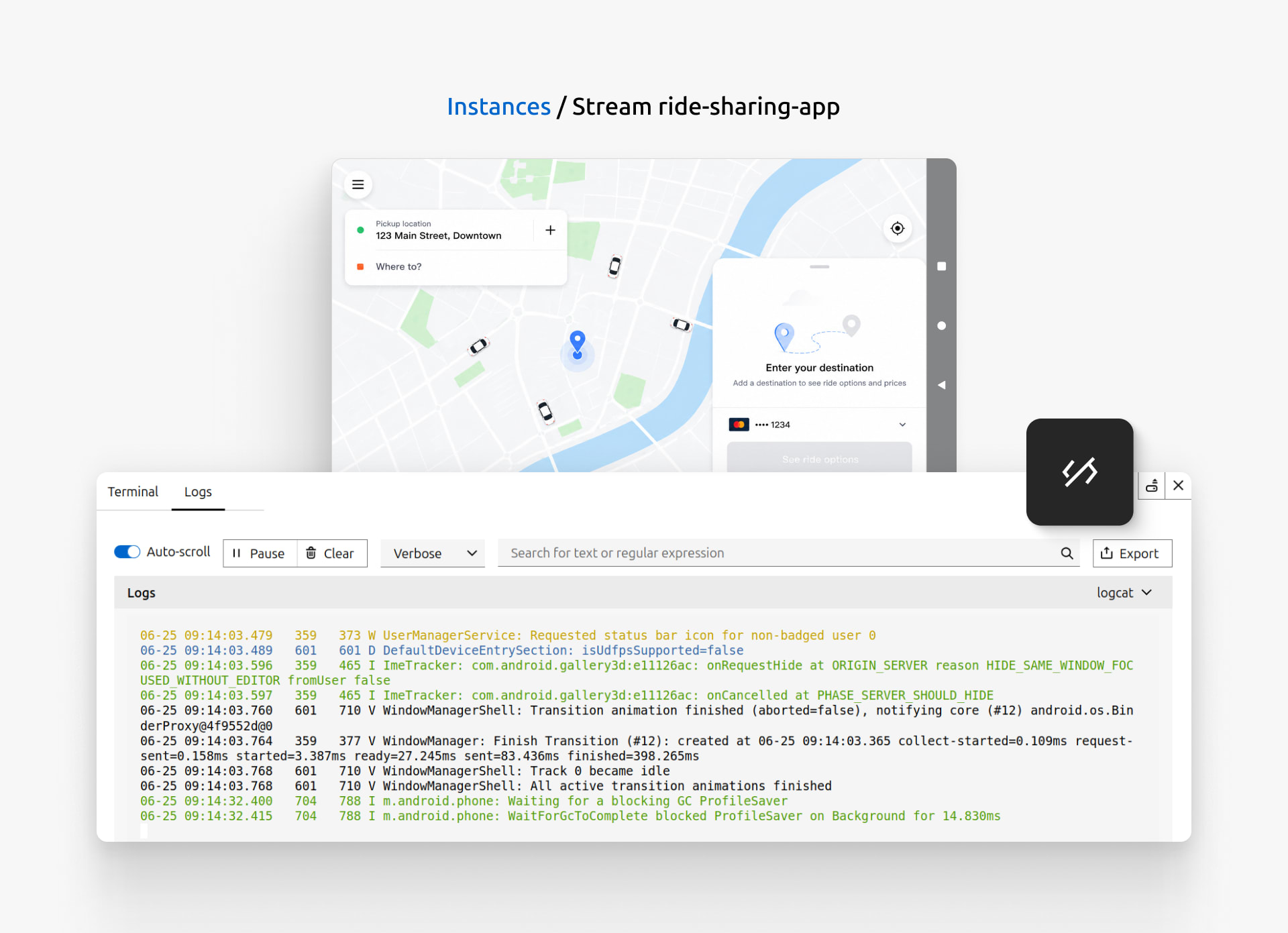
Use the Developer tools to investigate issues through live android and system level logs.

To avoid running into similar issues, Alex writes automated tests for the new ride-tracking feature and integrates them into their CI/CD pipeline. Using Anbox Cloud GitHub Actions, whenever the workflow runs, a fresh Android environment is provisioned automatically. This ensures that future changes won’t introduce any regressions to the ride-sharing application.

5pm: Preparing to ship

Now that the feature is complete, Alex is finally ready to ship it to users. Before announcing the release, Alex uses the screenshots feature to highlight key parts of the ride-tracking experience and records a short demo using the screen recording feature. Alex then uses these assets to prepare the release notes, documentation, and announcement. 

Alex knows that if anything about the stream ever needs looking into, the Download bug report button is one click away. It quickly collects diagnostic information that can be used to investigate the issue or shared with the Anbox Cloud team.

By the end of the day, Alex has taken the ride-tracking feature from first line of code to finished release: developing, testing, debugging, and automating, all from a single platform. And that’s a day in the life of an Android developer with Anbox Cloud.

Explore Anbox Cloud in action and discover how it can streamline your development workflow! 

Further reading