


惯性聚合 高效追踪和阅读你感兴趣的博客、新闻、科技资讯
阅读原文 在惯性聚合中打开

推荐订阅源

Google DeepMind News
Apple Machine Learning Research
博客园_首页
爱范儿
爱范儿
让小产品的独立变现更简单 - ezindie.com
罗磊的独立博客
M
MIT News - Artificial intelligence
D
Docker
量子位
T
Tailwind CSS Blog
人人都是产品经理
人人都是产品经理
月光博客
月光博客
有赞技术团队
有赞技术团队
J
Java Code Geeks
A
About on SuperTechFans
P
Proofpoint News Feed
Jina AI
Jina AI
Y
Y Combinator Blog
T
The Blog of Author Tim Ferriss
The GitHub Blog
The GitHub Blog
Microsoft Security Blog
V
V2EX
GbyAI
GbyAI
F
Fortinet All Blogs

Blog on 1Password Blog

Why secure-by-design is an incentives problem, with Bob Lord | 1Password NIST and AI agents: 1Password’s approach to agent identity | 1Password Natoma and 1Password help enterprises scale AI securely with governed agent access | 1Password New integrations between 1Password SaaS Manager and EPM | 1Password A first step toward post-quantum security | 1Password RSA 2026: Leading the way to secure agentic AI | 1Password How 1Password is Building a Culture of AI Fluency Through AI Champions | 1Password 1Password vs. Keeper Security: A comparison | 1Password 1Password vs. LastPass: Which is right for you? | 1Password Secure MCP credentials with 1Password and Runlayer | 1Password The next layer of AI security | 1Password Building the next chapter of Go-to-Market in EMEA | 1Password Automating SOC workflows with 1Password Enterprise Password Manager | 1Password Automated Provisioning hosted by 1Password: A Simpler, Smarter Way to Manage Access | 1Password Introducing 1Password® Unified Access: Identity Security for Humans and Their AI Agents | 1Password Next-generation automated provisioning, without compromising zero-knowledge security | 1Password Bitwarden vs. 1Password: Which password manager is right for you? | 1Password Password Manager for Families, Enterprise & Business | 1Password | 1Password How to wrangle SaaS contract renewals | 1Password Stop trusting consumer browsers with work credentials | 1Password IAM stops at sign-in. Your credentials do not. | 1Password Your digital pit crew: a 10-minute pre-race security checklist | 1Password 1Password Device Trust is coming to EMEA | 1Password The identity transformation: Analyst and CIO insights | 1Password Why now is the moment to join 1Password Go-To-Market | 1Password Identity and Accountability in the Age of AI Agents | 1Password How 1Password secures agent architectures | 1Password 1Password becomes the first global partner to transact through Express Private Offers in AWS Marketplace | 1Password Start Learning on 1Password Academy | 1Password Expanding Programmatic Access to 1Password | 1Password
Go beyond device health with External Checks in 1Password...
info@1password.com (1Password) · 2026-04-02 · via Blog on 1Password Blog

Most organizations already have the policies they need in place. The problem is enforcement.

Employees must complete security awareness training, contractors must acknowledge updated agreements, and teams must meet compliance requirements. But the systems that track these requirements rarely connect to the systems that control user and device access. As a result, access is granted even when required conditions haven’t been met.

That’s why we're excited to announce that 1Password Device Trust can now take signals from other systems into account before allowing users to reach sensitive company apps and data. 

External Checks in Device Trust

Until now, 1Password Device Trust focused primarily on device telemetry. That meant administrators could block employees from accessing company resources if their device failed to meet certain requirements, but they couldn’t enforce compliance based on signals that live outside of the device. With the ability to create custom External Checks, that changes.
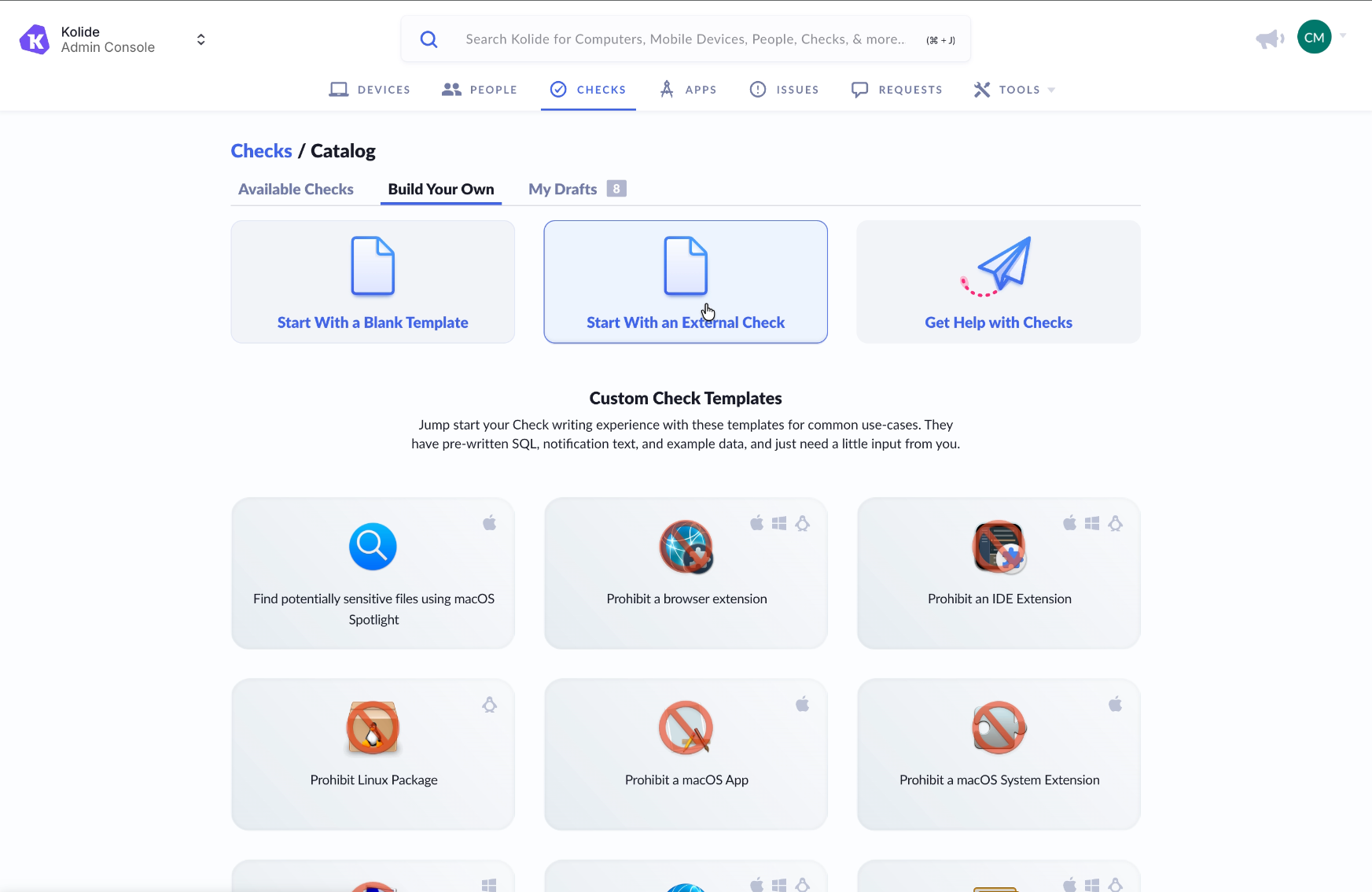
A screenshot of the interface within 1Password Device Trust to create custom checks, including external checks.

Access to protected apps can now depend on:

  • User compliance status

  • Policy acknowledgments

  • MFA enrollment status

  • Active employment status

  • Many other external verification signals 

Access decisions are no longer limited to what’s happening on the device. They reflect whether the user of the device has met required conditions across systems. 

How External Checks work

Administrators configure an External Check by connecting Device Trust to a third-party system via API. That external system becomes a source of truth for a specific requirement, such as whether a user has completed training or acknowledged a required policy.
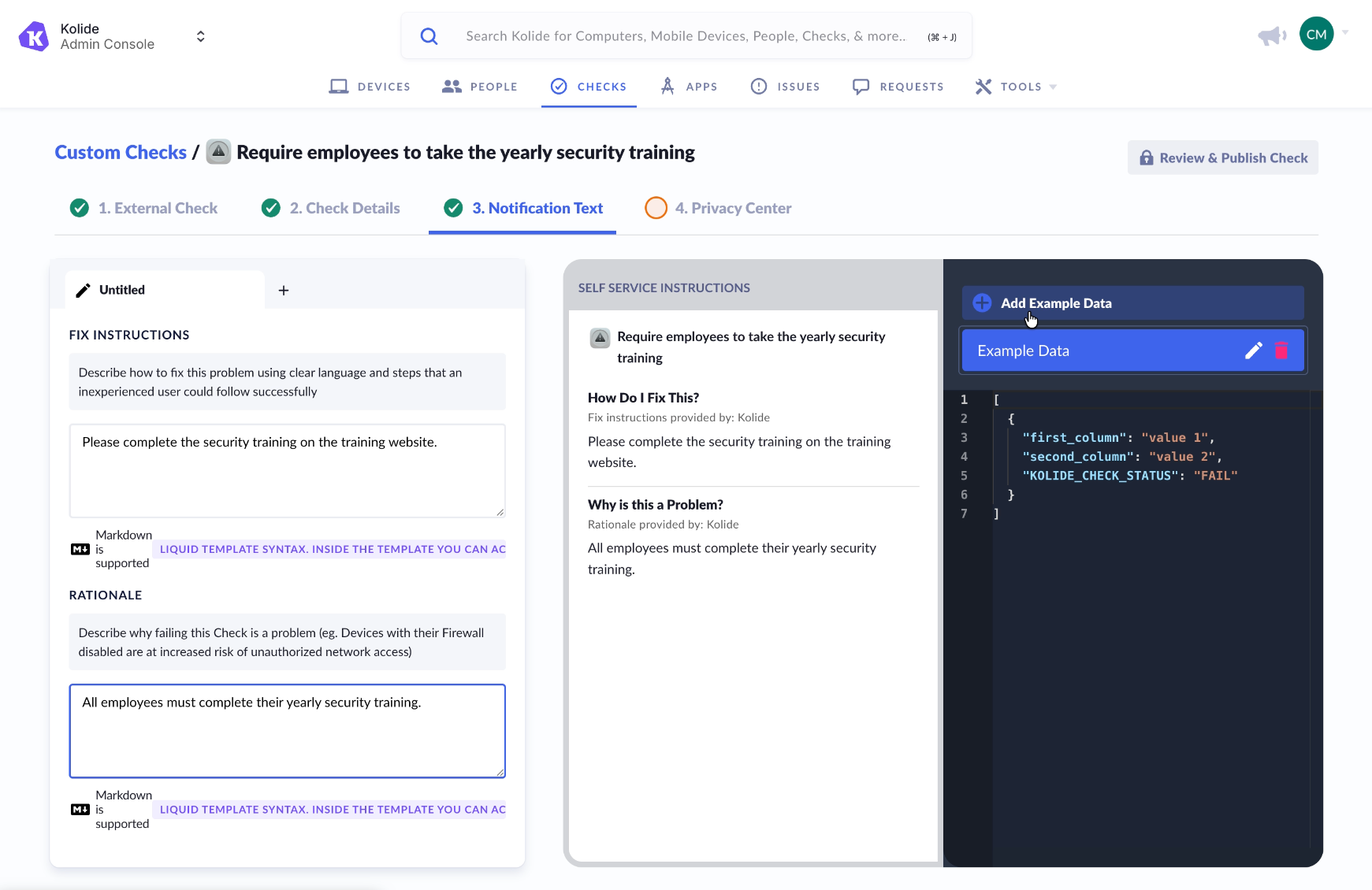
A screenshot of the 1Password Device Trust admin console interface for setting custom device health checks. In this case, the check is to ensure that employees have completed required security training.

When a user attempts to access a protected application:

  1. Device Trust evaluates device posture as it does today.

  2. Device Trust sends a request to the configured external system.

  3. The external system returns a simple result: pass or fail.

  4. Device Trust incorporates that result into the overall access decision.

If the check passes, access proceeds normally.

If the check fails, Device Trust can block access according to the policy defined by the administrator, while providing end users with custom remediation instructions so they know exactly how to resolve the issue.

This keeps enforcement centralized in Device Trust while allowing organizations to rely on their existing HR, training, or security systems as sources of truth.

Extending Zero Trust by closing the Access-Trust Gap

Zero Trust is about verifying that only the right user, on the right device, under the right conditions, can access the right application. External Checks help organizations move closer to that model by connecting the disparate systems that are already in place to make a more informed access decision. 

By bringing identity and compliance signals into Device Trust, security teams can reduce gaps between compliance systems and real-world access. Ready to set up External Checks for your organization? Check out our documentation here to get started.