


Retro gaming fans should be careful with GitHub projects that claim to be tools or plugins for their consoles. Attackers can disguise ordinary computer malware as homebrew software, and the technique works against any retro platform with an active modding scene, not just one console.
We recently looked at one example aimed at PlayStation Vita owners: a fake project that pretends to be a free audio tool but actually runs Windows malware on your computer.
The project, called EQVita, looks like a normal homebrew plugin. It has a polished README, a download button, screenshots, and a tidy layout. But the file you download doesn’t contain anything for a Vita at all. It contains three Windows files, and the harmless-looking text file among them is actually a hidden script that quietly connects to the attacker’s server once you run it.
This isn’t a one-off. Other researchers have observed attackers using fake GitHub repositories—dressed up with AI-generated descriptions—to spread a type of malware called SmartLoader, which then pulls in password and wallet-stealing malware such as Lumma Stealer. The EQVita download uses the same method, repackaged to appeal to retro gaming fans.
Take a look at the comparison below. On the left we have a fake GitHub repository, on the right a real one.
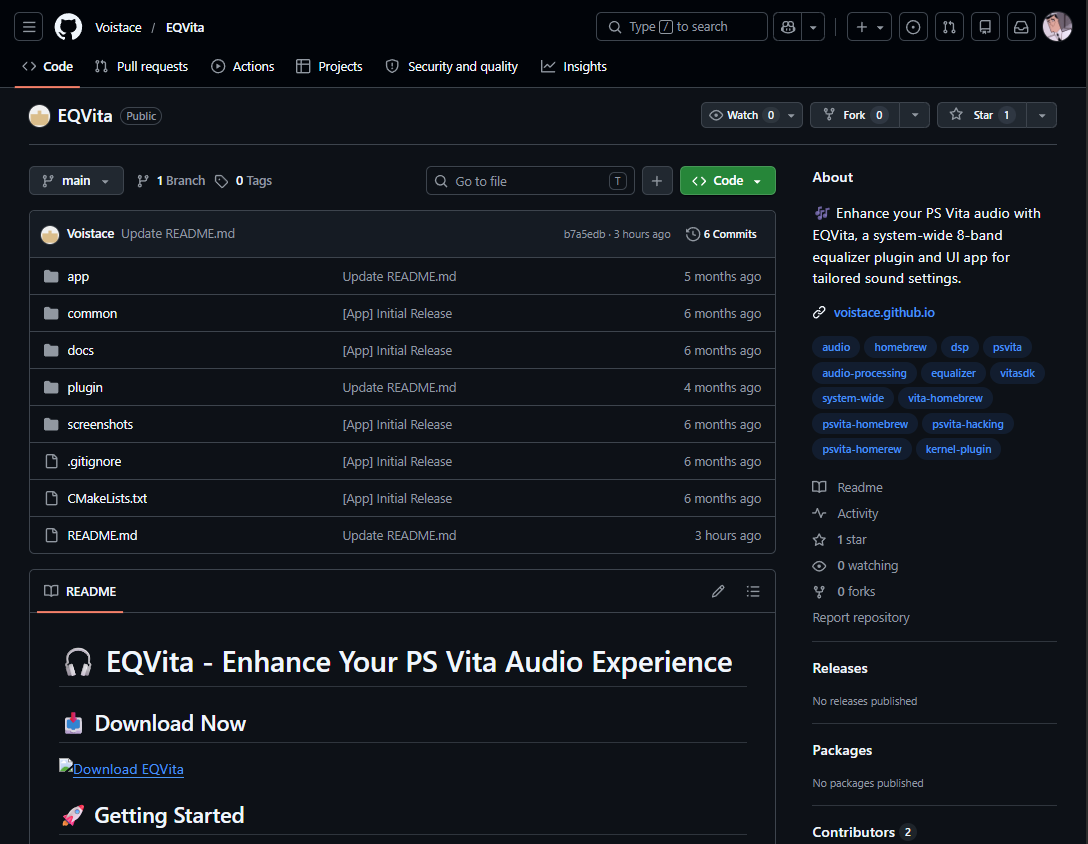
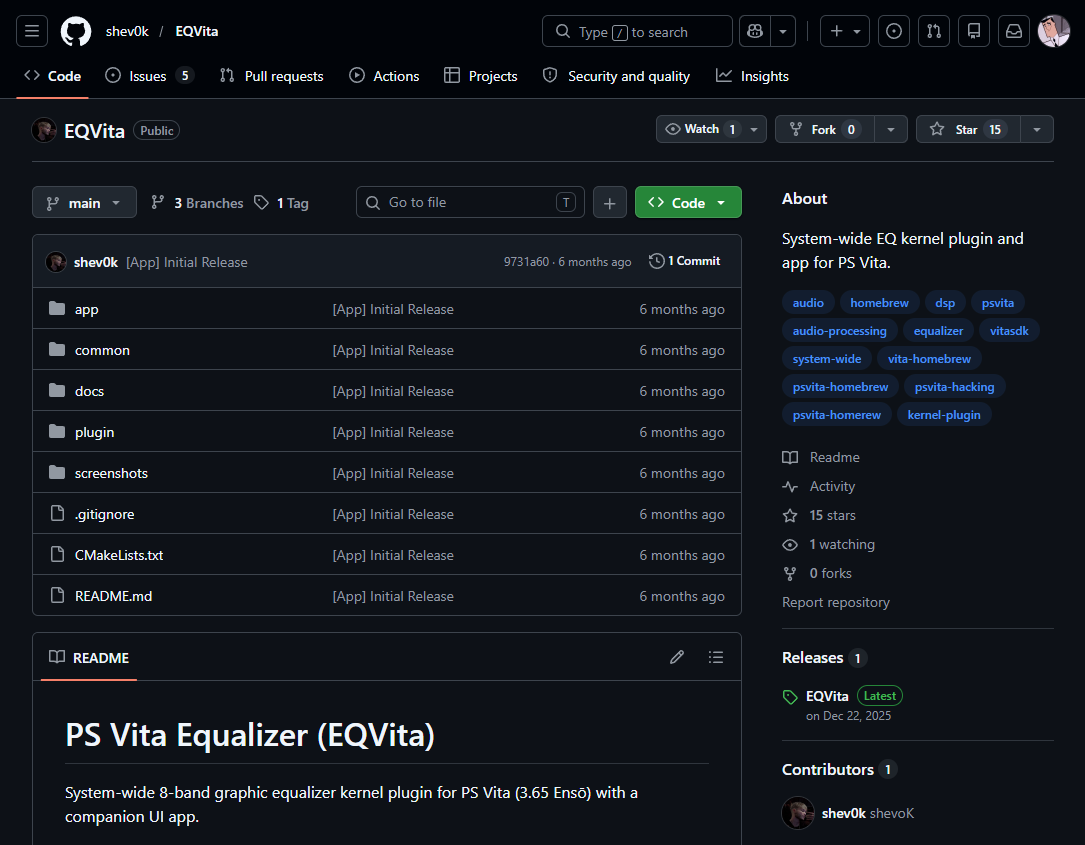
There’s even a small trick in the version number. The real EQVita is on version 1.10, while the fake is labeled 1.3. At a glance, 1.3 may appear newer—but it isn’t. In software, 1.10 comes after 1.9, so the real project is the more up-to-date one. The fake just borrows a number that looks current.
If you’re not into retro consoles, the PS Vita might not mean much to you. But for a large and active community, it’s a big deal, and that makes it a target.
I’ll admit a soft spot here: I bought my own Vita 1000 second hand about ten years ago, and it still runs beautifully. It comes off the shelf every now and then, mostly because the library is so deep there’s always something worth coming back to. I’m clearly not alone.
Even though Sony stopped making the Vita years ago, fans have kept it alive by writing their own software for it: emulators, file managers, and plugins. A modded Vita can run its own PSP games at full speed and emulate older systems like the SNES, Game Boy Advance, and Sega Genesis, which turns the handheld into a do-everything retro machine. In 2026 the scene is thriving, with active developers and even homebrew contests with cash prizes.
That demand shows up in the price, too. With no new units made since 2019, working Vitas have become a sought-after retro item, and resale prices have climbed across the major marketplaces over the past year—the older OLED model, prized by modders for its firmware, has risen the most. In other words, more people than ever are buying a Vita specifically to mod it, which means more people hunting for plugins and tools to install.
That enthusiasm is exactly what attackers abuse. Homebrew users are used to downloading files from GitHub, dropping them into folders, and running them. The whole hobby runs on trusting code from individual developers. Scammers know this, so a fake “Vita plugin” is an easy way to get people to run something they normally wouldn’t.
How the scam works
The download, EQ_Vita_v1.3.zip, contains three files:
Launch.batluajit.exex64.txt
Here’s the clever part. luajit.exe is a real, harmless program that runs scripts. The batch file simply tells it to open x64.txt. Despite the .txt name, that file isn’t text at all—it’s a hidden script, and LuaJIT runs it. Calling it .txt is what makes it look harmless and easy to scroll past. Researchers found the same setup in the SmartLoader campaign: the only dangerous file in the download is the disguised script, and everything around it is legitimate.
So nothing in the download looks dangerous on its own. There’s no obvious installer and no scary-looking app—just a trusted tool being used to run someone else’s code.
We watched what happened when it ran. First, the script checked where in the world the computer was. Then it quietly contacted a server on the internet and sent it data, using a web address scrambled into a meaningless-looking string. The server answered back.
An audio plugin has no reason to do any of that. This is how a malware “loader” behaves: it phones home to the attacker’s server to receive instructions and fetch its next piece of malware. In this campaign, that next piece is usually a stealer—malware that hunts for cryptocurrency wallets, saved browser passwords, and login codes.
Malwarebytes blocks this threat, so protected users are stopped before the file can run.
How to spot the fake
Most Vita plugins are installed on the Vita, using tools like VitaShell or Autoplugin, and they come as Vita files (the kind ending in .skprx or .vpk).
Some legitimate tools in the scene—installers, file-transfer helpers, build tools—do run on a PC, so a Windows program isn’t automatically bad. The key is to check before you run it.
Is it well known? Is it widely used? Is it recommended by trusted community sources, or did you just stumble onto it in an unfamiliar repository? A “plugin” that quietly leans on a .bat file to launch a hidden program is exactly what that check is meant to catch.
A few habits help:
- Match the file to the device, and verify PC tools. Most Vita plugins are Vita files, not Windows programs. Some legitimate tools do run on your PC, so don’t panic at an
.exeor.bat, but check that it’s a well-known, trusted tool before running it. - Be wary of “Download Now” polish. Real homebrew READMEs are written for users like other developers. In this campaign, the fake repositories lean on AI-generated text, which tends to read like marketing: heavy on emoji, friendly phrasing, and a big download button. A project that pushes you to click fast deserves a second look.
- Stick to trusted sources. Established community hubs and trusted-source lists exist for a reason. Check before you download.
- Add another layer of protection. Malwarebytes Browser Guard can help block known malicious pages and downloads before they reach you.
What to do if you’ve already run it
If you have downloaded and run EQ_Vita_v1.3.zip, you should treat the computer as compromised. Here’s what to do:
- Run a full malware scan with up-to-date security software.
- Because this campaign delivers information-stealing malware, change your important passwords from a different, clean device, and review your accounts for unauthorized logins.
- If you keep any cryptocurrency on that computer, move your funds using a different, clean device and rotate your keys and seed phrases.
- Check your two-factor authentication (2FA) settings, as stealers can also target 2FA data.
- Finally, delete the three files and report the GitHub repository so it can be taken down.
Why this scam works
It works because it doesn’t look like a scam. It lives on GitHub, where homebrew users already place their trust. It uses a real, harmless tool to do its dirty work. And it hides the dangerous part inside a file that looks like plain text. None of those tricks is clever on its own, but together they slip right past the quick checks most people actually do.
What makes this one worth noting is where it’s aimed. Retro communities run on goodwill—volunteers who keep old hardware alive, share their work for free, and vouch for one another’s tools. That same trust is what this campaign exploits, and every fake repository that slips through makes the next genuine project a little harder to trust.
The best defense is the one these communities already have: trusted-source lists, established wikis, and people who test things and report back. Verify where a file comes from before you run it, and when something doesn’t add up, say so. That habit is what keeps the scene safe for everyone in it.
Indicators of Compromise (IOCs)
Domains
https://github.com/Voistace/EQVita
https://voistace.github.io
IP
85.137.52.21 C2
We don’t just report on threats—we remove them
Cybersecurity risks should never spread beyond a headline. Keep threats off your devices by downloading Malwarebytes today.
