







A year ago, I wrote a .NET Blog post about running GPT-OSS locally with Ollama and C#. That sample used IChatClient from Microsoft.Extensions.AI to build one of the most familiar Local AI scenarios: a chat application.
Chat is a great place to start, but Local AI is not limited to asking a small language model to write a poem or summarize a document.
Foundry Local can also run specialized models for workloads such as speech recognition. Even better, it manages the complete model lifecycle for your application: finding the appropriate model variant, downloading it when required, storing it in its local cache, loading it for inference, and unloading it when the application is finished.
In this post, we will build a small C# console application that uses an NVIDIA 0.6B Nemotron speech model to transcribe microphone audio in real time. The model runs locally, and the application receives partial and final transcription results while you speak.
Abstractions when possible, native capabilities when needed
In the previous Ollama sample, Microsoft.Extensions.AI gave us the IChatClient abstraction. That makes it possible to write chat code that can work with different AI providers without changing the application’s core logic.
Live audio streaming is slightly different. The AudioClient used in this sample belongs to the native Microsoft.AI.Foundry.Local SDK; it is not a Microsoft.Extensions.AI abstraction. We use the provider SDK here because live transcription sessions, raw PCM streaming, and interim results are Foundry Local specific capabilities.
This is a useful pattern for .NET AI applications:
- Use
Microsoft.Extensions.AIabstractions when they match the scenario. - Use the provider SDK when you need a specialized provider capability.
The two approaches complement each other.
What we are building
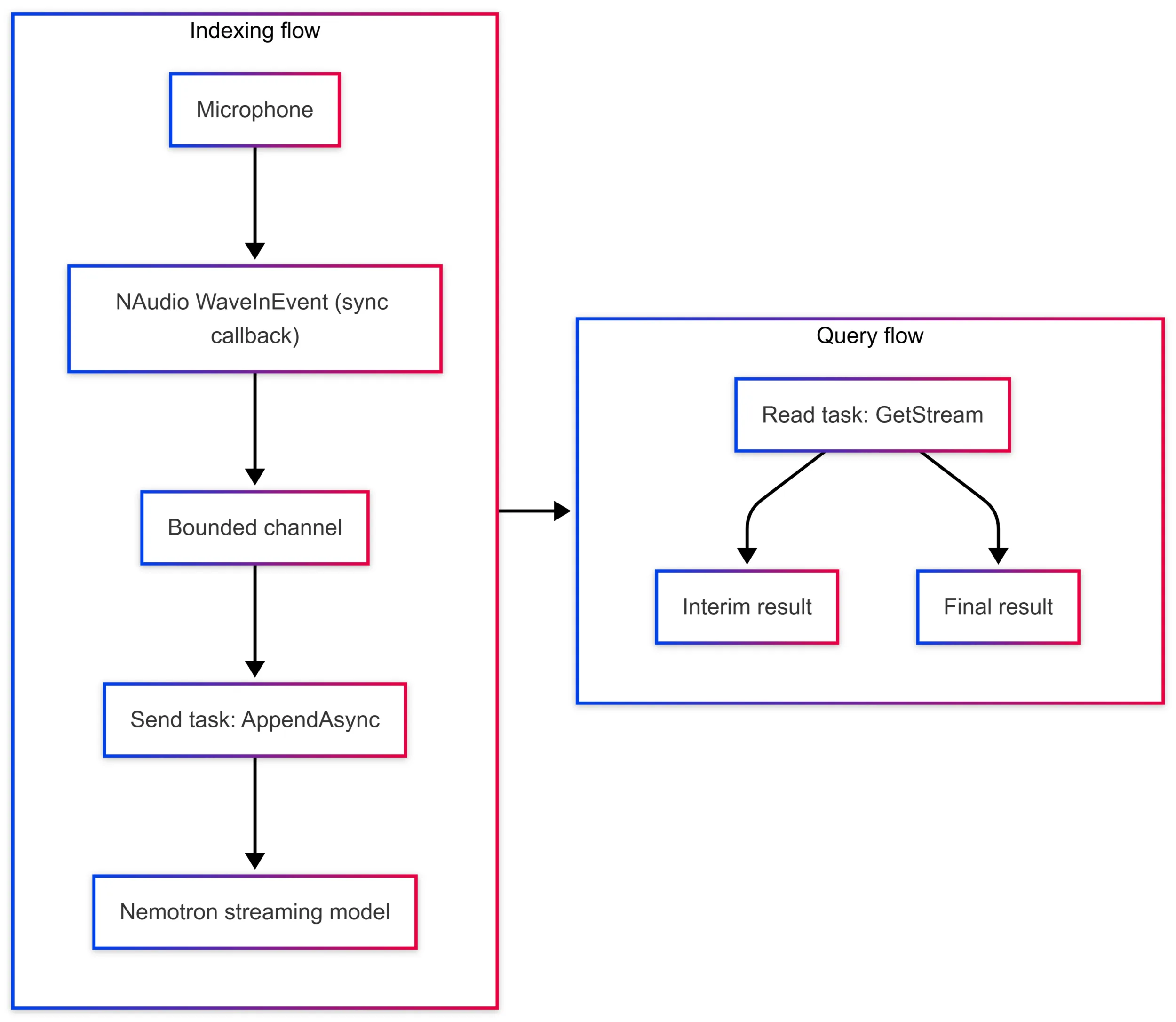
The application has a simple flow:
- Initialize Foundry Local and resolve a speech model from its catalog.
- Download and load the model.
- Create a live transcription session.
- Capture microphone audio as 16-kHz, 16-bit, mono PCM.
- Stream the audio to the model and print interim and final results.
The complete sample targets .NET 10 and uses:
Microsoft.AI.Foundry.Local.WinMLfor Foundry Local.NAudioto capture microphone audio.nemotron-speech-streaming-en-0.6b, an English streaming ASR model from the Foundry Local catalog.
Important
This sample is Windows-only. Microsoft.AI.Foundry.Local.WinML targets Windows ML, and NAudio.WaveInEvent uses the Windows audio APIs.
You can find the complete working application here:
See it in action
I show the complete application running on the .NET & AI Community Standup: Foundry Local resolves and loads the speech model, the application captures microphone audio, and interim and final transcription results appear in real time.
▶ Watch the .NET & AI Community Standup
Beyond Chat: live Speech-to-Text with Foundry Local and C#
Let Foundry Local manage the model
The first important part is resolving the model through the Foundry Local catalog:
About the code snippets
The snippets in this post focus on the Foundry Local APIs and omit some application-level details for clarity. See the complete working sample for the full implementation, including error handling and resource cleanup.
using Microsoft.AI.Foundry.Local;
using Microsoft.Extensions.Logging.Abstractions;
using NAudio.Wave;
using System.Threading.Channels;

var config = new Configuration
{
    AppName = "dotnet-local-ai-live-transcription",
    LogLevel = LogLevel.Information
};

await FoundryLocalManager.CreateAsync(config, NullLogger.Instance);

using var manager = FoundryLocalManager.Instance;
await manager.DownloadAndRegisterEpsAsync(); // EPs: execution providers for the detected hardware

var catalog = await manager.GetCatalogAsync();
var model = await catalog.GetModelAsync(
    "nemotron-speech-streaming-en-0.6b")
    ?? throw new InvalidOperationException("Speech model not found.");

await model.DownloadAsync(progress =>
    Console.Write($"\rDownloading model: {progress:F2}%"));

await model.LoadAsync();
This is one of my favorite parts of the Foundry Local developer experience. The application asks for a model by alias, and Foundry Local takes care of the model files and the execution providers required by the available hardware.
On the first run, the model and the necessary execution providers are downloaded. If you keep the model in the Foundry Local cache, later runs can reuse it without downloading it again. There is no separate download script, no manually managed model folder, and no API key.
On the first run, Foundry Local downloads and caches the Nemotron speech model before starting the application.
Foundry Local also owns the catalog-specific metadata and file layout. For this scenario, the model should be obtained from the catalog and downloaded through model.DownloadAsync() instead of downloading the files separately from Hugging Face.
Foundry Local can select the model variant and execution provider that match the available hardware. That is a useful reminder that not every Local AI workload needs a large model or even a GPU.
Create a live transcription session
Once the model is loaded, we can get its AudioClient and create a streaming session:
var audioClient = await model.GetAudioClientAsync();
using var session = audioClient.CreateLiveTranscriptionSession();

session.Settings.SampleRate = 16000;
session.Settings.Channels = 1;
session.Settings.Language = "en"; // this Nemotron variant is English-only

await session.StartAsync();
This is not batch transcription over a completed audio file. The session stays open and accepts raw PCM audio while the user is speaking.
The sample uses NAudio.WaveInEvent to capture the microphone at 16 kHz, 16 bits, and one channel. Because the NAudio callback is synchronous and session.AppendAsync() is asynchronous, the complete sample places audio chunks in a bounded channel and sends them to the session from a dedicated task. This respects backpressure and avoids creating an unlimited number of fire-and-forget operations.
The essential operation that feeds the model is:
var audioChannel = Channel.CreateBounded<byte[]>(new BoundedChannelOptions(50)
{
    FullMode = BoundedChannelFullMode.DropOldest
});

var appendTask = Task.Run(async () =>
{
    await foreach (var chunk in audioChannel.Reader.ReadAllAsync())
    {
        await session.AppendAsync(chunk);
    }
});
Read partial and final results as an async stream
The transcription results arrive through an async stream. Consume it from a different task than the one calling AppendAsync(), so that reading results never blocks audio capture:
await foreach (var result in session.GetStream())
{
    var text = result.Content?[0]?.Text;

    if (result.IsFinal)
    {
        Console.WriteLine();
        Console.WriteLine($"[FINAL] {text}");
    }
    else if (!string.IsNullOrEmpty(text))
    {
        Console.Write(text);
    }
}
Interim results can be displayed immediately while the user speaks. When the model completes an utterance, it emits a final result. This makes the API useful for experiences such as live captions, meeting notes, voice-controlled desktop applications, accessibility tools, and edge solutions with limited connectivity.
Here is the application already running, with the model loaded and live transcription active:
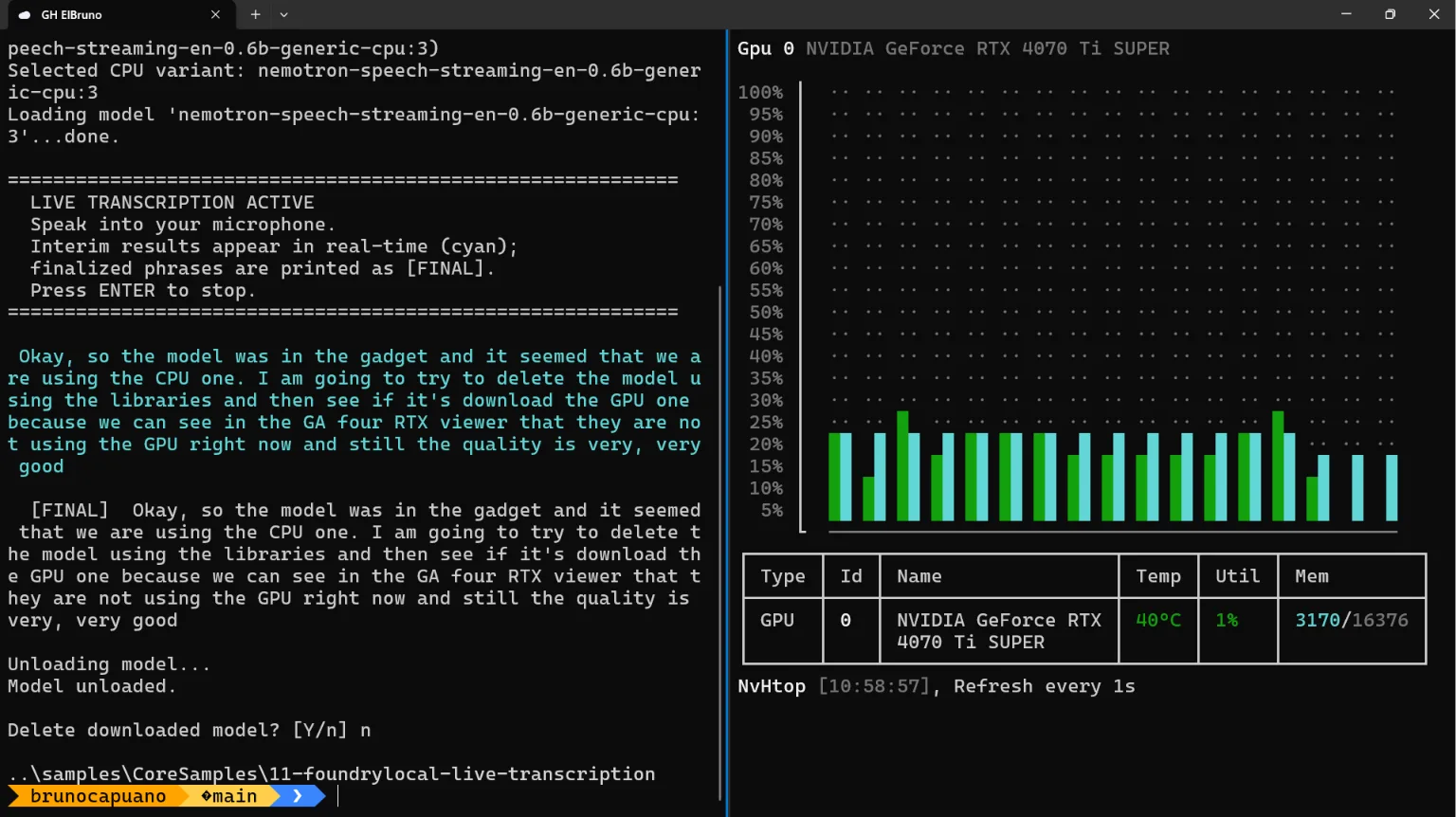
The application displays interim transcription in cyan and finalized text in white with the [FINAL] prefix.
The snippets above focus on each stage of the application. In the complete sample, resource cleanup is protected so it also runs after an exception. The simplified lifecycle looks like this:
await model.LoadAsync();
try
{
  using var session = audioClient.CreateLiveTranscriptionSession();
  await session.StartAsync();

  try
  {
    using var waveIn = new WaveInEvent();
    // Capture and stream microphone audio.
  }
  finally
  {
    await session.StopAsync();
  }
}
finally
{
  await model.UnloadAsync();
}
The sample uses Enter for a graceful shutdown. A production command-line application that supports Ctrl+C should handle Console.CancelKeyPress, cancel the active work, and allow the same finally path to complete.
The sample also demonstrates RemoveFromCacheAsync() so you can explicitly remove the downloaded model when you no longer want to keep it. In a normal application, keeping it cached avoids downloading it again on the next run.
Why run speech-to-text locally?
Local inference brings some practical advantages to this scenario:
- Microphone audio stays on the device.
- No cloud AI resource or API key is required.
- After the initial model download, inference can run without a network round trip.
- The streaming model can run through the CPU variant selected by Foundry Local.
- The application still uses familiar C# patterns:
async/await, async streams, channels, and strongly typed SDK clients.
Local AI will not replace every cloud AI workload. Larger models, centralized management, elastic scale, and other cloud services remain important. But for privacy-sensitive audio, offline experiences, prototypes, and applications that need on-device processing, it gives .NET developers another very useful option.
Summary
Chat clients are usually the first Local AI demo and for good reason. They are easy to understand and fun to build. But Foundry Local is more than a local chat runtime.
It can manage and run different types of models, including specialized streaming speech models, directly from a C# application. You focus on the experience you want to build; Foundry Local handles much of the model lifecycle underneath it.
And yes, asking a local model to write a poem is still allowed. Now your application can also transcribe the poem while you read it.
Learn more
- Live audio transcription with Foundry Local: https://learn.microsoft.com/azure/foundry-local/how-to/how-to-live-transcribe-audio?tabs=windows&pivots=programming-language-csharp
- Complete C# sample: https://github.com/microsoft/Generative-AI-for-beginners-dotnet/tree/main/samples/CoreSamples/11-foundrylocal-live-transcription
- .NET & AI Community Standup: https://dotnet.microsoft.com/live/community-standup?category=ai
- Generative AI for Beginners .NET: https://aka.ms/genainet
- Previous post GPT-OSS, C#, and Ollama: https://devblogs.microsoft.com/dotnet/gpt-oss-csharp-ollama/