





Recently, in a blog post titled Running inference in web extensions, Mozilla announced a pretty interesting experiment on their blog:
We've recently shipped a new component inside of Firefox that leverages Transformers.js […] and the underlying ONNX runtime engine. This component lets you run any machine learning model that is compatible with Transformers.js in the browser, with no server-side calls beyond the initial download of the models. This means Firefox can run everything on your device and avoid sending your data to third parties.
They expose this component to Web extensions under the browser.trial.ml namespace. Where it gets really juicy is at the detail how models are stored (emphasis mine):
Model files are stored using IndexedDB and shared across origins
Typically when you develop an app with Transformers.js, the model needs to be cached for each origin separately, so if two apps on different origins end up using the same model, the model needs to be downloaded and stored redundantly. (Together with Chris and François, I have thought about this problem, too, but that's not the topic of this blog post.)
To get a feeling for the platform, I extracted their example extension from the Firefox source tree and put it separately in a GitHub repository, so you can more easily test it on your own.
Make sure that the following flags are toggled to
trueon the specialabout:configpage:browser.ml.enable extensions.ml.enabledCheck out the source code.
git clone git@github.com:tomayac/firefox-ml-extension.gitLoad the extension as a temporary extension on the This Nightly tab of the special
about:debuggingpage. It's important to actually use Firefox Nightly.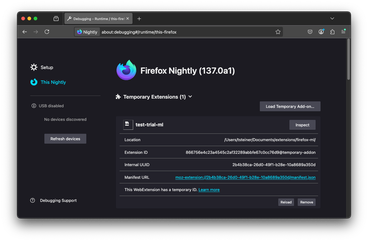
After loading the extension, you're brought to the welcome page, where you need to grant the ML permission. The permission reads "Example extension requests additional permissions. It wants to: Download and run AI models on your device". In the
manifest.json, it looks like this:{ "optional_permissions": ["trialML"] }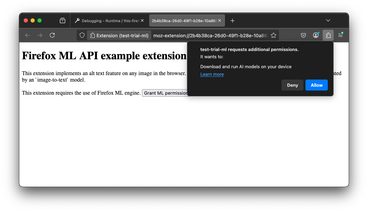
After granting permission, right-click any image on a page, for example, Unsplash. In the context menu, select ✨ Generate Alt Text.
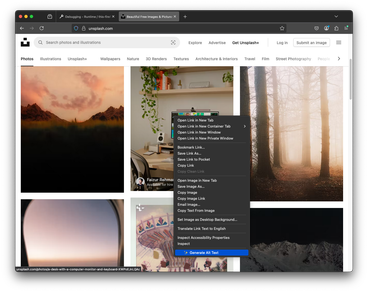
If this was the first time, this triggers the download of the model. On the JavaScript code side, this is the relevant part:
// Initialize the event listener
browser.trial.ml.onProgress.addListener((progressData) => {
  console.log(progressData);
});

// Create the inference engine. This may trigger model downloads.
await browser.trial.ml.createEngine({
  modelHub: 'mozilla',
  taskName: 'image-to-text',
});
You can see the extension display download progress in the lower left corner.
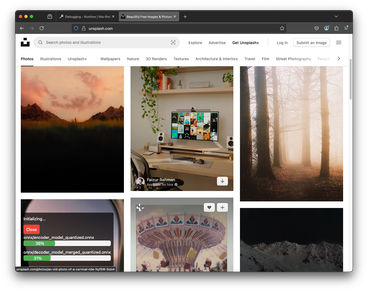
Once the model download is complete, the inference engine is ready to run.
// Call the engine.
const res = await browser.trial.ml.runEngine({
  args: [imageUrl],
});
console.log(res[0].generated_text);
It's not the most detailed description, but "A computer desk with a monitor, keyboard, and a plant" definitely isn't wrong.

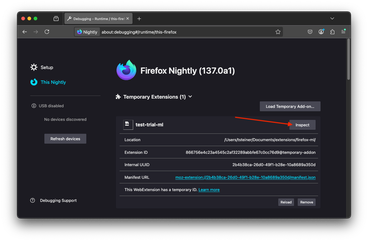
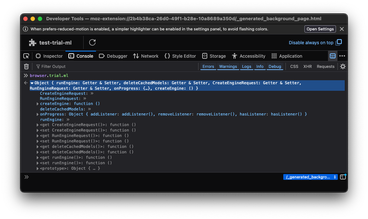
If you click Inspect on the extension debugging page, you can play with the WebExtensions AI APIs directly.
The
browser.trial.mlnamespace exposes the following functions:createEngine(): creates an inference engine.runEngine(): runs an inference engine.onProgress(): listener for engine eventsdeleteCachedModels(): delete model(s) files
I played with various tasks, and initially, I had some trouble getting translation to run, so I hopped on the
firefox-aichannel on the Mozilla AI Discord, where Tarek Ziade from the Firefox team helped me out and also pointed me atabout:inference, another cool special page in Firefox Nightly where you can manage the installed AI models. If you want to delete models from JavaScript, it seems like it's all or nothing, as thedeleteCachedModels()function doesn't seem to take an argument. (It also threw aDOMExceptionwhen I tried to run it on Firefox Nightly137.0a1.)// Delete all AI models. await browser.trial.ml.deleteCachedModels();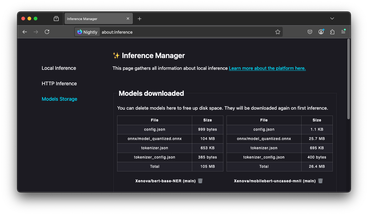
The
about:inferencepage also lets you play directly with many AI tasks supported by Transformers.js and hence Firefox WebExtensions AI APIs.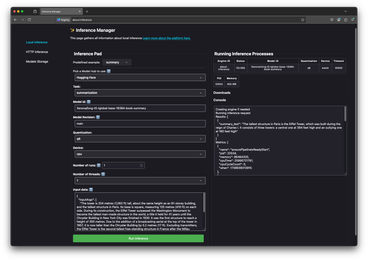


Concluding, I think this is a very interesting way of working with AI inference in the browser. The obvious downside is that you need to convince your users to download an extension, but the obvious upside is that you possibly can save them from having to download a model they may already have downloaded and stored on their disk. When you experiment with AI models a bit, disk space can definitely become a problem, especially on smaller SSDs, which led me to a fun random discovery the other day, when I was trying to free up some disk space for Gemini Nano…
As teased before, Chris, François, and I have some ideas around cross-origin storage in general, but the Firefox WebExtensions AI APIs definitely solve the problem for AI models. Be sure to read their documentation and play with their demo extension! On the Chrome team, we're experimenting with built-in AI APIs in Chrome. It's a very exciting space for sure! Special thanks again to Tarek Ziade on the Mozilla AI Discord for his help in getting me started.