




惯性聚合 高效追踪和阅读你感兴趣的博客、新闻、科技资讯
阅读原文 在惯性聚合中打开

推荐订阅源

G
Google Developers Blog
Google DeepMind News
Microsoft Security Blog
Martin Fowler
Martin Fowler
MyScale Blog
MyScale Blog
The GitHub Blog
The GitHub Blog
I
InfoQ
A
About on SuperTechFans
GbyAI
GbyAI
宝玉的分享
宝玉的分享
爱范儿
爱范儿
博客园 - 【当耐特】
博客园 - 司徒正美
博客园 - 聂微东
P
Proofpoint News Feed
WordPress大学
WordPress大学
云风的 BLOG
云风的 BLOG
Last Week in AI
Last Week in AI
阮一峰的网络日志
阮一峰的网络日志
B
Blog RSS Feed
Jina AI
Jina AI
aimingoo的专栏
aimingoo的专栏
J
Java Code Geeks
博客园 - 叶小钗

Rachel Andrew

CSS Layout News in the ATmosphere Multiple-column layout, rows, rules, and floats How do we talk about atproto to non-developers? Understanding AT Protocol Over 15 years of conference speaking Where’s the holistic AI productivity data? – Rachel Andrew Joining the atmosphere – Rachel Andrew What would a 2026 CSS Anthology look like? – Rachel Andrew The importance of people who care – Rachel Andrew Do you need AI for that? – Rachel Andrew Look into the future of the web platform – Rachel Andrew Generative AI has broken the subject matter expert/editor relationship – Rachel Andrew 2025 in review – Rachel Andrew A matter of fact – Rachel Andrew Reading flow ships in Chrome 137 – Rachel Andrew
Remove start and end margins with the margin-trim property
rachelandrew · 2026-09-15 · via Rachel Andrew

A frequently asked multiple-column layout question is why a new paragraph at the start of the column has additional space above it.
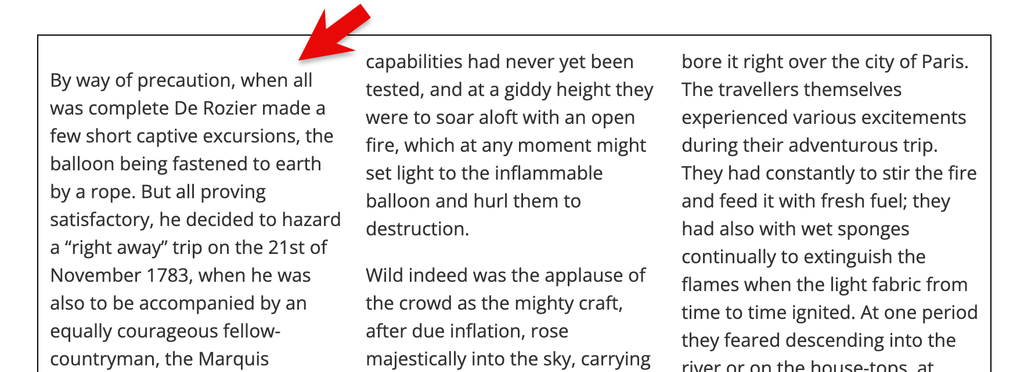
Text arranged into three columns, there is a margin applied to the top of the first column which means the start edge of the three columns doesn't line up.
The space above the first column is the top margin of the initial paragraph.

The space is the margin on the paragraph, which doesn’t collapse if the paragraph is inside a multicol container. The only fix is to not use a top margin on paragraphs.

However, the new margin-trim CSS property solves this problem. From Chrome 155 applying margin-trim: block-start to the multicol container will trim the margin on any element at the start of the container. You can see it working in this CodePen demo, using Chrome 155.
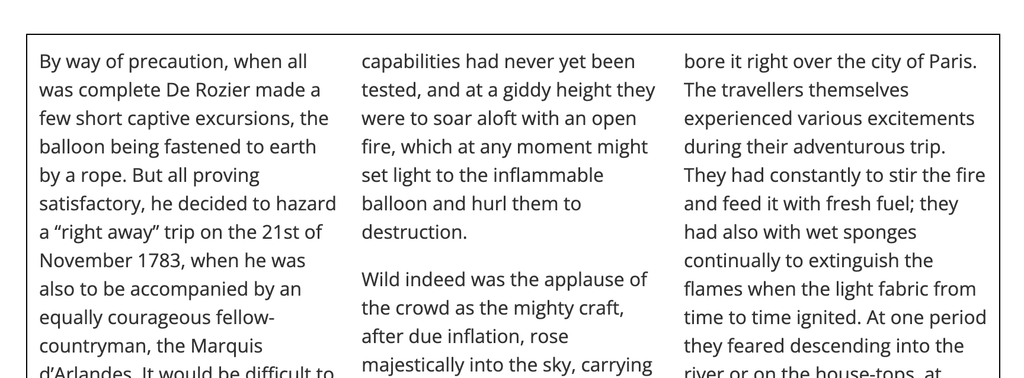
Text in three columns with a trimmed margin so the columns line up at the top.
The columns with margin-trim: block-start applied to the multicol container.

Safari has supported the margin-trim property on block elements since Safari 16.4, however it doesn’t support the property for multicol. Due to this partial implementation using feature queries to test support for margin-trim in multicol isn’t possible. In the linked CodePen, I use feature queries to test for margin-trim: block-start, and show a message to alert the viewer if their browser doesn’t have support. While Safari won’t show that message, the trimming of the top margin fails due to lack of support in multicol.

There are lots of useful applications for margin-trim in block layout. You can see some of these in the WebKit post Easier layout with margin-trim. I’m hopeful we’ll see this implemented everywhere for multicol soon, and I’ll finally have a good answer to one of the questions I get asked about multicol!