Chrome can now remember your loyalty card and flight details for faster submission, along with an improved autofill experience on Android.
General summary
Chrome is adding new autofill features to simplify your holiday tasks. You can now access Google Account info for quick logins and use Google Wallet for loyalty cards and travel details. Plus enjoy an improved two-line display on Android and more accurate address recognition worldwide.
Summaries were generated by Google AI. Generative AI is experimental.
Bullet points
- Chrome's getting four autofill updates to simplify your holiday tasks, saving you time and clicks.
- Chrome now pulls info like your name and email from your Google Account to fill forms.
- Use autofill for loyalty cards and travel info saved in Google Wallet on desktop and Android.
- Chrome on Android now shows autofill suggestions in two lines for easier, more accurate filling.
- Address recognition is improved worldwide, so Chrome can fill forms accurately, everywhere.
Summaries were generated by Google AI. Generative AI is experimental.
Basic explainer
Chrome is getting some cool updates to help you fill out forms faster. It can now grab your info like name and address from your Google account. Chrome can also use your Google Wallet to fill in travel details and loyalty card numbers. Plus, it's easier to pick the right info on your phone and it works better with addresses from all over the world.
Summaries were generated by Google AI. Generative AI is experimental.
Shakespeare-ish
Attend, and hear of Chrome's helpful hand,
To ease your tasks throughout the holiday land.
Your Google Account now aids with form's demand.
From Wallet's depths, your travel details rise,
And loyalty cards appear before your eyes.
On Android too, a clearer view now lies.
Addresses worldwide, it knows them all,
So fill with ease, and heed Chrome's call.
A simpler season, standing strong and tall.
Summaries were generated by Google AI. Generative AI is experimental.
Explore other styles:

Your browser does not support the audio element.
Listen to article
This content is generated by Google AI. Generative AI is experimental
[[duration]] minutes
We all know the feeling of scrambling to finish off your gifts checklist or booking a trip back home for the holidays. Just as you're about to check out, you run into a wall of repetitive forms. Filling out the same fields across different websites — including hard-to-remember information like loyalty numbers and travel details — can add friction and slow you down.
This holiday season, we’re rolling out four improvements to Chrome autofill to better anticipate your needs, transforming frustrating tasks into effortless actions, saving you clicks and giving you time back.
1. Easily access your Google Account information.
For signed in users, Chrome comes with a deeper connection to your Google Account, enabling Chrome to securely pull your name and email address the moment you need to sign up, log in or enter your information on a website.
In another instance, when you’re shopping or ordering a service, your saved Home and Work addresses are shared securely from your Google Account, ready to fill instantly. This smooth handoff removes all the hassle from your first interaction with any new website. It’s quick and accurate, and is rolling out on desktop, Android and iOS today.
2. Use autofill for travel info and loyalty cards saved in Google Wallet.
Chrome now integrates with Google Wallet so you don’t need to remember details like loyalty card numbers, travel details, and vehicle information.
Now, when shopping in Chrome on desktop or Android, you can use autofill for existing loyalty card information, making sure you earn your rewards without having to dig out your physical card.
And if you're booking flights for a holiday reunion or renting a car for a road trip, Chrome now can fill in your trip and vehicle details, making travel-related tasks simple.
Say you're renting a car at the airport and need to provide your incoming flight details. Chrome recognizes the form then pulls in the necessary flight information — like the confirmation number and dates — from your booking saved in Google Wallet. What used to be a frantic search for booking details is now an automatic, single-tap interaction.
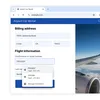
Beyond the airport, for tasks like insurance quotes or car rentals, Chrome on desktop now supports saving and filing vehicle details to and from Wallet.
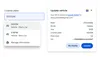
To access these new, smart filling features, enable enhanced autofill in your Chrome settings.
3. Fill out forms on the go with Chrome on Android.
Filling out any form on your phone requires both speed and accuracy. Previously, the autofill suggestions that appear above your keyboard sometimes appeared too condensed, making it tricky to choose between different saved details.
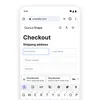
We’re solving this by introducing a two-line display for all autofill suggestions in Chrome on Android. This expanded view gives you more information about each suggestion — whether it’s a password, an address or a payment method — allowing you to instantly understand the content and choose the correct option faster and easier, ensuring accuracy every time.
4. Enter more accurate addresses, worldwide.
The way we use addresses varies in different parts of the world. We've made significant improvements to recognizing and filling addresses globally, such as 'between streets' descriptions in Mexico, and upcoming support for phonetic names in Japan. This has led to a better form-filling experience in many regions, making Chrome a reliable helper for everyone, everywhere