








What's new in DevTools (Chrome 149)

Published: June 2, 2026
Chrome 149 brings major upgrades to AI assistance, introduces experimental WebMCP debugging tools in the Application panel, and expands code completion support to CSS.
DevTools for agents
The MCP server and CLI of Chrome DevTools for agents are now officially stable! Read the full announcement here.
Key features and new tools added up to the v1.1.1 release include:
- Custom third-party, page-exposed tools: pages can now define custom debugging tools through JavaScript, discoverable and callable by DevTools for agents.
- WebMCP debugging: DevTools for agents can now list and execute WebMCP tools.
- Custom HTTP headers emulation: Adds support for HTTP headers (such as Auth tokens or custom User-Agents) to the emulation tool.
Third-party tools and WebMCP debugging are still experimental and not yet enabled by default. Check the tool reference for info on how to use them. We will provide more documentation on developer.chrome.com once those features are ready for production use.
For the most recent updates around DevTools for agents, and to contribute, visit the GitHub repository. Get started with our documentation or get up to speed with the comprehensive Google I/O video session Supercharge your AI coding workflow with Chrome DevTools for agents.
AI assistance
The AI assistance panel has received a significant user interface update and new tools to improve the conversational experience and provide deeper page insights:
- Agent walkthrough: AI assistance now renders widgets directly within the chat interface instead of plain text Markdown. These widgets cover Core Web Vitals and related insights, LCP elements, LCP breakdown, Bottom-up thread activity, and more. A Reveal link inside the widget brings you to the source of this information inside DevTools.
- Copy to coding agent: Conversations now end with a dedicated button to copy the conversation, either summarized as a prompt, or the verbatim conversation, for you to paste it in your coding agent of choice.
- Upgraded capabilities: AI assistance now has access to Lighthouse and related insights, allowing it to holistically analyze your page and give targeted advice.
- Improved responses: Using Gemini 3 under the hood, and refined preambles, AI assistance gives more concise, and more actionable answers.
- Improved navigation: You can now navigate through your previous chat prompts using the Up Arrow and Down Arrow keys, making it fast and intuitive to refine or re-run previous queries.
Let us know what you think by commenting on the dedicated feedback bug. In favor of Copy to coding agent, we will deprecate support for automated styling fixes through AI assistance, with Chrome 152.
WebMCP
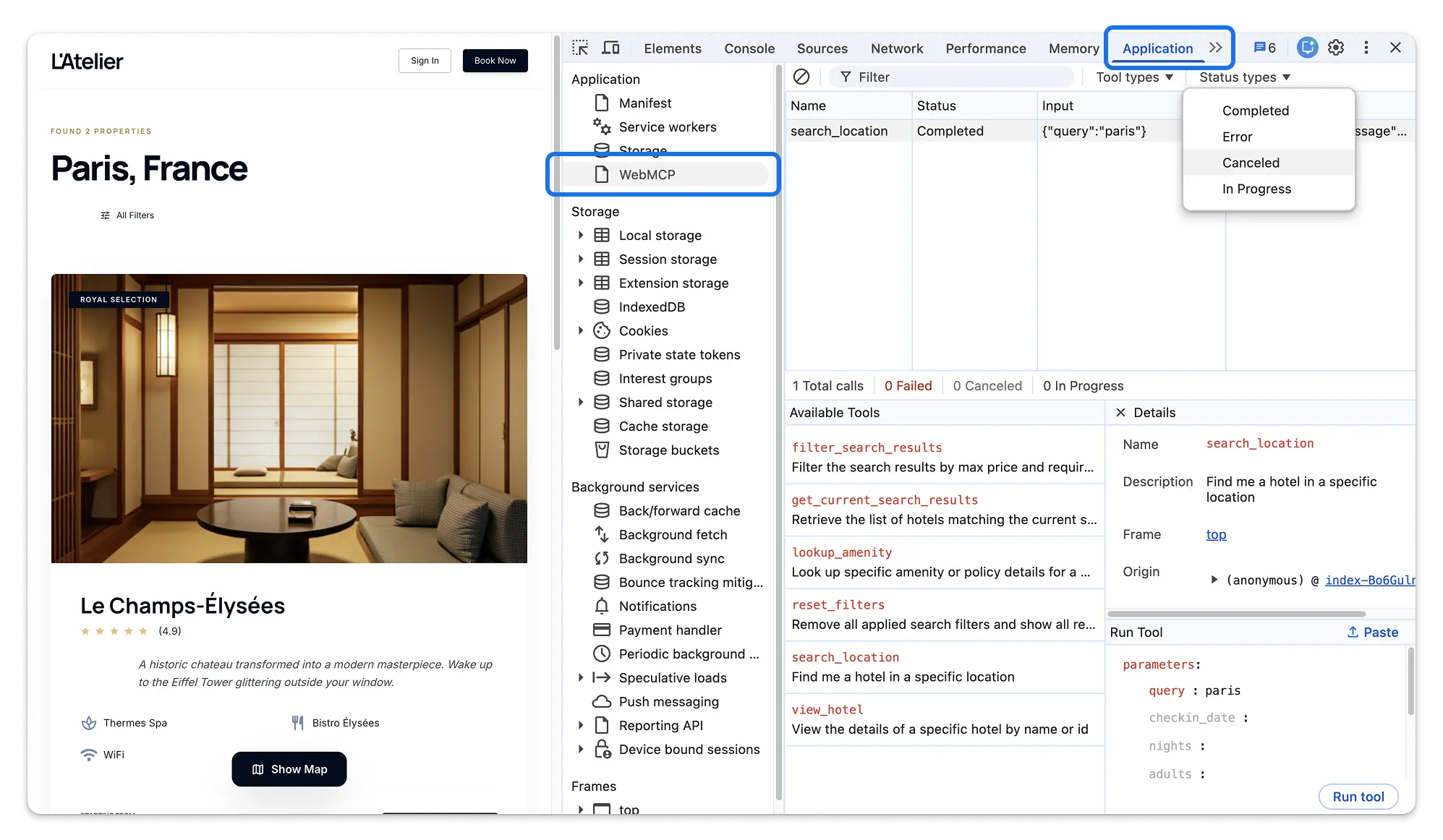
This release introduces experimental WebMCP debugging tools within the Application panel sidebar. WebMCP (Web Model Context Protocol) allows web pages to register tools to be used by visiting LLM agents. Learn more about the proposed standard in our documentation.
The new debugging tools lets developers:
- Inspect client-side tools and their schemas.
- Manually run tools execution with custom parameters.
- Track and filter active or pending tool invocation events.
- Monitor execution status and inspect return payloads.
WebMCP is a proposed web standard in early preview. Enable the #devtools-webmcp-support and
#enable-webmcp-testing flags on chrome://flags to start experimenting.
Chromium issues: 494516094
Code completion for CSS
The Styles tab now features code completion for CSS with Gemini, building on the support for the Console & Sources panels. Enable code suggestions in Settings > AI innovations > Code suggestions.
This helps you to play around with more complex combinations of CSS properties, like gradients or box shadows, without remembering their exact syntax. Or to quickly build out grid- and flex- layouts, relying on multiple related properties.
The toolbar at the bottom of the Styles tab displays the status through a loading spinner. Suggestions update or clear as you type, ensuring that the AI-generated text stays relevant to your manual edits.
APCA color contrast guidelines promoted to stable
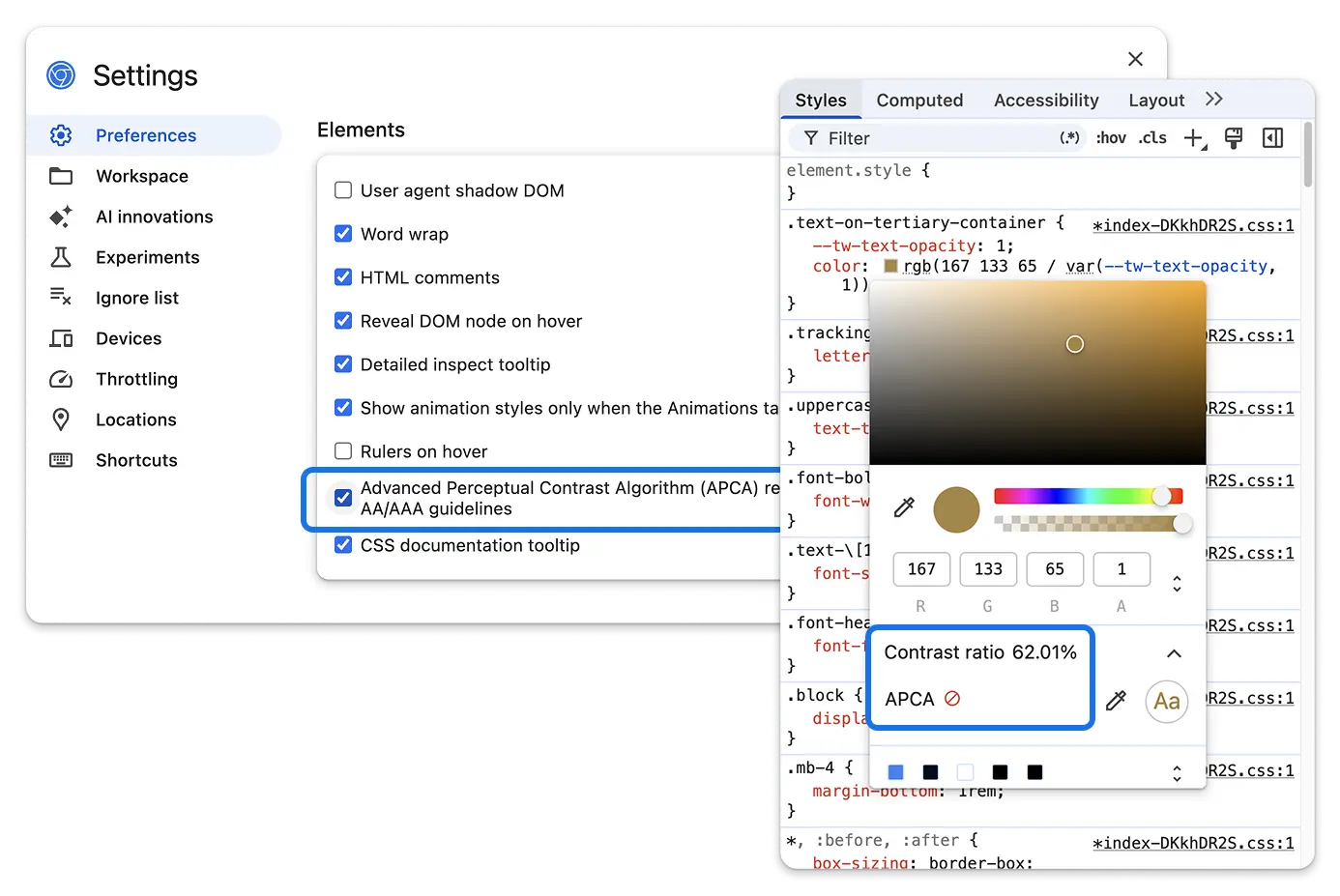
The Advanced Perceptual Contrast Algorithm (APCA) contrast calculator has officially left its experimental phase and is now available as a standard preference setting. APCA replaces the legacy AAA/AA contrast guidelines with a modern perceptual contrast model optimized for modern displays and text rendering.
You can now enable or disable APCA guidelines using the checkbox located under Settings > Preferences > Elements > Enable APCA contrast guidelines.
Dynamic Device Mode user agent
The Responsive device mode previously used a hardcoded User Agent string (Android 6.0; Nexus 5). This caused modern websites to degrade functionality or trigger compatibility modes because the reported OS was recognized as over a decade old.
The hard coded user agent has been replaced with a dynamic heuristic that auto-updates based on the current calendar year, ensuring DevTools always reports a plausible, modern environment without requiring manual maintenance.
Other highlights
A collection of smaller improvements and bug fixes in this release:
- Console: Added a Collapse / Expand all toggle button to the Console panel toolbar to quickly expand or collapse all active console groups and stack traces at once. (427657550)
- Application: Clickable hyperlinks have replaced static text for storage bucket fields in the Application metadata view. Clicking a bucket link automatically navigates to and highlights that specific bucket in the Storage Buckets sidebar panel. (435311130)
- Application: Re-enabled full storage inspection support for Service Workers after resolving a crash regression. (406991275, 466134219)
- Application: Added support for inspecting
form_submissionprerendering events within the Preloading panel. (346555939, 488078903) - Application: Implemented Device-Bound Session Credentials (DBSC)
management, allowing developers to clear or delete active sessions from the
context menu or by pressing the
DeleteorBackspacekeys. (471017387) - Elements: Highlights on DOM nodes representing hidden issues in the Issues panel now dynamically update (appearing or disappearing) in response to issue filter actions. (40272723)
- Network: Server-Sent Events (SSE) are now fully serialized and included in HAR exports, enabling ongoing, live event stream captures to be saved and re-imported into DevTools. (494294071)
- Performance: Fixed Core Web Vitals tracking in the Live Metrics view to pin tracking strictly to the primary frame execution context, preventing dynamic iframe churn from resetting metrics. (494350655)
- Performance: Upgraded
web-vitalsto v5.2.0, introducing native upstream fixes for memory leaks during INP monitoring. (484342204)