







Every engineer has implemented a text field with a character limit. Most of us have also written something like text length <= 30 without thinking twice. Then someone pastes in an emoji. Suddenly the UI says there’s still room left, another client rejects the same input, or the backend refuses text that appeared to be valid.
When a requirement says “30 characters max,” the real problem is deciding what “character” means. Unicode distinguishes between code points, code units, glyphs, and grapheme clusters, and those units are not interchangeable.12
For most user-facing counters, what is meant by “character” is much closer to a grapheme cluster: the default Unicode unit for user-perceived characters.2
This article explains the differences between those text units, why they matter when writing product requirements, and how to implement and test character limits that behave consistently across clients and backends.
Imagine this requirement:
Add a List name field with a maximum length of 30 characters and show a live counter below the field.
A first implementation in Compose might look like this:
Column {
    var listName by remember { mutableStateOf("") }
    val listNameLength = listName.length
    val maxLength = 30
    val isTooLong = listNameLength > maxLength

    OutlinedTextField(
        modifier = Modifier.width(400.dp),
        value = listName,
        onValueChange = { listName = it },
        label = { Text("List Name") },
        isError = isTooLong,
    )

    Text(
        text = "Count: $listNameLength/$maxLength",
        color = if (isTooLong) Color.Red else Color.Unspecified,
    )
}
At first, the implementation appears correct:
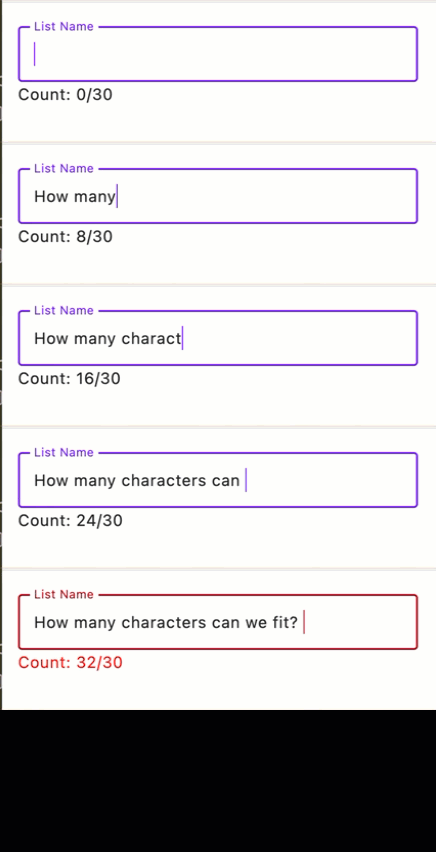
Then someone pastes in emoji:
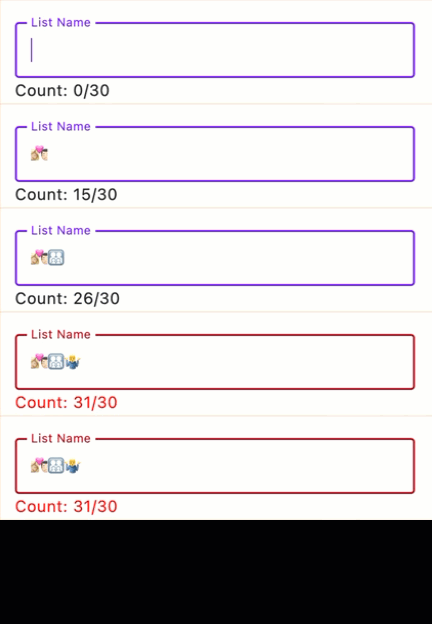
The resulting behavior is usually traced back to the requirement rather than the rendering code. The UI is counting one text unit while the product requirement is written as if there were only one obvious way to count characters.
At the product level, this creates an inconsistent user experience. One client may show room left while another rejects the same input, or the backend may reject text that the UI appeared to accept. Rather than reflecting incorrect Unicode handling, the discrepancy comes from different parts of the system enforcing different interpretations of the same requirement.
| Unit | What it means | Good for | Bad for |
|---|---|---|---|
| Code point | A Unicode value such as U+1F44D |
Unicode properties, parsing, low-level text logic | UI counters |
| Code unit | A storage unit in an encoding such as UTF-8 or UTF-16 | API internals, storage details | UI counters |
| Glyph | A shape drawn by the font | Rendering and typography | Validation rules |
| Grapheme cluster | The Unicode default for a user-perceived character | Text counters, caret movement, deletion | Byte limits |
Examples make the difference obvious:
| Text | Why it is tricky | Code points | Graphemes |
|---|---|---|---|
e + U+0301 |
Base letter plus combining acute accent | 2 | 1 |
👍 |
Single emoji outside the Basic Multilingual Plane (BMP) | 1 | 1 |
✌️ |
Symbol plus variation selector | 2 | 1 |
🇺🇸 |
Two regional indicators make one flag | 2 | 1 |
👩🏽💻 |
Emoji plus skin-tone modifier plus zero-width joiner (ZWJ) plus emoji | 4 | 1 |
👨👩👧👦 |
Multiple emoji joined into one family | 7 | 1 |
Switching from code units to code points does not solve the underlying product problem. If the requirement is intended to match what users perceive as characters, the counter still needs to follow grapheme-cluster boundaries.2
That does not make code-unit or byte limits “wrong.” Some systems use them intentionally for compatibility with storage, transport, or downstream APIs. The real problem is ambiguity in the requirement. Teams need to say explicitly which unit each limit is using.
Glyphs are for rendering, not product limits. The same text can render as a different number of glyphs depending on the font. Ligatures are the classic example. For example, ffi may render as three glyphs or as a single ligature glyph, but for most product requirements it is still three user-perceived letters.1
Here is a version that removes the ambiguity:
The List name field accepts up to 30 grapheme clusters. The visible counter and validation use the same grapheme-counting rule. Truncation, cursor movement, selection, and deletion must not split a grapheme cluster. The backend enforces the same rule.
That requirement is longer, but it is much easier to implement consistently.
Unicode normalization answers a different question: whether two different code point sequences should be treated as equivalent for comparison, search, storage, or validation.3 It is worth deciding explicitly, but it should not be folded into “character count” as if they were the same problem.
For example, e + U+0301 and é are different code-point sequences, but they still count as one grapheme
cluster. Normalization matters for equivalence policy; it does not change the basic unit a user-facing counter
should use.3
This matters any time you store and compare input over time. If you hash a password, compare stored values later, or build search behavior on top of user input, decide whether canonically equivalent forms should be treated as the same value before you ship.3
Use the following as a working checklist before you ship any user-facing character limit.
length for a user-facing counter unless the requirement explicitly
means code units or code points.Those engineering checks only work if the implementation is using a Unicode-aware segmentation rule instead of a raw string-length function.2
The examples below all count grapheme clusters. They are intentionally minimal and should still be validated against shared test cases before being used in production.
Use ICU4J BreakIterator to segment text on grapheme boundaries.4
// Gradle:
// implementation("com.ibm.icu:icu4j:78.3")

import com.ibm.icu.text.BreakIterator
import java.util.Locale

fun graphemeCount(text: String): Int {
    val iterator = BreakIterator.getCharacterInstance(Locale.ROOT)
    iterator.setText(text)

    var count = 0
    while (iterator.next() != BreakIterator.DONE) {
        count += 1
    }
    return count
}
This example uses ICU4J explicitly so the same approach works across JVM environments. If your platform already exposes ICU-backed grapheme APIs, you may be able to use the platform implementation instead.4
The same ICU4J approach works in Java.4
// Gradle:
// implementation("com.ibm.icu:icu4j:78.3")

import com.ibm.icu.text.BreakIterator;
import java.util.Locale;

public final class Graphemes {
    public static int graphemeCount(String text) {
        BreakIterator iterator = BreakIterator.getCharacterInstance(Locale.ROOT);
        iterator.setText(text);

        int count = 0;
        while (iterator.next() != BreakIterator.DONE) {
            count++;
        }
        return count;
    }
}The clipperhouse/uax29 package exposes grapheme iteration based on Unicode
text-segmentation rules.5
// go get github.com/clipperhouse/uax29/v2/graphemes

package main

import "github.com/clipperhouse/uax29/v2/graphemes"

func graphemeCount(text string) int {
    count := 0
    tokens := graphemes.FromString(text)
    for tokens.Next() {
        count++
    }
    return count
}
Swift String is a collection of extended grapheme clusters, so count is the
right default for this use case.6
func graphemeCount(_ text: String) -> Int {
    text.count
}The third-party regex module supports \X, which matches an extended
grapheme cluster.7
# pip install regex

import regex


def grapheme_count(text: str) -> int:
return len(regex.findall(r"\X", text))Intl.Segmenter provides grapheme segmentation in JavaScript runtimes that
implement it. Check your browser and Node support matrix before you rely on it
without a fallback.8
function graphemeCount(text: string): number {
  const segmenter = new Intl.Segmenter(undefined, { granularity: "grapheme" });
  return [...segmenter.segment(text)].length;
}
If different clients and services all enforce the same limit, they should share the same test cases.
| Example | Why it belongs in the QA cases |
|---|---|
e + U+0301 and é |
Same visible result, different underlying representation |
✌ and ✌️ |
Variation selector changes presentation |
🇺🇸 |
Two code points, one flag |
👩🏽💻 |
Modifier plus ZWJ sequence |
👨👩👧👦 |
One visible family, many internal units |
ffi and ffi |
Ligatures are rendering concerns, not UI character-count rules |
क्ष |
Script-specific conjunct and joiner behavior |
กัััััััััั |
One grapheme cluster that grows to 33 UTF-8 bytes |
À̖᪰ |
Multiple combining marks on one base |
grocerylist |
Contains U+200B ZERO WIDTH SPACE, so a grapheme-aware counter will count one more invisible unit |
Writing down the expected counts before implementation is useful because it forces the product rule to become explicit.
It is also worth recording the Unicode or ICU version behind each implementation. Grapheme-boundary behavior can change as Unicode evolves, so shared test cases should be re-checked when those dependencies move forward.2
A grapheme limit is usually the right UI rule, but it is not enough by itself. OWASP still recommends validating input and defining minimum and maximum lengths for strings.9 For text fields like this, teams often end up needing:
That is why a grapheme limit is not a substitute for a byte limit.
As a practical starting heuristic, a byte limit of about 10x the grapheme limit is often reasonable for fields that need to support emoji-rich text. That is not a Unicode rule; it is a product and security tradeoff. For stricter allow-lists, such as some password fields, a smaller multiplier may be the better choice.
UAX #29’s extended grapheme-cluster rules keep a base character and its following combining marks in the same cluster.2 That means a single grapheme can keep absorbing more marks without the grapheme count changing.
A useful stress case is กัััััััััั. It is:
Why 33 bytes? The string starts with ก and then repeats the Thai mark ั
ten times. All 11 code points are in the U+0800 to U+FFFF range, so UTF-8
encodes each one using 3 bytes.10 Add one more ั, and the grapheme count
still stays at 1 while the encoded size grows to 36 bytes. In principle, you
can keep doing that: the grapheme count stays fixed at 1 while the byte count
keeps growing by 3 bytes each time.
This is not normal Thai prose. It is a deliberately adversarial test case. But that is exactly the point: a product rule such as “30 grapheme clusters max” does not, by itself, protect request size, storage, or downstream systems.
If a field allows up to 30 grapheme clusters and up to 32 UTF-8 bytes, copy and paste this exact string into your QA cases:
Expected result:
1/30.If your system uses a different byte threshold, choose a limit below the encoded size of the string and follow the same process.
There is no single universal way to count “characters.” There are code points, code units, glyphs, grapheme clusters, and bytes, and each answers a different question.
For most text-field counters, grapheme clusters are the best fit because they track what users usually perceive as characters.2 Once that rule is explicit, the counter, validation, deletion behavior, backend checks, and QA cases can all line up around the same definition.
Additional background reading:
此内容由惯性聚合(RSS阅读器)自动聚合整理,仅供阅读参考。 原文来自 — 版权归原作者所有。