








本篇将记录我使用 gitweb 和 nginx 搭建带有网页界面和 HTTP clone 的 Git 服务器的过程。
首先设置能使用 SSH 访问的 Git 服务器,参考 Pro Git 中的说明。先在服务器上添加 git 用户
sudo useradd -m /srv/git git
sudo passwd git
然后导入本地的 SSH key(需要在 /etc/ssh/sshd_config 中设置
Password)
ssh-copy-id -i ~/.ssh/id_rsa git@<IP address>
为了安全禁用 shell 登录
sudo chsh git -s $(which git-shell)
Ubuntu 中的 git 包已经包含了 gitweb 需要的一些静态文件,在 /usr/
里面。还需安装的是 highlight 和 fcgiwrap。
sudo apt install highlight fcgiwrap
在 /etc/gitweb.conf 中设置 gitweb,其它配置选项可在 man gitweb.conf
中查看。
# path to git projects (<project>.git)
$projectroot = "/srv/git";

# directory to use for temp files
$git_temp = "/tmp";

# html text to include at home page
$home_text = "/srv/git/indextext.html";

# stylesheet to use
#@stylesheets = ("static/gitweb.css");

# javascript code for gitweb
#$javascript = "static/gitweb.js";

# logo to use
#$logo = "static/git-logo.png";

# the 'favicon'
#$favicon = "static/git-favicon.png";

# git-diff-tree(1) options to use for generated patches
#@diff_opts = ("-M");
@diff_opts = ();

# 不显示 owner
$omit_owner = 1;

# 只显示 bare repo 中有 "git-daemon-export-ok" 这个文件的仓库
$export_ok = "git-daemon-export-ok";

# 语法高亮(需要 highlight 包)
$feature{'highlight'}{'default'} = [1];
向 /srv/git/indextext.html 中写入需要在主页中额外添加的文字
echo 'My personal git repos' | sudo tee /srv/git/indextext.html
添加一个新的 nginx server block
# /etc/nginx/sites-available/git

server {
    server_name git.example.com;
    location /gitweb.cgi {
        root /usr/share/gitweb;
        gzip off;
        include fastcgi_params;
        fastcgi_param SCRIPT_NAME $uri;
        fastcgi_param GITWEB_CONFIG /etc/gitweb.conf;
        fastcgi_pass unix:/var/run/fcgiwrap.socket;
    }
    location / {
        root /usr/share/gitweb;
        index gitweb.cgi;
    }
}
最后 enable 并获取一个 SSL 证书
sudo ln -sf /etc/nginx/sites-{available,enabled}/git
sudo certbot --nginx
sudo systemctl restart nginx
目的是允许任何人使用 git clone https://git.example.com/clone/NAME 对 gitweb 中显示的仓库进行 clone,为此使用 git-http-backend。在
/etc/nginx/sites-available/git 的 server 块中加入
location ~ /clone(/.*) {
    client_max_body_size 0;
    include /etc/nginx/fastcgi_params;
    fastcgi_param SCRIPT_FILENAME /usr/lib/git-core/git-http-backend;
    fastcgi_param GIT_PROJECT_ROOT /srv/git;
    fastcgi_param PATH_INFO $1;
    fastcgi_pass unix:/var/run/fcgiwrap.socket;
}
git-http-backend 会检查 bare repo 中是否有 git-daemon-export-ok 这个文件,如果没有则不允许 clone,这正好是 gitweb 配置中表示「公有仓库」使用的文件。如果想对所有的仓库都允许 clone,则可以添加一个 fastcgi param:
fastcgi_param GIT_HTTP_EXPORT_ALL "";
这个 HTTP clone 只是一个只读的 clone,如果想要 push 还需使用 SSH。
创建一个测试仓库并标记为公开,再添加一个说明
cd
git init --bare test.git
touch test.git/git-daemon-export-ok
echo 'Test repo' > test.git/description
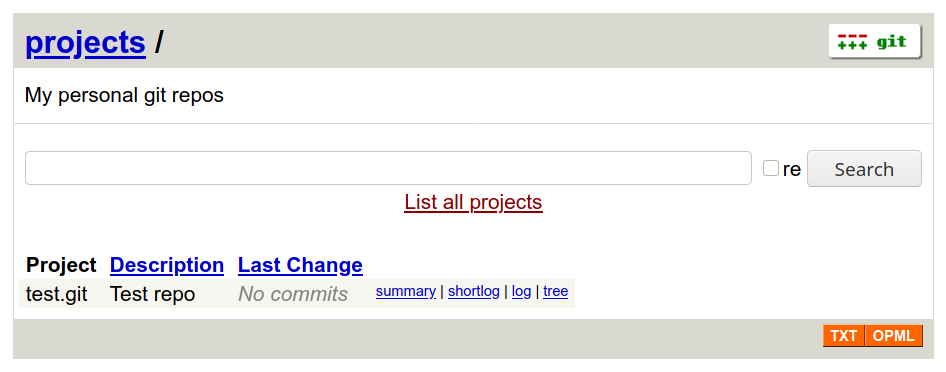
网页效果如下
Clone:
$ git clone https://git.example.com/clone/test
Cloning into 'test'...
warning: You appear to have cloned an empty repository.

$ ls -a test
.git
此内容由惯性聚合(RSS阅读器)自动聚合整理,仅供阅读参考。 原文来自 — 版权归原作者所有。