


惯性聚合 高效追踪和阅读你感兴趣的博客、新闻、科技资讯
阅读原文 在惯性聚合中打开

推荐订阅源

W
WeLiveSecurity
The GitHub Blog
The GitHub Blog
Engineering at Meta
Engineering at Meta
Microsoft Azure Blog
The Register - Security
Stack Overflow Blog
Stack Overflow Blog
博客园 - 三生石上(FineUI控件)
T
Threat Research - Cisco Blogs
S
SegmentFault 最新的问题
V2EX - 技术
V2EX - 技术
Hacker News: Ask HN
Hacker News: Ask HN
K
KPMG report finds enterprise disconnect between AI and its ROI | CIO
P
Proofpoint News Feed
J
Java Code Geeks
Microsoft Security Blog
M
MIT News - Artificial intelligence
AI
AI
cs.CL updates on arXiv.org
P
Proofpoint News Feed
Hacker News - Newest:
Hacker News - Newest: "LLM"
B
Blog
N
News and Events Feed by Topic
N
News | PayPal Newsroom
Google DeepMind News
酷 壳 – CoolShell
酷 壳 – CoolShell
freeCodeCamp Programming Tutorials: Python, JavaScript, Git & More
WordPress大学
WordPress大学
C
Cybersecurity and Infrastructure Security Agency CISA
Cyber Security Advisories - MS-ISAC
博客园 - 【当耐特】
U
Unit 42
腾讯CDC
Threat Intelligence Blog | Flashpoint
The Cloudflare Blog
H
Help Net Security
Recent Announcements
P
Privacy & Cybersecurity Law Blog
IT之家
IT之家
钛媒体:引领未来商业与生活新知
钛媒体:引领未来商业与生活新知
Security Archives - TechRepublic
L
LINUX DO - 热门话题
Martin Fowler
Martin Fowler
MongoDB | Blog
MongoDB | Blog
cs.CV updates on arXiv.org
H
Heimdal Security Blog
博客园 - 聂微东
S
Securelist
大猫的无限游戏
大猫的无限游戏
Cloudbric
Cloudbric
Cisco Talos Blog
Cisco Talos Blog

Rat's Blog - Nginx

使用Nginx反向代理,自建CDN加速节点 - Rat's Blog LNMP环境下,利用Nginx反代Google网站的方法 - Rat's Blog Nginx环境下对部分网站做防盗链设置及外链的跳转 - Rat's Blog CentOS 7安装配置Nginx 1.10、PHP 5.6、MySQL 5.7教程 利用Nginx反向代理来简单镜像HTTP(S)网站的方法 - Rat's Blog LNMP环境下使用CDN后获取访客真实IP的方法 - Rat's Blog Nginx环境使用auth_basic密码保护wordpress后台登录界面 - Rat's Blog Nginx环境开启ssl后强制https 301全部指向www的方法 - Rat's Blog 防止Linux VPS主机Nginx环境根目录被解析的方法 - Rat's Blog
Nginx给网站添加用户认证配置( Basic HTTP authentication) - Rat's Blog
博主: Rat's · 2017-06-11 · via Rat's Blog - Nginx

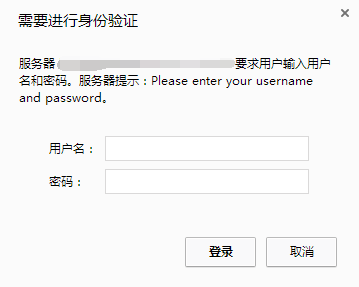
说明:ngx_http_auth_basic_module模块实现让访问者只有输入正确的用户密码才允许访问web内容。web上的一些内容不想被其他人知道,但是又想让部分人看到。nginxhttp auth模块以及Apache http auth都是很好的解决方案。
请输入图片描述
这里以军哥的LNMP为例,默认情况下nginx已经安装了ngx_http_auth_basic_module模块。

Nginx认证配置实例

1、生成认证文件

# printf "test:$(openssl passwd -crypt 123456)\n" >>/home/htpasswd
# cat /home/htpasswd 
test:xyJkVhXGAZ8tM

注意:这里账号:test,密码:123456,记住认证文件路径

2、配置网站conf文件

server{
       listen 80;
       server_name  www.moerats.com moerats.com;
       index index.html index.php;
       root /home/wwwroot/www.moerats.com;       
       location /
       {
                auth_basic "Please enter your username and password";
                auth_basic_user_file /home/htpasswd; 
                autoindex on;
       }
}

注意:一定要注意auth_basic_user_file路径,否则会不厌其烦的出现403。

3、重启Nginx

/etc/init.d/nginx restart

LNMP下为Nginx目录设置访问验证的用户名密码

有时候需要象Apache那样为指定的目录添加访问验证,一般在Apache下使用htpasswd来添加,而htpasswd是包含在apache2-utils里,一般LNMP一键安装包或自己编译安装LNMP都不会安装apache2-utils

1、创建类htpasswd文件
执行下面命令:

wget -c https://www.moerats.com/usr/down/htpasswd.sh;bash htpasswd.sh

按提示输入用户名、密码、及认证文件名。脚本会自动生成认证文件。记录下脚本返回的文件路径。如:/usr/local/nginx/conf/vpser.net.auth

2、为Nginx添加auth认证配置
下面是以某域名下面的soft目录为例,在域名的server段里加上如下代码:

location ^~ /soft/
{
auth_basic "Authorized users only";
auth_basic_user_file 这里写前面脚本返回的文件路径;
}

Authorized users only为提示信息,可以修改成自己想让他提示的信息;auth_basic_user_file后面需要填htpasswd.sh脚本返回的人家文件的路径。按上面的提示修改好配置后,重启nginx,访问http://yourdomainname/soft/ 就会提示输入用户名和密码。

注意:加上认证之后该目录下的PHP将不会被解析,会出现下载提示,如果想可以解析PHP可以将上面的配置改为:

location ^~ /soft/ {
    location ~ .*\.(php|php5)?$ {
        fastcgi_pass unix:/tmp/php-cgi.sock;
        fastcgi_index index.php;
        include fastcgi.conf;
    }
    auth_basic "Authorized users only";
    auth_basic_user_file 这里写前面脚本返回的文件路径;
}

本教程适合LNMP一键安装包或自己安装的LNMP,只不过目录和配置文件可能位置不一样。

设置完执行:/usr/local/nginx/sbin/nginx -t测试配置是否有错误。
再执行:/usr/local/nginx/sbin/nginx -s reload载入配置文件。

部分参考:https://www.vpser.net/build/nginx-htpasswd.html


版权声明:本文为原创文章,版权归 Rat's Blog 所有,转载请注明出处!

本文链接:https://www.moerats.com/archives/171/

如教程需要更新,或者相关链接出现404,可以在文章下面评论留言。