



惯性聚合 高效追踪和阅读你感兴趣的博客、新闻、科技资讯
阅读原文 在惯性聚合中打开

推荐订阅源

Simon Willison's Weblog
Help Net Security
Help Net Security
P
Privacy International News Feed
T
Threat Research - Cisco Blogs
C
Cisco Blogs
C
CERT Recently Published Vulnerability Notes
NISL@THU
NISL@THU
L
LINUX DO - 热门话题
Security Latest
Security Latest
A
Arctic Wolf
G
GRAHAM CLULEY
月光博客
月光博客
S
Securelist
D
Docker
J
Java Code Geeks
T
Troy Hunt's Blog
T
Tenable Blog
让小产品的独立变现更简单 - ezindie.com
SecWiki News
SecWiki News
S
Security @ Cisco Blogs
量子位
freeCodeCamp Programming Tutorials: Python, JavaScript, Git & More
L
LINUX DO - 最新话题
Recent Commits to openclaw:main
aimingoo的专栏
aimingoo的专栏
博客园 - 【当耐特】
H
Heimdal Security Blog
The Hacker News
The Hacker News
博客园 - 三生石上(FineUI控件)
Application and Cybersecurity Blog
N
Netflix TechBlog - Medium
Vercel News
Vercel News
Forbes - Security
Forbes - Security
B
Blog RSS Feed
H
Hackread – Cybersecurity News, Data Breaches, AI and More
IT之家
IT之家
B
Blog
MongoDB | Blog
MongoDB | Blog
博客园 - 聂微东
Google DeepMind News
S
Secure Thoughts
Threat Intelligence Blog | Flashpoint
C
Check Point Blog
云风的 BLOG
云风的 BLOG
CTFtime.org: upcoming CTF events
T
The Blog of Author Tim Ferriss
L
Lohrmann on Cybersecurity
F
Full Disclosure
D
Darknet – Hacking Tools, Hacker News & Cyber Security
P
Proofpoint News Feed

Rat's Blog - vps

SpartanHost:512MB内存/10GB硬盘/1T流量/DDoS防御/KVM/西雅图/最低月付$2 - Rat's Blog 一个去中心化的图片分享平台:ipfs.pics搭建教程 - Rat's Blog Linux VPS一键更换软件源脚本 - Rat's Blog 使用Aira2下载文件后自动上传到Google Drive网盘 - Rat's Blog Linux VPS一键安装桌面环境和RDP远程桌面连接 - Rat's Blog Kvmla:1G内存/40G硬盘/600G流量/日本&香港&新加坡KVM/月付¥80 - Rat's Blog 新型功能强大的VPS虚拟主机控制面板:BrainyCP安装教程 - Rat's Blog VPS服务器如何优化/加快网站的访问速度 - Rat's Blog loader工具转换成Debian 9系统 - Rat's Blog
Flask+WebUploader实现快速将本地文件上传到VPS服务器 - Rat's Blog
博主: Rat's · 2018-10-14 · via Rat's Blog - vps

说明:之前博主就写过一篇将本地文件上传至VPS服务器的教程→点击查看,虽然该教程使用的jQuery-File-Upload很强大,但配置起来还是有点麻烦,现在再分享一个上传工具,使用Flask+WebUploader实现上传功能,使用起来很简单,但是不如jQuery-File-Upload稳定,不过各有所需,用来上传小文件是足矣的。
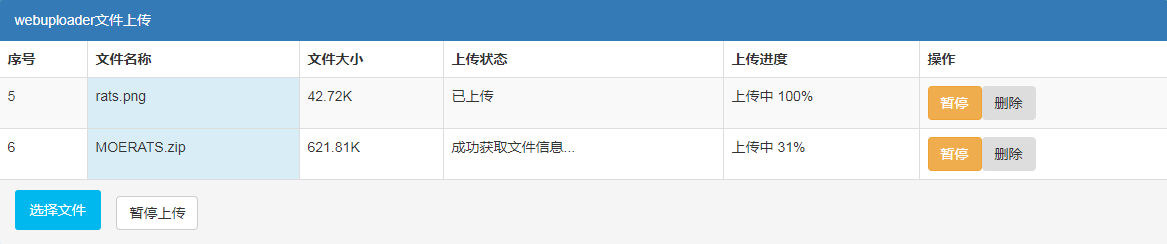
截图

请输入图片描述

安装

Github地址:https://github.com/abbeyokgo/flask_multi_uploader

1、安装依赖

#CentOS 6.x 32位
rpm -ivh http://dl.fedoraproject.org/pub/epel/6/i386/epel-release-6-8.noarch.rpm
yum install -y python-pip git

#CentOS 6.x 64位
rpm -ivh http://dl.fedoraproject.org/pub/epel/6/x86_64/epel-release-6-8.noarch.rpm
yum install -y python-pip git

#CentOS 7.x
yum install -y epel-release
yum install -y python-pip git
#如果CentOS 7安装出现No package python-pip available,可以用以下命令进行安装
wget https://bootstrap.pypa.io/get-pip.py
python get-pip.py

#Debian/Ubuntu系统
apt-get -y update
apt-get -y install python-pip git

2、运行程序

git clone https://github.com/abbeyokgo/flask_multi_uploader.git
cd flask_multi_uploader
#安装依赖
pip install -r requirements.txt
#启动程序,8888端口可自行修改
gunicorn -k eventlet -b 0:8888 server:app

如果启动的时候提示-bash: gunicorn: command not found错误,需要先运行命令:

pip install gunicorn

然后再使用命令启动程序,接下来就可以访问IP:8888上传文件了,上传文件保存在upload文件夹。如果Web界面打不开,可能需要开启防火墙端口。

#CentOS 6
iptables -I INPUT -p tcp --dport 8888 -j ACCEPT
service iptables save
service iptables restart

#CentOS 7
firewall-cmd --zone=public --add-port=8888/tcp --permanent
firewall-cmd --reload

开启端口后你会发现,启动命令运行出错了,这时候使用Ctrl+C断开命令,再重新使用命令启动即可。

如果你需要常驻后台,就得使用screen命令了,使用查看→传送门


版权声明:本文为原创文章,版权归 Rat's Blog 所有,转载请注明出处!

本文链接:https://www.moerats.com/archives/766/

如教程需要更新,或者相关链接出现404,可以在文章下面评论留言。