



惯性聚合 高效追踪和阅读你感兴趣的博客、新闻、科技资讯
阅读原文 在惯性聚合中打开

推荐订阅源

T
The Blog of Author Tim Ferriss
S
Securelist
D
Docker
The Register - Security
GbyAI
GbyAI
Recorded Future
Recorded Future
Engineering at Meta
Engineering at Meta
Stack Overflow Blog
Stack Overflow Blog
云风的 BLOG
云风的 BLOG
P
Proofpoint News Feed
罗磊的独立博客
博客园 - 【当耐特】
F
Full Disclosure
WordPress大学
WordPress大学
腾讯CDC
小众软件
小众软件
大猫的无限游戏
大猫的无限游戏
D
DataBreaches.Net
SecWiki News
SecWiki News
L
Lohrmann on Cybersecurity
I
InfoQ
MyScale Blog
MyScale Blog
量子位
Cyberwarzone
Cyberwarzone
博客园 - 三生石上(FineUI控件)
The Hacker News
The Hacker News
F
Fortinet All Blogs
freeCodeCamp Programming Tutorials: Python, JavaScript, Git & More
Jina AI
Jina AI
博客园_首页
H
Help Net Security
K
Kaspersky official blog
酷 壳 – CoolShell
酷 壳 – CoolShell
Threat Intelligence Blog | Flashpoint
www.infosecurity-magazine.com
Webroot Blog
Webroot Blog
Blog — PlanetScale
Blog — PlanetScale
V
Vulnerabilities – Threatpost
Y
Y Combinator Blog
The Cloudflare Blog
P
Proofpoint News Feed
V
Visual Studio Blog
C
Cyber Attacks, Cyber Crime and Cyber Security
T
Tailwind CSS Blog
爱范儿
爱范儿
P
Privacy International News Feed
Security Archives - TechRepublic
The GitHub Blog
The GitHub Blog
C
Cybersecurity and Infrastructure Security Agency CISA
B
Blog RSS Feed

Rat's Blog - BT下载

live-torrent:一个支持磁力链和种子的在线搜索云播Web客户端 - Rat's Blog yunBT:一个基于ThinkCMS的多用户BT离线下载程序,支持在线播放 - Rat's Blog Speedpan:百度网盘满速下载工具,无需登录,也可直接下载BT种子 - Rat's Blog Torrench:一个命令行BT种子搜索工具,可直接下载资源 - Rat's Blog Linux VPS使用torrent-cli命令行获取电影等资源的BT磁力 - Rat's Blog Linux下安装Vuze (Azureus)客户端教程,可离线BT下载 - Rat's Blog 使用Aria2下载BT磁力的时候,速度慢或者没速度的解决方法 - Rat's Blog 使用Docker快速安装Aria2+AriaNg+h5ai,可离线BT下载和在线播放 - Rat's Blog Linux一键安装Aria2+Yaaw+FileManager实现BT磁力下载,并在线查看/观看 - Rat's Blog
webtorrent-cli:一个BT种子命令行下载工具,可边下边播放 - Rat's Blog
博主: Rat's · 2018-08-18 · via Rat's Blog - BT下载
  •  发布时间:
  •  22748 次浏览
  •   12 条评论
  •  1585 字数
  • 分类: 主机教程
  1.  首页
  2. 正文  
  3. 分享到:

说明:WebTorrent是一款可以直接在线播放视频的BT下载客户端,而webtorrent-cli是它的命令行应用程序,像这种BT命令行工具博主说了很多了,但是支持边下边播的目前就看到了这个,这里就说下使用方法。

安装

1、安装node.js

Debian/Ubuntu系统
curl -sL https://deb.nodesource.com/setup_9.x | bash -
apt-get install -y nodejs

Centos系统
curl -sL https://rpm.nodesource.com/setup_9.x | bash -
yum install nodejs -y

2、安装webtorrent-cli

npm install webtorrent-cli -g

使用

1、下载命令
先使用命令下载文件,选择下面其中一种命令方式进行下载:

#以下路径分别为磁力链接、种子HTTP链接地址、服务器种子路径,种子HASH
webtorrent magnet:?xt=urn:btih:828E2289E73ED9C96C16203E24EBD66E198EB65F
webtorrent http://moerats.com/debian-9.2.torrent
webtorrent /root/debian-9.2.torrent
webtorrent 828E2289E73ED9C96C16203E24EBD66E198EB65F

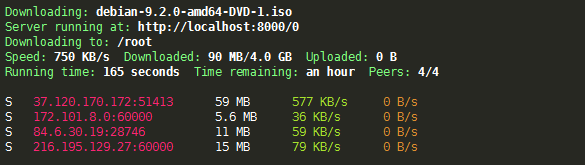
这时候会输出以下界面:
请输入图片描述
下载文件默认存在/root文件夹,然后我们可以在浏览器上输入http://IP:8000访问下载文件列表,并通过访问http://IP:8000/x进行在线观看和下载了,x为文件列表前面的数字减1

2、命令拓展
webtorrent下载命令后面可以加很多参数,这里只说2个常用参数。

#了解更多参数输入webtorrent --help即可
-o, --out [path]  #设置BT下载目录,默认为当前目录
-p, --port [number]  #设置HTTP服务器端口,默认8000

如果我们要使用一个磁力将文件下载到/home目录,并通过浏览器访问IP:8080进行在线观看,使用命令:

webtorrent magnet:?xt=urn:btih:828E2289E73ED9C96C16203E24EBD66E198EB65F -p 8080 -o /home

其它参考上面。

相关教程


版权声明:本文为原创文章,版权归 Rat's Blog 所有,转载请注明出处!

本文链接:https://www.moerats.com/archives/701/

如教程需要更新,或者相关链接出现404,可以在文章下面评论留言。

Vultr新用户注册送100美元/16个机房按小时计费,支持支付宝,【点击查看】。