







说明:博主无聊翻了下邮箱,发现以前注册的Microsoft office365企业版E3还剩下为期9个月的订阅时间,就开了23个子账号,每个账号均有OneDrive 1T使用空间以及office全家桶。这里分享出来,应该够同学们看几个月电影了。然后免费获取一年E3方法后面会讲到。
【2018.12.03】
这里再分享24个子账户,给不想注册E3的人用吧!这次有效期为1年,均在2019.12.2到期,不会翻车。
Office访问地址:https://www.office.com。
#如果密码错误就说明被领取了
用户名:moerats1@moeratss.onmicrosoft.com
密码:Pof20724

用户名:moerats2@moeratss.onmicrosoft.com
密码:Jah65399

用户名:moerats3@moeratss.onmicrosoft.com
密码:Fay44047

用户名:moerats4@moeratss.onmicrosoft.com
密码:Yuy35484

用户名:moerats5@moeratss.onmicrosoft.com
密码:Tun00993

用户名:moerats6@moeratss.onmicrosoft.com
密码:Rob19000

用户名:moerats7@moeratss.onmicrosoft.com
密码:Zud12971

用户名:moerats8@moeratss.onmicrosoft.com
密码:Nak44167

用户名:moerats9@moeratss.onmicrosoft.com
密码:Vob23194

用户名:moerats10@moeratss.onmicrosoft.com
密码:Fam07525

用户名:moerats11@moeratss.onmicrosoft.com
密码:Xus45710

用户名:moerats12@moeratss.onmicrosoft.com
密码:Rok30868

用户名:moerats13@moeratss.onmicrosoft.com
密码:Pas36315

用户名:moerats14@moeratss.onmicrosoft.com
密码:Moc70087

用户名:moerats15@moeratss.onmicrosoft.com
密码:Fof97605

用户名:moerats16@moeratss.onmicrosoft.com
密码:Cor99420

用户名:moerats17@moeratss.onmicrosoft.com
密码:Vob34212

用户名:moerats18@moeratss.onmicrosoft.com
密码:Lag00527

用户名:moerats19@moeratss.onmicrosoft.com
密码:Cuq65425

用户名:moerats20@moeratss.onmicrosoft.com
密码:Qum17491

用户名:moerats21@moeratss.onmicrosoft.com
密码:Gud41136

用户名:moerats22@moeratss.onmicrosoft.com
密码:Bal48564

用户名:moerats23@moeratss.onmicrosoft.com
密码:Gon98498

用户名:moerats24@moeratss.onmicrosoft.com
密码:Sux07511

用户名:moerats24@moeratss.onmicrosoft.com
密码:Wuc97755
这里博主又随便的试了下之前的方法注册Microsoft Office 365企业版E3,发现之前微软活动还没结束,依然还可以参加Office 365开发者计划,并获得为期一年的免费Office 365企业版E3(可分配给25个子用户,每人1T)。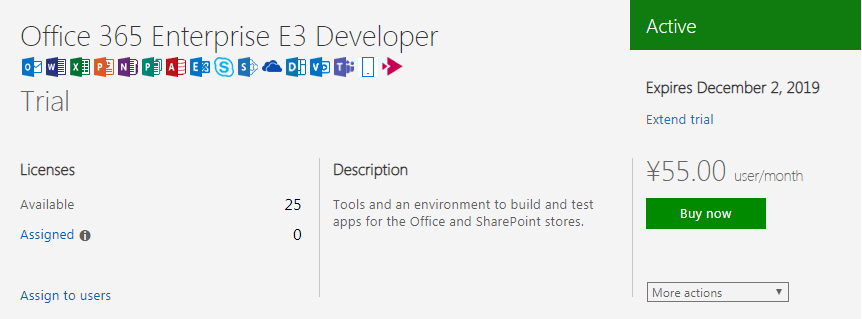
申请教程:https://www.moerats.com/archives/696/好了,之前没上车的同学们可以上车了,注意下获取手机验证码那里可能需要挂梯子。活动属于正版授权,不会翻车,放心使用一年。
E3开子账户OneDrive默认为1T,需要提前修改下容量,修改地址:https://admin.onedrive.com/#v=StorageSettings,设置好了后再重新添加子账户,默认容量就会变成5T。

然后这里博主开的小号依然显示1T,不知道是姿势不对,还是试用版有限制,看同学们能不能成功吧。
版权声明:本文为原创文章,版权归 Rat's Blog 所有,转载请注明出处!
本文链接:https://www.moerats.com/archives/810/
如教程需要更新,或者相关链接出现404,可以在文章下面评论留言。
此内容由惯性聚合(RSS阅读器)自动聚合整理,仅供阅读参考。 原文来自 — 版权归原作者所有。