



惯性聚合 高效追踪和阅读你感兴趣的博客、新闻、科技资讯
阅读原文 在惯性聚合中打开

推荐订阅源

博客园 - 【当耐特】
Help Net Security
Help Net Security
P
Proofpoint News Feed
J
Java Code Geeks
爱范儿
爱范儿
Last Week in AI
Last Week in AI
钛媒体:引领未来商业与生活新知
钛媒体:引领未来商业与生活新知
F
Full Disclosure
Google DeepMind News
H
Help Net Security
G
Google Developers Blog
Jina AI
Jina AI
Vercel News
Vercel News
cs.AI updates on arXiv.org
L
Lohrmann on Cybersecurity
S
Schneier on Security
Microsoft Azure Blog
IT之家
IT之家
Security Archives - TechRepublic
阮一峰的网络日志
阮一峰的网络日志
N
News and Events Feed by Topic
GbyAI
GbyAI
B
Blog
O
OpenAI News
博客园_首页
Cisco Talos Blog
Cisco Talos Blog
K
KPMG report finds enterprise disconnect between AI and its ROI | CIO
Hacker News: Ask HN
Hacker News: Ask HN
TaoSecurity Blog
TaoSecurity Blog
腾讯CDC
MongoDB | Blog
MongoDB | Blog
M
MIT News - Artificial intelligence
C
Cybersecurity and Infrastructure Security Agency CISA
Cyberwarzone
Cyberwarzone
Webroot Blog
Webroot Blog
Simon Willison's Weblog
Y
Y Combinator Blog
C
Cisco Blogs
A
Arctic Wolf
CTFtime.org: upcoming CTF events
T
The Exploit Database - CXSecurity.com
Security Latest
Security Latest
AI
AI
W
WeLiveSecurity
aimingoo的专栏
aimingoo的专栏
The Register - Security
Project Zero
Project Zero
H
Hackread – Cybersecurity News, Data Breaches, AI and More
N
Netflix TechBlog - Medium
Blog — PlanetScale
Blog — PlanetScale

WooCommerce教程 – 奶爸建站笔记

怎么删除WooCommerce产品价格显示 – 奶爸建站笔记 怎么修改WooCommerce的产品排序 – 奶爸建站笔记 给WooCommerce订单添加一个正在运输中的状态 – 奶爸建站笔记 允许在WooCommerce的分类描述里面插入html代码和图片 – 奶爸建站笔记 自定义WooCommerce库存提示插件,修改Out of stock缺货提示 – 奶爸建站笔记 2025年最新PayPal注册教程,对接WooCommerce独立站收款 – 奶爸建站笔记 WooCommerce短代码大全,从任意位置调用商品信息 – 奶爸建站笔记
免插件导出WooCommerce订单教程 – 奶爸建站笔记
Lee · 2022-10-09 · via WooCommerce教程 – 奶爸建站笔记

首页 WooCommerce教程 标准文章

标准文章

使用WordPress搭建电商网站之后,出于某些需要我们有导出商品订单的需要,很多人都在找插件导入,实际上我们可以免插件导出WooCommerc的产品订单,本文就分享具体步骤给大家。 方法一:通过WooCommerce分析面板导出 在WooCommerce…

免插件导出WooCommerce订单教程

使用WordPress搭建电商网站之后,出于某些需要我们有导出商品订单的需要,很多人都在找插件导入,实际上我们可以免插件导出WooCommerc的产品订单,本文就分享具体步骤给大家。

方法一:通过WooCommerce分析面板导出

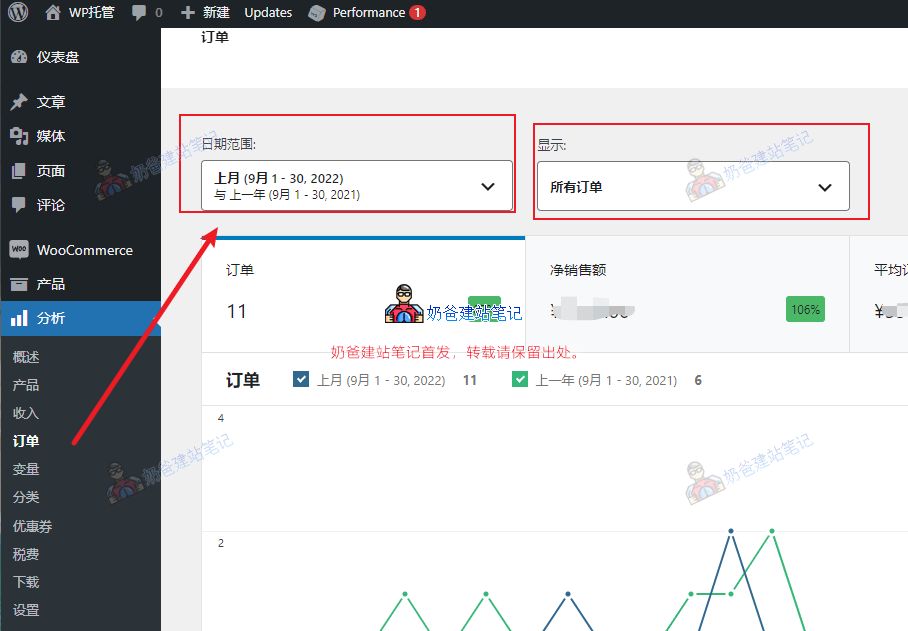
在WooCommerce后台菜单里面有一个分析,点击分析下面的订单标签。
WooCommerce订单列表

在订单界面我们可以选择日期范围,订单条件,例如使用了某些优惠券的订单,某个产品的订单,筛选完毕之后就可以导出。
导出WooCommerce订单

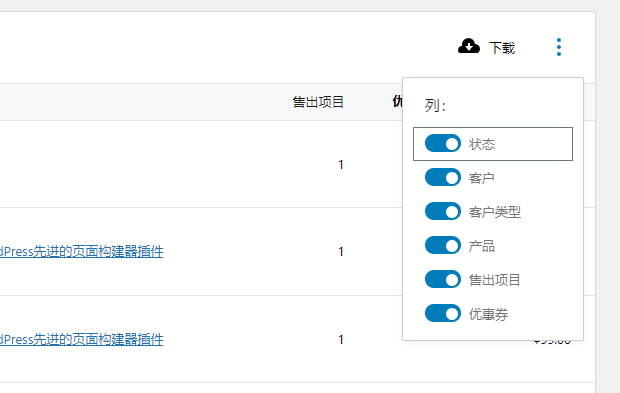
接着我们可以看到下面订单列表右侧有一个下载按钮,点击旁边的三个点可以开启关闭需要导入的内容列。

点击下载按钮就可以把订单列表下载到电脑上,为csv格式。

方式二:使用WooCommerce导出

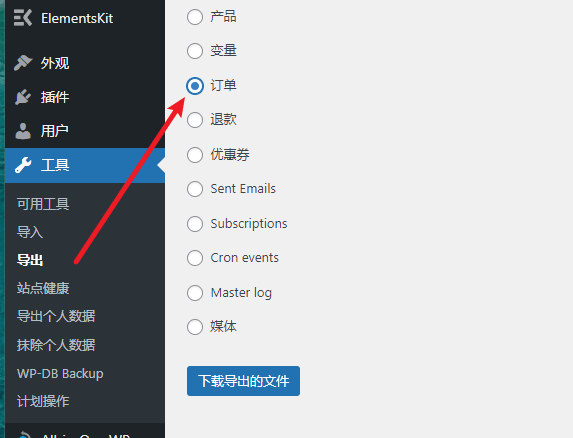
在WordPress的后台菜单工具下有一个导出按钮,点击之后就可以选择导出的项目,例如订单。
导出Woocommerce订单

使用这里导出的内容为xml格式,这种方式适合把一个网站的订单数据导入到另外一个网站。

以上就是两种免插件导出WooCommerce订单的方法了。