








When someone searches for information today, they increasingly turn to AI models like ChatGPT, Perplexity, or Gemini instead of Google. But these models don't return a list of links. They synthesize an answer and cite the sources they trust most.
The question for anyone who runs a blog or content site is: how do you become one of those trusted sources? The answer lies in structured data, specifically JSON-LD Knowledge Graphs that help AI models understand not just what your content says, but how it connects to everything else you've published.
In this tutorial, you'll build a PHP function that auto-generates a JSON-LD Knowledge Graph for every blog post on your site. There are no plugins, no external APIs, and just one function. It will detect entities in your content, map relationships between posts, and output a unified schema that both Google and AI models like ChatGPT can parse as a connected system.
Table of Contents
Why This Matters Now
AI search engines are replacing blue links with synthesized answers. When someone asks ChatGPT a question, it doesn't return a list of URLs. It builds a response by citing the sources it trusts.
According to AccuraCast's research on AI search citations, 81% of pages cited by AI engines use schema markup with JSON-LD as the dominant format. Pages with structured schema are 3 to 4 times more likely to be cited by ChatGPT or Perplexity than pages without it.
Most JSON-LD tutorials teach you to paste a static <script> tag with your title and author name. That gets you into Google's index. But it doesn't get you cited by AI.
For that, you need a Knowledge Graph: a system where your entities (author, site, topics, tools, related articles) are connected through persistent identifiers that machines can follow across every page on your site.
I built this system for my own blog. After three months in production with 52 posts in three languages, I asked ChatGPT, Gemini, and Perplexity to audit the resulting schema. ChatGPT scored it 9.1 out of 10 and called it "production-grade graph design." This article walks you through how to build the same thing.
Prerequisites
To follow this tutorial, you'll need:
PHP 7.4 or higher running on your server
A MySQL or MariaDB database with a posts table that stores your blog content (title, slug, content, excerpt, created_at, updated_at)
Basic PHP knowledge: variables, arrays, functions, and database queries with PDO
A working blog where you can edit PHP files and add schema markup to your HTML output
The tools we'll use are all built into PHP. No external packages or Composer dependencies are required. The entity detection uses simple string matching with strpos(), the database queries use PDO prepared statements, and the JSON-LD output uses PHP's native json_encode(). If you've built a blog with PHP before, you have everything you need.
The Pipeline
The system works in four stages:
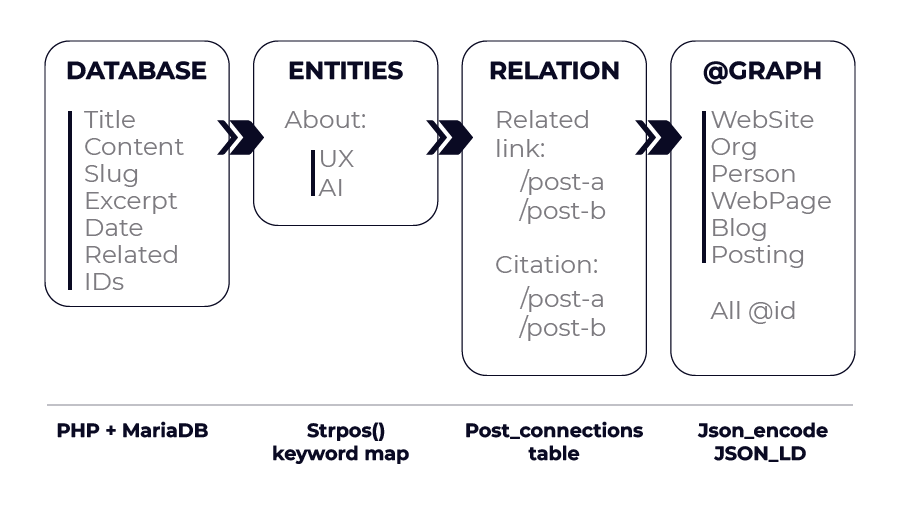
Stage 1: PHP queries MariaDB for the post content, metadata, and related post IDs.
Stage 2: The system scans the content for known topics and tools using keyword matching. No NLP libraries needed. A simple associative array maps keywords to schema entities.
Stage 3: Related posts are fetched and mapped as both navigation links (relatedLink) and knowledge relationships (citation).
Stage 4: Everything gets combined into a single @graph array with five connected entities: WebSite, Organization, Person, WebPage, and BlogPosting. Each entity has a stable @id that machines can reference across pages.
What Static JSON-LD Looks Like (And Why It Falls Short)
Here is what a typical tutorial tells you to add:
{
  "@context": "https://schema.org",
  "@type": "BlogPosting",
  "headline": "My Blog Post",
  "author": {
    "@type": "Person",
    "name": "Jane"
  },
  "datePublished": "2026-01-15"
}
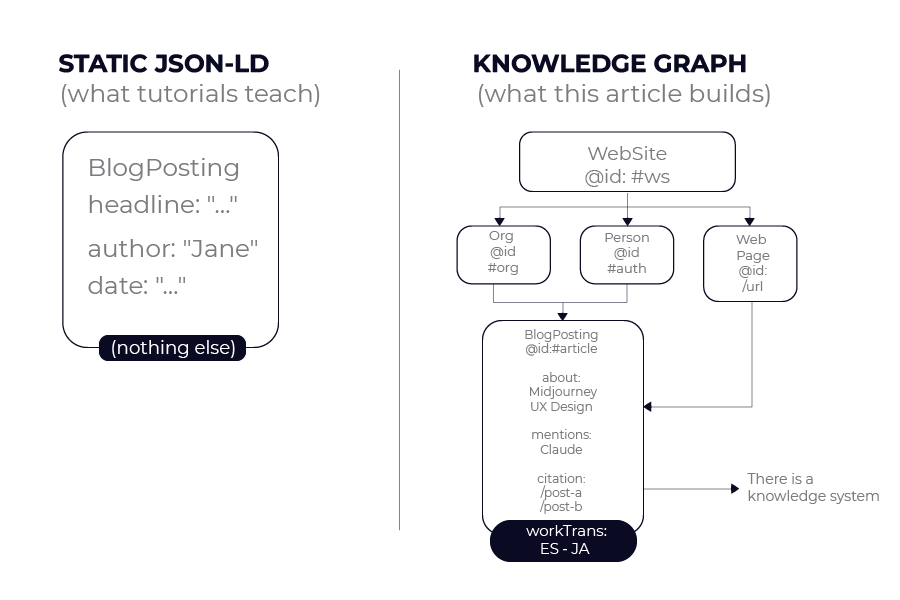
This tells Google "there is an article by Jane." It doesn't say what topics the article covers, what tools it mentions, how it connects to other articles on your site, who publishes the site, or what makes Jane an authority on the subject.
For a blog with dozens of posts about interconnected topics, every post exists in isolation. Search engines and AI models can't see that your articles form a system of knowledge. They can't tell that your post about Midjourney prompts connects to your post about AI design workflows, which connects to your post about fintech UX.
By the end of this tutorial, that same post will generate a @graph with five linked entities, automatic topic detection, relationship mapping, multilingual connections, and an abstract that LLMs read before deciding whether to cite you.
Step 1: Define Your Entity Helpers
Three PHP functions define your core entities. They return arrays that get reused on every page of your site.
function getSchemaAuthor($baseUrl) {
    return [
        '@type' => 'Person',
        '@id' => $baseUrl . '/#author',
        'name' => 'Your Name',
        'description' => 'Your professional description.',
        'url' => $baseUrl . '/about',
        'image' => $baseUrl . '/photo.png',
        'jobTitle' => 'Your Title',
        'sameAs' => [
            'https://linkedin.com/in/yourprofile',
            'https://x.com/yourhandle',
            'https://dev.to/yourprofile'
        ]
    ];
}

function getSchemaOrganization($baseUrl) {
    return [
        '@type' => 'Organization',
        '@id' => $baseUrl . '/#organization',
        'name' => 'Your Site Name',
        'url' => $baseUrl,
        'logo' => [
            '@type' => 'ImageObject',
            'url' => $baseUrl . '/logo.png'
        ]
    ];
}

function getSchemaWebSite(\(baseUrl, \)siteName, \(siteDesc, \)langCode) {
    return [
        '@type' => 'WebSite',
        '@id' => $baseUrl . '/#website',
        'name' => $siteName,
        'description' => $siteDesc,
        'url' => $baseUrl,
        'inLanguage' => $langCode,
        'publisher' => ['@id' => $baseUrl . '/#organization']
    ];
}
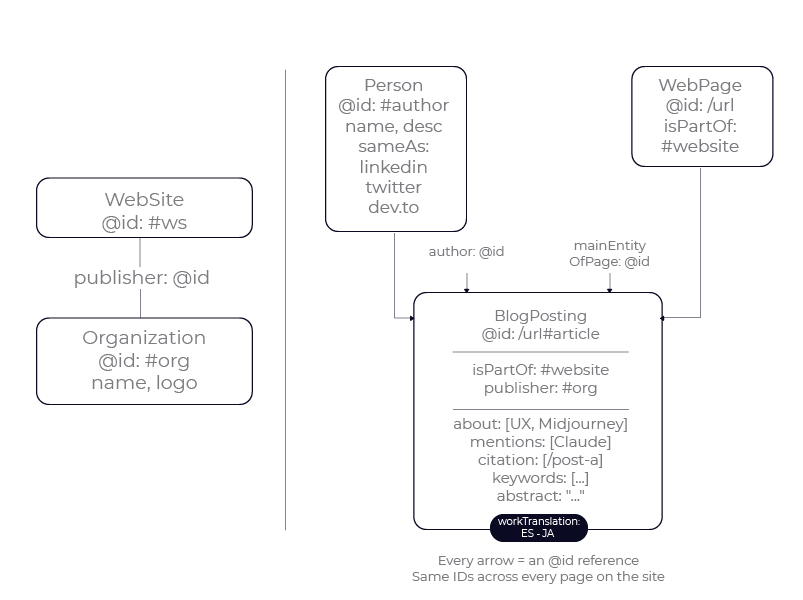
The @id values are the most important detail. /#author, /#organization, and /#website are persistent identifiers that stay the same across every page.
When a machine reads your homepage and then reads a blog post, it recognizes that https://yoursite.com/#author is the same entity in both places. Without @id, each page creates a new floating entity that machines can't connect.
One decision that matters: the publisher should be an Organization, not a Person. AI systems assign more trust to content published by organizations than by individuals. Even if you're a solo creator, define your site as an Organization for publishing purposes and keep yourself as the Person author.
Step 2: Build the BlogPosting Schema
This function takes a post from your database and the current language code, then builds the core BlogPosting entity.
function generateBlogPostingSchema(\(post, \)langCode) {
    $baseUrl = rtrim(SITE_URL, '/');
    \(siteName = getLocalizedSetting('site_name', \)langCode);
    \(siteDesc = getLocalizedSetting('site_description', \)langCode);
    $defaultLang = getDefaultLanguage();
    \(postSlug = \)post['slug'];

    \(postUrl = \)langCode === $defaultLang
        ? \(baseUrl . '/' . \)postSlug
        : \(baseUrl . '/' . \)langCode . '/' . $postSlug;

    \(excerpt = \)post['excerpt']
        ?: mb_substr(strip_tags($post['content']), 0, 160);

    $blogPosting = [
        '@type' => 'BlogPosting',
        '@id' => $postUrl . '#article',
        'headline' => $post['title'],
        'description' => $excerpt,
        'abstract' => $excerpt,
        'url' => $postUrl,
        'datePublished' => date('c', strtotime($post['created_at'])),
        'dateModified' => date('c', strtotime($post['updated_at'])),
        'author' => [
            '@type' => 'Person',
            '@id' => $baseUrl . '/#author',
            'name' => 'Your Name',
            'url' => $baseUrl . '/about'
        ],
        'publisher' => [
            '@type' => 'Organization',
            '@id' => $baseUrl . '/#organization',
            'name' => 'Your Site Name',
            'logo' => [
                '@type' => 'ImageObject',
                'url' => $baseUrl . '/logo.png'
            ]
        ],
        'isPartOf' => ['@id' => $baseUrl . '/#website'],
        'mainEntityOfPage' => [
            '@type' => 'WebPage',
            '@id' => $postUrl
        ],
        'inLanguage' => $langCode,
        'wordCount' => str_word_count(strip_tags($post['content']))
    ];
Two properties deserve attention.
abstract maps the post excerpt. LLMs read the abstract first to decide whether the rest of the page is worth processing. If your excerpt says "In this post I explore some ideas about..." models may skip you entirely. Make it a direct statement: "To implement a Knowledge Graph you need five connected entities with persistent @id references." That's something an LLM can evaluate immediately.
isPartOf connects the article to the WebSite entity. This tells machines "this article belongs to a larger knowledge source." Without it, each post looks like an independent document.
Notice that author and publisher include both @id and inline properties. The @id connects to the full entity in the @graph. The inline properties are a fallback because some parsers (including Google's Rich Results Test) don't always resolve @id references. Including both ensures zero validation warnings.
Step 3: Add Automatic Entity Detection
This is where static JSON-LD tutorials stop and your Knowledge Graph begins. Instead of manually tagging each post with its topics, the system scans the content automatically.
    \(contentLower = strtolower(\)post['content'] . ' ' . $post['title']);

    $topicMap = [
        'midjourney'      => ['name' => 'Midjourney', 'url' => 'https://midjourney.com'],
        'prompt'          => ['name' => 'Prompt Engineering'],
        'fintech'         => ['name' => 'Fintech UX Design'],
        'ux design'       => ['name' => 'UX Design'],
        'llms.txt'        => ['name' => 'llms.txt', 'url' => 'https://llmstxt.org'],
        'knowledge graph' => ['name' => 'Knowledge Graph'],
    ];

    $aboutItems = [];
    $keywordsList = [];
    foreach (\(topicMap as \)keyword => $meta) {
        if (strpos(\(contentLower, \)keyword) !== false) {
            \(item = ['@type' => 'Thing', 'name' => \)meta['name']];
            if (isset(\(meta['url'])) \)item['url'] = $meta['url'];
            \(aboutItems[] = \)item;
            \(keywordsList[] = \)meta['name'];
        }
    }
    if (!empty($aboutItems)) {
        \(blogPosting['about'] = \)aboutItems;
    }
The same pattern detects tools mentioned in the content:
    $toolMap = [
        'midjourney' => ['name' => 'Midjourney', 'url' => 'https://midjourney.com'],
        'claude'     => ['name' => 'Claude', 'url' => 'https://claude.ai'],
        'chatgpt'    => ['name' => 'ChatGPT', 'url' => 'https://chat.openai.com'],
        'figma'      => ['name' => 'Figma', 'url' => 'https://figma.com'],
    ];

    $mentionItems = [];
    foreach (\(toolMap as \)keyword => $meta) {
        if (strpos(\(contentLower, \)keyword) !== false) {
            $mentionItems[] = [
                '@type' => 'Thing',
                'name' => $meta['name'],
                'url' => $meta['url']
            ];
            \(keywordsList[] = \)meta['name'];
        }
    }
    if (!empty($mentionItems)) {
        \(blogPosting['mentions'] = \)mentionItems;
    }

    if (!empty($keywordsList)) {
        \(blogPosting['keywords'] = array_values(array_unique(\)keywordsList));
    }
The difference between about and mentions matters for AI citation. about declares the main topics. mentions declares tools and references that appear in the content. If a post is a Midjourney tutorial that also mentions Claude, about gets Midjourney and mentions gets Claude.
This distinction helps AI models decide whether to cite your page when someone asks about Midjourney versus when they ask about Claude.
A question that comes up often: do you need NLP for entity detection? No. A keyword map with strpos handles the vast majority of cases for a personal blog. NLP adds complexity, latency, and a dependency you don't need. If your topic map has 20 to 30 entries, keyword matching is fast, predictable, and easy to debug.
Step 4: Map Relationships Between Posts
Each post connects to related posts through two properties: relatedLink for navigation and citation for knowledge relationships.
    \(relatedUrls = getRelatedPostUrls(\)post['id'], $langCode);
    if (!empty($relatedUrls)) {
        \(blogPosting['relatedLink'] = \)relatedUrls;
        \(blogPosting['citation'] = \)relatedUrls;
    }
The helper function queries a post_connections table:
function getRelatedPostUrls(\(postId, \)langCode) {
    $pdo = getDB();
    $baseUrl = rtrim(SITE_URL, '/');
    $defaultLang = getDefaultLanguage();

    \(stmt = \)pdo->prepare(
        "SELECT connected_post_id FROM post_connections WHERE post_id = ?"
    );
    \(stmt->execute([\)postId]);
    \(connections = \)stmt->fetchAll(PDO::FETCH_COLUMN);

    $urls = [];
    foreach (\(connections as \)connId) {
        \(slug = getPostSlugForLanguage(\)connId, $langCode);
        if ($slug) {
            \(urls[] = \)langCode === $defaultLang
                ? \(baseUrl . '/' . \)slug
                : \(baseUrl . '/' . \)langCode . '/' . $slug;
        }
    }
    return $urls;
}
Why use both relatedLink and citation on the same URLs? They signal different things to machines. relatedLink says "the reader might want to visit these pages next." citation says "this article builds on the knowledge in these other articles."
AI models weigh citation more heavily when deciding whether your content is part of a larger knowledge system. Using both tells machines that your related posts aren't just navigation. They're sources this article builds upon.
Step 5: Add Multilingual Support
If your blog publishes in multiple languages, workTranslation connects different language versions of the same article.
    $languages = getActiveLanguages();
    $translations = [];
    foreach (\(languages as \)lang) {
        \(lc = \)lang['code'];
        if (\(lc === \)langCode) continue;

        \(translatedSlug = getPostSlugForLanguage(\)post['id'], $lc);
        if ($translatedSlug) {
            \(translatedUrl = \)lc === $defaultLang
                ? \(baseUrl . '/' . \)translatedSlug
                : \(baseUrl . '/' . \)lc . '/' . $translatedSlug;

            \(stmtT = \)pdo->prepare(
                "SELECT title FROM post_translations
                 WHERE post_id = ? AND language_code = ? LIMIT 1"
            );
            \(stmtT->execute([\)post['id'], $lc]);
            \(translatedTitle = \)stmtT->fetchColumn() ?: $post['title'];

            $translations[] = [
                '@type' => 'CreativeWork',
                '@id' => $translatedUrl . '#article',
                'headline' => $translatedTitle,
                'url' => $translatedUrl,
                'inLanguage' => $lc
            ];
        }
    }
    if (!empty($translations)) {
        \(blogPosting['workTranslation'] = \)translations;
    }
Without workTranslation, a blog with 50 posts in three languages looks like 150 independent articles to AI models. With it, the same blog looks like 50 pieces of knowledge with multilingual reach. The authority consolidates instead of fragmenting.
The translations use @type: CreativeWork instead of BlogPosting. This avoids warnings in Google's Rich Results Test where each translation would be flagged as a separate article with missing required fields.
Step 6: Assemble the Graph
Bring everything together:
    $webPage = [
        '@type' => 'WebPage',
        '@id' => $postUrl,
        'url' => $postUrl,
        'name' => $post['title'],
        'isPartOf' => ['@id' => $baseUrl . '/#website']
    ];

    $graph = [
        '@context' => 'https://schema.org',
        '@graph' => [
            getSchemaWebSite(\(baseUrl, \)siteName, \(siteDesc, \)langCode),
            getSchemaOrganization($baseUrl),
            getSchemaAuthor($baseUrl),
            $webPage,
            $blogPosting
        ]
    ];

    return '<script type="application/ld+json">'
        . json_encode($graph,
            JSON_UNESCAPED_SLASHES
            | JSON_UNESCAPED_UNICODE
            | JSON_PRETTY_PRINT)
        . '</script>';
}
The json_encode flags matter. JSON_UNESCAPED_SLASHES prevents URLs from getting escaped. JSON_UNESCAPED_UNICODE keeps non-ASCII characters readable for multilingual content. Without these, a single special character in a blog post title fetched from the database can break the entire JSON-LD block silently.
What the Output Looks Like in Production
Here is the actual JSON-LD generated by a real post on shinobis.com, a blog about AI tools and UX design:
{
  "@context": "https://schema.org",
  "@graph": [
    {
      "@type": "WebSite",
      "@id": "https://shinobis.com/#website",
      "name": "Designer in the Age of AI",
      "description": "AI tools and real workflows from a designer who builds with AI.",
      "url": "https://shinobis.com",
      "inLanguage": "en",
      "publisher": { "@id": "https://shinobis.com/#organization" }
    },
    {
      "@type": "Organization",
      "@id": "https://shinobis.com/#organization",
      "name": "Shinobis",
      "url": "https://shinobis.com",
      "logo": { "@type": "ImageObject", "url": "https://shinobis.com/3117045.png" }
    },
    {
      "@type": "Person",
      "@id": "https://shinobis.com/#author",
      "name": "Shinobis",
      "description": "UX/UI Designer with 10+ years in banking and fintech.",
      "url": "https://shinobis.com/en/about",
      "jobTitle": "UX/UI Designer",
      "sameAs": [
        "https://www.linkedin.com/company/shinobis-ai",
        "https://dev.to/shinobis_ia"
      ]
    },
    {
      "@type": "WebPage",
      "@id": "https://shinobis.com/en/one-year-with-ai-open-letter-to-designers",
      "url": "https://shinobis.com/en/one-year-with-ai-open-letter-to-designers",
      "name": "One Year with AI: Open Letter to Designers",
      "isPartOf": { "@id": "https://shinobis.com/#website" }
    },
    {
      "@type": "BlogPosting",
      "@id": "https://shinobis.com/en/one-year-with-ai-open-letter-to-designers#article",
      "headline": "One Year with AI: Open Letter to Designers",
      "description": "One year ago I started this journey. Today I write to all designers who are still doubting, fearing, or ignoring AI.",
      "abstract": "One year ago I started this journey. Today I write to all designers who are still doubting, fearing, or ignoring AI.",
      "url": "https://shinobis.com/en/one-year-with-ai-open-letter-to-designers",
      "datePublished": "2026-02-15T09:00:00-05:00",
      "dateModified": "2026-03-20T14:30:00-05:00",
      "inLanguage": "en",
      "wordCount": 1842,
      "author": {
        "@type": "Person",
        "@id": "https://shinobis.com/#author",
        "name": "Shinobis",
        "url": "https://shinobis.com/en/about"
      },
      "publisher": {
        "@type": "Organization",
        "@id": "https://shinobis.com/#organization",
        "name": "Shinobis",
        "logo": { "@type": "ImageObject", "url": "https://shinobis.com/3117045.png" }
      },
      "isPartOf": { "@id": "https://shinobis.com/#website" },
      "mainEntityOfPage": {
        "@type": "WebPage",
        "@id": "https://shinobis.com/en/one-year-with-ai-open-letter-to-designers"
      },
      "about": [
        { "@type": "Thing", "name": "Midjourney", "url": "https://midjourney.com" },
        { "@type": "Thing", "name": "Prompt Engineering" }
      ],
      "mentions": [
        { "@type": "Thing", "name": "Claude", "url": "https://claude.ai" }
      ],
      "relatedLink": [
        "https://shinobis.com/en/ai-is-not-going-to-take-your-job-your-comfort-zone-will",
        "https://shinobis.com/en/the-designer-as-creative-director-of-machines"
      ],
      "citation": [
        "https://shinobis.com/en/ai-is-not-going-to-take-your-job-your-comfort-zone-will",
        "https://shinobis.com/en/the-designer-as-creative-director-of-machines"
      ],
      "keywords": ["Midjourney", "Prompt Engineering", "Claude"],
      "workTranslation": [
        {
          "@type": "CreativeWork",
          "@id": "https://shinobis.com/un-ano-con-ia-carta-abierta-disenadores#article",
          "headline": "Un año con IA: carta abierta a los diseñadores",
          "url": "https://shinobis.com/un-ano-con-ia-carta-abierta-disenadores",
          "inLanguage": "es"
        },
        {
          "@type": "CreativeWork",
          "@id": "https://shinobis.com/ja/one-year-with-ai-open-letter-to-designers#article",
          "headline": "AIと一年:デザイナーへの公開書簡",
          "url": "https://shinobis.com/ja/one-year-with-ai-open-letter-to-designers",
          "inLanguage": "ja"
        }
      ]
    }
  ]
}
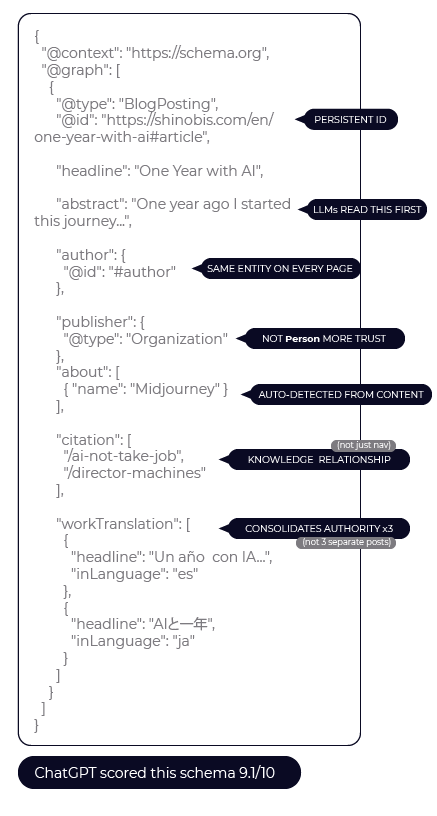
Compare that to the static version: one BlogPosting with a headline and an author name. The difference isn't cosmetic. It's the difference between "there is an article" and "there is a knowledge node connected to an author with verified profiles, published by an organization, linked to related articles through citation relationships, covering specific topics, and available in three languages."
Testing Your Implementation
After deploying, validate at Google's Rich Results Test. Paste any post URL and look for your BlogPosting with all properties.
For a deeper audit, copy the <script type="application/ld+json"> block from your page source and paste it into ChatGPT with this prompt: "Audit this JSON-LD schema for AI citation visibility. Score it 1-10 and tell me what is missing." The feedback is surprisingly specific.
When I did this, ChatGPT identified five improvements that raised the score from 8.7 to 9.1.
What I Learned After 3 Months in Production
I have been running this system on a blog with 52 posts in three languages since early 2026. Google indexed pages went from 26 to 48 in three months. The keyword "llms txt" reached position 4 on Google. AI models started citing my content in responses about JSON-LD implementation.
Three things I would do differently if starting today.
First, add the abstract property from day one. I added it three months in and the impact was immediate. LLMs use abstract as a first filter. Perplexity confirmed that the first 200 characters of a page are critical for whether AI extracts the content.
Second, use citation alongside relatedLink from the beginning. relatedLink is a navigation hint. citation signals a knowledge relationship. AI models interpret the connections between your posts differently depending on which property you use.
Third, define the publisher as an Organization immediately. I started with @type: Person and changed it later. AI systems assign more trust to organizational publishers.
The system generates JSON-LD on every page load. At this scale (under 100 posts) the performance impact is negligible. For thousands of posts, generate on publish and cache the output.
Wrapping Up
This system is one layer of what is now called Generative Engine Optimization: structuring content so AI models cite you in their responses.
The other layers include an llms.txt file at your domain root (which gives AI crawlers a site-level overview) and writing content that AI can extract without needing additional context (direct statements over narrative introductions).
The complete source code is running in production at shinobis.com. Every post uses the exact system described here.
The next SEO battlefield isn't rankings. It's citations. And citations start with structure.
Learn to code for free. freeCodeCamp's open source curriculum has helped more than 40,000 people get jobs as developers. Get started