



惯性聚合 高效追踪和阅读你感兴趣的博客、新闻、科技资讯
阅读原文 在惯性聚合中打开

推荐订阅源

K
Kaspersky official blog
Martin Fowler
Martin Fowler
CTFtime.org: upcoming CTF events
V
Visual Studio Blog
博客园_首页
Engineering at Meta
Engineering at Meta
The Cloudflare Blog
MongoDB | Blog
MongoDB | Blog
Blog — PlanetScale
Blog — PlanetScale
T
The Blog of Author Tim Ferriss
雷峰网
雷峰网
D
Docker
博客园 - 司徒正美
S
SegmentFault 最新的问题
M
MIT News - Artificial intelligence
博客园 - 叶小钗
博客园 - 三生石上(FineUI控件)
U
Unit 42
J
Java Code Geeks
A
About on SuperTechFans
N
Netflix TechBlog - Medium
freeCodeCamp Programming Tutorials: Python, JavaScript, Git & More
S
Security Affairs
I
Intezer
Cisco Talos Blog
Cisco Talos Blog
C
Cyber Attacks, Cyber Crime and Cyber Security
Threat Intelligence Blog | Flashpoint
B
Blog RSS Feed
P
Privacy & Cybersecurity Law Blog
T
Tenable Blog
T
Threatpost
H
Hacker News: Front Page
G
Google Developers Blog
博客园 - 【当耐特】
Hugging Face - Blog
Hugging Face - Blog
Apple Machine Learning Research
L
Lohrmann on Cybersecurity
大猫的无限游戏
大猫的无限游戏
Google DeepMind News
A
Arctic Wolf
S
Secure Thoughts
GbyAI
GbyAI
NISL@THU
NISL@THU
S
Security @ Cisco Blogs
Exploit-DB.com RSS Feed
Webroot Blog
Webroot Blog
C
CXSECURITY Database RSS Feed - CXSecurity.com
O
OpenAI News
Spread Privacy
Spread Privacy
Application and Cybersecurity Blog

安静的石头

捡垃圾之J1900安装飞牛NAS 2024年猪头肉事件 黑龙江-伊春森林公园之行 2022年国庆前随笔 2022年中秋节快乐 对产品开发的一点狭隘看法 关于大龄青年找工作 博客更换程序和主题 二零二二年新年快乐!
解决wordpress使用阿里CDN后评论无法获取访客真实IP
安静的石头 · 2022-10-05 · via 安静的石头

    4,204

最近给访问量为个数的博客添加了阿里的CDN,但是WordPress开启CDN之后别人在你的文章中评论,IP则显示的是该人所在地区的CDN节点的IP,而不会显示该人的真实IP,这样的话其实不会有很大的问题,但是对于垃圾评论过多的网站来说,这无疑是一个噩梦,因为不可以进行IP拦截。

解决办法:
编辑wp-config.php,把以下代码加入到wp-config.php的<?php之后:

if(isset($_SERVER['HTTP_X_FORWARDED_FOR'])) {
$list = explode(',',$_SERVER['HTTP_X_FORWARDED_FOR']);
$_SERVER['REMOTE_ADDR'] = $list[0];
}

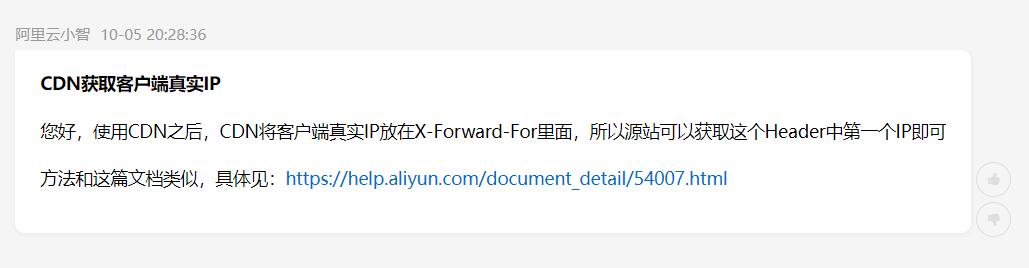
注意:阿里的CDN将客户端真实IP放在X-Forward-For内,其他CDN请自行确认后设置。
编辑完成后保存,刷新一下,然后评论试试看吧~

评论已关闭...