








Ecosystem Engineering IntelliJ IDEA IntelliJ Platform Remote Development WebStorm
JetBrains IDEs have worked with WSL for many years, and over time, several ways of using it have emerged across our products. Depending on the entry point, the IDE could rely on a different underlying architecture, leading to a different experience.
Starting with the 2026.2 release, there is one recommended entry point. In IntelliJ IDEA, WebStorm, and PhpStorm, opening a project that lives in WSL runs the IDE in what we call Native mode. The IDE stays a Windows application, while a small agent inside WSL handles files and processes on its behalf.
Below is how Native mode works, how our approach to WSL integration evolved to get here, and – since we tried three other approaches first – why we’re confident it’s the right foundation for your work.
What it takes to support WSL in an IDE
We’ll start with an idealized picture in which the IDE functions seamlessly inside WSL while being operated from Windows. In practical terms, “seamlessly” means you should be able to use any of the IDE’s capabilities – terminal, run and debug configurations, profiling, etc. – against a project that resides in a Linux environment. Not only that, but this must incur as little latency as possible for the coding experience to feel quick and natural, as if the project files and the IDE itself resided in a single operating-system environment.
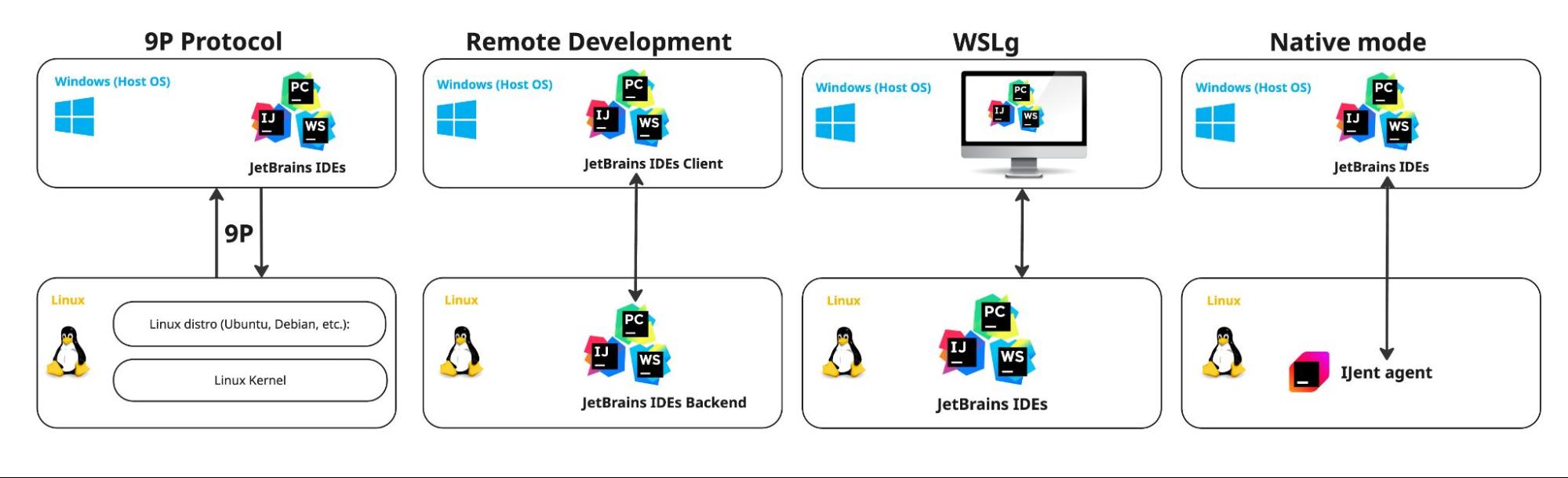
We’ll trace how this challenge has been addressed, beginning with the earliest implementation, in which the IDE interacted with WSL through the 9P transport protocol. We will then cover Remote Development and WSLg before examining Native mode – the currently preferred mode for how IDEs work with WSL.
Toward native IDE execution in WSL
9P filesystem access and
For the IDE to function, it needs access to the basics of a project, which are plain files. This is where the 9P filesystem protocol comes in. It provides the mechanism that allows Windows-side processes access files inside WSL. In practice, project-related file I/O performed by the IDE – scanning, indexing, archive access, and similar operations – is routed through the 9P-based filesystem layer to the Linux virtual machine.
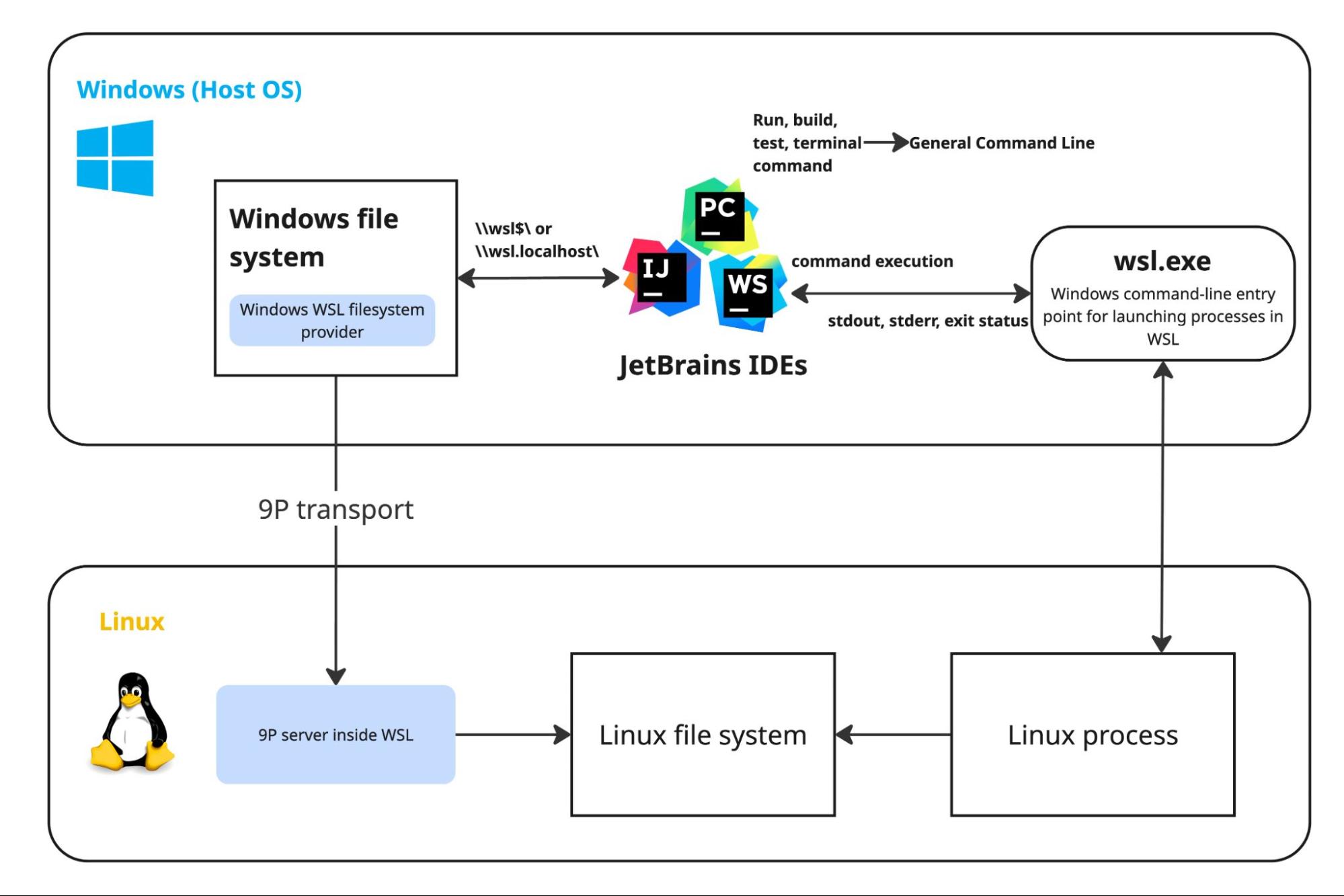
Once file access is accounted for, the next challenge is process execution. While running on Windows, the IDE must be able to invoke tools inside WSL with the correct Linux paths, working directories, executables, environment variables, and arguments. The IDE-internal GeneralCommandLine class manages this by normalizing command execution in the WSL environment.
While this architecture enables the IDE to operate against WSL, it introduces significant trade-offs in both file access and process execution.
The 9P protocol is known to be problematic for several reasons:
- Limited symlink handling – 9P does not properly expose Linux symbolic links to Windows through
\\wsl$. As a result, the IDE may detect an entry but be unable to resolve or index the linked directory tree. This affects pnpm workspaces, Python virtual environments, PHP Composer path repositories, and other environments that rely on symlinks. - Microsoft Defender scans – on-access scanning over 9P can stretch WSL file reads by tens of seconds.
- Latency and degraded throughput – 9P-backed filesystem access adds latency, and throughput can degrade significantly, especially in workflows involving many small files. Core IDE operations such as indexing follow this pattern, generating numerous separate requests that cross the Windows/WSL VM boundary through 9P.
The situation was no less challenging on the GeneralCommandLine side. The pipeline added a maintenance burden, as developers had to account for WSL-specific execution semantics across the codebase.
As a consequence, the approach became increasingly difficult to scale and maintain, and it surfaced persistent issues with symlink handling and performance.
Running the IDE inside WSL with WSLg
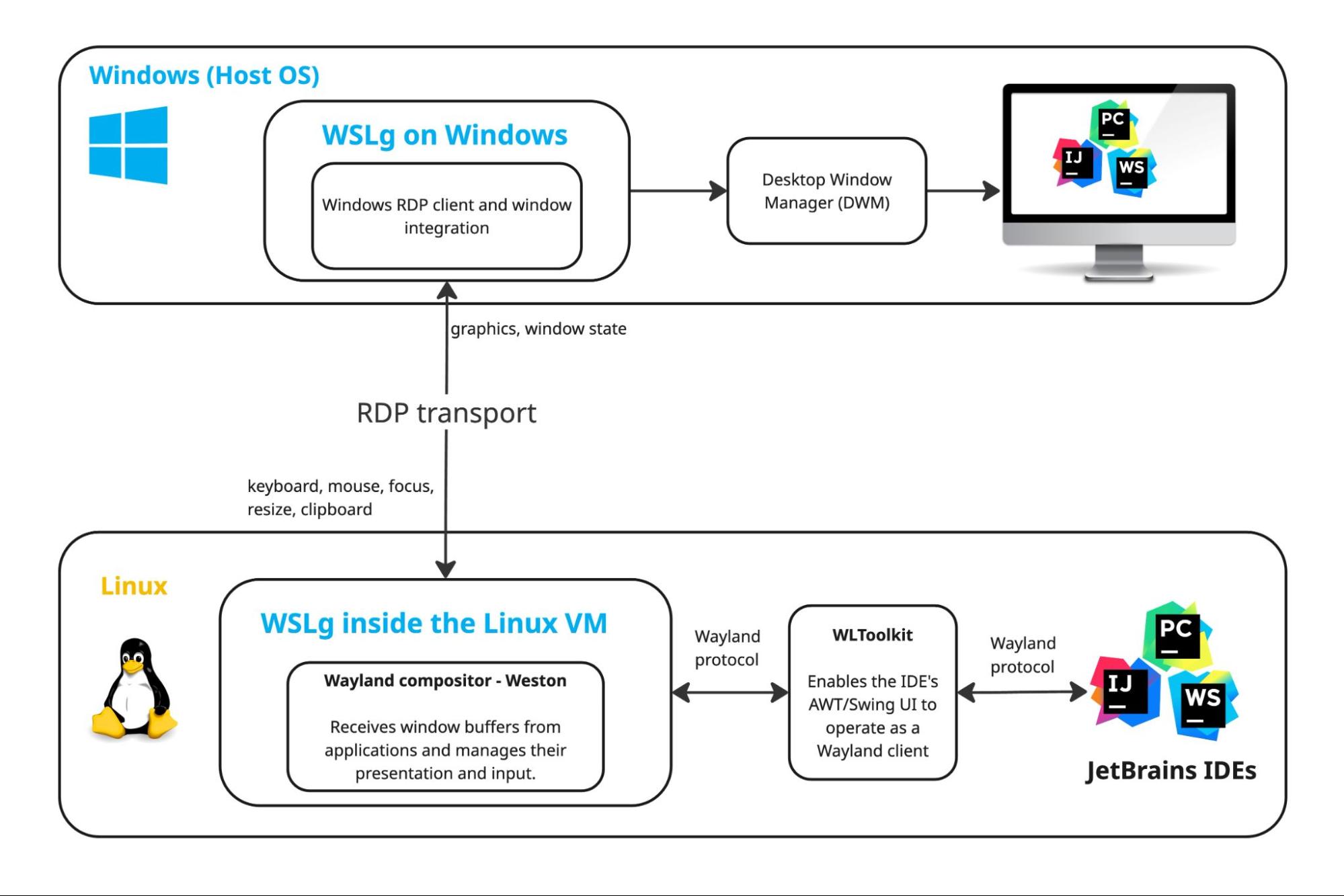
What if, instead, the IDE itself resided inside WSL, close to the project it works with? This is where WSLg comes in. It provides a way to run Linux GUI applications whose visual output is integrated directly into the Windows desktop.
Here’s why we do not recommend the WSLg approach:
- From a product perspective, if the IDE is displayed on Windows, it is preferable for it to behave as a Windows-native application rather than as a Linux GUI application projected into the Windows desktop. This preserves greater control over the IDE experience and avoids dependence on an additional GUI-remoting layer.
- In a WSLg setup, the IDE may run on the native Wayland path, where JetBrains Runtime uses WLToolkit against WSLg’s Wayland compositor. This path carries known limitations in rendering, popups, window management, input methods, and desktop integration.
No first-class product experience was ever built around this setup. Although running the IDE through WSLg is technically viable, it has never been considered the preferred direction, and no dedicated out-of-the-box installation or onboarding flow was provided. It remains an ad hoc workaround rather than a supported IDE workflow.
The Remote Development approach
Another approach was Remote Development, which addressed the same fundamental challenges of file access and process execution from a different angle. Rather than extending the Windows-based IDE across the WSL boundary, it moved the IDE backend into WSL and kept only the client on Windows. This architecture solved the underlying integration problems more directly, but introduced a different set of trade-offs.
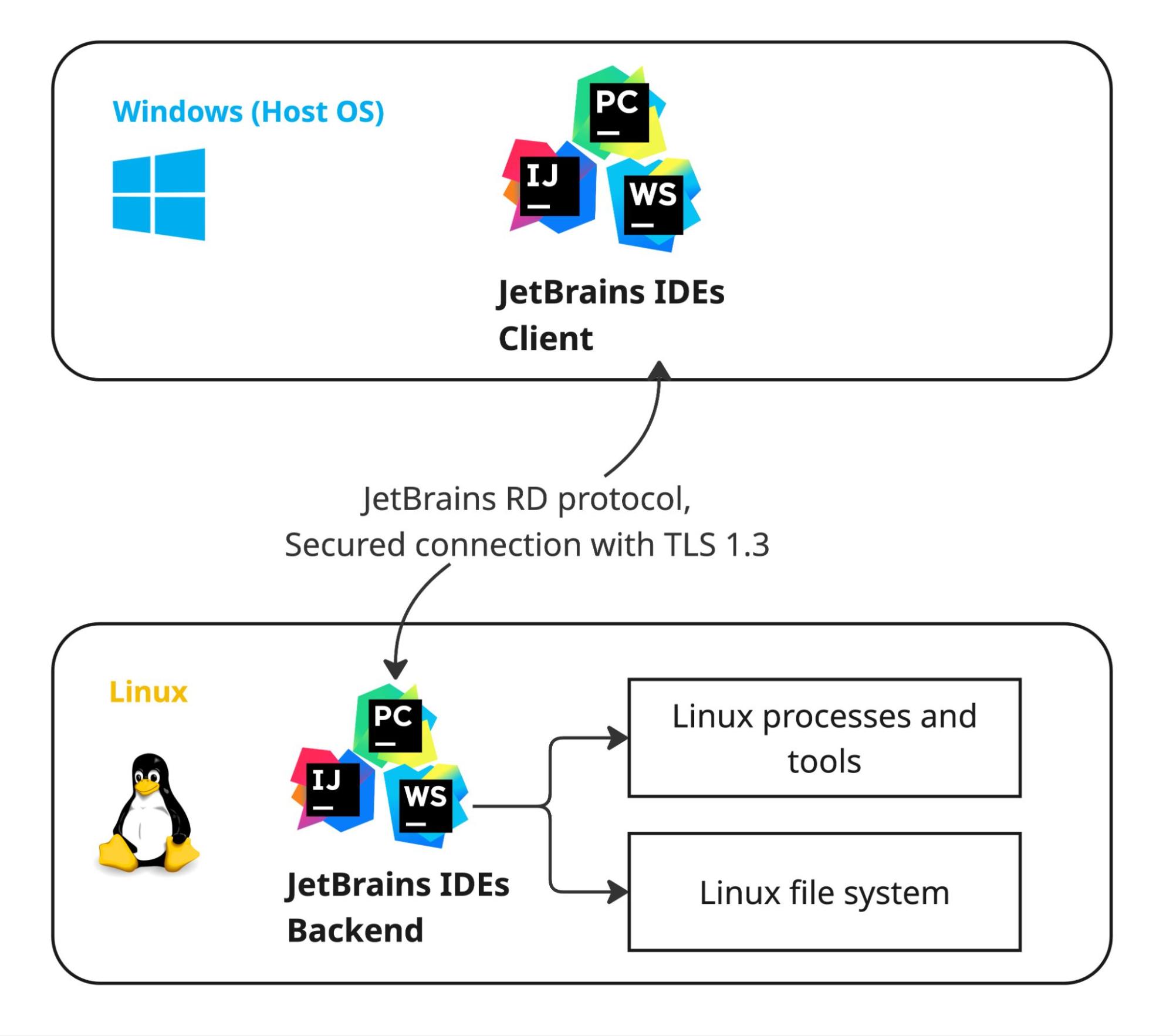
The main technical challenge of this configuration is establishing and maintaining communication between them while ensuring that the UI accurately reflects user actions and the IDE continues to function as a coherent whole. At the same time, placing the backend inside WSL provides the clear advantage of direct access to Linux files and processes.
In this setup, the two IDE parts communicate over the JetBrains RD protocol. The protocol is a structured, bidirectional stream of IDE models and events that keeps the thin client and the backend IDE logically in sync, while all heavy work, such as indexing, analysis, builds, debugging, VCS operations, and so on, happens on the backend.
The client, in its turn:
- Renders all windows and editors, and handles user input.
- Mirrors the project and editor state it receives from the backend over the RD protocol, and sends back edits, caret moves, refactoring commands, debug actions, and so on.
- Loads UI-level plugins.
The elephant in the room, however, is the cost of this split architecture. The IDE backend is a heavyweight component in its own right, requiring roughly 2 GB of additional disk space and time to download and install inside WSL. The split also introduces an inherent performance penalty, as UI-event state, user input, and other interaction data must travel continuously between the local client and the backend.
It also adds development overhead, as the code has to be split into client and server parts. Leaving specific modules undivided can cause delays and freezes in highly dynamic UIs. The associated engineering effort therefore becomes a constant and unavoidable cost.
Native mode and the IJent agent
The current design – now integrated into most of our IDEs – represents the culmination of this work and addresses many of the shortcomings of earlier approaches to WSL.
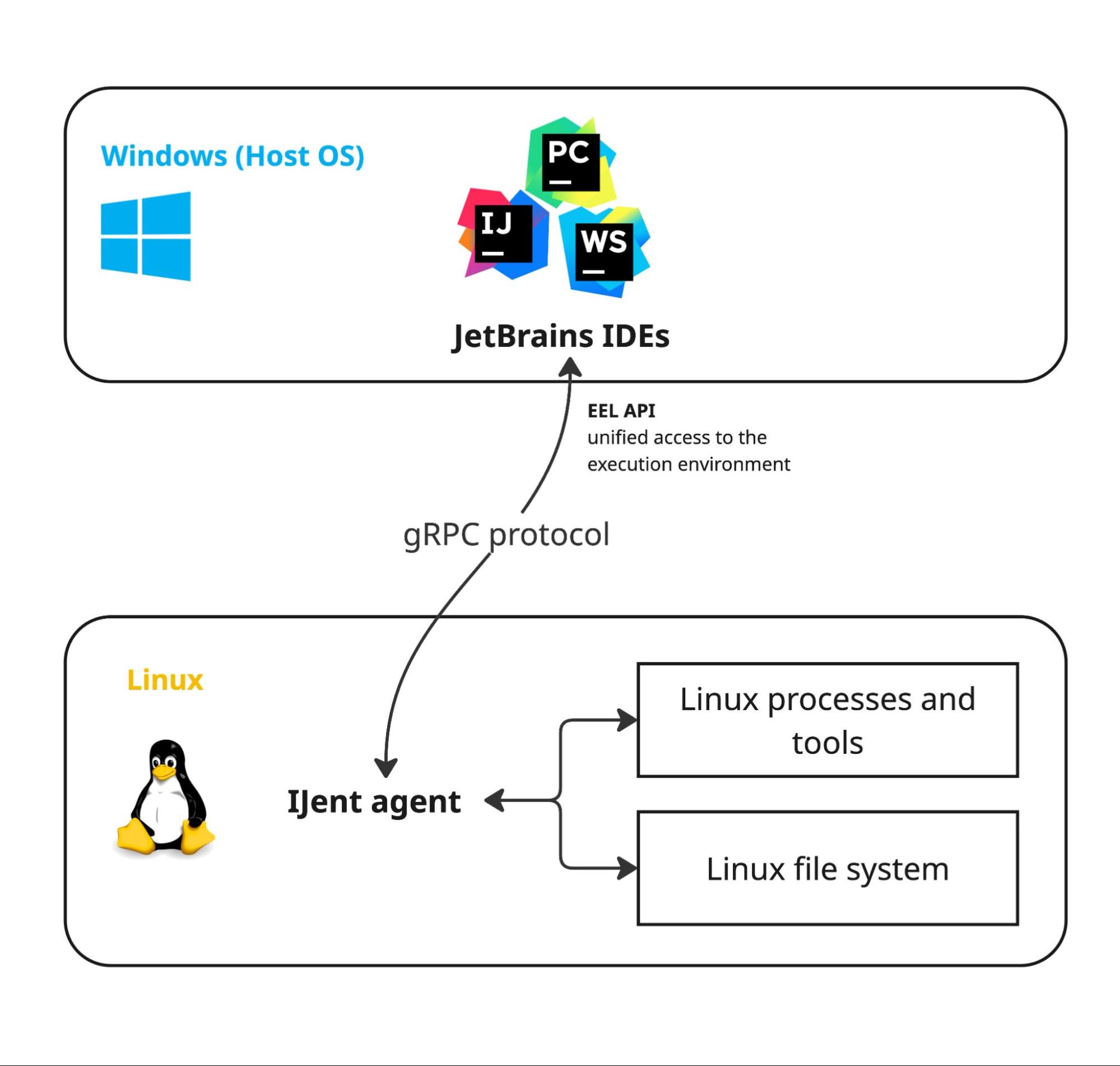
To provide access to the Linux filesystem, processes, and other environment resources without relying on 9P, GeneralCommandLine, or other second-class communication mechanisms, we developed a small agent named IJent. Because it is designed specifically for IDE scenarios, we can shape its behavior, protocol, and capabilities according to our requirements.
Together, the IDE and IJent form a client–server pair. This may resemble the Remote Development model, but the server component is much thinner and, at the same time, more versatile. Installing IJent into a WSL environment is merely one of several possible configurations; the same model can also apply to Docker and Dev Containers.
By choosing this particular technology stack, we address a broad set of concerns:
- Rust implementation – Rust keeps the executable slim. By avoiding Java/Kotlin for the agent, we eliminate additional runtime dependencies inside containers or WSL.
- Transport layer – Stdio gives us a portable, firewall-friendly transport across all environments. Hyper-V sockets on WSL offer a faster path, which is especially beneficial for large or numerous filesystem transfers.
- Correct filesystem semantics – IJent executes filesystem operations on behalf of the IDE inside the target environment. As a result, path resolution, including symbolic links, follows correct Linux semantics rather than being mediated through 9P. Third-party plugins also benefit from this model, since their file operations are routed through IJent.
EelApi: one interface for any environment
For the IDE to fully benefit from IJent, changes on the IDE side are also required. Enter EelAPI.
EelApi is an API designed to abstract away the distinction between local and remote environments for everyone writing IDE-related code – plugin authors and platform contributors alike. With EelApi, the underlying environment against which the IDE operates should no longer matter, removing the need to account for these concerns explicitly in code. In this sense, EelApi is platform-agnostic, and the IDE can remain unaware of whether it is working locally, in WSL, in Docker, or in a Dev Container.
In general, IJent implements the EelApi interface, providing the actual functionality that EelApi exposes to the IDE and plugins.
If you’re interested in a more detailed explanation of EelApi, together with a practical introduction to the topic, head over to the article The Dev Containers Story: Introducing EelApi for Plugin Authors.
What this means in practice
There are two ways to open a WSL project today:
- Opening the project directly gives you Native mode in IntelliJ IDEA, WebStorm, and PhpStorm, and more IDEs are adopting the IJent and EelApi architecture as we speak.
- The Remote Development entry point on the Welcome screen still works, but it is no longer the recommended way to open a WSL project.
We conducted performance tests in order to compare 9P mode and Native mode. The results show a clear performance gain in favor of the new approach:
Where this applies: A cold first open of spring-framework, with 23 subprojects and 8,191 source files. A small project with few source files showed no measurable difference.
Test setup: Median of five measured runs on Windows 11 with WSL 2, Ubuntu 24.04, and IntelliJ IDEA Ultimate 263.SNAPSHOT.
Beyond performance, this architecture places development in WSL within the broader context of development in non-local environments, allowing them to be approached through the same underlying model. The same IJent agent already backs our work on Docker and Dev Containers.
Thank you for reading and for all the feedback that helped us reach this point. Tell us how Native mode holds up against your projects in the comments below.
Subscribe to JetBrains Platform updates