




惯性聚合 高效追踪和阅读你感兴趣的博客、新闻、科技资讯
阅读原文 在惯性聚合中打开

推荐订阅源

Simon Willison's Weblog
G
Google Developers Blog
Spread Privacy
Spread Privacy
I
InfoQ
V
V2EX
S
Schneier on Security
小众软件
小众软件
C
CERT Recently Published Vulnerability Notes
博客园 - 聂微东
奇客Solidot–传递最新科技情报
奇客Solidot–传递最新科技情报
Stack Overflow Blog
Stack Overflow Blog
T
Threat Research - Cisco Blogs
L
Lohrmann on Cybersecurity
Recent Announcements
Cyber Security Advisories - MS-ISAC
Attack and Defense Labs
云风的 BLOG
云风的 BLOG
The Hacker News
The Hacker News
S
SegmentFault 最新的问题
C
Cybersecurity and Infrastructure Security Agency CISA
NISL@THU
NISL@THU
OSCHINA 社区最新新闻
OSCHINA 社区最新新闻
GbyAI
GbyAI
Latest news
Latest news
S
Secure Thoughts
Project Zero
Project Zero
MongoDB | Blog
MongoDB | Blog
I
Intezer
Security Latest
Security Latest
Apple Machine Learning Research
Vercel News
Vercel News
N
Netflix TechBlog - Medium
V2EX - 技术
V2EX - 技术
量子位
T
Threatpost
T
The Blog of Author Tim Ferriss
Y
Y Combinator Blog
T
Tor Project blog
A
Arctic Wolf
Microsoft Security Blog
T
The Exploit Database - CXSecurity.com
大猫的无限游戏
大猫的无限游戏
T
Tailwind CSS Blog
freeCodeCamp Programming Tutorials: Python, JavaScript, Git & More
C
Check Point Blog
博客园 - Franky
Google DeepMind News
The Register - Security
The GitHub Blog
The GitHub Blog
L
LINUX DO - 热门话题

Qute

我的世界 Minecraft 开服指南 - Qute Windows 实用软件推荐(持续更新) - Qute 最近那些折腾 - Qute Self-hosted LiveSync插件实现Obsidian实时同步 - Qute RSS订阅折腾记 - Qute Microsoft 365 全局绑定自己的域名邮箱 - Qute Google One科学上网探索 - Qute 简悦——浏览器扩展推荐 - Qute 本地Markdown图片自动上传图床 - Qute
设置onedrive同步任意指定文件夹 - Qute
Misaka · 2023-01-17 · via Qute

请注意,本文编写于 1244 天前,最后修改于 1244 天前,其中某些信息可能已经过时。

首先找到自己ondrive在本地的位置,例如:
D:\MyOnedrive\OneDrive - Misaka
找到自己想同步的文件夹在本地位置,例如
D:\note
这里以上述两个地址为例
复制这两个链接
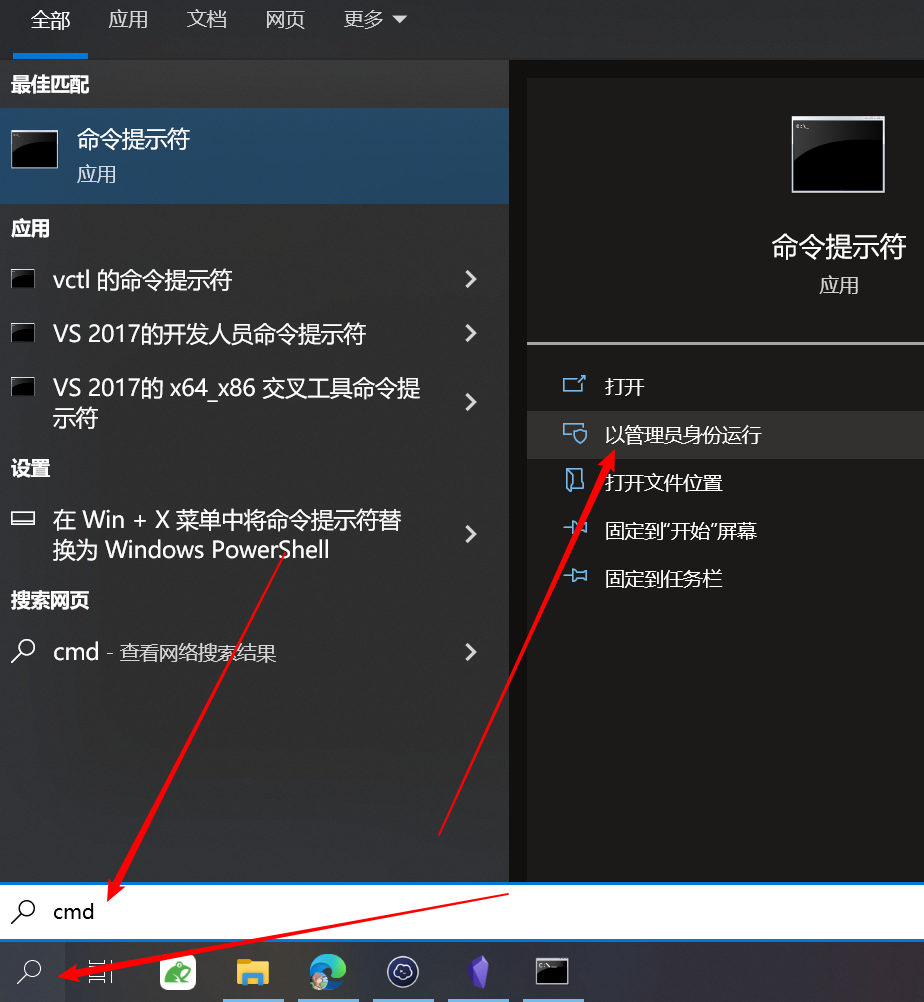
搜索cmd并以管理员身份运行cmd,如下图
Pasted image 20230115010406.png

在命令行中输入

mklink/d "D:\MyOnedrive\OneDrive - Misaka\note" "D:\note"

替换以上引号中的地址内容回车即可(引号不要去掉)
注:地址中ondrive在本地的位置后面要加上与自己想要同步的文件夹同名的内容,例如上面的note,在onedrive中不要提前创建同名的文件夹
语法mklink [options] <Link> <Target>
成功后会显示为 D:\MyOnedrive\OneDrive - Misaka\note <<===>> D:\note 创建的符号链接,如下图

Pasted image 20230115011141.png

如果你想取消链接删除文件即可


本文作者:Qute

本文链接:https://blog.wfso.cn/archives/59/

版权声明:转载时须注明出处及本声明