









Joe 是 Typecho 博客中一款开源免费且非常精美的主题,但是这款主题很早就停止维护了,有些功能作者并没有开发,并且在 Typecho 更新到 1.2.1 版本后还出现了一些小问题
Joe 主题的知名度很高,所以在原作者停止维护后很多大佬发布过自己魔改的版本,魔改后的主题修复了 BUG 而且新增了很多的功能,但是大佬都是基于自己的想法魔改的,我个人觉得有些过于花里胡哨,所以我决定自己动手只做微调,保证 Joe 的原汁原味,本次主要调整了两点
1. 修复(或者说适配)了 Joe 主题在 Typecho 1.2.1 版本中搜索关键字不回显的问题
2. 在文章详情页侧边栏添加了导航目录模块,如果文章中包含 H1 H2 H3 等标题元素时会生成导航目录
主要就这两点修改其他地方基本没动,我将该主题命名为 Joe 优化版并在结尾给出下载地址,哪怕只有这两点您也觉得改动大,或介意使用第三方修改过的主题或其他原因也没关系,后面我会详细说明修改步骤可自行修改
适配/修复搜索关键字回显
问题截图:
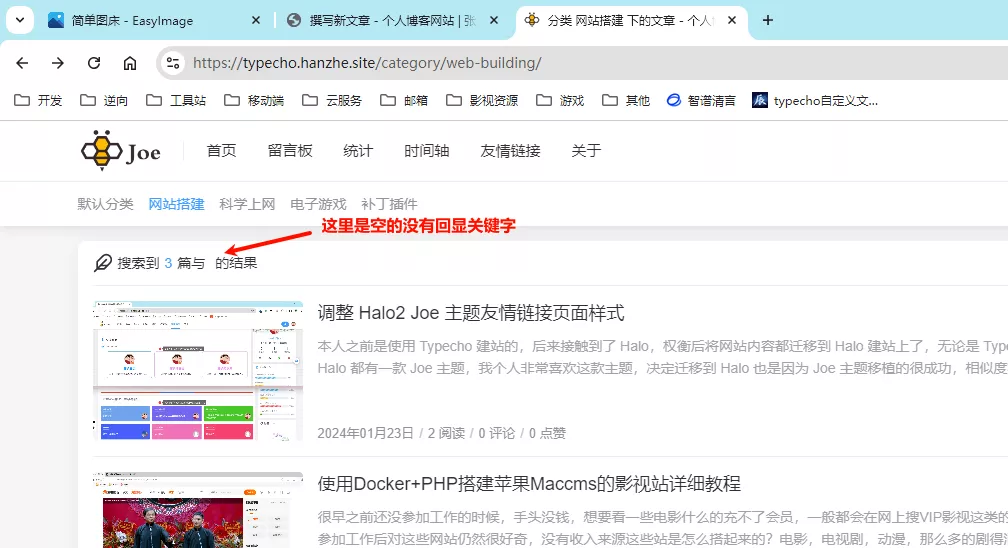
据猜测只有在使用 Typecho 1.2.1 以上版本才会出现这个问题,这并不是 BUG 只是主题并没有适配新版,看了一下源码后发现只是简单的取值问题而已,改几个字母就可以了,可以直接在服务器上改也可以在本地修改后上传至服务器
找到主题文件夹所在位置,编辑/archive.php文件,大概在25行左右可以看到他取值为_keywords,把这个值改成archiveTitle即可解决问题
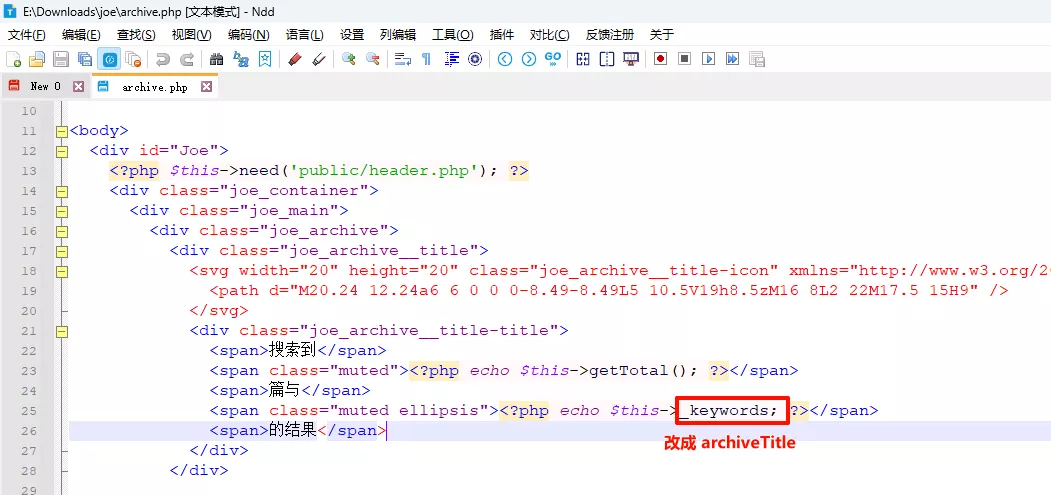
侧边导航菜单目录
该功能并非我原创,是照搬他人代码后做少量调整并整合进主题中,点击查看原作者文章
这个功能对我诱惑很大,去年因为这个功能我从 Typecho 转到 Halo(国产 Java 编写的网站构建工具),并且有大佬把 Joe 主题移植过去实现了导航目录,但当我真正使用 Halo 后发现生态不是很完善,性能不强且有很多细小的 BUG,兜兜转转又回到了 Typecho,并最终实现了导航目录的效果
添加侧边组件
编辑/public/aside.php文件,这个文件包含了所有侧边栏组件,在博主栏和人生倒计时中间插入下面这段代码
<?php if (($this->is('post') || $this->is('page')) : ?>
    <section class="joe_aside__item catalogue">
        <div class="joe_aside__item-title">
            <svg class="icon" viewBox="0 0 1024 1024" version="1.1" xmlns="http://www.w3.org/2000/svg" p-id="2084" width="18" height="18"><path d="M640 192H224c-17.7 0-32-14.3-32-32s14.3-32 32-32h416c17.7 0 32 14.3 32 32s-14.3 32-32 32zM960 544H224c-17.7 0-32-14.3-32-32s14.3-32 32-32h736c17.7 0 32 14.3 32 32s-14.3 32-32 32zM640 896H224c-17.7 0-32-14.3-32-32s14.3-32 32-32h416c17.7 0 32 14.3 32 32s-14.3 32-32 32zM96 192H64c-17.7 0-32-14.3-32-32s14.3-32 32-32h32c17.7 0 32 14.3 32 32s-14.3 32-32 32zM96 544H64c-17.7 0-32-14.3-32-32s14.3-32 32-32h32c17.7 0 32 14.3 32 32s-14.3 32-32 32zM96 896H64c-17.7 0-32-14.3-32-32s14.3-32 32-32h32c17.7 0 32 14.3 32 32s-14.3 32-32 32z" p-id="2085"></path></svg>
            <span class="text">导航目录</span>
            <span class="line"></span>
        </div>
        <div class="joe_aside__item-contain">
            <ul class="catalogue-items">
            </ul>
        </div>
    </section>
<?php endif; ?>
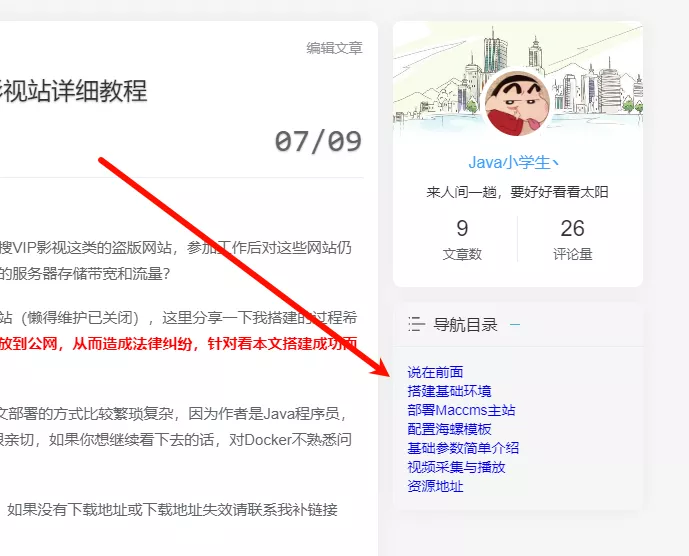
刷新页面后可以看到,导航目录的雏形已经出现了
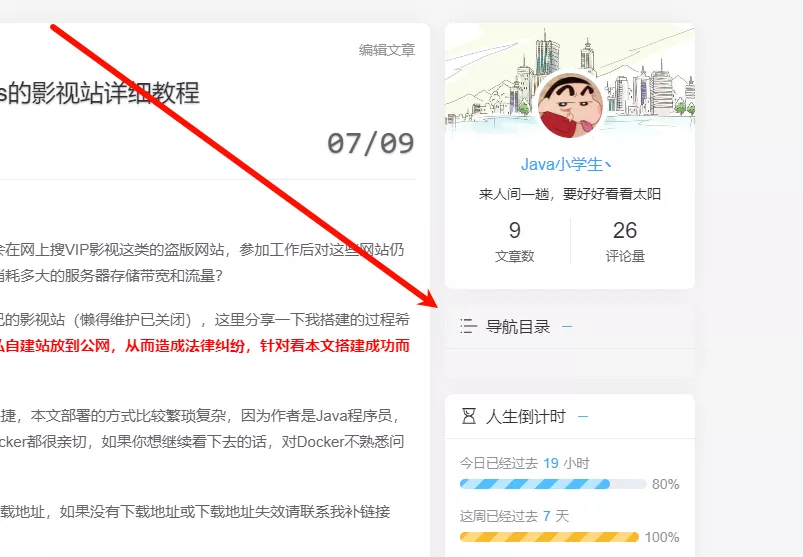
编写JS生成目录
接下来修改/assets/js/joe.post_page.min.js文件,在文件开头的第一个大括号后面添加下面这段代码
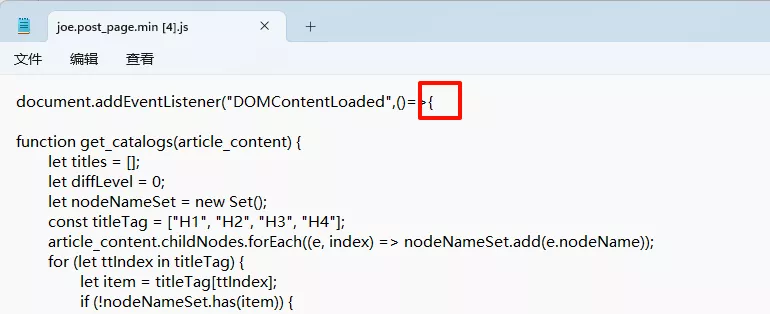
function get_catalogs(article_content) {
    let titles = [];
    let diffLevel = 0;
    let nodeNameSet = new Set();
    const titleTag = ["H1", "H2", "H3", "H4"];
    article_content.childNodes.forEach((e, index) => nodeNameSet.add(e.nodeName));
    for (let ttIndex in titleTag) {
        let item = titleTag[ttIndex];
        if (!nodeNameSet.has(item)) {
            diffLevel++
        } else {
            break
        }
    }
    article_content.childNodes.forEach((e, index) => {
        const id = "header-" + index;
        if (titleTag.includes(e.nodeName)) {
            titles.push({
                id: id,
                text: e.textContent,
                level: Number(e.nodeName.substring(1, 2) - diffLevel)
            });
            e.setAttribute("id", id)
        }
    });
    return titles
}
article_content = document.querySelector('.joe_detail__article');
if (article_content) {
    var catalog = get_catalogs(article_content);
    if (catalog.length == 0) {
        $('.catalogue').hide()
    } else {
        let asideArr = ['timelife', 'today', 'hot', 'newreply', 'weather', 'tags', 'flatterer'];
        asideArr.forEach(item => $('.joe_aside__item.' + item).remove());
        let catalogue = '';
        for (let i = 0; i < catalog.length; i++) {
            let node = '<li class="catalogue-item"><a href="javascript:;" id="to-' + catalog[i].id + '" to="' + catalog[i].id + '" title="' + catalog[i].text + '"><span class="dir_name">' + catalog[i].text + '</span></a>';
            if (i == catalog.length - 1) {
                catalogue += node + '</li>'
            } else {
                if (catalog[i + 1].level == catalog[i].level) {
                    catalogue += node + '</li>'
                } else if (catalog[i + 1].level > catalog[i].level) {
                    catalogue += (catalog[i + 1].level > 1) ? node + '<ul class="level-' + catalog[i + 1].level + '">' : node + '</li>'
                } else {
                    if (catalog[i + 1].level - catalog[i].level == -2) {
                        catalogue += i > 1 ? node + '</li></ul></li></ul></li>' : node + '</li></ul></li>'
                    } else {
                        catalogue += i > 1 ? node + '</li></ul></li>' : node + '</li>'
                    }
                }
            }
        }
        document.querySelector('.catalogue-items').innerHTML = catalogue;
        $('.catalogue-item > a').on('mouseenter', function() {
            $(this).parent().addClass('_active')
        });
        $('.catalogue-item > a').on('mouseleave', function() {
            $(this).parent().removeClass('_active')
        });
        $('.catalogue-item > a').on('click', function() {
            document.removeEventListener("scroll", autoActive);
            $('.catalogue-item').removeClass('active');
            $(this).parent().addClass('active');
            let aim = document.querySelector('#' + $(this).attr('to'));
            let aim_top = aim.offsetTop;
            let aim_h = aim.clientHeight;
            let above_h = document.querySelector('.joe_header__above').clientHeight;
            let below_h = document.querySelector('.joe_header__below').clientHeight;
            let offset = 0;
            let case1 = !document.querySelector('.joe_header__above').className.includes('active');
            let case2 = document.getElementsByTagName("html")[0].scrollTop + above_h > aim_top;
            if (case1 && case2) {
                offset = above_h
            }
            window.scrollTo({
                top: aim_top - offset - below_h - 10,
                behavior: 'smooth'
            });
            setTimeout(() => {
                document.addEventListener("scroll", autoActive)
            }, 500)
        });
        if (catalog.length) $('.catalogue-item').eq(0).addClass('active');
        let autoActive = function() {
            let html_top = document.getElementsByTagName("html")[0].scrollTop;
            let contain = $(".joe_aside__item.catalogue .joe_aside__item-contain");
            for (let i = 0; i < catalog.length; i++) {
                let offset = 0;
                let h_id = '#' + catalog[i].id;
                let h_offset = document.querySelector(h_id).offsetTop;
                let above_h = document.querySelector('.joe_header__above').clientHeight;
                let below_h = document.querySelector('.joe_header__below').clientHeight;
                if (!document.querySelector('.joe_header').className.includes('active')) offset = above_h;
                if (h_offset + below_h + offset + 10 >= html_top) {
                    $('.catalogue-item').removeClass('active');
                    if (i > 0 && i < catalog.length - 1 && document.querySelector('#' + catalog[i].id).offsetTop > html_top + window.innerHeight * 0.2) {
                        i--
                    }
                    $('#to-' + catalog[i].id).parent().addClass('active');
                    break
                }
            }
        };
        document.addEventListener("scroll", autoActive)
    }
} else {
    $('.catalogue').hide()
}
刷新页面后可以看到,目录的基本结构已经出来了,为了保证导航目录的显示效果,在有目录的页面其他侧边组件会被移除
编写CSS美化目录
后面就是样式问题了,接下来修改/assets/css/joe.post.min.css在文件末尾添加下面这段CSS
.joe_aside__item.catalogue{margin-bottom:15px;transition:top 0.35s;background:var(--background)}
.joe_aside__item.catalogue .joe_aside__item-contain{padding:0;margin:0;margin-left:10px;max-height:500px;overflow-y:auto}
.joe_aside__item.catalogue .joe_aside__item-contain::-webkit-scrollbar{width:3px}
.joe_aside__item.catalogue .joe_aside__item-contain .catalogue-items{border-left:2px solid var(--classC);padding:10px 15px}
.joe_aside__item.catalogue .joe_aside__item-contain .catalogue-items .catalogue-item{margin:0;padding:0;line-height:26px;font-size:15px}
.joe_aside__item.catalogue .joe_aside__item-contain .catalogue-items .catalogue-item a{position:relative;display:block;line-height:26px;color:var(--main);transition:color 0.5s}
.joe_aside__item.catalogue .joe_aside__item-contain .catalogue-items .catalogue-item a:hover{color:var(--theme)}
.joe_aside__item.catalogue .joe_aside__item-contain .catalogue-items .catalogue-item._active>a,.joe_aside__item.catalogue .joe_aside__item-contain .catalogue-items .catalogue-item.active>a{color:var(--theme)}
.joe_aside__item.catalogue .joe_aside__item-contain .catalogue-items .catalogue-item._active>a::before,.joe_aside__item.catalogue .joe_aside__item-contain .catalogue-items .catalogue-item.active>a::before{content:"";position:absolute;left:-17px;top:0;width:2px;height:26px;background-color:var(--theme);transition:height 0.35s}
.joe_aside__item.catalogue .joe_aside__item-contain .catalogue-items .catalogue-item .level-2>.catalogue-item,.joe_aside__item.catalogue .joe_aside__item-contain .catalogue-items .catalogue-item .level-3 .catalogue-item{font-size:14px}
.joe_aside__item.catalogue .joe_aside__item-contain .catalogue-items .catalogue-item .level-2 .catalogue-item._active>a::before,.joe_aside__item.catalogue .joe_aside__item-contain .catalogue-items .catalogue-item .level-2 .catalogue-item.active>a::before,.joe_aside__item.catalogue .joe_aside__item-contain .catalogue-items .catalogue-item .level-3 .catalogue-item._active>a::before,.joe_aside__item.catalogue .joe_aside__item-contain .catalogue-items .catalogue-item .level-3 .catalogue-item.active>a::before{left:-34px}
.joe_aside__item.catalogue .joe_aside__item-contain .catalogue-items .catalogue-item .level-2 .catalogue-item .level-3 .catalogue-item,.joe_aside__item.catalogue .joe_aside__item-contain .catalogue-items .catalogue-item .level-3 .catalogue-item .level-3 .catalogue-item{font-size:14px}
.joe_aside__item.catalogue .joe_aside__item-contain .catalogue-items .catalogue-item .level-2 .catalogue-item .level-3 .catalogue-item._active>a::before,.joe_aside__item.catalogue .joe_aside__item-contain .catalogue-items .catalogue-item .level-2 .catalogue-item .level-3 .catalogue-item.active>a::before,.joe_aside__item.catalogue .joe_aside__item-contain .catalogue-items .catalogue-item .level-3 .catalogue-item .level-3 .catalogue-item._active>a::before,.joe_aside__item.catalogue .joe_aside__item-contain .catalogue-items .catalogue-item .level-3 .catalogue-item .level-3 .catalogue-item.active>a::before{left:-51px}
.joe_aside__item.catalogue .joe_aside__item-contain .catalogue-items .catalogue-item .level-3>.catalogue-item{font-size:14px}
.joe_aside__item.catalogue .joe_aside__item-contain .catalogue-items .catalogue-item ul{padding-left:17px}
.joe_aside__item.catalogue .joe_aside__item-contain .catalogue-items ul{display:block;list-style-type:disc}
.joe_aside__item.catalogue .joe_aside__item-contain .catalogue-items .catalogue-item a span.dir_name{display:block;width:100%;overflow:hidden;white-space:nowrap;text-overflow:ellipsis}
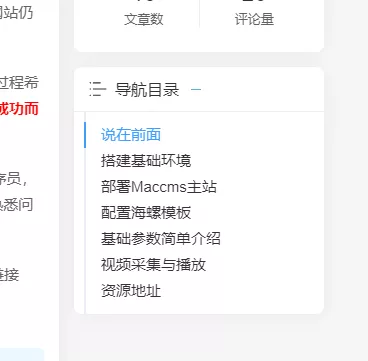
回过头来刷新页面,发现样式已经修改完成,原作者很给力CSS样式十分契合主题的风格
2024-09-10 v2
相较上一版做出如下调整,改动稍微有点大,这里代码太较啰嗦就不讲了
1. 调整导航目录样式,最大高度从500px缩减为400px,激活的目录字体加粗
2. 防止侧边目录过于空旷,将人生倒计时加了回来(可自行查看源码修改)
3. 将侧边栏从原来的单个停靠改成两个停靠(可自行查看源码修改)
4. 适当缩减人生倒计时组件的边距,防止两个侧边栏高度超出
2024-09-10 v3
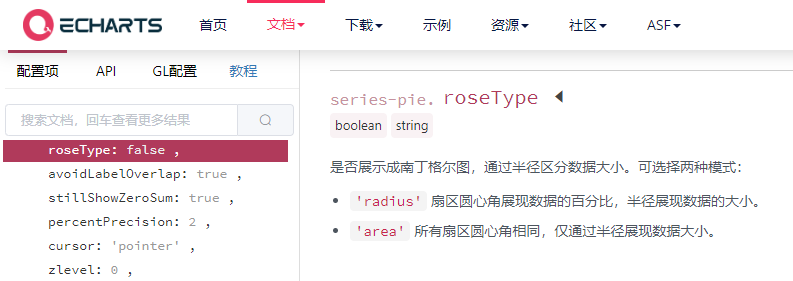
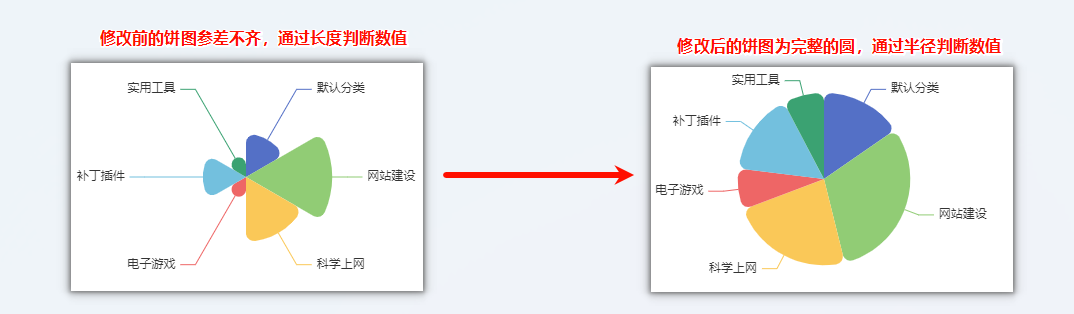
在 v2 的基础上修改了饼图的样式,Joe 统计页面的分类饼图是用 Echarts 绘制的,绘制饼图时使用了南丁格尔图,该饼图的特点是无论某一项的数值是多少半径始终保持不变,通过饼图的长度分辨数值的多少,这就导致饼图显得参差不齐,这里改回默认样式
代码位置在/assets/js/joe.census.min.js全局搜索roseType关键字即可,可参照 Echarts 官方文档 修改
2025-03-29 v4
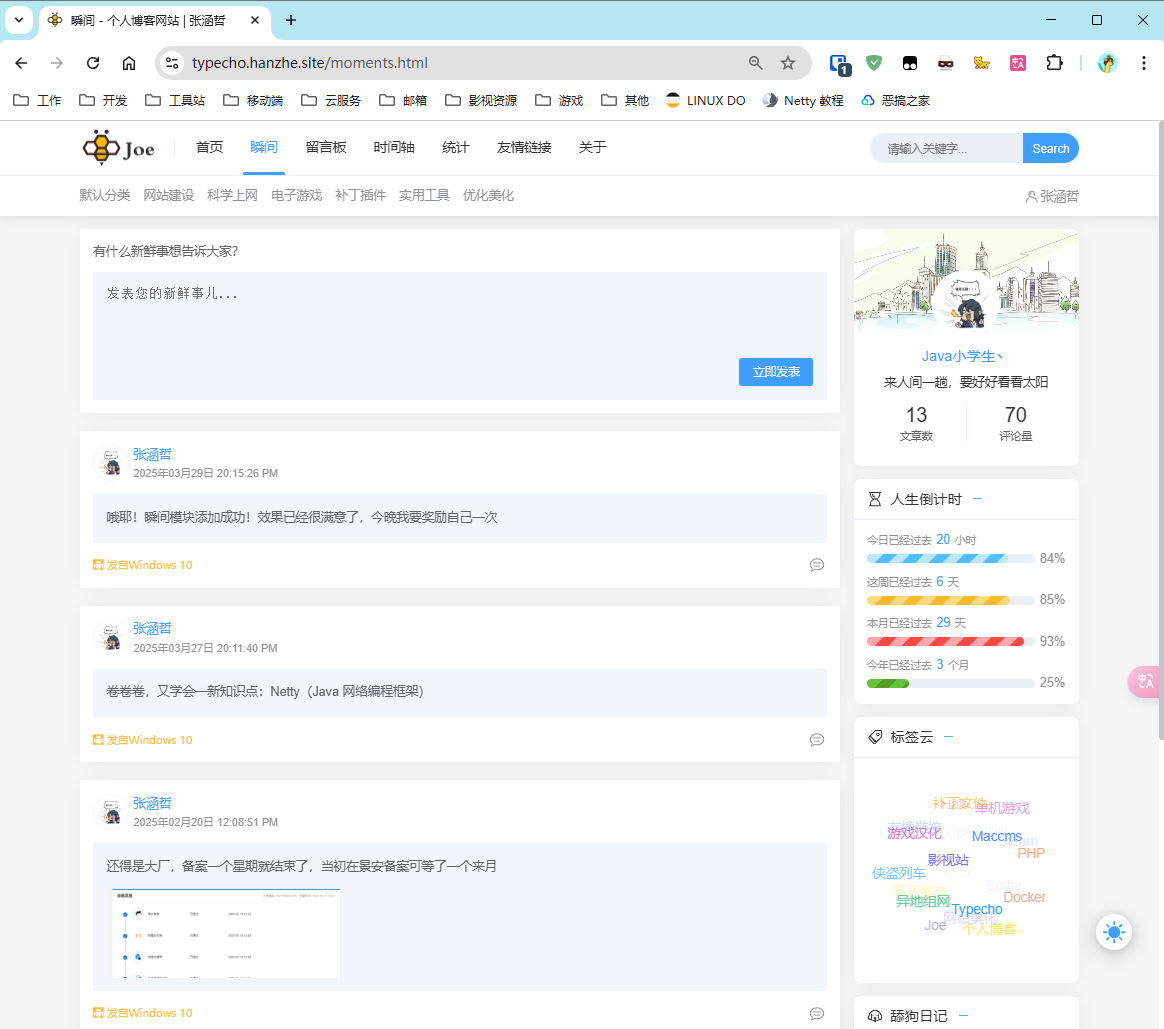
添加了瞬间/动态模块,可以实现类似朋友圈分享生活的功能,效果如下图所示,该功能应该算一次比较大的更新了,我会出一期新帖来介绍该功能的一些细节,感兴趣的可以捧个场点个赞
资源下载
可以下载我准备好的优化版主题包,保持主题文件夹名称一致,删除原主题后解压本主题即可,主题并未做大改动(也没那个能耐不懂 PHP)完全兼容可放心大胆的操作,不过为了以防万一我还是建议在删除旧主题前先备份