










由于 busuanzi 统计插件今年曾罢工了一段时间,然后就转到了 Vercount 统计。使用 Vercount 统计插件,发觉它功能更丰富,自定义程度高,兼容 busuanzi,还有统计面板,后续就一直使用了。这里说一下集成 Vercount 统计插件的过程,其实是跟 busuanzi 高度类似的。

提示
项目使用 Tailwind 进行了重构,本文组件样式都对此有所依赖,参见 我的 Tailwind 配置。如果不想使用 Tailwind,可以直接把代码扔给 AI,让其转化为一般 css
由于 Vercount 暂不支持 npm 安装,所以这里我们对引入稍作处理。
新建 useVisitData.ts 文件,然后再主题中心调用
.vitepress/theme/hooks/useVisitData.ts.vitepress/theme/index.ts
ts
/**
 * 网站访问量统计
 *
 * https://events.vercount.one/
 */
const useVisitData = () => {
  const script = document.createElement('script')
  script.defer = true
  script.async = true
  // 调用 Vercount 接口
  script.src = 'https://events.vercount.one/js'
  document.head.appendChild(script)
}

export default useVisitData
ts
import DefaultTheme from 'vitepress/theme'
import { EnhanceAppContext, inBrowser } from 'vitepress'
import useVisitData from './hooks/useVisitData' // 网站访问统计 vercount

export default {
  extends: DefaultTheme,
  enhanceApp({ app, router }: EnhanceAppContext) {
    if (inBrowser) {
      // 访问量统计,路由加载完成,在加载页面组件后(在更新页面组件之前)调用
      router.onAfterPageLoad = () => {
        useVisitData()
      }
    }
  }
}
使用方式跟 busuanzi 一致,对应 ID 显示对应统计量。而且 Vercount 兼容 Busuanzi 的 span 标签,数据会在首次访问时自动同步。
也就是说你仍然可以使用原来 busuanzi 的 ID,并且数据可以继承过来。
| Vercount ID | busaunzi ID | 说明 |
|---|---|---|
| vercount_value_site_pv | busuanzi_value_site_pv | 全站访问量 |
| vercount_value_site_uv | busuanzi_value_site_uv | 全站访客量 |
| vercount_value_page_pv | busuanzi_value_page_pv | 单个网页访问量 |
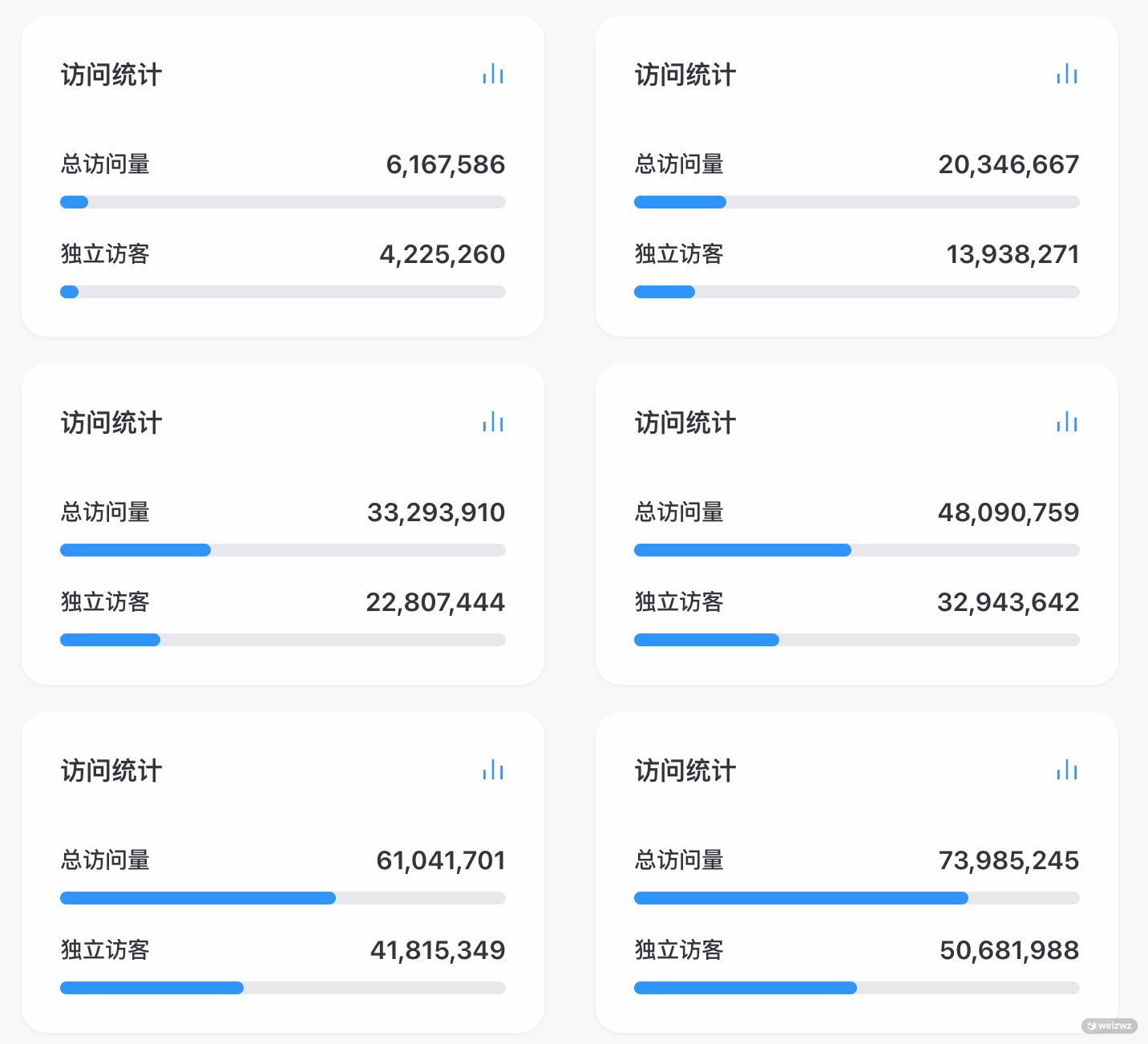
对于我们之前的统计组件,这里也做了代码更新和优化。注意事项:
.vitepress/theme/index.ts 中去,就可以全局使用了,要么就局部引用局部使用.vitepress/theme/components/WStatistics.vue.vitepress/utils/tools.ts
vue
<template>
  <div
    class="group bg-bg shadow-shadow relative flex h-full w-full flex-col overflow-hidden rounded-2xl p-6 shadow-xs transition-all duration-600 hover:shadow-xl"
  >
    <div class="mb-6 flex items-center justify-between">
      <div class="text-text1 text-lg font-bold">访问统计</div>
      <WIcon tag="count" class="w-4 h-4" />
    </div>
    <div class="flex flex-col gap-6">
      <div>
        <div class="mb-1 flex items-end justify-between">
          <span class="text-text2 text-sm font-bold">总访问量</span>
          <span class="text-text1 text-base font-bold" ref="pvEl">{{ pv }}</span>
        </div>
        <div class="h-2 w-full overflow-hidden rounded-full bg-gray-100 dark:bg-gray-700">
          <div class="bg-main h-full rounded-full" ref="pvBarEl" :style="{ width: defaultPvWidth }"></div>
        </div>
      </div>
      <div>
        <div class="mb-1 flex items-end justify-between">
          <span class="text-text2 text-sm font-bold">独立访客</span>
          <span class="text-text1 text-base font-bold" ref="uvEl">{{ uv }}</span>
        </div>
        <div class="h-2 w-full overflow-hidden rounded-full bg-gray-100 dark:bg-gray-700">
          <div class="bg-main h-full rounded-full" ref="uvBarEl" :style="{ width: defaultUvWidth }"></div>
        </div>
      </div>
    </div>
    <span id="vercount_value_site_pv" style="display: none" />
    <span id="vercount_value_site_uv" style="display: none" />
  </div>
</template>

<script setup lang="ts">
import { onMounted, ref } from 'vue'
import { getSessionStorage, setSessionStorage, numberWithCommas } from '../../utils/tools'
import WIcon from './WIcon.vue'

let sessionPv = getSessionStorage('pv')
let sessionUv = getSessionStorage('uv')
let defaultPvWidth = sessionPv ? '70%' : '0%'
let defaultUvWidth = sessionUv ? '45%' : '0%'
const pv = ref<string | number>(sessionPv ? numberWithCommas(parseInt(sessionPv)) : '♾️')
const uv = ref<string | number>(sessionUv ? numberWithCommas(parseInt(sessionUv)) : '♾️')

const pvEl = ref<HTMLElement | null>(null)
const pvBarEl = ref<HTMLElement | null>(null)
const uvEl = ref<HTMLElement | null>(null)
const uvBarEl = ref<HTMLElement | null>(null)

const MAX_RETRY_COUNT = 16 // 最大重试次数
const RETRY_DELAY = 500 // 重试间隔

// 统计数据获取状态
const statisticsState = {
  pv: { timeout: 0, retryCount: 0 },
  uv: { timeout: 0, retryCount: 0 }
}

// 通用的统计数据获取方法
const getStatisticsData = (type: 'pv' | 'uv') => {
  const config = {
    pv: {
      selector: '#vercount_value_site_pv',
      counterEl: pvEl.value,
      barEl: pvBarEl.value,
      targetPercentage: 75,
      ref: pv,
      storageKey: 'pv'
    },
    uv: {
      selector: '#vercount_value_site_uv',
      counterEl: uvEl.value,
      barEl: uvBarEl.value,
      targetPercentage: 50,
      ref: uv,
      storageKey: 'uv'
    }
  }

  const currentConfig = config[type]
  const state = statisticsState[type]

  if (state.timeout) clearTimeout(state.timeout)

  if (state.retryCount >= MAX_RETRY_COUNT) {
    console.warn(`${type.toUpperCase()}数据获取失败,已达到最大重试次数`)
    currentConfig.ref.value = '♾️'
    return
  }

  state.timeout = window.setTimeout(() => {
    const element = document.querySelector(currentConfig.selector)
    const text = element?.innerHTML?.trim()

    if (element && text && text !== '') {
      const storedVal = getSessionStorage(currentConfig.storageKey)
      const start = storedVal || '0'
      const hasSession = !!storedVal
      const calculatedStartPercentage = hasSession ? currentConfig.targetPercentage - 5 : 0

      currentConfig.ref.value = numberWithCommas(parseInt(text))
      setSessionStorage(currentConfig.storageKey, text)
      state.retryCount = 0 // 重置重试计数

      // 调用封装的函数
      animateNumberAndProgressBar({
        counterEl: currentConfig.counterEl,
        barEl: currentConfig.barEl,
        start: parseFloat(start),
        end: parseInt(text),
        totalDuration: 2000,
        minPercentage: 5,
        targetPercentage: currentConfig.targetPercentage,
        startPercentage: calculatedStartPercentage
      })
    } else {
      state.retryCount++
      getStatisticsData(type)
    }
  }, RETRY_DELAY)
}

// 简化的调用方法
const getPV = () => getStatisticsData('pv')
const getUV = () => getStatisticsData('uv')

interface AnimateOptions {
  counterEl: HTMLElement | null
  barEl: HTMLElement | null
  start?: number
  end: number
  totalDuration?: number
  minPercentage?: number
  targetPercentage?: number
  startPercentage?: number
}

// 统计数字动画
const animateNumberAndProgressBar = ({
  counterEl,
  barEl,
  start = 0,
  end,
  totalDuration = 2000,
  minPercentage = 5,
  targetPercentage = 75,
  startPercentage: explicitStartPercentage
}: AnimateOptions) => {
  // 如果开始和结束的数字相同,直接返回
  if (start == end) {
    return
  }

  if (!counterEl || !barEl) return

  // 调整进度条起始位置,要基本符合进度条的长度
  const maxNum = (end * 100) / targetPercentage
  let startPercentage = explicitStartPercentage ?? (start / maxNum) * 100

  let startTime: number | null = null
  const totalSteps = end - start

  function animateCounter(timestamp: number) {
    if (!startTime) startTime = timestamp
    const elapsed = timestamp - (startTime ?? timestamp)

    const progress = Math.min(elapsed / totalDuration, 1)
    const currentNumber = Math.floor(start + progress * totalSteps)
    let stepPercentage = progress * (targetPercentage - startPercentage)
    // 保证肉眼能看到至少5%的变化
    if (targetPercentage - startPercentage < minPercentage) {
      stepPercentage = progress * minPercentage
      startPercentage = targetPercentage - minPercentage
    }

    const currentProgress = startPercentage + stepPercentage

    counterEl!.textContent = numberWithCommas(currentNumber)
    barEl!.style.width = currentProgress + '%'

    if (barEl!.style.display !== 'block') {
      barEl!.style.display = 'block'
    }

    if (progress < 1) {
      requestAnimationFrame(animateCounter)
    }
  }

  barEl.style.width = startPercentage + '%'
  barEl.style.display = 'block'

  requestAnimationFrame(animateCounter)
}

onMounted(() => {
  getUV()
  getPV()
})
</script>
ts
/**
 * 读取 sessionStorage
 * @param key 键名
 * @returns 值或 null
 */
export const getSessionStorage = (key: string): string | null => {
  if (typeof window === 'undefined') return null
  try {
    return sessionStorage.getItem(key)
  } catch (e) {
    console.warn(`[getSessionStorage] Failed to read ${key}:`, e)
    return null
  }
}

/**
 * 设置 sessionStorage
 * @param key 键名
 * @param value 键值
 */
export const setSessionStorage = (key: string, value: string): void => {
  if (typeof window === 'undefined') return
  try {
    sessionStorage.setItem(key, value)
  } catch (e) {
    console.warn(`[setSessionStorage] Failed to write ${key}:`, e)
  }
}

/**
 * 文字统计 (中文字符按字数计,英文单词按1个计)
 * @param data 字符串
 * @returns 统计结果
 */
export const countWord = (data: string): number => {
  if (!data) return 0
  // 移除 Markdown 语法干扰(可选,视需求而定)
  const cleanData = data.replace(/!\[.*?\]\(.*?\)|\[.*?\]\(.*?\)|<.*?>/g, '')

  // 匹配中文字符、韩文、日文
  const cjkPattern = /[\u4E00-\u9FFF\u3400-\u4DBF\uF900-\uFAFF\u3040-\u309F\uAC00-\uD7AF]/g
  // 匹配英文单词、数字
  const wordPattern = /[a-zA-Z0-9_\u00C0-\u00FF]+/g

  const cjkMatches = cleanData.match(cjkPattern) || []
  const wordMatches = cleanData.match(wordPattern) || []

  return cjkMatches.length + wordMatches.length
}

/**
 * 数字千分位转换 1500 -> 1.5K,1500000 -> 1.5M
 * @param count 数字
 * @returns 格式化后的字符串
 */
export const countTransK = (count: number): string => {
  return new Intl.NumberFormat('en-US', {
    notation: 'compact',
    maximumFractionDigits: 1
  }).format(count)
}

/**
 * 将数字转化为千分位逗号分隔格式
 * @param num 数字
 * @returns 格式化后的字符串
 */
export const numberWithCommas = (num: number): string => {
  return num.toLocaleString('en-US')
}

/* #region format-date */
/**
 * 日期格式化程序
 * @param hasTime 是否包含时间
 * @returns Intl.DateTimeFormat 实例
 */
export const formatDate = (hasTime = false): Intl.DateTimeFormat => {
  const options: Intl.DateTimeFormatOptions = {
    year: 'numeric',
    month: '2-digit',
    day: '2-digit',
    ...(hasTime && {
      hour: '2-digit',
      minute: '2-digit',
      second: '2-digit',
      hour12: false
    })
  }
  return new Intl.DateTimeFormat('zh-CN', options)
}
/* #endregion format-date */.vitepress/theme/index.ts.vitepress/theme/components/WHome/index.vue
ts
import DefaultTheme from 'vitepress/theme'
import WStatistics from './components/WStatistics.vue'

export default {
  extends: DefaultTheme,
  enhanceApp({ app }) {
    // 注册自定义全局组件
    app.component('weiz-statistics', WStatistics)
  }
}
vue
<template>
  <div>
    <weiz-statistics />
  </div>
</template>参见 busuanzi - 单个网页统计,为单个文章显示统计信息

.vitepress/theme/components/WDocTitleMeta.vue.vitepress/utils/tools.ts
vue
<template>
  <div class="text-text2 flex flex-wrap items-center gap-2 pt-4 pb-6 text-sm leading-relaxed font-medium break-keep md:gap-4">
    <div class="flex items-center" title="发表于">
      <WIcon tag="created" class="text-text2! mr-1 w-4 h-4" />
      <span>发表于 {{ firstCommit }}</span>
    </div>
    <div class="flex items-center" title="更新于">
      <WIcon tag="updated" class="text-text2! mr-1 w-4 h-4" />
      <span>更新于 {{ lastUpdated }}</span>
    </div>
    <div class="flex items-center" title="字数">
      <WIcon tag="word" class="text-text2! mr-1 w-4 h-4" />
      <span>总字数 {{ wordCount }}</span>
    </div>
    <div class="flex items-center" title="阅读量">
      <WIcon tag="user" class="text-text2! mr-1 w-4 h-4" />
      <span>阅读量 {{ pv }}<span id="vercount_value_page_pv" class="hidden" /></span>
    </div>
  </div>
</template>

<script setup lang="ts">
import { useData } from 'vitepress'
import { ref, onMounted, computed, onUnmounted, nextTick, watch } from 'vue'
import { countWord, countTransK, formatDate } from '../../utils/tools'
import WIcon from './WIcon.vue'

const { frontmatter, page } = useData()

// 日期格式化
const dateFormatter = formatDate()
const format = (date: string | number | Date | undefined) => {
  if (!date) return ''
  return dateFormatter.format(new Date(date)).replace(/\//g, '-')
}

const firstCommit = computed(() => format(frontmatter.value.firstCommit))
const lastUpdated = computed(() => format(frontmatter.value.lastUpdated || page.value.lastUpdated))

// 字数统计
const wordCount = ref('')
const updateWordCount = () => {
  const docDomContainer = document.querySelector('#VPContent')
  const content = docDomContainer?.querySelector('.content-container .main')?.textContent || ''
  wordCount.value = countTransK(countWord(content))
}

// 阅读量 (使用 MutationObserver 替代轮询)
const pv = ref('♾️')
let observer: MutationObserver | null = null

const initPVObserver = () => {
  const pvEl = document.getElementById('vercount_value_page_pv')
  if (!pvEl) return

  // 如果已有内容,直接读取
  if (pvEl.textContent && pvEl.textContent.trim()) {
    const val = parseInt(pvEl.textContent.trim())
    if (!isNaN(val)) {
      pv.value = countTransK(val)
      return
    }
  }

  // 监听变化
  observer = new MutationObserver((mutations) => {
    for (const mutation of mutations) {
      if (mutation.type === 'childList' || mutation.type === 'characterData') {
        const text = pvEl.textContent?.trim()
        if (text) {
          const val = parseInt(text)
          if (!isNaN(val)) {
            pv.value = countTransK(val)
            observer?.disconnect() // 获取到值后停止监听
          }
        }
      }
    }
  })

  observer.observe(pvEl, { childList: true, characterData: true, subtree: true })
}

onMounted(() => {
  nextTick(() => {
    updateWordCount()
    initPVObserver()
  })
})

onUnmounted(() => {
  observer?.disconnect()
})

// 监听路由变化重新计算
watch(
  () => page.value.relativePath,
  () => {
    nextTick(() => {
      updateWordCount()
      pv.value = '...'
      observer?.disconnect()
      initPVObserver()
    })
  }
)
</script>
ts
/**
 * 读取 sessionStorage
 * @param key 键名
 * @returns 值或 null
 */
export const getSessionStorage = (key: string): string | null => {
  if (typeof window === 'undefined') return null
  try {
    return sessionStorage.getItem(key)
  } catch (e) {
    console.warn(`[getSessionStorage] Failed to read ${key}:`, e)
    return null
  }
}

/**
 * 设置 sessionStorage
 * @param key 键名
 * @param value 键值
 */
export const setSessionStorage = (key: string, value: string): void => {
  if (typeof window === 'undefined') return
  try {
    sessionStorage.setItem(key, value)
  } catch (e) {
    console.warn(`[setSessionStorage] Failed to write ${key}:`, e)
  }
}

/**
 * 文字统计 (中文字符按字数计,英文单词按1个计)
 * @param data 字符串
 * @returns 统计结果
 */
export const countWord = (data: string): number => {
  if (!data) return 0
  // 移除 Markdown 语法干扰(可选,视需求而定)
  const cleanData = data.replace(/!\[.*?\]\(.*?\)|\[.*?\]\(.*?\)|<.*?>/g, '')

  // 匹配中文字符、韩文、日文
  const cjkPattern = /[\u4E00-\u9FFF\u3400-\u4DBF\uF900-\uFAFF\u3040-\u309F\uAC00-\uD7AF]/g
  // 匹配英文单词、数字
  const wordPattern = /[a-zA-Z0-9_\u00C0-\u00FF]+/g

  const cjkMatches = cleanData.match(cjkPattern) || []
  const wordMatches = cleanData.match(wordPattern) || []

  return cjkMatches.length + wordMatches.length
}

/**
 * 数字千分位转换 1500 -> 1.5K,1500000 -> 1.5M
 * @param count 数字
 * @returns 格式化后的字符串
 */
export const countTransK = (count: number): string => {
  return new Intl.NumberFormat('en-US', {
    notation: 'compact',
    maximumFractionDigits: 1
  }).format(count)
}

/**
 * 将数字转化为千分位逗号分隔格式
 * @param num 数字
 * @returns 格式化后的字符串
 */
export const numberWithCommas = (num: number): string => {
  return num.toLocaleString('en-US')
}

/* #region format-date */
/**
 * 日期格式化程序
 * @param hasTime 是否包含时间
 * @returns Intl.DateTimeFormat 实例
 */
export const formatDate = (hasTime = false): Intl.DateTimeFormat => {
  const options: Intl.DateTimeFormatOptions = {
    year: 'numeric',
    month: '2-digit',
    day: '2-digit',
    ...(hasTime && {
      hour: '2-digit',
      minute: '2-digit',
      second: '2-digit',
      hour12: false
    })
  }
  return new Intl.DateTimeFormat('zh-CN', options)
}
/* #endregion format-date */.vitepress/theme/index.ts
ts
import DefaultTheme from 'vitepress/theme'
import WDocTitleMeta from './components/WDocTitleMeta.vue' //文章顶部

export default {
  extends: DefaultTheme,
  enhanceApp({ app }) {
    // 注册自定义全局组件
    app.component('weiz-title-meta', WDocTitleMeta)
  }
}参考 VitePress 的高级配置,我们在 Markdown 渲染器 里进行拦截,监听到有 h1 标签时,将此组件插入在 h1 后面
.vitepress/config/index.ts
ts
import { defineConfig } from 'vitepress'

export default defineConfig({
  //markdown配置
  markdown: {
    // 对markdown中的内容进行替换或者批量处理
    config: (md) => {
      // 创建 markdown-it 插件
      md.use((md) => {
        // 组件插入h1标题下
        md.renderer.rules.heading_close = (tokens, idx, options, env, slf) => {
          let htmlResult = slf.renderToken(tokens, idx, options)
          if (tokens[idx].tag === 'h1') htmlResult += `<weiz-title-meta />`
          return htmlResult
        }
      })
    }
  }
})
此内容由惯性聚合(RSS阅读器)自动聚合整理,仅供阅读参考。 原文来自 — 版权归原作者所有。