惯性聚合 高效追踪和阅读你感兴趣的博客、新闻、科技资讯
阅读原文 在惯性聚合中打开

推荐订阅源

罗磊的独立博客
U
Unit 42
N
Netflix TechBlog - Medium
人人都是产品经理
人人都是产品经理
Hugging Face - Blog
Hugging Face - Blog
腾讯CDC
小众软件
小众软件
V
Visual Studio Blog
T
Tailwind CSS Blog
Engineering at Meta
Engineering at Meta
博客园 - 叶小钗
GbyAI
GbyAI
爱范儿
爱范儿
雷峰网
雷峰网
Microsoft Azure Blog
D
DataBreaches.Net
博客园_首页
D
Docker
A
About on SuperTechFans
G
Google Developers Blog
I
InfoQ
T
The Blog of Author Tim Ferriss
V
V2EX
博客园 - Franky

DEV Community

Authentication Security Deep Dive: From Brute Force to Salted Hashing (With Java Examples) Why AI Systems Don’t Fail — They Drift Spilling beans for how i learn for exam😁"Reinforcement Learning Cheat Sheet" I Replaced Chrome with Safari for AI Browser Automation. Here's What Broke (and What Finally Worked) How Python Borrows Other People's Work The $40 Architecture: Processing 1 Billion API Requests with 99.99% Uptime Vibe Coding: A Workflow Guide (From Zero to SaaS) Most webhook security guides protect the wrong side. The scary part is delivery. Headless CMS for TanStack Start: Build a Blog with Cosmic EU Age Verification App "Hacked in 2 Minutes" — What Actually Happened Comfy Cloud’s delete function does not actually remove files Running AI Models on GPU Cloud Servers: A Beginner Guide Event-driven media intelligence with AWS Step Functions and Bedrock I scored 500 AI prompts across 8 quality dimensions — here's what broke How to Call Google Gemini API from Next.js (Free Tier, No Backend Needed) The Portal Protocol: Reclaiming Human Connection in the Age of AI How to Fix Your Team's Scattered Knowledge Problem With a Self-Hosted Forum Intro to tc Cloud Functors: A Graph-First Mental Model for the Modern Cloud Designing Multi-Tenant Backends With Both Ownership and Team Access I Built a Neumorphic CSS Library with 77+ Components — Here's What I Learned PostgreSQL Performance Optimization: Why Connection Pooling Is Critical at Scale Cómo construí un SaaS multi-rubro para gestionar expensas en Argentina con FastAPI + Vue 3 🚀 I Built an Ethical Hacking Scanner Tool – Open Source Project I Replaced /usage and /context in Claude Code With a Single Statusline A Pythonic Way to Handle Emails (IMAP/SMTP) with Auto-Discovery and AI-Ready Design I Collected 8.9 Million Polymarket Price Points — Here's What I Found About How Markets Really Move EcoTrack AI — Carbon Footprint Tracker & Dashboard Everyone's Using AI. No One Agrees How. 5 self-hosted ebook managers worth trying in 2026 Building Your First AI Agent with LangChain: From Chatbot to Autonomous Assistant
Stop Burning Tokens (and Brain Cells): A CLI Pomodoro Tim...
Sergey Korsi · 2026-04-26 · via DEV Community
Cover image for Stop Burning Tokens (and Brain Cells): A CLI Pomodoro Timer for Focused Coding

Sergey Korsik

While struggling with concentration, I've always forced myself to use techniques that help me stay in flow while still leaving room to stretch, grab some snacks, or prepare a matcha latte. Giving the brain time to stray away from a problem often helps to solve it in the 'background.'

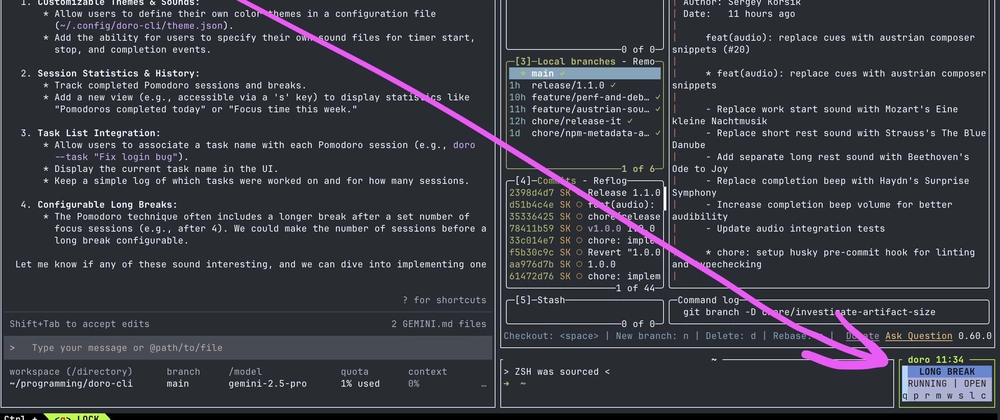
Nothing fits this better than the Pomodoro Technique. I used to use browser-based tools, but as my workflow shifted more toward the IDE and CLI (especially when 'vibecoding' with AI), I found myself forgetting to check the browser. I needed something fast, simple, and right in my terminal.

What's your focus setup?
Do you prefer browser-based timers, or are you a terminal purist like me? Also, if you have a favorite CLI productivity tool, drop it in the comments—I’m always looking to improve my workflow!

Getting Started

  1. Run npm i -g doro-cli (Requires Node.js)
  2. Run the doro command to start.

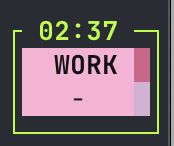
A terminal window showing the doro-cli interface with a countdown timer and hotkey options

Please check out the repository! I'd love to hear your feedback or see your contributions.

doro-cli

A minimal, keyboard-first, full-screen terminal Pomodoro timer with soft pastel themes and synthetic 8-bit audio cues.

Focus on your work, not your timer.

doro-cli demo

Features

  • Distraction-Free UI: Full-screen, minimalist design keeps you focused.
  • Keyboard-First: Navigate and control everything from your keyboard.
  • Responsive Layout: Adapts to any terminal size, from tiny to wide.
  • Color Themes: Switch between modern and calm themes with a keypress.
  • Audio Cues: Lightweight, generated 8-bit sounds for timer events (no media files needed).
  • Mouse Support: Optional mouse control for key actions.

Gallery

Small Medium (Text Hints) Medium (Icon Hints) Wide
Screenshot Small Screenshot Medium with Keys Screenshot Medium with Icons Screenshot Wide

Installation

Requires Node.js >= 22.

npm install -g doro-cli

Enter fullscreen mode Exit fullscreen mode

Once installed, just run doro in your terminal!

Quick Start (Build from source)

# Clone the repository
git clone https://github.com/dnim/doro-cli.git
cd doro-cli

# Install dependencies
npm install

# Build the project
npm run build

# Run it!
node dist/cli.js

Enter fullscreen mode Exit fullscreen mode

Development

Run in…

What's your focus setup?

Do you prefer browser-based timers, or are you a terminal purist like me? Also, if you have a favorite CLI productivity tool, drop it in the comments - whould be happy to try!


See other CLI Pomodoro alternatives
  • openpomodoro-cli - Built in Go, has a slightly different philosophy.
  • pomo - A bit more minimal; requires cloning the repo to set up.