









This guide covers the core set of principles you can apply to improve latency across a wide variety of LLM-related use cases. These techniques come from working with a wide range of customers and developers on production applications, so they should apply regardless of what you’re building – from a granular workflow to an end-to-end chatbot.
While there’s many individual techniques, we’ll be grouping them into seven principles meant to represent a high-level taxonomy of approaches for improving latency.
At the end, we’ll walk through an example to see how they can be applied.
Seven principles
- Process tokens faster.
- Generate fewer tokens.
- Use fewer input tokens.
- Make fewer requests.
- Parallelize.
- Make your users wait less.
- Don’t default to an LLM.
Inference speed is probably the first thing that comes to mind when addressing latency (but as you’ll see soon, it’s far from the only one). This refers to the actual rate at which the LLM processes tokens, and is often measured in TPM (tokens per minute) or TPS (tokens per second).
The main factor that influences inference speed is model size – smaller models usually run faster (and cheaper), and when used correctly can even outperform larger models. To maintain high quality performance with smaller models you can explore:
- using a longer, more detailed prompt,
- adding (more) few-shot examples, or
- fine-tuning / distillation.
You can also employ inference optimizations like our Predicted outputs feature. Predicted outputs let you significantly reduce latency of a generation when you know most of the output ahead of time, such as code editing tasks. By giving the model a prediction, the LLM can focus more on the actual changes, and less on the content that will remain the same.
Other factors that affect inference speed are the amount of compute you have available and any additional inference optimizations you employ.
Most people can’t influence these factors directly, but if you’re curious, and have some control over your infra, faster hardware or running engines at a lower saturation may give you a modest TPM boost. And if you’re down in the trenches, there’s a myriad of other
inference optimizations
that are a bit beyond the scope of this guide.
Generating tokens is almost always the highest latency step when using an LLM: as a general heuristic, cutting 50% of your output tokens may cut ~50% your latency. The way you reduce your output size will depend on output type:
If you’re generating natural language, simply asking the model to be more concise (“under 20 words” or “be very brief”) may help. You can also use few shot examples and/or fine-tuning to teach the model shorter responses.
If you’re generating structured output, try to minimize your output syntax where possible: shorten function names, omit named arguments, coalesce parameters, etc.
Finally, while not common, you can also use max_tokens or stop_tokens to end your generation early.
Always remember: an output token cut is a (milli)second earned!
While reducing the number of input tokens does result in lower latency, this is not usually a significant factor – cutting 50% of your prompt may only result in a 1-5% latency improvement. Unless you’re working with truly massive context sizes (documents, images), you may want to spend your efforts elsewhere.
That being said, if you are working with massive contexts (or you’re set on squeezing every last bit of performance and you’ve exhausted all other options) you can use the following techniques to reduce your input tokens:
- Fine-tuning the model, to replace the need for lengthy instructions / examples.
- Filtering context input, like pruning RAG results, cleaning HTML, etc.
- Maximize shared prompt prefix, by putting dynamic portions (e.g. RAG results, history, etc) later in the prompt. This makes your request more KV cache-friendly (which most LLM providers use) and means fewer input tokens are processed on each request.
Each time you make a request you incur some round-trip latency – this can start to add up.
If you have sequential steps for the LLM to perform, instead of firing off one request per step consider putting them in a single prompt and getting them all in a single response. You’ll avoid the additional round-trip latency, and potentially also reduce complexity of processing multiple responses.
An approach to doing this is by collecting your steps in an enumerated list in the combined prompt, and then requesting the model to return the results in named fields in a JSON. This way you can easily parse out and reference each result!
Parallelization can be very powerful when performing multiple steps with an LLM.
If the steps are not strictly sequential, you can split them out into parallel calls. Two shirts take just as long to dry as one.
If the steps are strictly sequential, however, you might still be able to leverage speculative execution. This is particularly effective for classification steps where one outcome is more likely than the others (e.g. moderation).
- Start step 1 & step 2 simultaneously (e.g. input moderation & story generation)
- Verify the result of step 1
- If result was not the expected, cancel step 2 (and retry if necessary)
If your guess for step 1 is right, then you essentially got to run it with zero added latency!
There’s a huge difference between waiting and watching progress happen – make sure your users experience the latter. Here are a few techniques:
- Streaming: The single most effective approach, as it cuts the waiting time to a second or less. (ChatGPT would feel pretty different if you saw nothing until each response was done.)
- Chunking: If your output needs further processing before being shown to the user (moderation, translation) consider processing it in chunks instead of all at once. Do this by streaming to your backend, then sending processed chunks to your frontend.
- Show your steps: If you’re taking multiple steps or using tools, surface this to the user. The more real progress you can show, the better.
- Loading states: Spinners and progress bars go a long way.
Note that while showing your steps & having loading states have a mostly psychological effect, streaming & chunking genuinely do reduce overall latency once you consider the app + user system: the user will finish reading a response sooner.
LLMs are extremely powerful and versatile, and are therefore sometimes used in cases where a faster classical method would be more appropriate. Identifying such cases may allow you to cut your latency significantly. Consider the following examples:
- Hard-coding: If your output is highly constrained, you may not need an LLM to generate it. Action confirmations, refusal messages, and requests for standard input are all great candidates to be hard-coded. (You can even use the age-old method of coming up with a few variations for each.)
- Pre-computing: If your input is constrained (e.g. category selection) you can generate multiple responses in advance, and just make sure you never show the same one to a user twice.
- Leveraging UI: Summarized metrics, reports, or search results are sometimes better conveyed with classical, bespoke UI components rather than LLM-generated text.
- Traditional optimization techniques: An LLM application is still an application; binary search, caching, hash maps, and runtime complexity are all still useful in a world of LLMs.
Let’s now look at a sample application, identify potential latency optimizations, and propose some solutions!
We’ll be analyzing the architecture and prompts of a hypothetical customer service bot inspired by real production applications. The architecture and prompts section sets the stage, and the analysis and optimizations section will walk through the latency optimization process.
You’ll notice this example doesn’t cover every single principle, much like real-world use cases don’t require applying every technique.
Architecture and prompts
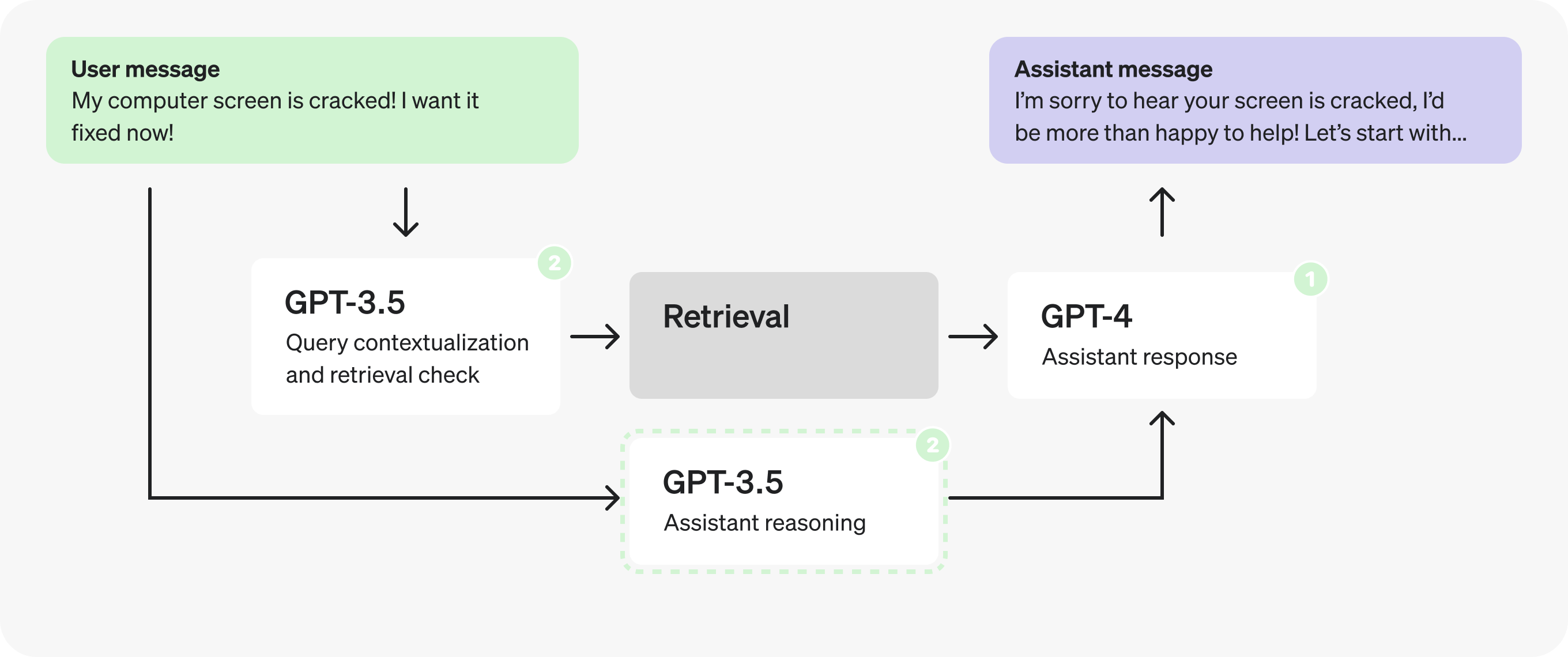
The following is the initial architecture for a hypothetical customer service bot. This is what we’ll be making changes to.
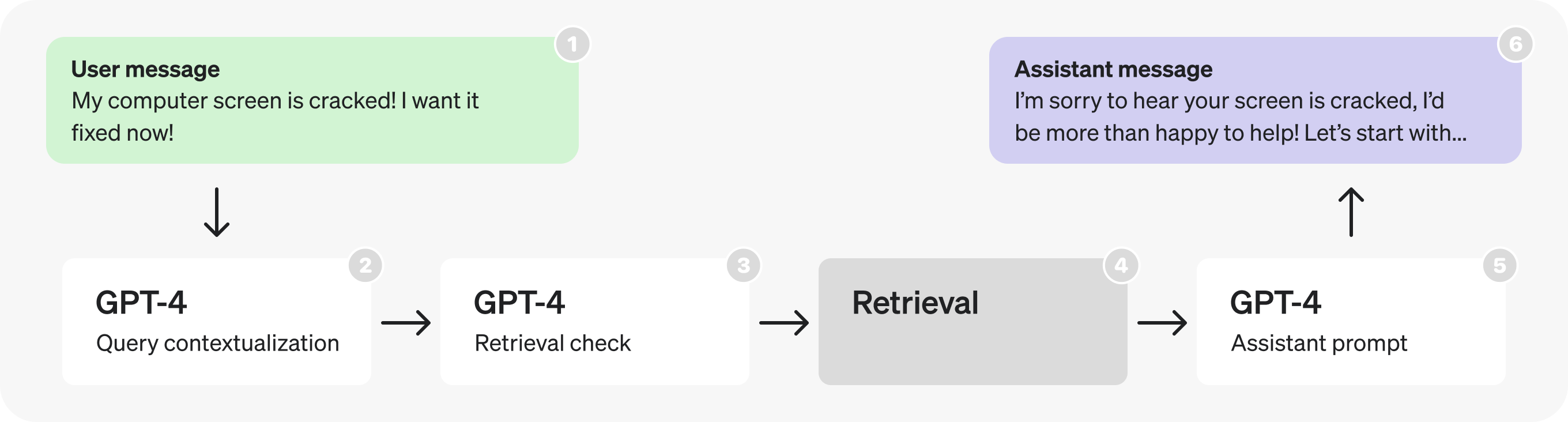
At a high level, the diagram flow describes the following process:
- A user sends a message as part of an ongoing conversation.
- The last message is turned into a self-contained query (see examples in prompt).
- We determine whether or not additional (retrieved) information is required to respond to that query.
- Retrieval is performed, producing search results.
- The assistant reasons about the user’s query and search results, and produces a response.
- The response is sent back to the user.
Below are the prompts used in each part of the diagram. While they are still only hypothetical and simplified, they are written with the same structure and wording that you would find in a production application.
Places where you see placeholders like “[user input here]” represent dynamic portions, that would be replaced by actual data at runtime.
Query contextualization prompt
Re-writes user query to be a self-contained search query.
SYSTEM: Given the previous conversation, re-write the last user query so it contains
all necessary context.

# Example
History: [{user: "What is your return policy?"},{assistant: "..."}]
User Query: "How long does it cover?"
Response: "How long does the return policy cover?"

# Conversation
[last 3 messages of conversation]

# User Query
[last user query]

USER: [JSON-formatted input conversation here]
Determines whether a query requires performing retrieval to respond.
SYSTEM: Given a user query, determine whether it requires doing a realtime lookup to
respond to.

# Examples
User Query: "How can I return this item after 30 days?"
Response: "true"

User Query: "Thank you!"
Response: "false"

USER: [input user query here]
Fills the fields of a JSON to reason through a pre-defined set of steps to produce a final response given a user conversation and relevant retrieved information.
SYSTEM: You are a helpful customer service bot.

Use the result JSON to reason about each user query - use the retrieved context.

# Example

User: "My computer screen is cracked! I want it fixed now!!!"

Assistant Response:
{
  "message_is_conversation_continuation": "True",
  "number_of_messages_in_conversation_so_far": "1",
  "user_sentiment": "Aggravated",
  "query_type": "Hardware Issue",
  "response_tone": "Validating and solution-oriented",
  "response_requirements": "Propose options for repair or replacement.",
  "user_requesting_to_talk_to_human": "False",
  "enough_information_in_context": "True",
  "response": "..."
}

USER: # Relevant Information
` ` `
[retrieved context]
` ` `

USER: [input user query here]
Analysis and optimizations
Part 1: Looking at retrieval prompts
Looking at the architecture, the first thing that stands out is the consecutive GPT-4 calls - these hint at a potential inefficiency, and can often be replaced by a single call or parallel calls.
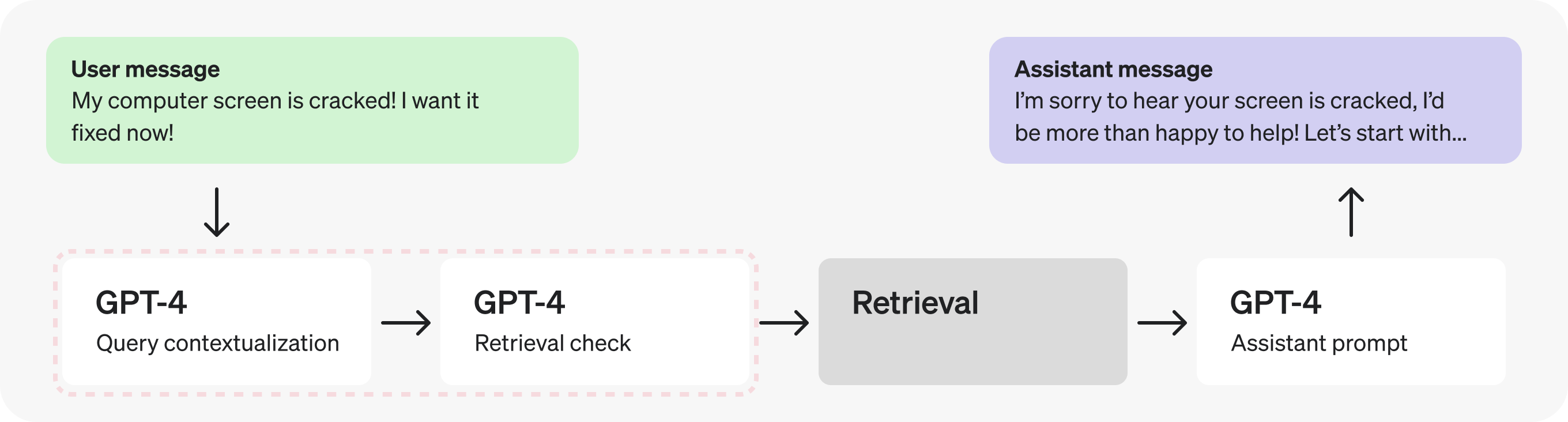
In this case, since the check for retrieval requires the contextualized query, let’s combine them into a single prompt to make fewer requests.
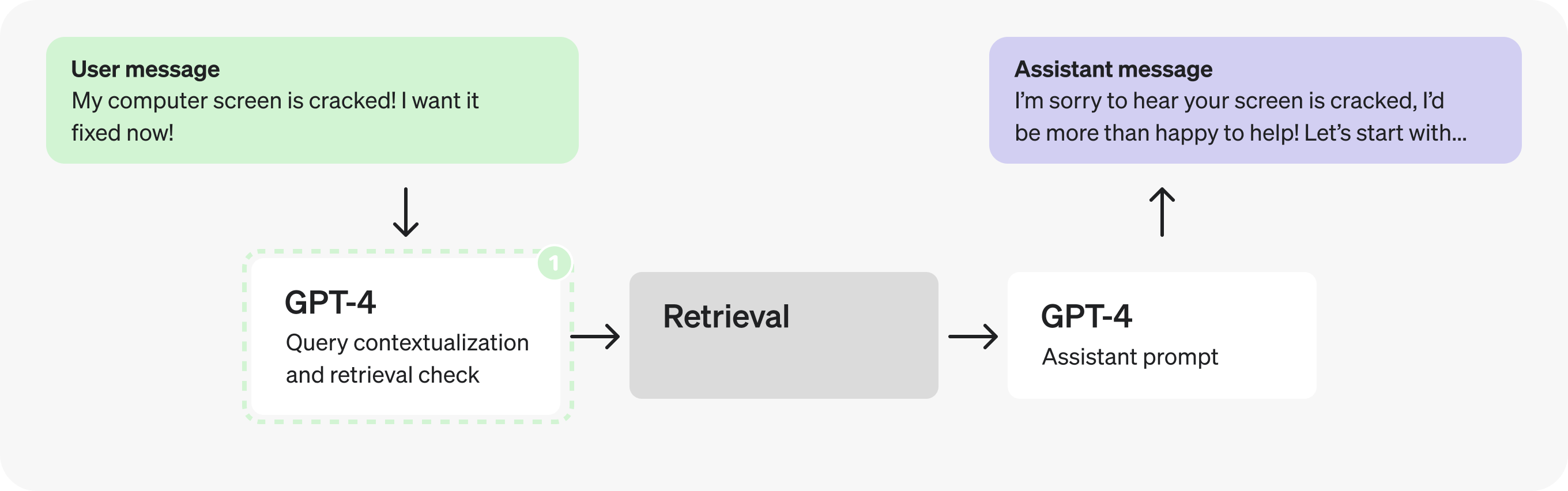
Combined query contextualization and retrieval check prompt
What changed? Before, we had one prompt to re-write the query and one to determine whether this requires doing a retrieval lookup. Now, this combined prompt does both. Specifically, notice the updated instruction in the first line of the prompt, and the updated output JSON:
1
2
3
4
{
  query:"[contextualized query]",
  retrieval:"[true/false - whether retrieval is required]"
}
SYSTEM: Given the previous conversation, re-write the last user query so it contains
all necessary context. Then, determine whether the full request requires doing a
realtime lookup to respond to.
Respond in the following form:
{
query:"[contextualized query]",
retrieval:"[true/false - whether retrieval is required]"
}
# Examples
History: [{user: "What is your return policy?"},{assistant: "..."}]
User Query: "How long does it cover?"
Response: {query: "How long does the return policy cover?", retrieval: "true"}
History: [{user: "How can I return this item after 30 days?"},{assistant: "..."}]
User Query: "Thank you!"
Response: {query: "Thank you!", retrieval: "false"}
# Conversation
[last 3 messages of conversation]
# User Query
[last user query]
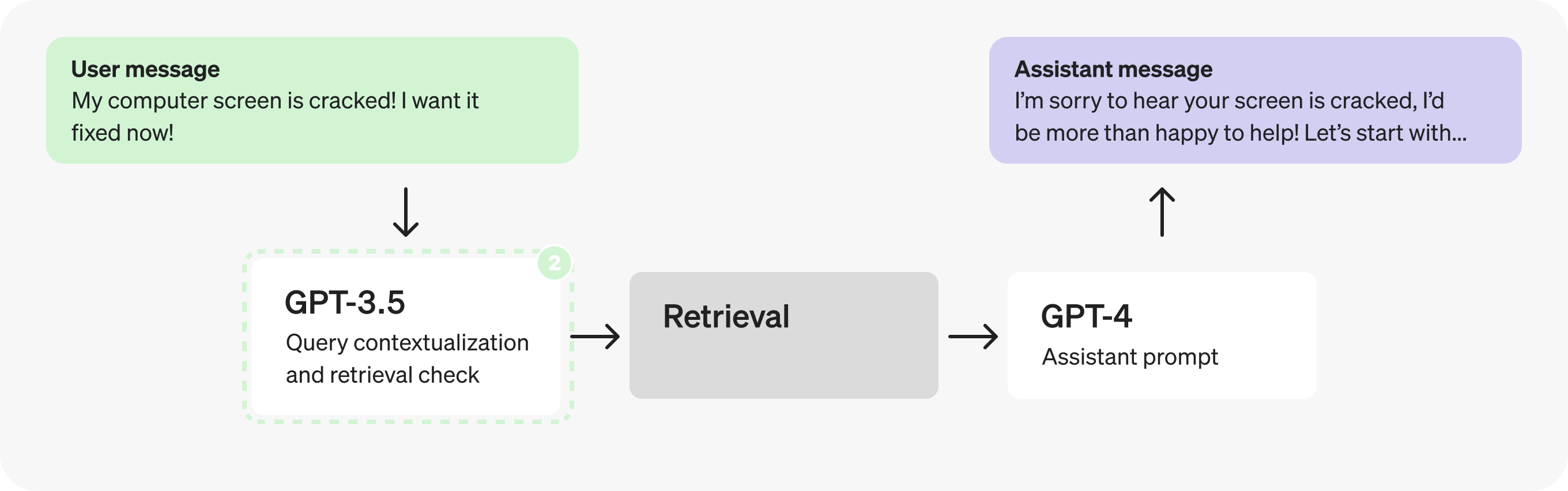
USER: [JSON-formatted input conversation here]Actually, adding context and determining whether to retrieve are very straightforward and well defined tasks, so we can likely use a smaller, fine-tuned model instead. Switching to GPT-3.5 will let us process tokens faster.
Part 2: Analyzing the assistant prompt
Let’s now direct our attention to the Assistant prompt. There seem to be many distinct steps happening as it fills the JSON fields – this could indicate an opportunity to parallelize.
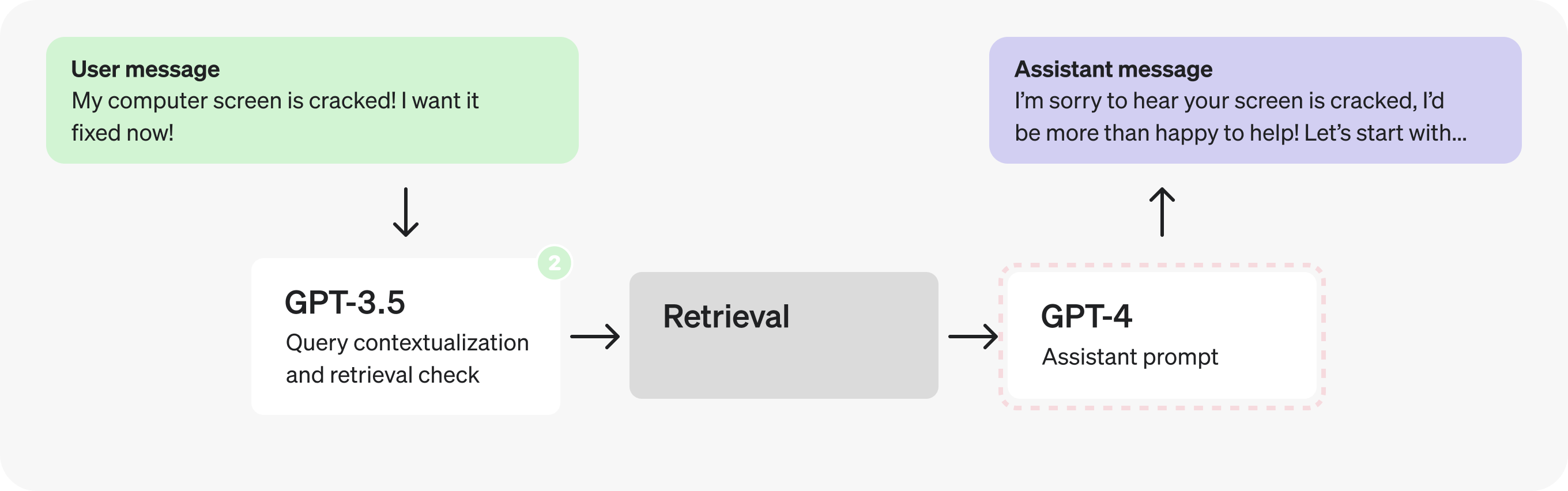
However, let’s pretend we have run some tests and discovered that splitting the reasoning steps in the JSON produces worse responses, so we need to explore different solutions.
Could we use a fine-tuned GPT-3.5 instead of GPT-4? Maybe – but in general, open-ended responses from assistants are best left to GPT-4 so it can better handle a greater range of cases. That being said, looking at the reasoning steps themselves, they may not all require GPT-4 level reasoning to produce. The well defined, limited scope nature makes them and good potential candidates for fine-tuning.
1
2
3
4
5
6
7
8
9
10
11
{
  "message_is_conversation_continuation": "True", // <-
  "number_of_messages_in_conversation_so_far": "1", // <-
  "user_sentiment": "Aggravated", // <-
  "query_type": "Hardware Issue", // <-
  "response_tone": "Validating and solution-oriented", // <-
  "response_requirements": "Propose options for repair or replacement.", // <-
  "user_requesting_to_talk_to_human": "False", // <-
  "enough_information_in_context": "True", // <-
  "response": "..." // X -- benefits from GPT-4
}
This opens up the possibility of a trade-off. Do we keep this as a single request entirely generated by GPT-4, or split it into two sequential requests and use GPT-3.5 for all but the final response? We have a case of conflicting principles: the first option lets us make fewer requests, but the second may let us process tokens faster.
As with many optimization tradeoffs, the answer will depend on the details. For example:
- The proportion of tokens in the
responsevs the other fields. - The average latency decrease from processing most fields faster.
- The average latency increase from doing two requests instead of one.
The conclusion will vary by case, and the best way to make the determiation is by testing this with production examples. In this case let’s pretend the tests indicated it’s favorable to split the prompt in two to process tokens faster.
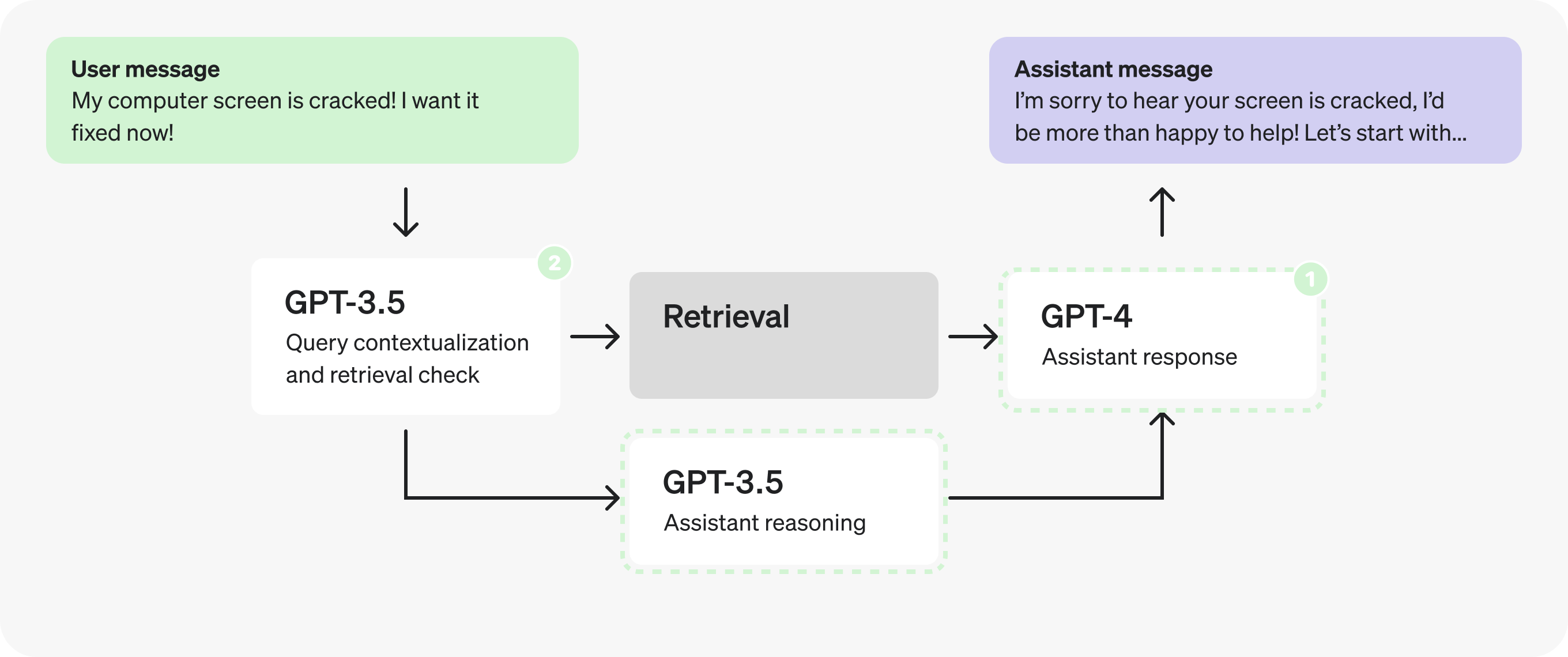
Note: We’ll be grouping response and enough_information_in_context together in the second prompt to avoid passing the retrieved context to both new prompts.
Assistants prompt - reasoning
This prompt will be passed to GPT-3.5 and can be fine-tuned on curated examples.
What changed? The “enough_information_in_context” and “response” fields were removed, and the retrieval results are no longer loaded into this prompt.
SYSTEM: You are a helpful customer service bot.

Based on the previous conversation, respond in a JSON to determine the required
fields.

# Example

User: "My freaking computer screen is cracked!"

Assistant Response:
{
  "message_is_conversation_continuation": "True",
  "number_of_messages_in_conversation_so_far": "1",
  "user_sentiment": "Aggravated",
  "query_type": "Hardware Issue",
  "response_tone": "Validating and solution-oriented",
  "response_requirements": "Propose options for repair or replacement.",
  "user_requesting_to_talk_to_human": "False",
}
Assistants prompt - response
This prompt will be processed by GPT-4 and will receive the reasoning steps determined in the prior prompt, as well as the results from retrieval.
What changed? All steps were removed except for “enough_information_in_context” and “response”. Additionally, the JSON we were previously filling in as output will be passed in to this prompt.
SYSTEM: You are a helpful customer service bot.

Use the retrieved context, as well as these pre-classified fields, to respond to
the user's query.

# Reasoning Fields
` ` `
[reasoning json determined in previous GPT-3.5 call]
` ` `

# Example

User: "My freaking computer screen is cracked!"

Assistant Response:
{
  "enough_information_in_context": "True",
  "response": "..."
}

USER: # Relevant Information
` ` `
[retrieved context]
` ` `
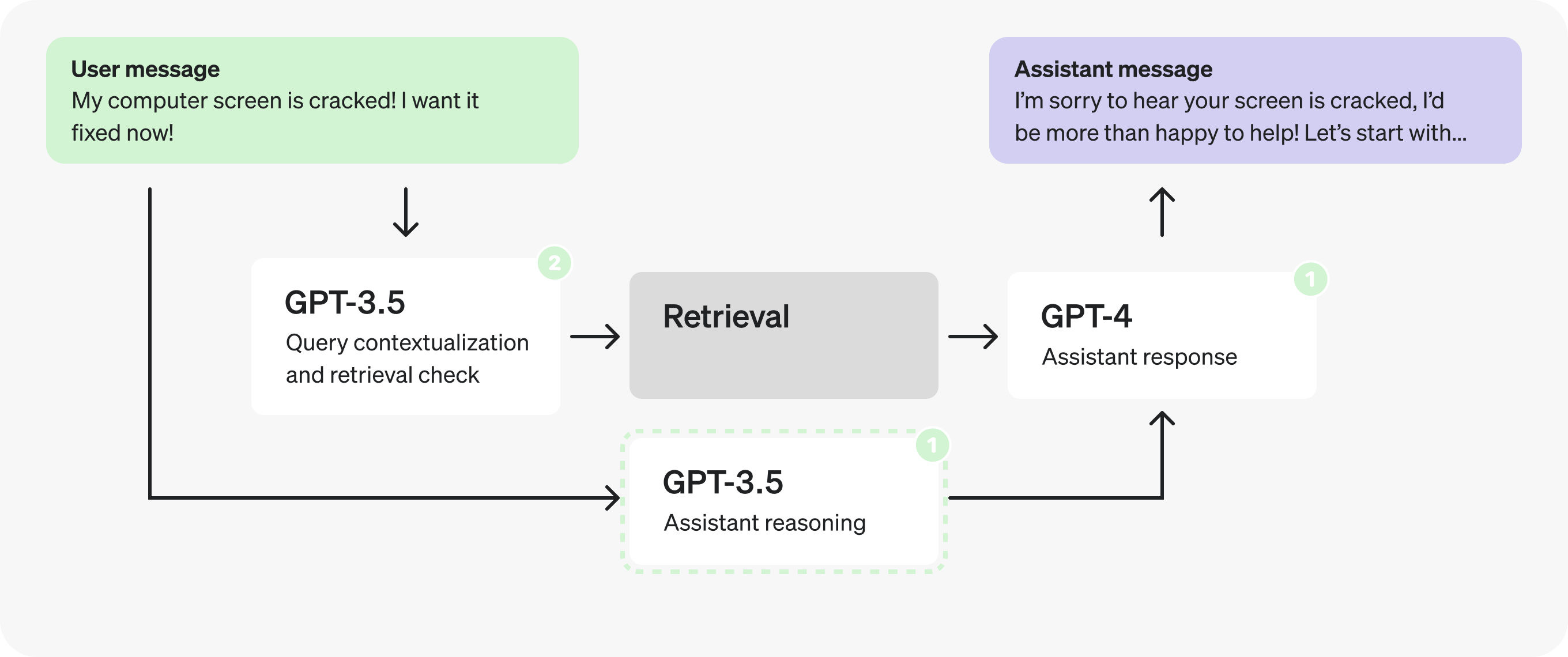
In fact, now that the reasoning prompt does not depend on the retrieved context we can parallelize and fire it off at the same time as the retrieval prompts.
Part 3: Optimizing the structured output
Let’s take another look at the reasoning prompt.
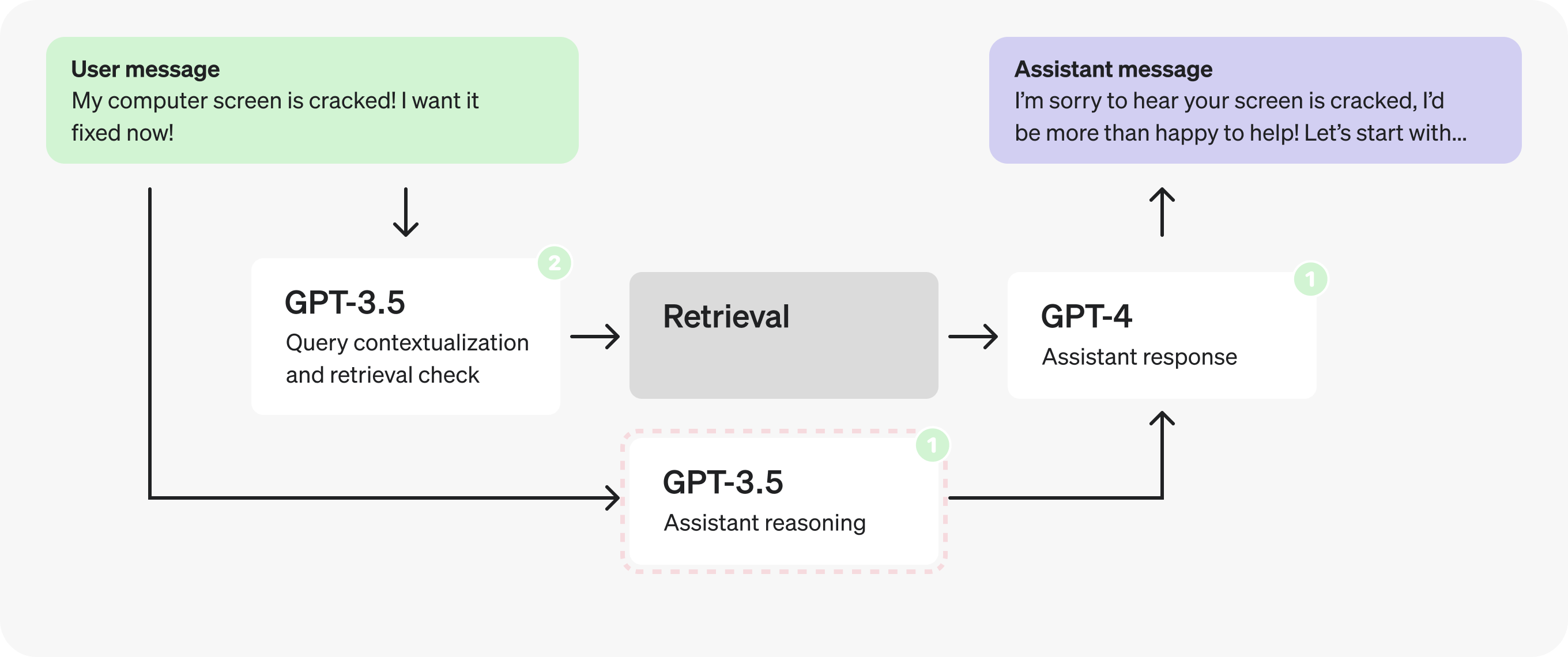
Taking a closer look at the reasoning JSON you may notice the field names themselves are quite long.
1
2
3
4
5
6
7
8
9
{
  "message_is_conversation_continuation": "True", // <-
  "number_of_messages_in_conversation_so_far": "1", // <-
  "user_sentiment": "Aggravated", // <-
  "query_type": "Hardware Issue", // <-
  "response_tone": "Validating and solution-oriented", // <-
  "response_requirements": "Propose options for repair or replacement.", // <-
  "user_requesting_to_talk_to_human": "False", // <-
}
By making them shorter and moving explanations to the comments we can generate fewer tokens.
1
2
3
4
5
6
7
8
9
{
  "cont": "True", // whether last message is a continuation
  "n_msg": "1", // number of messages in the continued conversation
  "tone_in": "Aggravated", // sentiment of user query
  "type": "Hardware Issue", // type of the user query
  "tone_out": "Validating and solution-oriented", // desired tone for response
  "reqs": "Propose options for repair or replacement.", // response requirements
  "human": "False", // whether user is expressing want to talk to human
}
This small change removed 19 output tokens. While with GPT-3.5 this may only result in a few millisecond improvement, with GPT-4 this could shave off up to a second.
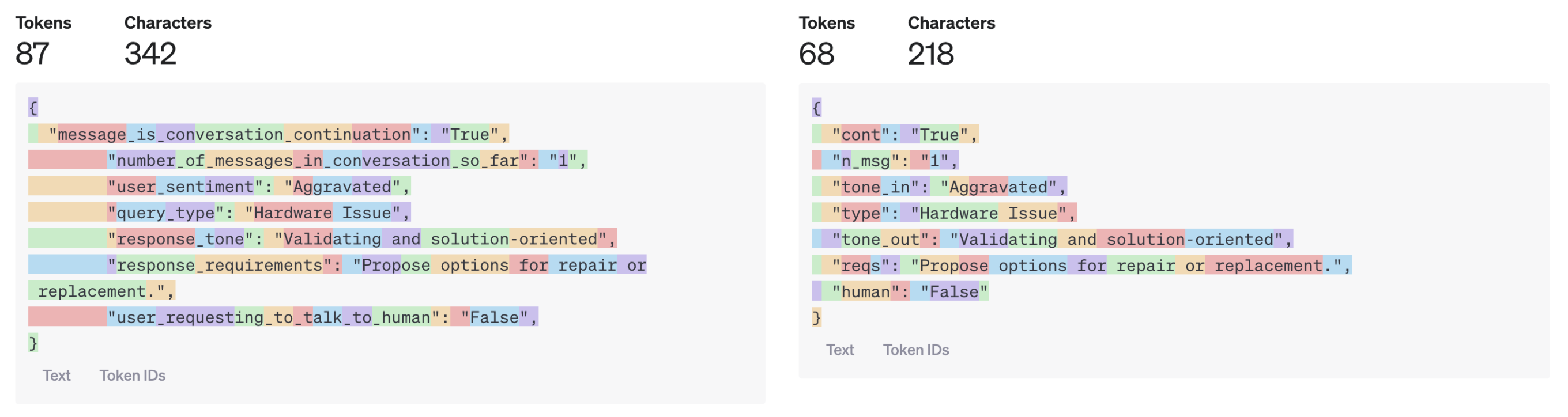
You might imagine, however, how this can have quite a significant impact for larger model outputs.
We could go further and use single characters for the JSON fields, or put everything in an array, but this may start to hurt our response quality. The best way to know, once again, is through testing.
Example wrap-up
Let’s review the optimizations we implemented for the customer service bot example:
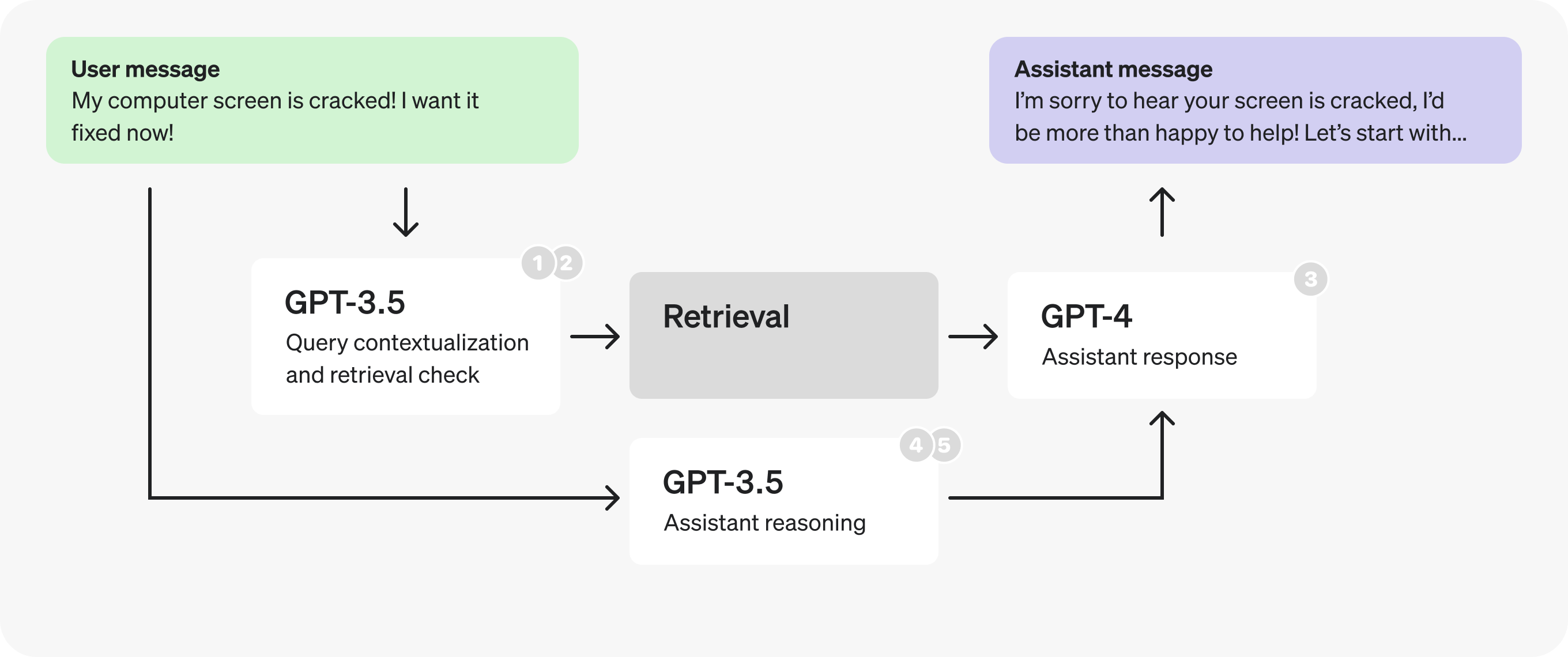
- Combined query contextualization and retrieval check steps to make fewer requests.
- For the new prompt, switched to a smaller, fine-tuned GPT-3.5 to process tokens faster.
- Split the assistant prompt in two, switching to a smaller, fine-tuned GPT-3.5 for the reasoning, again to process tokens faster.
- Parallelized the retrieval checks and the reasoning steps.
- Shortened reasoning field names and moved comments into the prompt, to generate fewer tokens.