


惯性聚合 高效追踪和阅读你感兴趣的博客、新闻、科技资讯
阅读原文 在惯性聚合中打开

推荐订阅源

云风的 BLOG
云风的 BLOG
M
MIT News - Artificial intelligence
Recent Announcements
Cyber Security Advisories - MS-ISAC
Stack Overflow Blog
Stack Overflow Blog
J
Java Code Geeks
Microsoft Azure Blog
罗磊的独立博客
博客园 - 【当耐特】
H
Help Net Security
腾讯CDC
大猫的无限游戏
大猫的无限游戏
GbyAI
GbyAI
Last Week in AI
Last Week in AI
Jina AI
Jina AI
博客园 - 聂微东
Blog — PlanetScale
Blog — PlanetScale
A
About on SuperTechFans
Apple Machine Learning Research
P
Proofpoint News Feed
Y
Y Combinator Blog
C
Check Point Blog
博客园 - 司徒正美
钛媒体:引领未来商业与生活新知
钛媒体:引领未来商业与生活新知

Butler's Log

Figma agent vs. one button: shipping design tokens to npm Local Model Performance on an M5 Max GitButler 0.22 - "Catch 22" Agentic Version Control Benchmarks Grit: rewriting Git in Rust with agents Git Merge 2026 Agent-safe Git with GitButler We’ve raised $17M to build what comes after Git Announcing the GitButler CLI for Linux The Great CSS Expansion A couple of git nits Simplifying Git by Using GitButler Introducing the GitButler CLI GitButler 0.19 - "Commander Keen" But Head: Crafting a Custom Font MCP vs RAG: Two Very Different Ways to Gain Context Getting Started With GitButler Agents Using the GitButler MCP Server to Build Better AI-Driven Git Workflows Using GitButler With Multiple GitHub Accounts Advent of Code! Upcoming GitButler Events Use GitButler for your Gerrit workflow Integrating GitButler and GitHub Enterprise Butler Flow: shipping code faster (but less like Alfred, more like CI on steroids) - Part 3 Butler Flow: shipping code faster (but less like Alfred, more like CI on steroids) - Part 2 Butler Flow: shipping code faster (but less like Alfred, more like CI on steroids) - Part 1 Grid Happens: Because Flexbox Wasn’t Enough Using Cursor Hooks for automatic version control Deep Dive into the new Cursor Hooks A Responsive Item Counter with CSS only
GitButler's Claude Code tab
Scott Chacon · 2025-09-11 · via Butler's Log

GitButler's new Agents Tab brings Claude Code directly into your Git workflow, giving each branch its own independent development assistant.

GitButler's Claude Code tab

More tightly integrating coding agents and version control is important to us.

We recently shipped a way to take advantage of Claude Code's hooks to enable the agent to automatically commit for you, including writing the commit message, even across multiple simultaneous branch contexts.

However, it got us to thinking how nice it would be if we had more control and context so we could make the whole process easier and more intuitive. This led us to start working on a new tab for GitButler where you could simply run Claude Code sessions directly in our client.

A quick overview of the new Claude Code UI in the Agents tab in GitButler

This new Agents Tab allows you to easily launch Claude Code sessions that are tied to branches of your project, automatically committing the results of finished tasks to that branch.

Run Claude Code on multiple branches directly in GitButler

Run Claude Code on multiple branches directly in GitButler

This makes it easy to quickly launch an agent to do a specific task on the branch you've been working on, or start a new branch to have it work on some new topic while you're still working on your current one. You can even have multiple agents working on multiple parallel branches simultaneously.

It will also do all of this in the same working directory, making it unneccesary to run setup scripts or configure worktrees for each task.

💡

You need to have Claude Code installed and configured already, we can't help too much with that yet.

While the branch context based sessions and auto-committing are cool, after using it for a few weeks I feel like I can also confidently say that running Claude Code in GitButler is just a nicer experience than running it in the terminal.
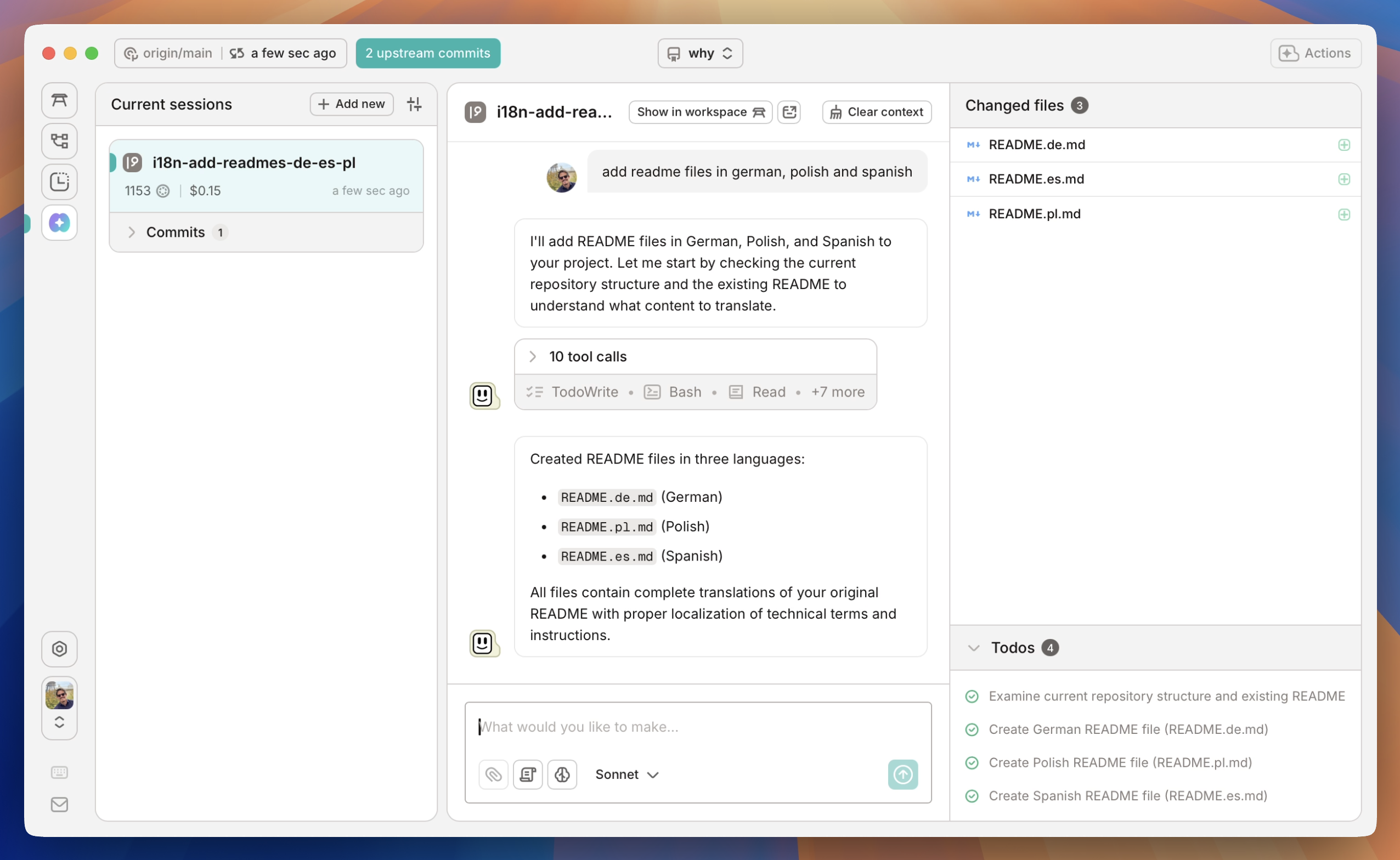
  • We break out the Todo list and changed files into a sidebar for a quick overview.
  • We show the token usage and estimated cost per branch as it's running.
  • Our auto-commit messages use your prompts for proper context, rather than just what the code changes were.
  • We fold the tool calls so you can concentrate on the conversation and unfold if you're interested in the details.

Quick 30 second tour of the new Agents tab

Quick 30 second tour of the new Agents tab

Most importantly, we have an entire interface for seeing the code diffs and jumping to those points in your editor of choice. I find this mode of usage much more fluid and easy to understand than agent integration in an editor.

This also gives us a basis for building even cooler stuff to help with using coding agents. For example, we've built in "prompt templates" that allow you to use a pre-written template to start crafting your prompt:

Prompt templates in GitButler's Agent tab

Prompt templates in GitButler's Agent tab

If you're a Claude Code user, try out our new Agents Tab for a much nicer experience in using Claude Code, but also in orchestrating your agents and crafting great commits for your peers. All you need to do is download the latest release of the GitButler client.

Scott Chacon

Written by Scott Chacon

Scott Chacon is a co-founder of GitHub and GitButler, where he builds innovative tools for modern version control. He has authored Pro Git and spoken globally on Git and software collaboration.