

惯性聚合 高效追踪和阅读你感兴趣的博客、新闻、科技资讯
阅读原文 在惯性聚合中打开

推荐订阅源

A
Arctic Wolf
T
The Blog of Author Tim Ferriss
月光博客
月光博客
Recent Announcements
V
V2EX
Microsoft Azure Blog
博客园 - 三生石上(FineUI控件)
P
Proofpoint News Feed
The Register - Security
博客园 - 叶小钗
博客园 - Franky
The Cloudflare Blog
雷峰网
雷峰网
罗磊的独立博客
M
MIT News - Artificial intelligence
I
InfoQ
钛媒体:引领未来商业与生活新知
钛媒体:引领未来商业与生活新知
博客园 - 【当耐特】
Engineering at Meta
Engineering at Meta
N
Netflix TechBlog - Medium
爱范儿
爱范儿
博客园 - 司徒正美
Recorded Future
Recorded Future
酷 壳 – CoolShell
酷 壳 – CoolShell
Google DeepMind News
Martin Fowler
Martin Fowler
Microsoft Security Blog
F
Full Disclosure
让小产品的独立变现更简单 - ezindie.com
B
Blog
大猫的无限游戏
大猫的无限游戏
奇客Solidot–传递最新科技情报
奇客Solidot–传递最新科技情报
腾讯CDC
WordPress大学
WordPress大学
小众软件
小众软件
K
Kaspersky official blog
Attack and Defense Labs
cs.AI updates on arXiv.org
Forbes - Security
Forbes - Security
aimingoo的专栏
aimingoo的专栏
IT之家
IT之家
The Last Watchdog
The Last Watchdog
N
News and Events Feed by Topic
B
Blog RSS Feed
S
Security @ Cisco Blogs
美团技术团队
量子位
Threat Intelligence Blog | Flashpoint
Cloudbric
Cloudbric
Hacker News - Newest:
Hacker News - Newest: "LLM"

Inside Nutrient

A guide to the invisible work behind documents Introducing Nutrient Documents for Salesforce: Native document generation and signing Document AI vs. traditional OCR: Choosing between OCR, AI, and hybrid pipelines PDF SDK compliance and security evaluation checklist for enterprise teams (2026) Invariant Corp replaces paper processes with Nutrient Workflow and scales without limits What is process mapping? A complete guide Nutrient vs. Conga Composer for Salesforce document generation (2026) Document routing: How to automate document distribution The CTO’s AI playbook: Why accountability architecture beats orchestration Compliance workflow automation: Why built-in compliance is table stakes Workflow diagrams: Examples, symbols, and how to build one that actually runs Digital forms: Replace paper forms with automated workflows Approval workflow software: How to automate approvals Why document-centric automation is different The CEO’s AI playbook: Why decision architecture beats model selection Nutrient SDK product updates for Q1 2026 PDF redaction verification: How to prove sensitive data is permanently removed What is a VPAT? The complete guide to accessibility conformance reports What is PDF/UA? The accessible PDF standard explained Salesforce eSignatures: Generate, sign, and track documents in one flow Online document viewer: Options, tradeoffs, and how to embed one Document viewer for web apps: React, Vue, Angular (2026) Best document viewers in 2026: A buyer’s guide How to edit a PDF in Python: Add text, images, and annotations Nutrient advances Workflow platform with agentic AI for enterprise-grade speed and consistency in document-heavy operations How to create a Salesforce quote template from opportunity data The business case for accessibility: Five ways it drives enterprise value Python PDF library comparison (2026): 7 libraries for developers Why your AI agent hallucinates PDF table data PDF.js limitations: When to upgrade to a commercial PDF SDK How Subject scaled 5× with Nutrient’s PDF SDK without rebuilding its document layer I replaced our sales training with an AI coach that runs in Slack — here’s what broke Redirecting to: https://securitybuzz.com/cybersecurity-news/why-enterprise-permissions-are-ais-most-dangerous-inheritance/ Nutrient .NET SDK vs. iText Core: Complete comparison for .NET developers DocuVieware: Support’s most frequently asked setup questions Introducing Nutrient Workflow How to convert PDF to Word in C# (.NET) When email and spreadsheets stop working: Work order approval workflows for field teams on the move Compliance with confidence: Why document-centric automation is the foundation of your mission Nutrient expands AI Assistant, automating multistep document workflows inside any application What is document generation? A developer’s guide to PDF generation Document Converter data flow and how real-time watermarks skip the queue PDF/UA compliance guide: Requirements, standards, and best practices Computers still can’t understand you How Athena Intelligence built AI agents for regulated enterprises with Nutrient’s document infrastructure How to convert HTML to PDF (2026): 4 methods from browser print to SDK How to build a document extraction pipeline with Nutrient Vision API OCR vs. intelligent document processing: Choosing the right document extraction engine Beyond OCR: How document intelligence eliminates manual processing in regulated industries Nutrient vs. IronPDF: Complete comparison for .NET developers Nutrient vs. Aspose.PDF: Complete comparison for .NET developers Redirecting to: https://fortune.com/2026/02/19/openclaw-who-is-peter-steinberger-openai-sam-altman-anthropic-moltbook/ Lufthansa Systems uses Nutrient to deliver reliable, scalable PDF rendering for pilots worldwide Nutrient vs. Syncfusion: Complete comparison for .NET developers React’s useTransition: The hook you’re probably using wrong First City Monument Bank streamlines banking processes with Nutrient Workflow Redirecting to: https://www.sdcexec.com/warehousing/automation/article/22957364/nutrient-workflow-automation-the-missing-link-in-supply-chain-efficiency The complete guide to digital signatures: PAdES, CAdES, and XAdES explained Nutrient Python SDK: Production-grade document processing for Python Introducing agentic document editing for web applications with AI Assistant Nutrient vs. QuestPDF: Complete comparison for .NET developers How we fixed the GdPicture license expiration (and what to do if you’re affected) Red team security testing with agentic AI The future of healthcare document automation Best healthcare workflow software compared Nutrient SDK product updates for Q4 2025 How Harvey scaled legal document workflows 50 percent MoM without rebuilding infrastructure HIPAA-compliant document management in hospitals How we optimized rendering performance while handling thousands of annotations in React — Part 2 Automated PII removal with Nutrient API Redirecting to: https://www.devopsdigest.com/2026-low-code-no-code-predictions Redirecting to: https://www.kmworld.com/Articles/Editorial/ViewPoints/Leaders-predict-AI-to-continue-permeating-all-aspects-of-KM-in-2026-172594.aspx What are deep agents and how do they solve complex problems? Whipping up document magic: Your easy-bake recipe for Vue and Nutrient Web SDK 🧁 What I’ve learned about product iteration planning while building SDKs Passwordless document signing: Three-layer security guide New zip folder functionality streamlines file management in Document Automation Server The keyboard shortcuts playbook: Taking control of keyboard events in Nutrient Web SDK From experienced engineer to AI beginner: My unexpected journey AI-assisted manual testing: Handling Safari’s PDF rendering and UI quirks How to keep a 20-year-old SDK up to date Nutrient announces new executive hires to accelerate next phase of growth High performance UI using web workers Automate document conversion at scale with Python and Nutrient DCS From curiosity to PLG (and AI): My journey to understanding product-led growth Prost to progress: One year as Nutrient Pigeon usage at Nutrient: Bridging native SDKs to Flutter Modernizing CI build servers: How to migrate from Chef to Ansible Unix man pages: AI-friendly documentation since 1971 Consistent hashing for even load distribution Best AI redaction APIs: Complete comparison guide for 2025 Why AI document redaction matters for modern security From coding to coordinating: How AI transformed my workflow What is intelligent document processing (IDP)? A complete guide Enterprise PDF SDKs: Best PSPDFKit (now Nutrient) alternatives Nutrient SDK product updates for Q3 2025 GdPicture support best practices Redacting sensitive data with Nutrient AI redaction API How AI is transforming the customer experience at Nutrient: From instant answers to intelligent support How manual QA uses PR testing between releases
How we optimized rendering performance while handling thousands of annotations in React — Part 1
Divyanshu Maithani · 2025-12-05 · via Inside Nutrient

At Nutrient, performance is a key area, especially in our Web Viewer SDK. It’s crucial for our customers to deliver a smooth and snappy user experience (UX) for their document needs, directly out of the box.

Recently, we discovered some delays and stutters in the Web viewer when handling very large documents with thousands of annotations. These became particularly noticeable during certain interactions, such as zooming and panning. The viewer would become unresponsive for a few seconds when trying to zoom in or out of such documents, and panning would freeze the user interface (UI) for a few hundred milliseconds.

In this detailed blog, we’ll share our experience in identifying and fixing these performance issues in the Web viewer, which is built with React. These learnings can be applied to any React application.

Identifying performance bottlenecks

To optimize performance, we had to identify the bottlenecks first.

“It is a capital mistake to theorize before one has data.”

A Study in Scarlet

We prepared a massive test document with thousands of annotations and loaded it in the viewer. There was evident lag in rendering and interactions, especially when trying to zoom in and out, or when moving around the document.

React Dev Tools has a great profiler(opens in a new tab) that can help narrow down performance bottlenecks by measuring rendering performance of the React component tree and identifying problematic components. It was a good starting point, but we needed more detailed insights into the components. Profiler gives a good picture of which components are contributing to the rendering time, but it doesn’t give a detailed breakdown of which function calls or operations within those components are unintentionally blocking the main thread.

For a more granular analysis, we turned to the browser’s built-in performance profiling dev tools. We fired up the browser’s built-in performance profiler on a build of the Web viewer and started recording while zooming in on the document.
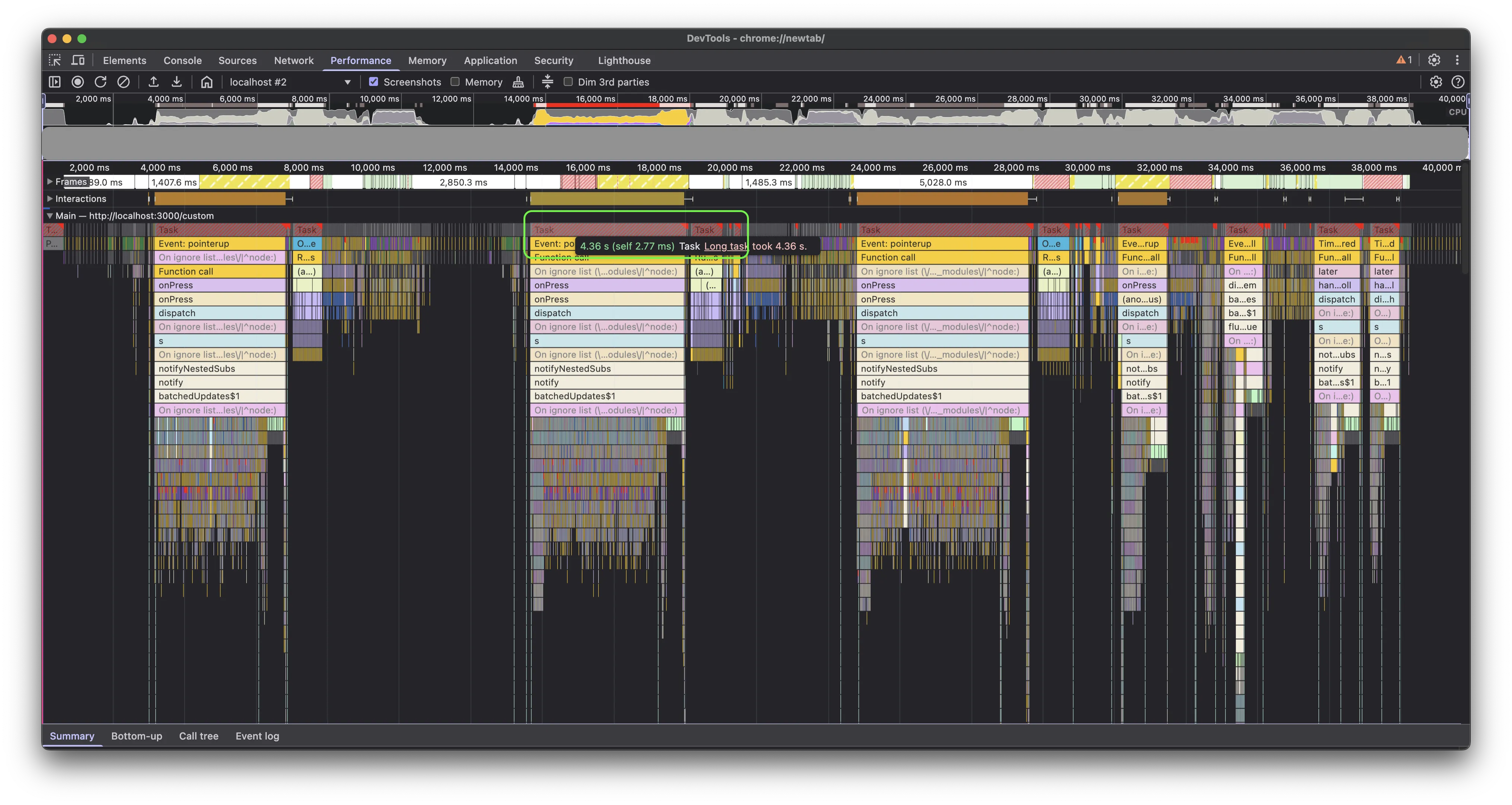
Baseline performance profile

The profile above shows the baseline performance while zooming in on the test document multiple times. On average, we noticed it blocked the main thread for about 4.5 seconds (note the highlighted red bar for one zoom operation), which is quite high. This was followed by approximately 800 ms of microtasks(opens in a new tab), which is also significant, since a long sequence of microtasks can block the UI.

Once we knew the baseline, we could start digging deeper and improving the numbers.

Render blocking tasks

When digging into the long task(opens in a new tab) that occurred during the zoom operation and sorting child tasks by their duration, a function call stood out as something significant that could have been an easy win.
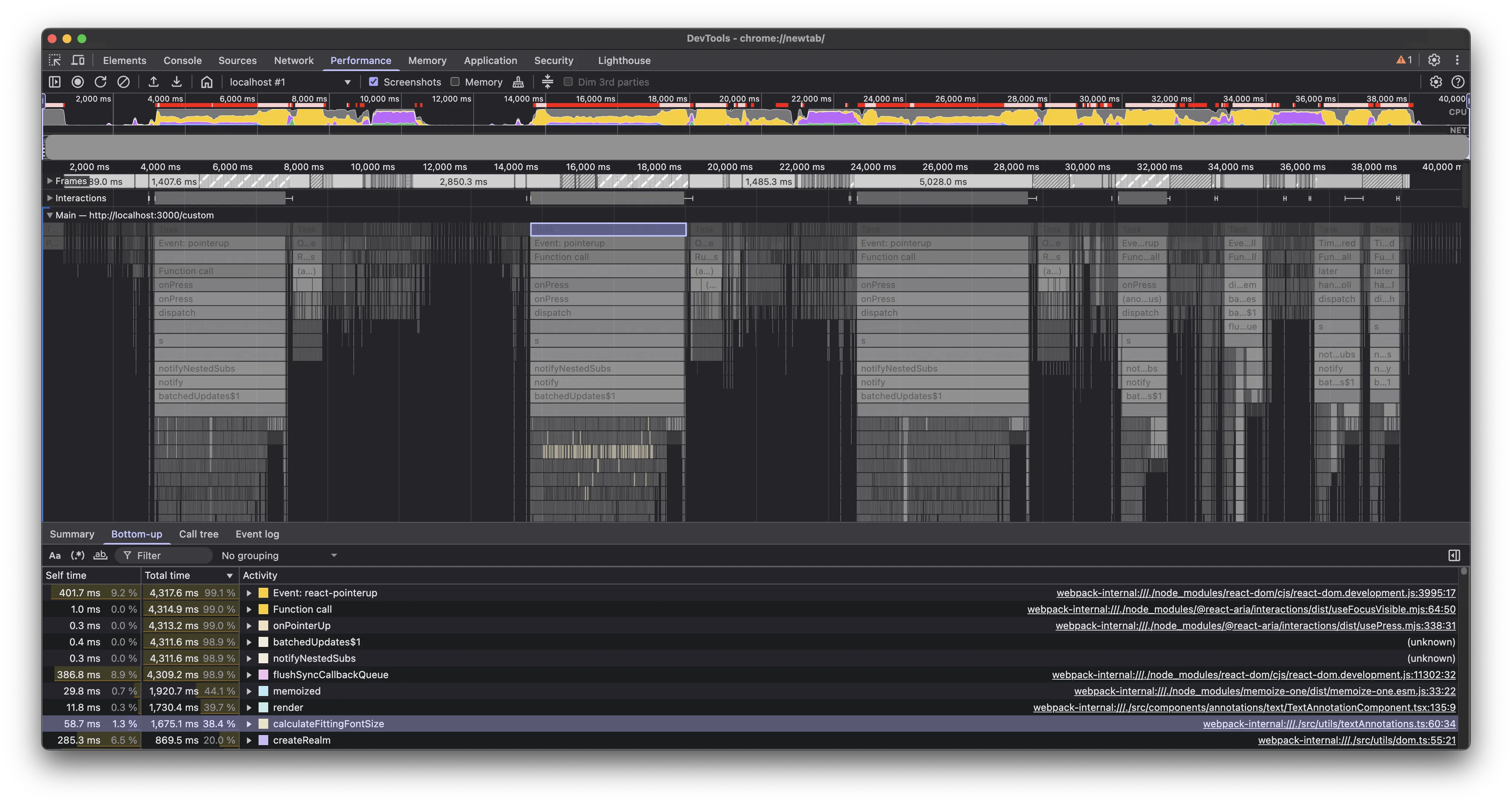
Render blocking tasks

Looking at the source code, we found that we were doing some font calculations in the render cycle(opens in a new tab). This wasn’t expensive for large documents with many annotations, but for our very large test document with thousands of annotations, it was enough to contribute significantly to the main thread blocking time.

The solution was to defer these calculations by moving them from render to componentDidUpdate (yes, we still have a few class-based components). This ensured the component could render first and then do these calculations after the DOM was updated, yielding to the main thread in between, and giving the browser a chance to run more priority tasks, such as handling user interactions.

With hooks, moving these to a useEffect would have been the way to go. We also added a few conditionals to further optimize how often these calculations were done.

With these in place, the UX became more responsive, but we still had a long way to go. On average, we were able to cut the main thread blocking time by more than half — better than our baseline, but there was still room for improvement. Plus, the queue of microtasks that happened immediately after was still waiting to be debugged.
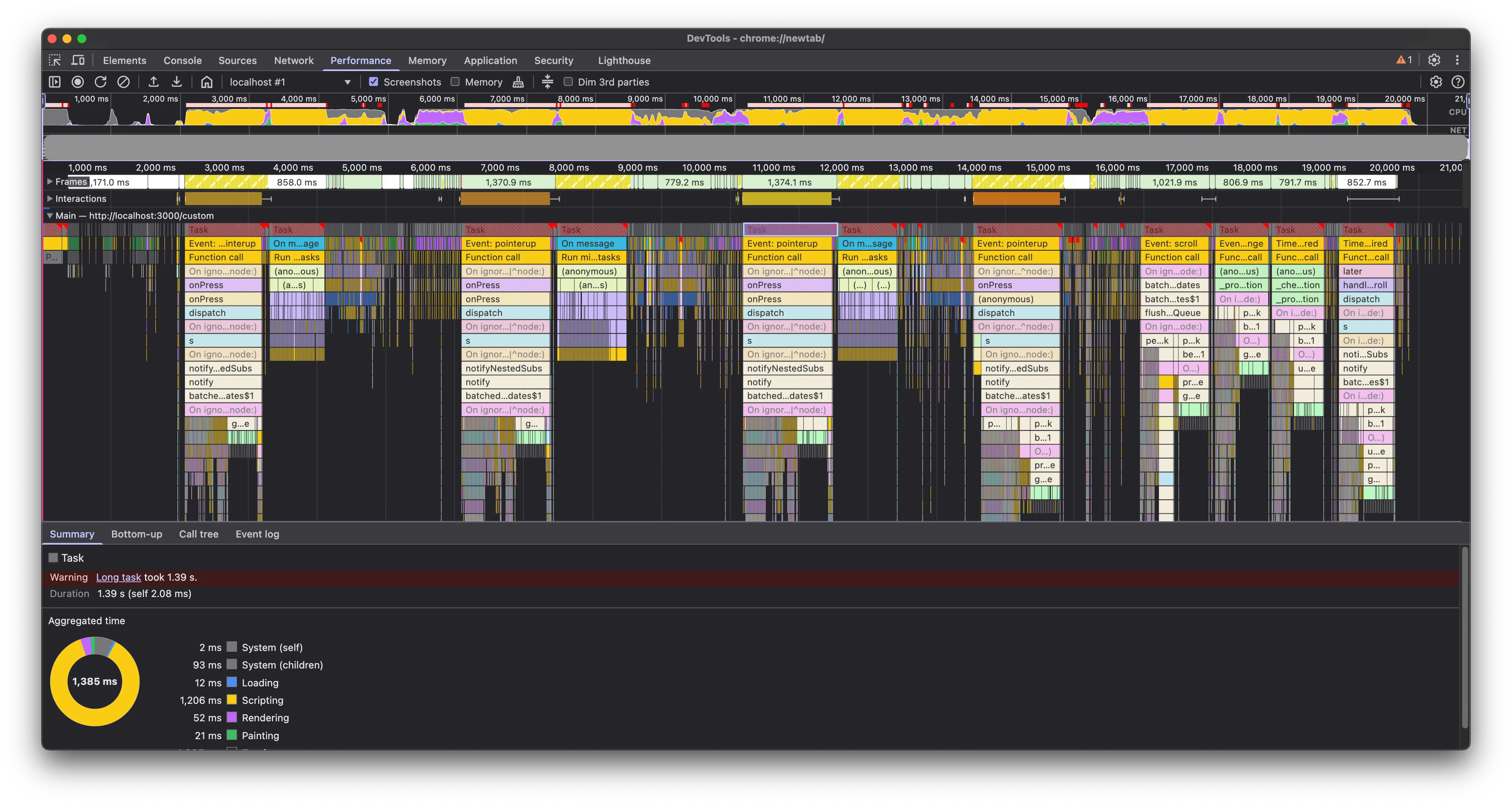
After deferring tasks

We identified a few more areas similarly and optimized those as well.

Avoiding shallow copying of very large objects

Another issue we found that was contributing significantly to the lag was a setState call, which looked pretty normal at first glance.
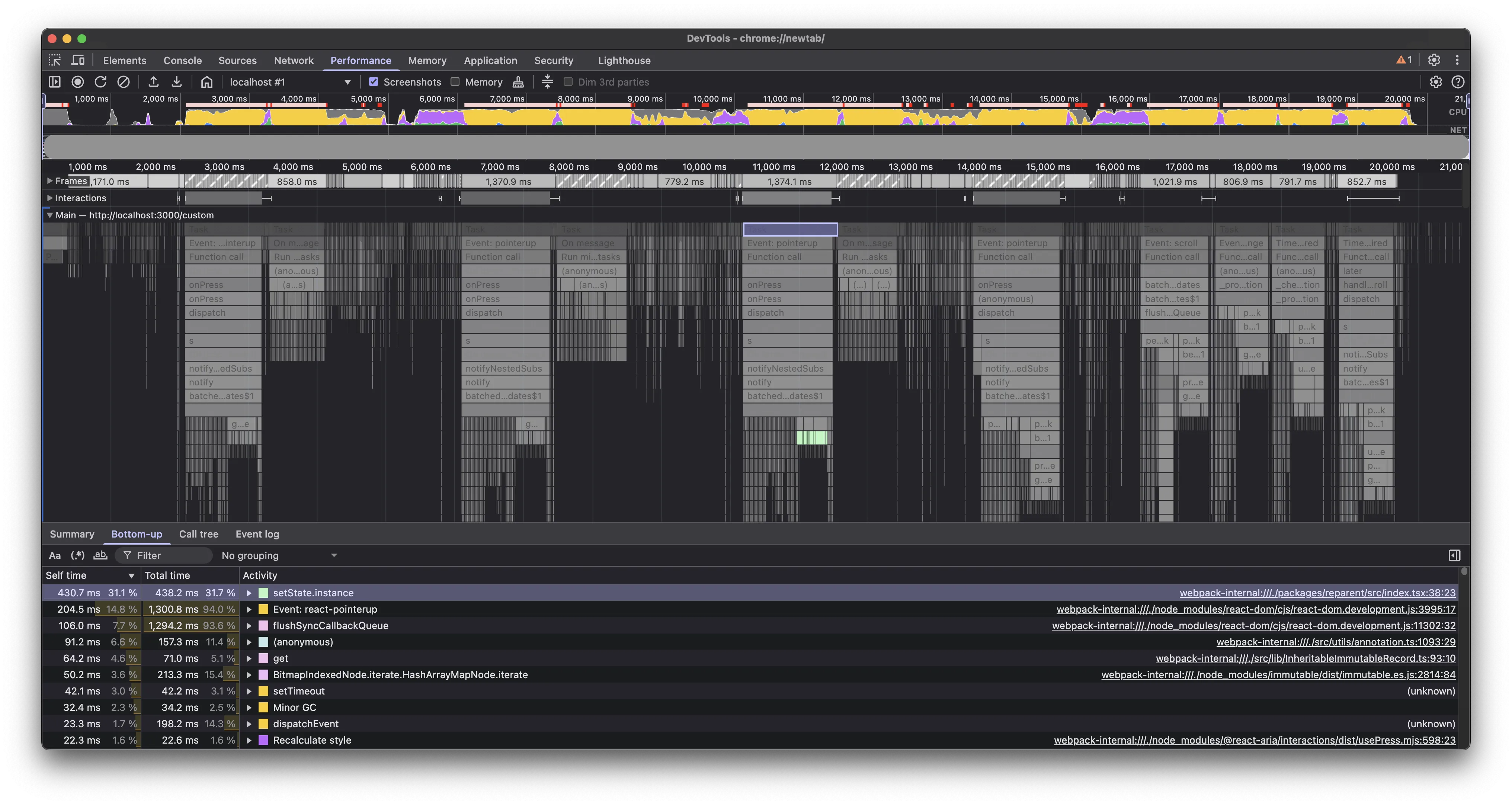
Shallow copying

Isolating this further, we narrowed it down to the place where we were updating the state with a new object that was a shallow copy of the previous state. It seemed like the shallow copy operation was taking a lot of time with thousands of annotations in the test document, and optimizing it would give us a significant boost. In case of large objects, shallow copying can cause noticeable performance issues because of the overhead of allocating new memory and copying properties.

This is a common practice in React, which made this less obvious, but as the great detective says:

“When you have eliminated the impossible, whatever remains, however improbable, must be the truth.”

The Sign of Four

While immutability is the preferred approach in React, we got rid of the shallow copy logic and instead updated the object in place. This was fine here, since we weren’t updating nested properties, and the updated object was immediately passed to setState:

return {

instances: { ...instances, [id]: { ...instance, node, target: ref } }

instances: Object.assign(instances, { [id]: { ...instance, node, target: ref } })

};

This change helped us shave off an additional 500 ms from the main thread blocking time.
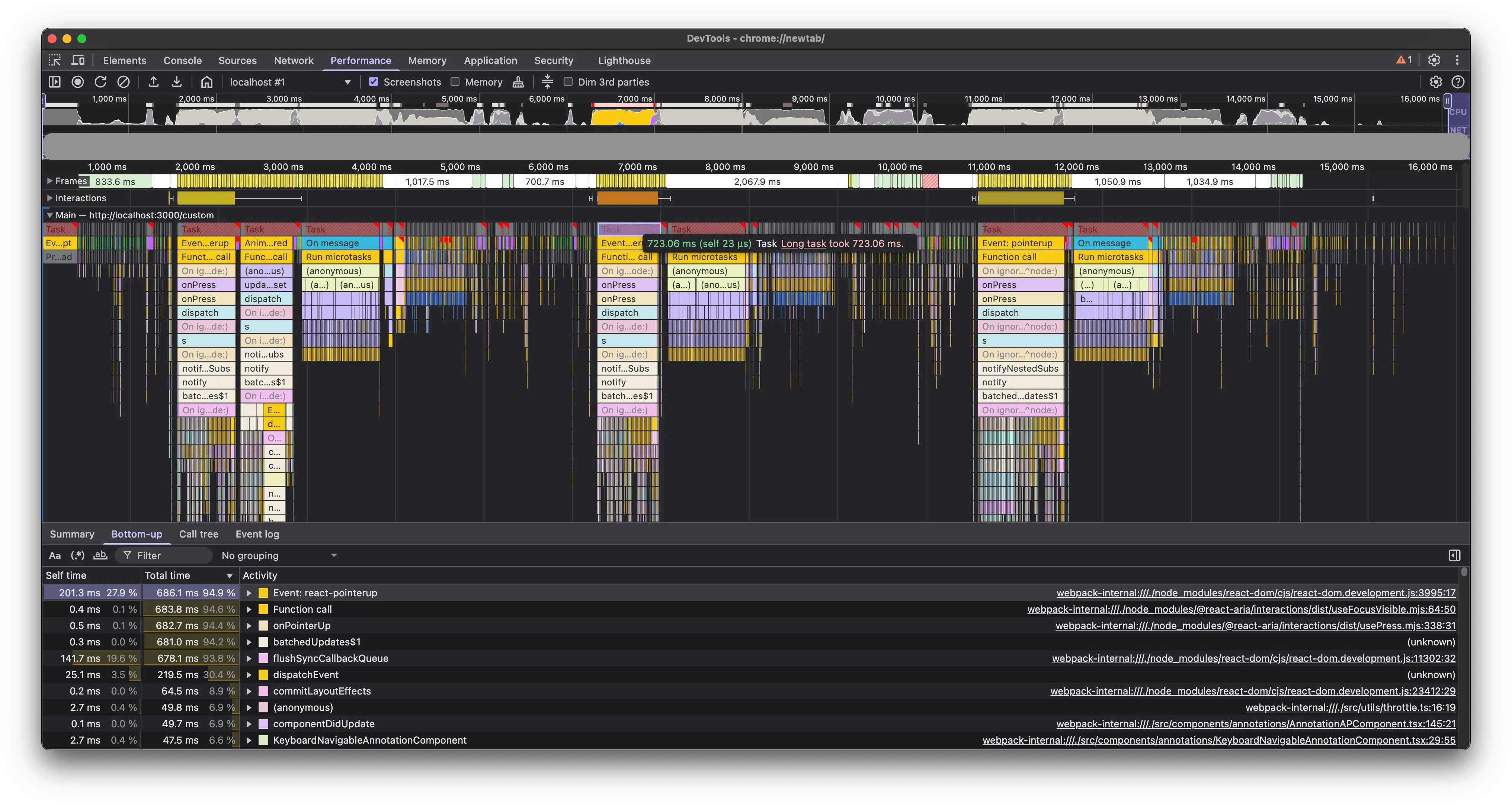
After in place update

Memoization

useMemo and useCallback are great tools to optimize performance in React applications. Analyzing the profile revealed a few places where we could benefit from these.

Here’s an example of one such place, which shaved off about 30 ms, but a few more such places can add up to a significant improvement:

const contents = getAnnotationContents(annotation, intl);

const contents = React.useMemo(

() => getAnnotationContents(annotation, intl),

[annotation, intl],

);
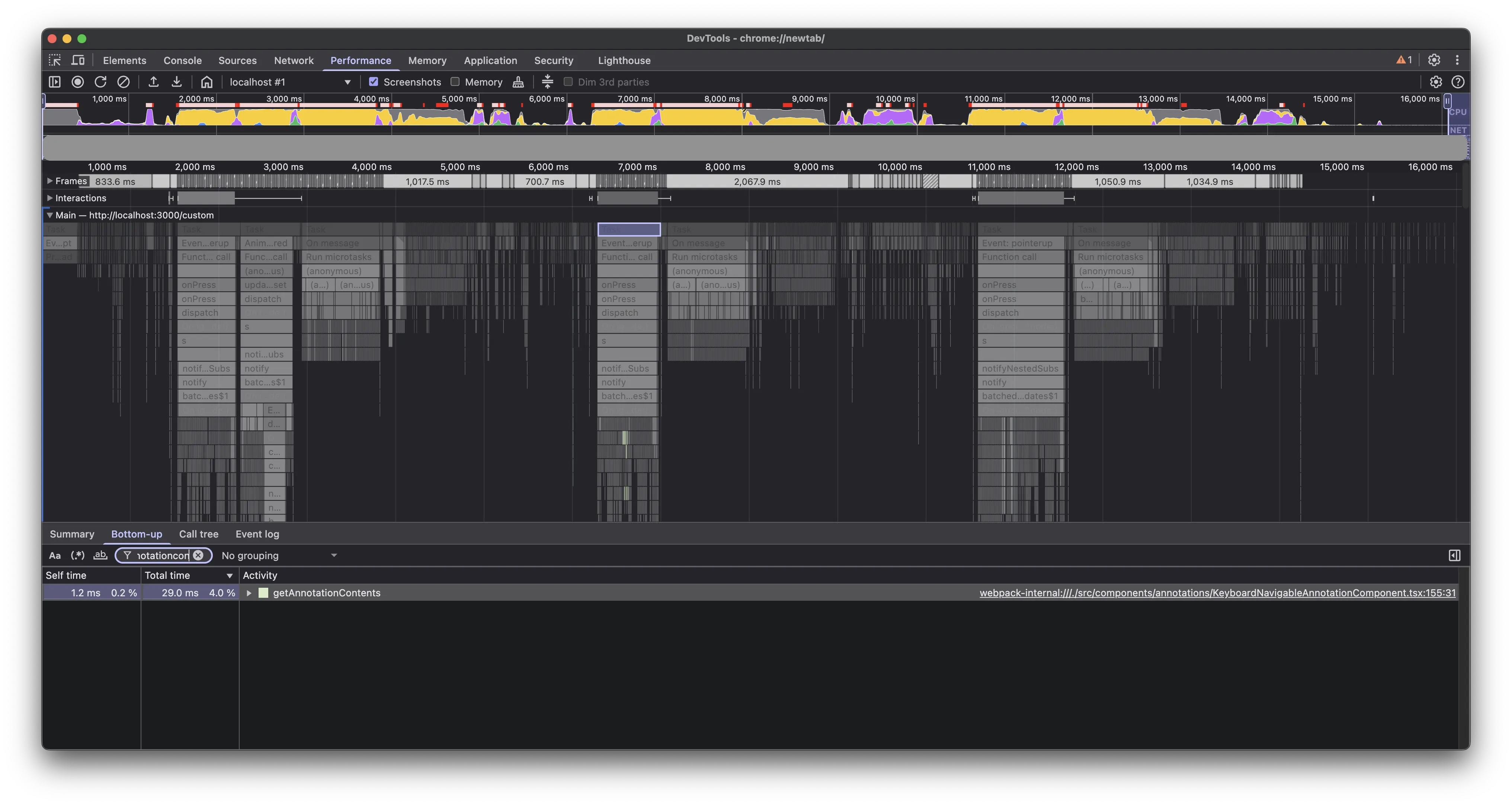
Memoization

Generally, we should try to avoid premature optimization, but this wasn’t it; this was actual surgical profiling being a very helpful tool in identifying code that can easily benefit with memoization.

Delegate to worker thread

We still had a bulk of microtasks that were blocking the main thread after each zoom operation. These were running some crucial image generations based on zoom recalculations, which were important, but we could afford to delegate running these a bit later. On average, these microtasks were taking about 800 ms to finish.
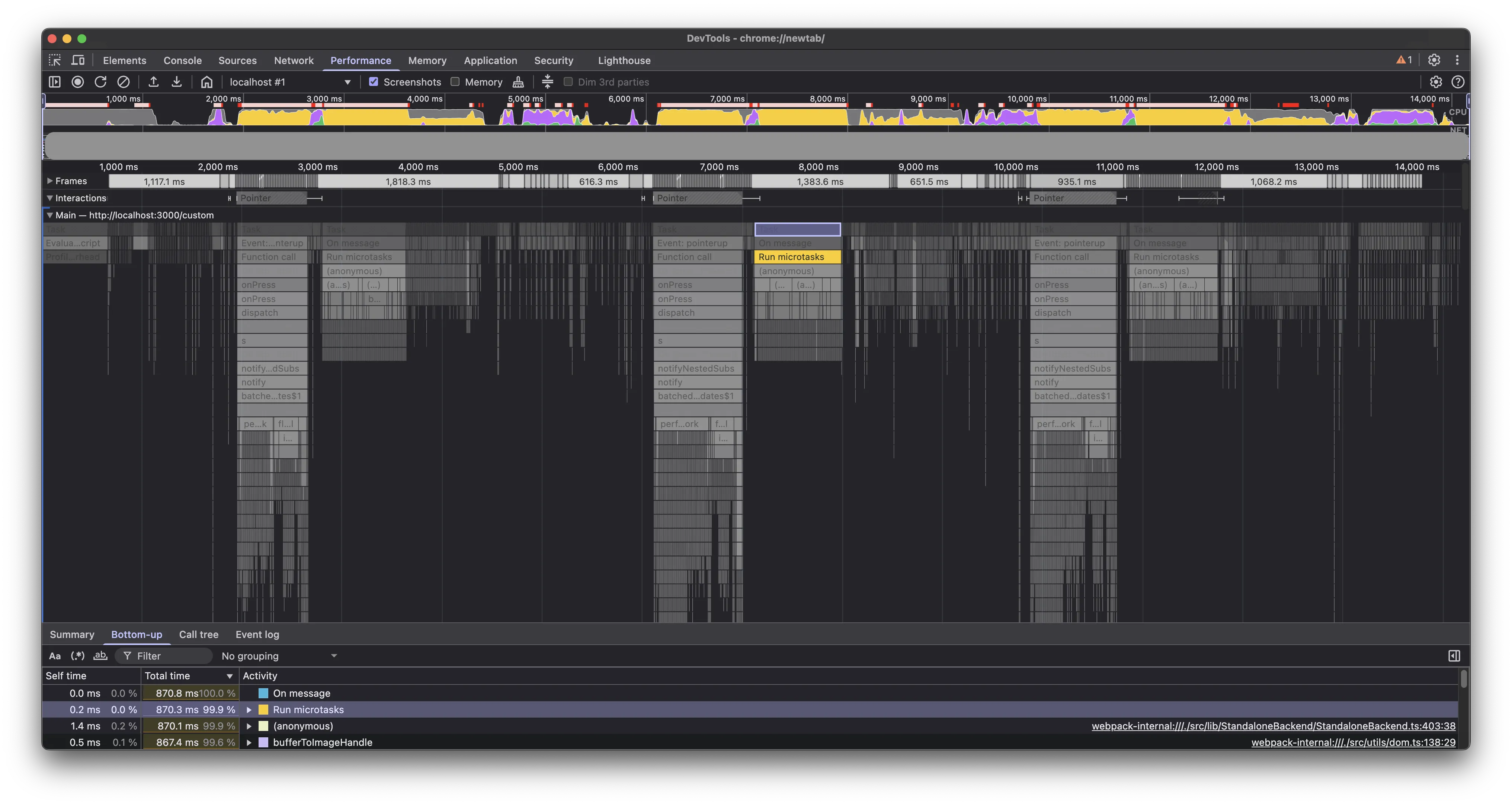
Microtasks blocking main thread

We delegated these tasks to the worker thread(opens in a new tab). Note the tasks running in the worker thread in the profile below.
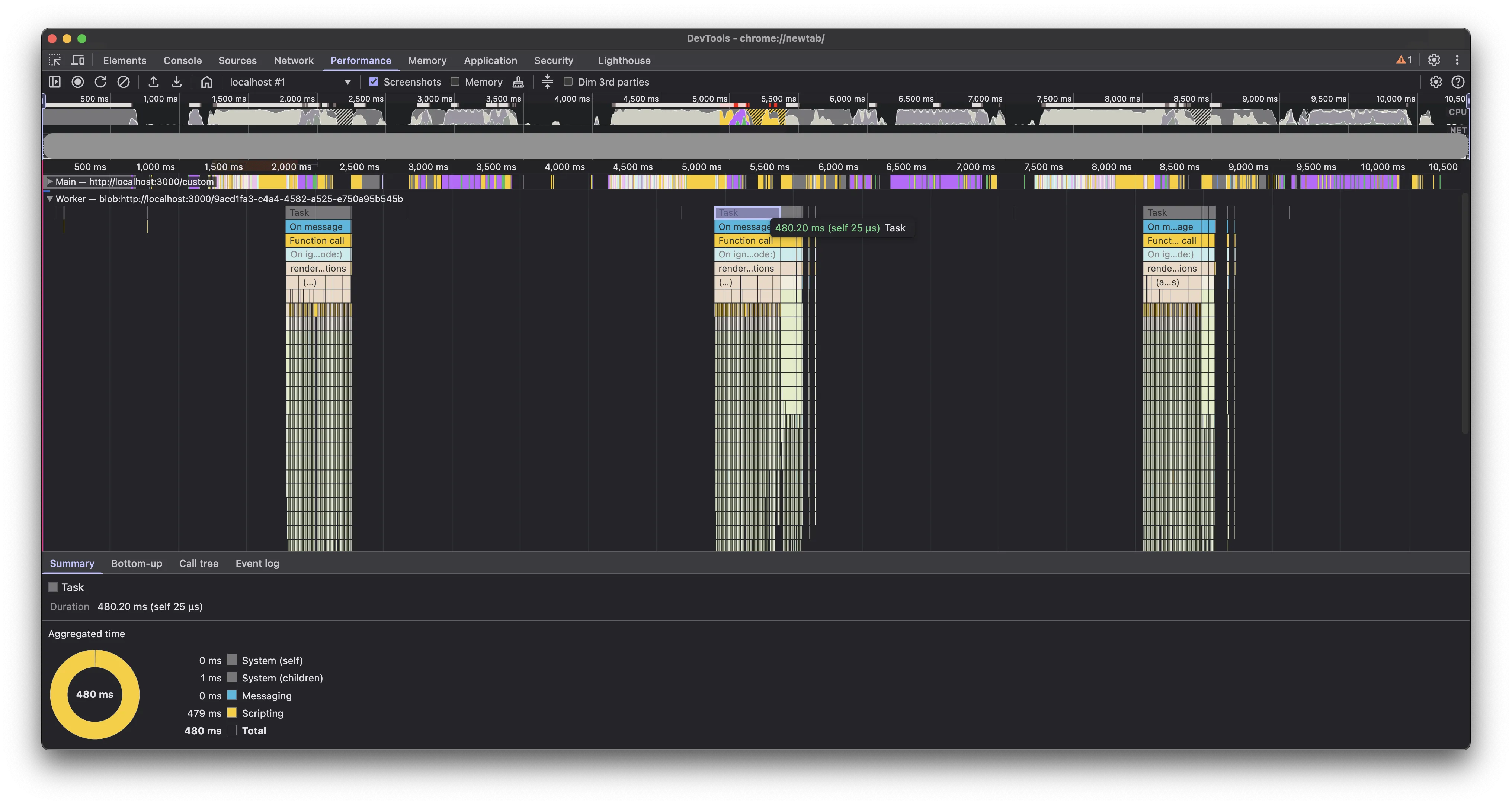
Worker thread execution

This increased the execution time in the worker thread, but it freed up the main thread much earlier by getting rid of the sequence of microtasks. Overall, it helped us shave off an additional 800 ms of main thread blocking time.

Conclusion

We were able to cut down the average main thread blocking time on our test document from 4.5 seconds to approximately 800 ms. Moreover, the microtasks that were blocking the main thread for about 800 ms were now running in the worker thread, making the UI more responsive.

Although these numbers are still not ideal on our test document, it has made the Web viewer much snappier for all our customers and a majority of documents.

We hope these ideas will be helpful to you in identifying and fixing performance bottlenecks in your React applications.

Next

This was just the first part; we’re not done yet! Part 2 shares how we continued improving these numbers with targeted rerenders and Redux optimization.