

惯性聚合 高效追踪和阅读你感兴趣的博客、新闻、科技资讯
阅读原文 在惯性聚合中打开

推荐订阅源

V
Vulnerabilities – Threatpost
P
Proofpoint News Feed
The Hacker News
The Hacker News
Know Your Adversary
Know Your Adversary
Threat Intelligence Blog | Flashpoint
T
Tenable Blog
AWS News Blog
AWS News Blog
S
Securelist
T
Threatpost
C
Cybersecurity and Infrastructure Security Agency CISA
IT之家
IT之家
腾讯CDC
WordPress大学
WordPress大学
Spread Privacy
Spread Privacy
C
Check Point Blog
cs.CL updates on arXiv.org
Engineering at Meta
Engineering at Meta
Latest news
Latest news
A
About on SuperTechFans
The Register - Security
L
LINUX DO - 热门话题
T
The Exploit Database - CXSecurity.com
C
Cisco Blogs
T
Tailwind CSS Blog
Simon Willison's Weblog
阮一峰的网络日志
阮一峰的网络日志
MyScale Blog
MyScale Blog
大猫的无限游戏
大猫的无限游戏
T
Tor Project blog
L
Lohrmann on Cybersecurity
G
GRAHAM CLULEY
B
Blog RSS Feed
Scott Helme
Scott Helme
让小产品的独立变现更简单 - ezindie.com
NISL@THU
NISL@THU
P
Privacy International News Feed
Security Latest
Security Latest
Recorded Future
Recorded Future
L
LangChain Blog
Cyberwarzone
Cyberwarzone
C
Cyber Attacks, Cyber Crime and Cyber Security
C
CXSECURITY Database RSS Feed - CXSecurity.com
博客园 - 聂微东
Google DeepMind News
Last Week in AI
Last Week in AI
Apple Machine Learning Research
F
Fortinet All Blogs
O
OpenAI News
T
Threat Research - Cisco Blogs
Blog — PlanetScale
Blog — PlanetScale

Inside Nutrient

A guide to the invisible work behind documents Introducing Nutrient Documents for Salesforce: Native document generation and signing Document AI vs. traditional OCR: Choosing between OCR, AI, and hybrid pipelines PDF SDK compliance and security evaluation checklist for enterprise teams (2026) Invariant Corp replaces paper processes with Nutrient Workflow and scales without limits What is process mapping? A complete guide Nutrient vs. Conga Composer for Salesforce document generation (2026) Document routing: How to automate document distribution The CTO’s AI playbook: Why accountability architecture beats orchestration Compliance workflow automation: Why built-in compliance is table stakes Workflow diagrams: Examples, symbols, and how to build one that actually runs Digital forms: Replace paper forms with automated workflows Approval workflow software: How to automate approvals Why document-centric automation is different The CEO’s AI playbook: Why decision architecture beats model selection Nutrient SDK product updates for Q1 2026 PDF redaction verification: How to prove sensitive data is permanently removed What is a VPAT? The complete guide to accessibility conformance reports What is PDF/UA? The accessible PDF standard explained Salesforce eSignatures: Generate, sign, and track documents in one flow Online document viewer: Options, tradeoffs, and how to embed one Document viewer for web apps: React, Vue, Angular (2026) Best document viewers in 2026: A buyer’s guide How to edit a PDF in Python: Add text, images, and annotations Nutrient advances Workflow platform with agentic AI for enterprise-grade speed and consistency in document-heavy operations How to create a Salesforce quote template from opportunity data The business case for accessibility: Five ways it drives enterprise value Python PDF library comparison (2026): 7 libraries for developers Why your AI agent hallucinates PDF table data PDF.js limitations: When to upgrade to a commercial PDF SDK How Subject scaled 5× with Nutrient’s PDF SDK without rebuilding its document layer I replaced our sales training with an AI coach that runs in Slack — here’s what broke Redirecting to: https://securitybuzz.com/cybersecurity-news/why-enterprise-permissions-are-ais-most-dangerous-inheritance/ Nutrient .NET SDK vs. iText Core: Complete comparison for .NET developers DocuVieware: Support’s most frequently asked setup questions Introducing Nutrient Workflow How to convert PDF to Word in C# (.NET) When email and spreadsheets stop working: Work order approval workflows for field teams on the move Compliance with confidence: Why document-centric automation is the foundation of your mission Nutrient expands AI Assistant, automating multistep document workflows inside any application What is document generation? A developer’s guide to PDF generation Document Converter data flow and how real-time watermarks skip the queue PDF/UA compliance guide: Requirements, standards, and best practices Computers still can’t understand you How Athena Intelligence built AI agents for regulated enterprises with Nutrient’s document infrastructure How to convert HTML to PDF (2026): 4 methods from browser print to SDK How to build a document extraction pipeline with Nutrient Vision API OCR vs. intelligent document processing: Choosing the right document extraction engine Beyond OCR: How document intelligence eliminates manual processing in regulated industries Nutrient vs. IronPDF: Complete comparison for .NET developers Nutrient vs. Aspose.PDF: Complete comparison for .NET developers Redirecting to: https://fortune.com/2026/02/19/openclaw-who-is-peter-steinberger-openai-sam-altman-anthropic-moltbook/ Lufthansa Systems uses Nutrient to deliver reliable, scalable PDF rendering for pilots worldwide Nutrient vs. Syncfusion: Complete comparison for .NET developers React’s useTransition: The hook you’re probably using wrong First City Monument Bank streamlines banking processes with Nutrient Workflow Redirecting to: https://www.sdcexec.com/warehousing/automation/article/22957364/nutrient-workflow-automation-the-missing-link-in-supply-chain-efficiency The complete guide to digital signatures: PAdES, CAdES, and XAdES explained Nutrient Python SDK: Production-grade document processing for Python Introducing agentic document editing for web applications with AI Assistant Nutrient vs. QuestPDF: Complete comparison for .NET developers How we fixed the GdPicture license expiration (and what to do if you’re affected) Red team security testing with agentic AI The future of healthcare document automation Best healthcare workflow software compared Nutrient SDK product updates for Q4 2025 How Harvey scaled legal document workflows 50 percent MoM without rebuilding infrastructure HIPAA-compliant document management in hospitals How we optimized rendering performance while handling thousands of annotations in React — Part 2 Automated PII removal with Nutrient API Redirecting to: https://www.devopsdigest.com/2026-low-code-no-code-predictions Redirecting to: https://www.kmworld.com/Articles/Editorial/ViewPoints/Leaders-predict-AI-to-continue-permeating-all-aspects-of-KM-in-2026-172594.aspx What are deep agents and how do they solve complex problems? Whipping up document magic: Your easy-bake recipe for Vue and Nutrient Web SDK 🧁 What I’ve learned about product iteration planning while building SDKs Passwordless document signing: Three-layer security guide New zip folder functionality streamlines file management in Document Automation Server The keyboard shortcuts playbook: Taking control of keyboard events in Nutrient Web SDK From experienced engineer to AI beginner: My unexpected journey AI-assisted manual testing: Handling Safari’s PDF rendering and UI quirks How to keep a 20-year-old SDK up to date How we optimized rendering performance while handling thousands of annotations in React — Part 1 Nutrient announces new executive hires to accelerate next phase of growth High performance UI using web workers Automate document conversion at scale with Python and Nutrient DCS From curiosity to PLG (and AI): My journey to understanding product-led growth Prost to progress: One year as Nutrient Pigeon usage at Nutrient: Bridging native SDKs to Flutter Modernizing CI build servers: How to migrate from Chef to Ansible Unix man pages: AI-friendly documentation since 1971 Consistent hashing for even load distribution Best AI redaction APIs: Complete comparison guide for 2025 Why AI document redaction matters for modern security From coding to coordinating: How AI transformed my workflow What is intelligent document processing (IDP)? A complete guide Enterprise PDF SDKs: Best PSPDFKit (now Nutrient) alternatives Nutrient SDK product updates for Q3 2025 GdPicture support best practices Redacting sensitive data with Nutrient AI redaction API How AI is transforming the customer experience at Nutrient: From instant answers to intelligent support
Introducing a new era of document automation at Nutrient
Greg Ives, Bradley Hearn · 2025-05-27 · via Inside Nutrient

In business, documents still do the heavy lifting. From contracts and claims to audits and onboarding, documents remain the foundation for how information is captured, decisions are made, and work gets done.

But while the world has moved forward, the systems around those documents haven’t. Too many teams still rely on fragmented tools, brittle workflows, and outdated processes that were never designed for today’s speed, scale, or compliance demands. Whether it’s paper forms passed between departments or disparate apps duct-taped together, the result is the same: inefficient operations, increased costs, and stalled growth.

At Nutrient, we know how central documents are to real work — and how underserved document-driven workflows have been by most automation tools. For organizations managing complex processes or operating in highly regulated industries, those workflows can’t just be fast. They need to be secure, agile, auditable, and deeply integrated with the systems your teams already rely on.

That’s why we’re excited to announce a bundled set of updates to our Workflow Automation platform that specifically address these needs. This release brings together advanced document editing, automated document generation, AI-powered data extraction, and our brand-new mobile companion app — all designed to bring clarity, consistency, and scale to your most critical operations.

This isn’t just a product update. It’s a milestone in our mission to bring efficient execution to document-driven processes — helping teams streamline complexity, maintain compliance, and transform the way work gets done in a digital world.

It’s what document-driven workflows should look like — brought to you by the company that knows documents. Let’s take a closer look.
Document editing

Document editing

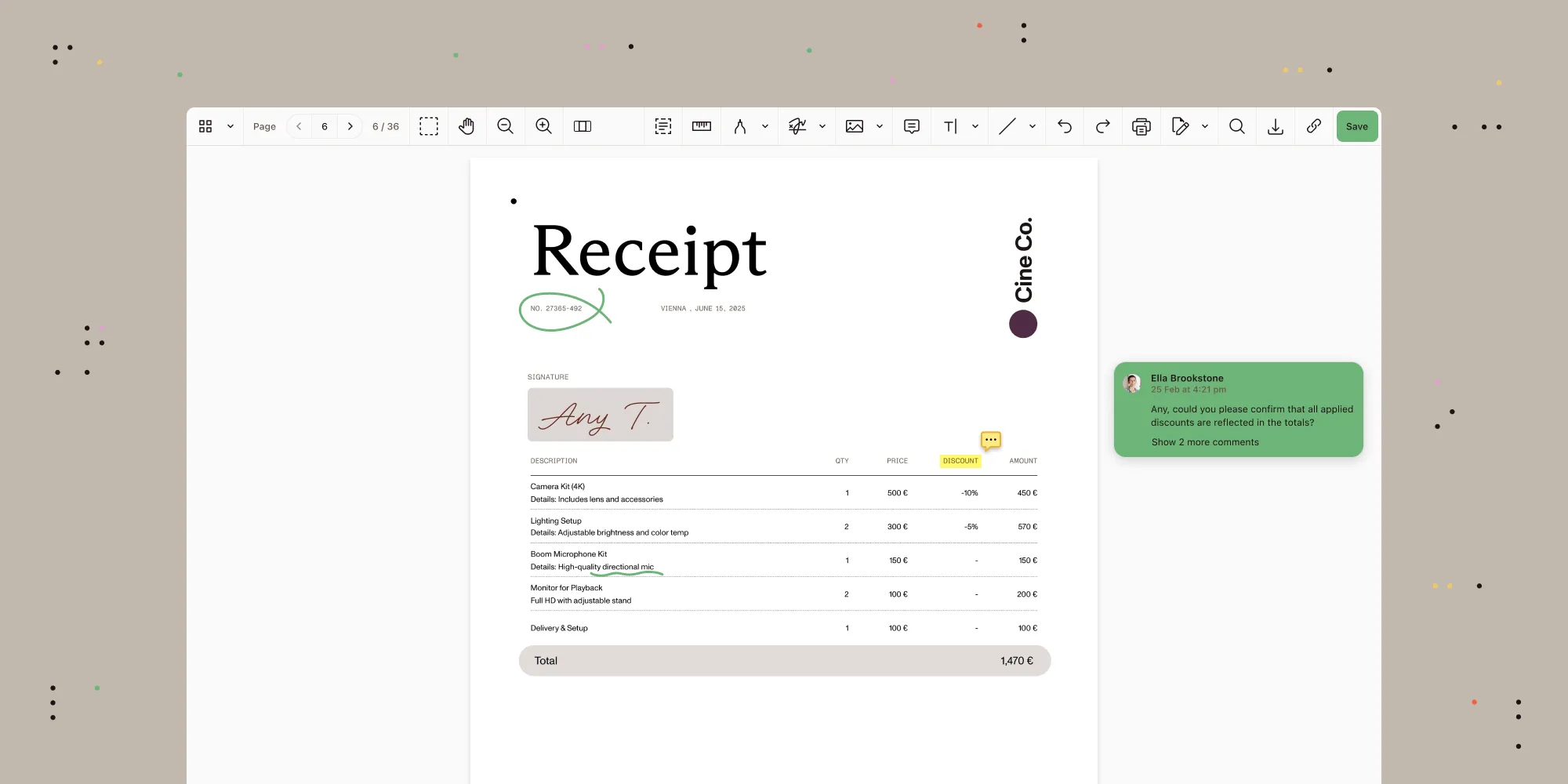
Managing business-critical documents has long been a drag on productivity — riddled with inefficiencies, disjointed tools, and cumbersome approval chains. Nutrient is changing that.

Building on last year’s introduction of in-platform document viewing, our latest update adds advanced document editing, markup, and collaboration capabilities — enabling teams to manage content seamlessly without ever needing to leave the platform.

No more third-party applications. No more manual bottlenecks. From contract approvals, to vendor onboarding, to compliance documentation, every step of your process just got smarter, faster, and more intuitive — all within one cohesive platform.
Here’s what sets it apart

  • A streamlined, unified interface for viewing PDFs, images, Office files, and HTML — responsive across devices.
  • Native document editing, annotation, and manipulation built right into the workflow — no external tools needed.
  • Full in-platform collaboration: View, edit, and sign documents directly in requests, complete with version tracking for auditability.
  • Coming soon: electronic signing capabilities, including digital signing.

Document generation

Document generation

Creating polished, consistent business documents shouldn’t be a manual, time-consuming task spread across multiple tools — yet for many organizations, it still is.

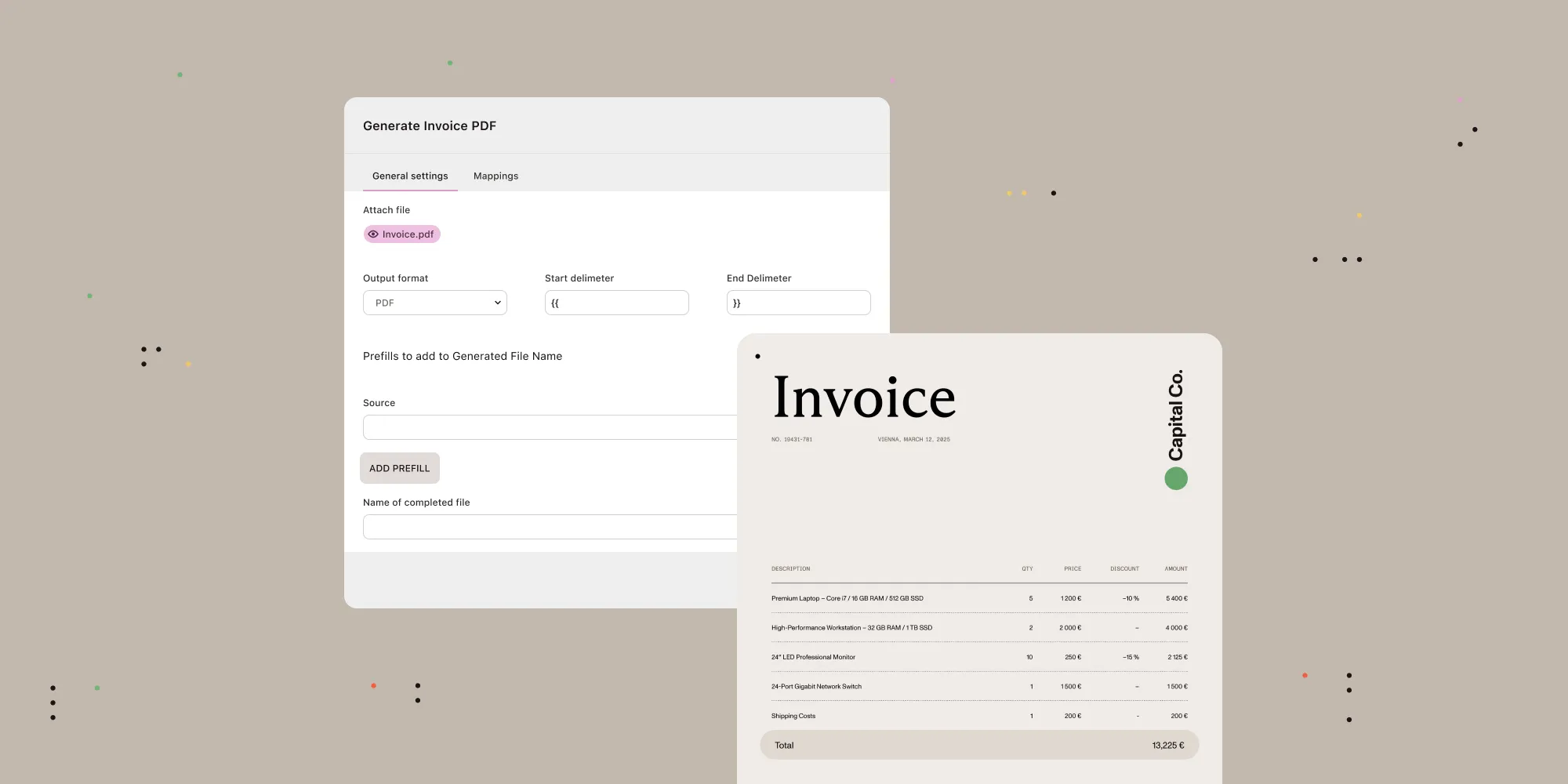
With the latest ability to generate documents directly in Nutrient Workflow Automation platform, that changes. This powerful new component brings effortless document generation to your workflows, allowing teams to automatically produce professional DOCX and PDF files using dynamic templates filled with real-time data from Workflow Automation, CRMs, ERPs, and internal databases.

Whether it’s HR offer letters, invoices, or financial reports, document creation is now scalable, accurate, and beautifully consistent — no formatting headaches required.

Why it matters

  • Consistent output with DOCX templates that support dynamic fields and tables for polished, on-brand documents every time.
  • Flexible formats that let you generate pixel-perfect outputs in both PDF and DOCX to meet diverse business needs.
  • High-volume efficiency with batch processing to handle large-scale document generation effortlessly.
  • Seamless integration with your existing CRM, ERP, or custom databases to automatically populate templates.

Nutrient transforms document generation from a burden into a strategic advantage — fast, intelligent, and always consistent.
AI Data Extraction

In today’s fast-moving business landscape, the simple act of manually transferring data from a document to a form can quietly erode productivity — eating up hours, introducing errors, and slowing down decision-making.

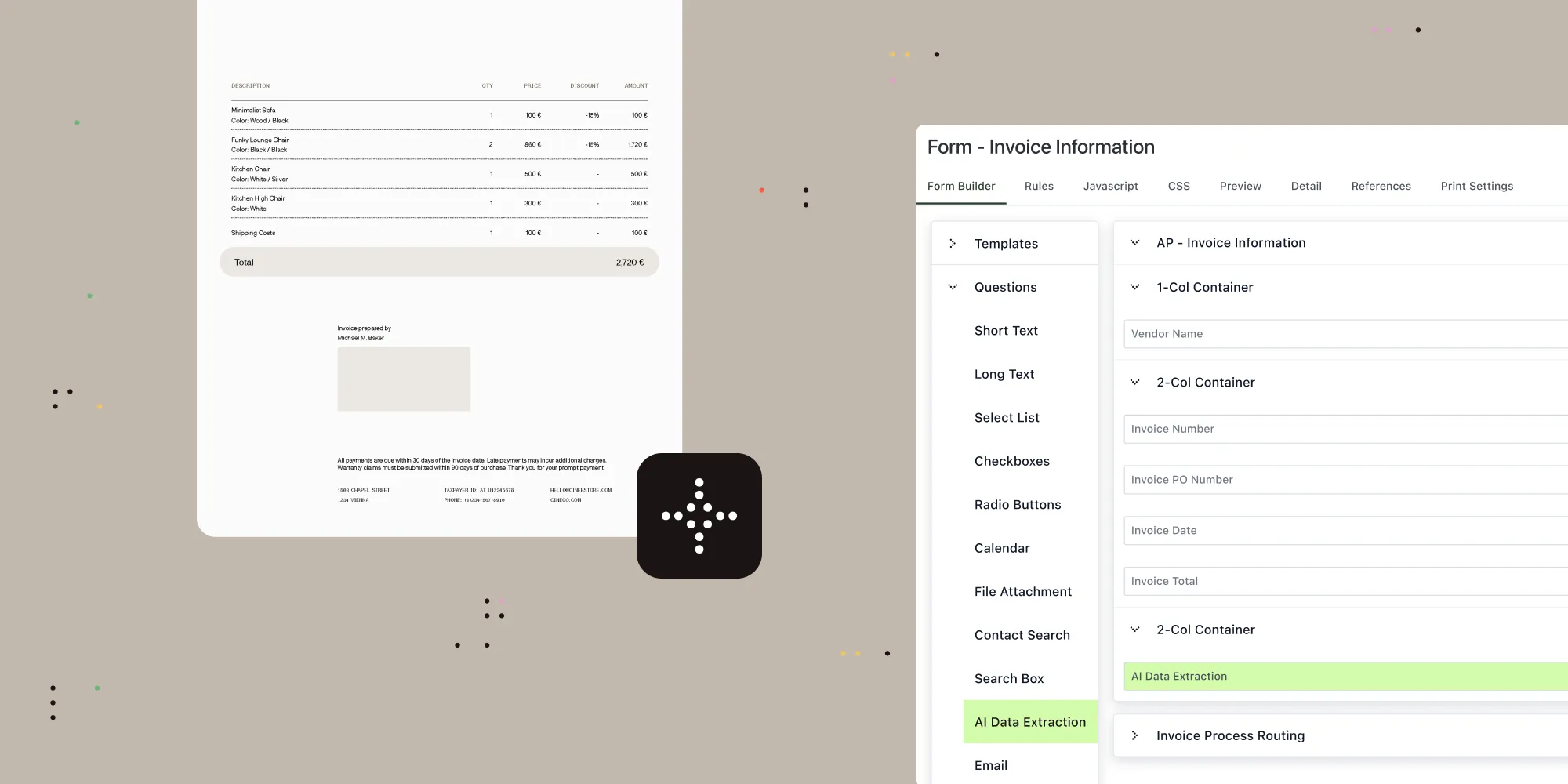
With the launch of Workflow AI Data Extraction, Nutrient is redefining what’s possible for document-centric workflows. This latest enhancement brings intelligence to the point of input, using AI to automatically extract and populate key data from PDFs and other formats directly into your workflow forms.

No more copying. No more pasting. Just seamless, scalable automation — designed to empower teams, not burden them.
What makes it transformative

  • Accelerated processing through AI-powered data extraction that moves critical information into workflow forms in seconds.
  • Error reduction by eliminating manual input, minimizing rework and bottlenecks across departments.
  • Effortless scale with automation that handles growing document volumes without increasing headcount.
  • Flexible implementation with intuitive setup and maintenance using natural language and familiar interface elements — no specialized skills required.
  • AI Data Extraction works with leading model providers — including OpenAI, Azure AI, and AWS Bedrock — and even self-hosted LLMs, giving you the flexibility to build AI-powered document workflows on your terms.

Mobile companion app (now in public preview)

Mobile companion

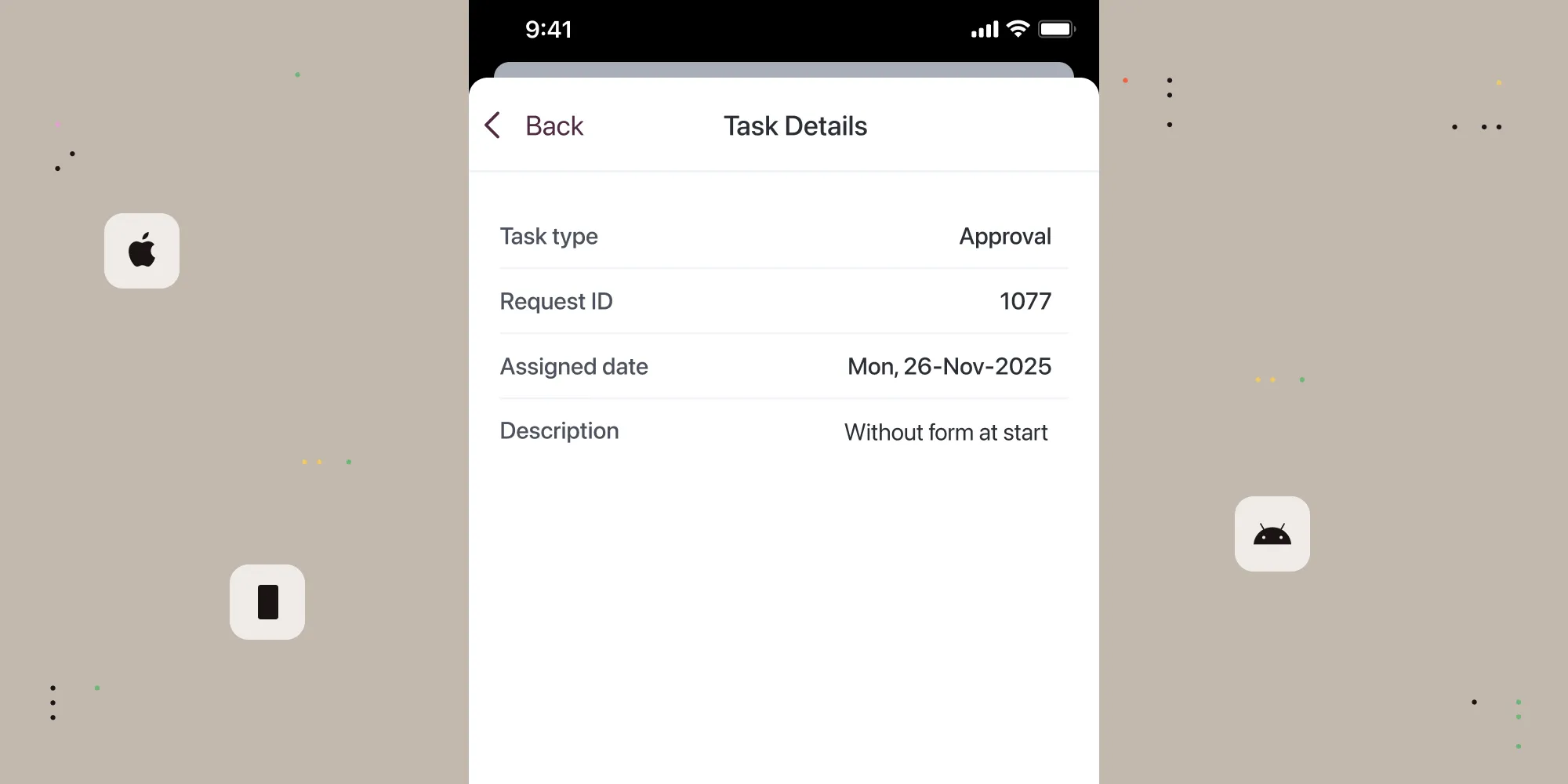
In today’s always-on world, work doesn’t stop when you leave your desk. With the launch of the Nutrient Workflow mobile companion app for iOS and Android, we’re bringing the power of Workflow Automation to your pocket.

Designed for speed, simplicity, and real-world utility, this companion app allows users to log in with their existing Workflow accounts, make immediate approvals, and stay connected wherever they are.

Whether you’re in the field, on the move, or simply between meetings, this first release lays the foundation for mobile-first productivity.

Features of the public preview

  • Access workflow approvals seamlessly across our mobile app and desktop platform with real-time synchronization that ensures your projects continue to move forward, no matter where you are.
  • Log in, view, and approve tasks from anywhere.
  • Gain instant access to all the data associated with requests to effectively make decisions on your approvals and keep processes flowing while on the go.

If you’d like to learn more about the mobile companion app’s availability, be sure to reach out to your customer support representative today.

Ongoing enterprise-grade security enhancements

Security enhancements

At Nutrient, we believe trust is earned — not assumed. That’s why every facet of our Workflow Automation platform is engineered for uncompromising security, transparency, and auditability.

This latest round of updates includes:

  • SOC 2 Type 2 compliance, which demonstrates our commitment to providing data protection and auditability by meeting the industry’s highest security standards.
  • Real-time notifications, which instantly alert administrators to license changes and task failures, streamlining oversight and ensuring users stay informed — with secure, intelligent redirects that preserve authentication across sessions.
  • A secure credentials center, which centralizes the management of sensitive tokens, passwords, and keys in a protected environment, giving administrators full control over integrations while keeping confidential data shielded from end users.

We’ve designed these features with your teams in mind — the ones who keep business moving, day in and day out. From operations to IT, from legal to HR, we’re here to make work flow better — securely, intelligently, and at scale.

Get started now

Interesting in experiencing Workflow Automation for yourself? Try our latest features today.

Want to learn more about our latest product updates? Watch our Nutrient Low-Code and Workflow product update: H1 2025 webinar.

And if you’re part of our developer community, join us on Discord(opens in a new tab) to connect, share feedback, and find out what’s next.