


惯性聚合 高效追踪和阅读你感兴趣的博客、新闻、科技资讯
阅读原文 在惯性聚合中打开

推荐订阅源

The GitHub Blog
The GitHub Blog
M
MIT News - Artificial intelligence
Engineering at Meta
Engineering at Meta
云风的 BLOG
云风的 BLOG
博客园 - 叶小钗
Jina AI
Jina AI
Last Week in AI
Last Week in AI
The Cloudflare Blog
博客园 - 【当耐特】
Stack Overflow Blog
Stack Overflow Blog
Cyber Security Advisories - MS-ISAC
WordPress大学
WordPress大学
博客园_首页
I
InfoQ
G
Google Developers Blog
Martin Fowler
Martin Fowler
Recent Announcements
H
Help Net Security
U
Unit 42
Blog — PlanetScale
Blog — PlanetScale
阮一峰的网络日志
阮一峰的网络日志
P
Proofpoint News Feed
IT之家
IT之家
Microsoft Security Blog

Inside Nutrient

A guide to the invisible work behind documents Introducing Nutrient Documents for Salesforce: Native document generation and signing Document AI vs. traditional OCR: Choosing between OCR, AI, and hybrid pipelines PDF SDK compliance and security evaluation checklist for enterprise teams (2026) Invariant Corp replaces paper processes with Nutrient Workflow and scales without limits What is process mapping? A complete guide Nutrient vs. Conga Composer for Salesforce document generation (2026) Document routing: How to automate document distribution The CTO’s AI playbook: Why accountability architecture beats orchestration Compliance workflow automation: Why built-in compliance is table stakes Workflow diagrams: Examples, symbols, and how to build one that actually runs Digital forms: Replace paper forms with automated workflows Approval workflow software: How to automate approvals Why document-centric automation is different The CEO’s AI playbook: Why decision architecture beats model selection Nutrient SDK product updates for Q1 2026 PDF redaction verification: How to prove sensitive data is permanently removed What is a VPAT? The complete guide to accessibility conformance reports What is PDF/UA? The accessible PDF standard explained Salesforce eSignatures: Generate, sign, and track documents in one flow Online document viewer: Options, tradeoffs, and how to embed one Document viewer for web apps: React, Vue, Angular (2026) Best document viewers in 2026: A buyer’s guide How to edit a PDF in Python: Add text, images, and annotations Nutrient advances Workflow platform with agentic AI for enterprise-grade speed and consistency in document-heavy operations How to create a Salesforce quote template from opportunity data The business case for accessibility: Five ways it drives enterprise value Python PDF library comparison (2026): 7 libraries for developers Why your AI agent hallucinates PDF table data PDF.js limitations: When to upgrade to a commercial PDF SDK
Creating functional mockup sites with Workflow Automation...
Roman Pendzich · 2025-01-02 · via Inside Nutrient

My career in workflow automation began more than 10 years ago at Integrify, now Nutrient, where I was part of the professional services department. From the start of my career in workflow, I began to see how much the platform is able to help teams improve their everyday processes and productivity. Currently, I work as a sales engineer helping show and explain our product to prospective customers.

During my time working in workflow automation, I’ve seen how important a working mockup site can be to our potential customers. In this article, I’ll explain why and how we do it.

The benefit of live demos

Workflow automation involves creating and automating processes based on specific rules. These processes route tasks, data, or files between people or systems according to predefined business rules. We’ve found that prospective customers resonate with being able to see an application running in a live demo when we first meet with them. So, on my team, we demonstrate its capabilities to our prospects by building some or all of their initial workflow as part of the sales cycle.
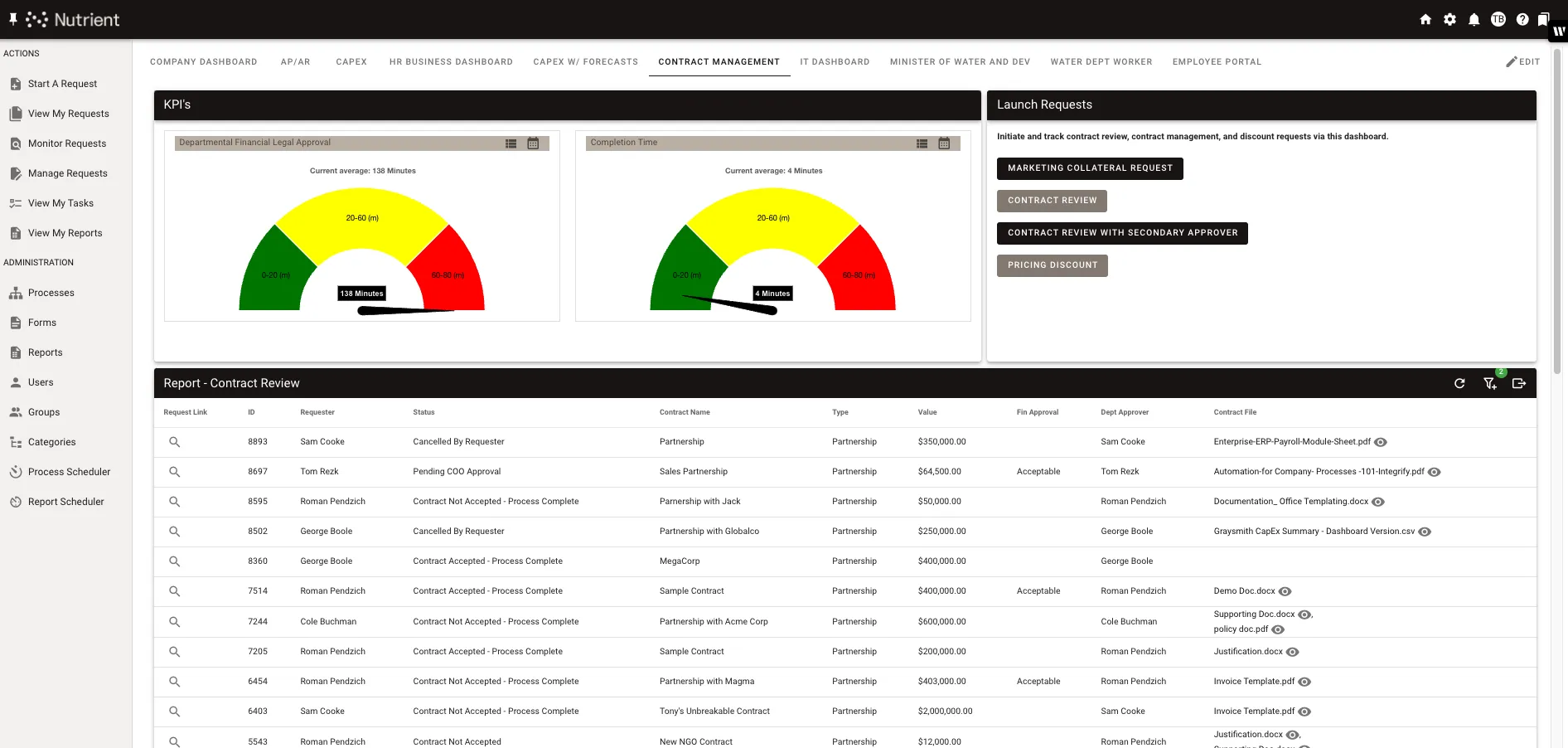
The process of creating functional mockup sites

Functional mockup for a customer

There are a few steps involved in setting up functional mockup sites to showcase Workflow Automation to potential users.

Step 1 — Gathering requirements

During our first discussion with the potential customer, we’re able to gather and understand their specific needs and requirements.

Step 2 — Building the workflow environment

After we’ve gathered the requirements for the mockup site, we begin building a functional product with an executive dashboard and reports to simulate a real-world workflow the customer could use. We find this can be very persuasive to someone who has concerns about how easy it is to build workflows with our tool.

Step 3 — Demonstration and feedback

Finally, during a live demo with the prospective customer, we’ll run through a built-out environment with their requirements to showcase its functionality, answering any questions they might have. Customers have an easier path to adopting our product when then can see their requirements embodied in a mockup. That’s because one major barrier to business process evolution within an organization is opposition to change. But when they see how easy it is to make changes that streamline their workflows, they’re more likely to want to incorporate it in their work.

Conclusion

When future users can see benefits for themselves while using or having a mockup demonstrated to them, it encourages them to adopt new technology, and it makes the desired benefit more likely to be realized. They can also keep or use their mockup site in their own website if they become a customer. This gives them the perfect way to get started with their new software. To learn more about Workflow Automation and how it can work for you, contact Sales.