




Table of contents
Summary
This comprehensive guide compares two leading JavaScript PDF editing solutions: the open source pdf-lib library, and Nutrient’s commercial Node.js PDF editor SDK. It provides detailed implementation examples for both options, discussing their features, limitations, and use cases. While pdf-lib offers lightweight, dependency-free PDF manipulation, Nutrient’s SDK provides enterprise-grade features, including advanced annotations, form handling, digital signatures, and a customizable UI.
In web development, handling PDFs efficiently can improve your application. Whether you need to add annotations, fill out forms, or make content adjustments, a reliable PDF editing tool is key to providing a good user experience.
Two standout options for integrating PDF functionalities into your web application are pdf-lib(opens in a new tab) and Nutrient. Both libraries provide robust solutions — from lightweight, open source alternatives, to full-featured commercial offerings — to suit various project needs.
This post will first look at pdf-lib and then explore the Nutrient PDF editor to help you determine which one best fits your needs.
Requirements
- Node.js(opens in a new tab) installed on your machine.
- npm(opens in a new tab) (Node Package Manager) or Yarn(opens in a new tab) for managing packages.
1. pdf-lib
pdf-lib(opens in a new tab) is a popular free JavaScript library for creating and editing PDF documents directly in the browser or Node.js. It’s lightweight and highly customizable, allowing developers to build their own PDF editing interfaces.
Key features
- Create PDFs from scratch — Generate new PDF documents with custom content.
- Modify existing PDFs — Edit existing PDFs by adding or changing text, images, and graphics.
- No dependencies — A self-contained library with no external dependencies.
- Cross-platform compatibility — Works in both browser and Node.js environments.
Limitations
- Basic annotation support — Lacks support for advanced annotations or commenting features.
- No built-in viewer — Doesn’t provide a built-in PDF viewer; you need to integrate a separate viewer for displaying PDFs.
How to use pdf-lib for PDF editing
- Set up your project directory with an
index.htmlandindex.jsfile. For instance:
mkdir pdf-lib-example
cd pdf-lib-example
touch index.html index.js
- Create a simple HTML structure in
index.htmlto include aniframefor displaying the PDF:
<!DOCTYPE html>
<html lang="en">
<head>
<meta charset="UTF-8" />
<meta name="viewport" content="width=device-width, initial-scale=1.0" />
<title>PDF Editing with pdf-lib</title>
<style>
#pdf {
width: 100%;
height: 100vh;
border: 1px solid #ccc;
}
</style>
<script src="https://unpkg.com/pdf-lib@1.17.1/dist/pdf-lib.js"></script>
</head>
<body>
<iframe id="pdf"></iframe>
<script src="index.js"></script>
</body>
</html>
This HTML file includes an iframe where the modified PDF will be displayed. The script tag loads the pdf-lib library from unpkg, allowing you to use its functionality in your project.
- In
index.js, use pdf-lib to modify an existing PDF and display it in the iframe:
const { degrees, PDFDocument, rgb, StandardFonts } = PDFLib;
async function modifyPdf() {
// URL of an existing PDF document.
const url = "https://pdf-lib.js.org/assets/with_update_sections.pdf";
// Fetch the existing PDF document.
const existingPdfBytes = await fetch(url).then((res) => res.arrayBuffer());
// Load the existing PDF document.
const pdfDoc = await PDFDocument.load(existingPdfBytes);
// Embed the Helvetica font.
const helveticaFont = await pdfDoc.embedFont(StandardFonts.Helvetica);
// Get the first page of the document.
const pages = pdfDoc.getPages();
const firstPage = pages[0];
// Get page dimensions.
const { width, height } = firstPage.getSize();
// Draw new text on the page.
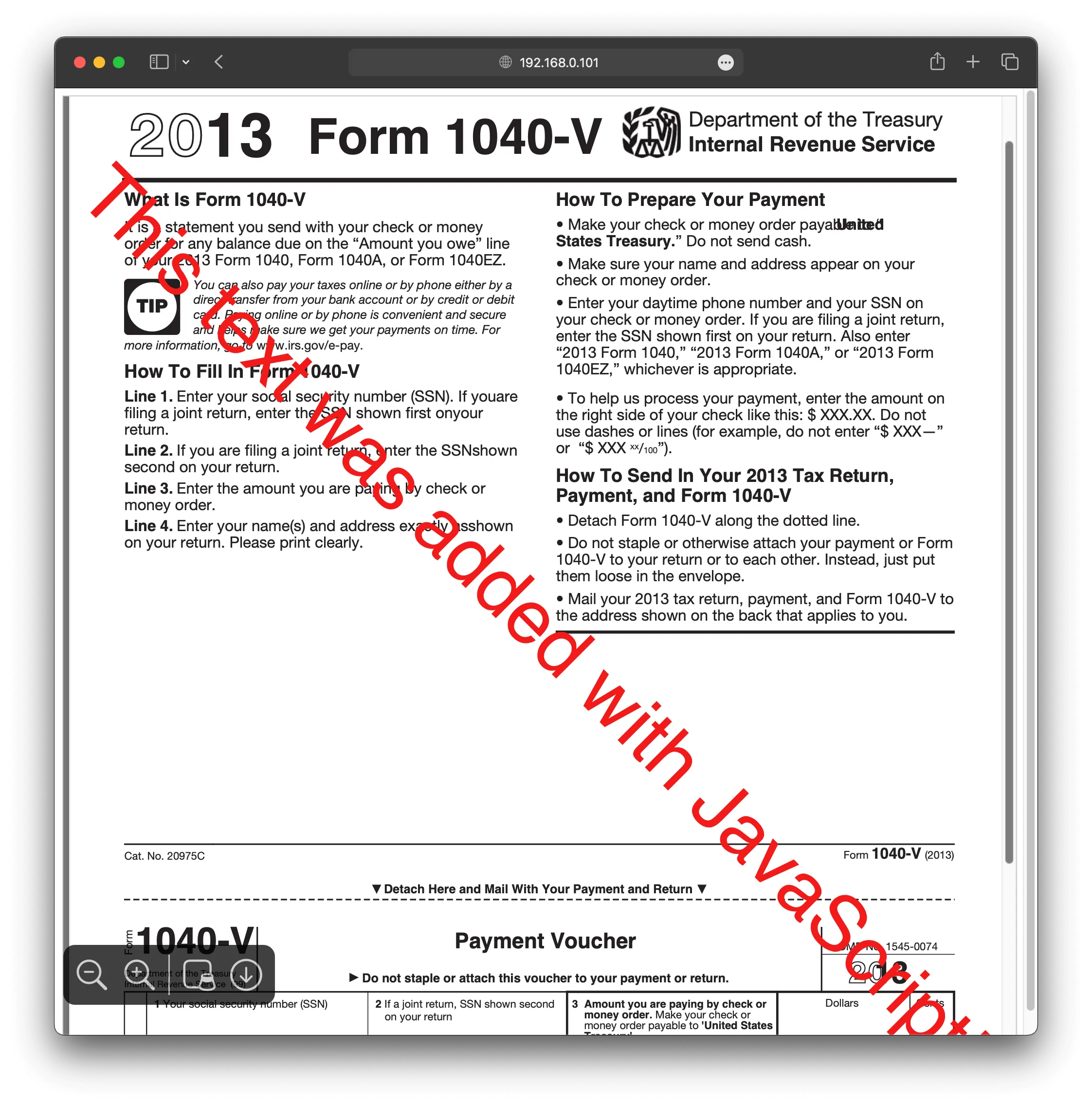
firstPage.drawText("This text was added with JavaScript!", {
x: 5,
y: height / 2 + 300,
size: 50,
font: helveticaFont,
color: rgb(0.95, 0.1, 0.1),
rotate: degrees(-45),
});
// Serialize the `PDFDocument` to bytes.
const pdfBytes = await pdfDoc.save();
// Create a Blob from the PDF bytes.
const blob = new Blob([pdfBytes], { type: "application/pdf" });
// Create a URL for the Blob and set it as the source of the iframe.
const urlObject = URL.createObjectURL(blob);
document.getElementById("pdf").src = urlObject;
}
// Call `modifyPdf` when the page loads.
modifyPdf();
This JavaScript code performs the following:
- Fetches an existing PDF from a URL.
- Loads the PDF and modifies it by adding text.
- Displays the modified PDF in the iframe by converting it to a Blob and setting a URL for it.
pdf-lib is an excellent choice for developers who need a lightweight and flexible library. For more detailed examples and usage of pdf-lib, check out our other blog posts:
- How to build a JavaScript PDF editor with pdf-lib
- How to add annotations to PDF using Vue.js
- How to build a Node.js PDF editor with pdf-lib
- How to use JavaScript to capture signatures in PDFs
- How to convert images to PDF in Node.js
- How to fill a PDF form in React
- How to fill PDF forms in Node.js
- How to programmatically create and fill PDF forms in Angular
2. Nutrient JavaScript PDF editor library
If you’re looking for a robust and comprehensive solution for handling PDF editing directly within your web application, Nutrient offers a full-featured JavaScript PDF editor. It provides an extensive set of functionalities out of the box, making it an excellent choice for commercial use.
Key features
- Annotation tools for text, highlights, stamps, and drawings.
- Form filling and editing.
- Document manipulation (reordering, adding, or deleting pages).
- Digital signatures.
- Customizable UI.
- Cross-platform support for Web, iOS, and Android.
Getting started with Nutrient
Integrating Nutrient into your project is straightforward. Before you begin, ensure you have the latest version of Node.js installed and a compatible package manager such as Yarn.
Step 1 — Installing Nutrient
To add Nutrient to your project, first, install it via Yarn or npm:
yarn add pspdfkit
npm
npm install pspdfkit
After the installation, copy the library distribution files into your project’s assets directory:
cp -R ./node_modules/pspdfkit/dist/ ./assets/
Ensure that the assets directory includes the pspdfkit.js file and the pspdfkit-lib folder containing necessary library files.
Step 2 — Setting up your HTML and JavaScript
Next, create a simple HTML structure that will serve as the foundation for your PDF viewer:
<!DOCTYPE html>
<html>
<head>
<title>PDF Viewer</title>
<meta
name="viewport"
content="width=device-width, initial-scale=1.0, minimum-scale=1.0, maximum-scale=1.0, user-scalable=no"
/>
</head>
<body>
<div id="pspdfkit" style="width: 100%; height: 100vh;"></div>
<script type="module" src="index.js"></script>
</body>
</html>
Add an empty <div> element with a specific width and height, where Nutrient will be rendered.
Step 3 — Initializing Nutrient in JavaScript
In your JavaScript file (index.js), import Nutrient and initialize it:
import "./assets/pspdfkit.js";
const baseUrl = `${window.location.protocol}//${window.location.host}/assets/`;
PSPDFKit.load({
baseUrl,
container: "#pspdfkit",
document: "/document.pdf",
})
.then((instance) => {
console.log("PSPDFKit loaded", instance);
})
.catch((error) => {
console.error(error.message);
});
This code snippet tells Nutrient where to find its assets and loads the PDF document you want to display.
Step 4 — Serving your project
To serve the project locally, you can use a simple HTTP server. Install the serve package globally:
Then, serve the contents of your directory:
Open http://localhost:8080 in your browser to view the website and start editing your PDFs.
Why choose Nutrient?
Nutrient is packed with features that make it stand out as a comprehensive commercial PDF editor:
- Customizable UI — Offers a highly customizable, ready-to-use interface that saves time and development effort.
- Cross-device syncing — Integrates with a syncing framework like Nutrient Instant, allowing users to maintain changes across devices.
- Advanced features — Supports complex functionalities such as annotations, redactions, digital signatures, and real-time collaboration.
- Office document support — Allows viewing and editing of Word, Excel, and PowerPoint files directly within the PDF viewer.
- Dedicated support — Provides access to professional customer support to help streamline integration and resolve any issues quickly.
While pdf-lib is great for basic editing and viewing functionalities, Nutrient is ideal for applications that need a professional-grade PDF editor with extensive customization options and enhanced user experience.
By opting for Nutrient, you gain access to powerful tools and features that help you deploy faster, reduce development effort, and deliver a seamless PDF editing experience for your users.
Nutrient offers a rich set of capabilities that can significantly speed up the development process, particularly for enterprises and businesses that require a fully featured PDF editor in their applications.
Conclusion
Choosing the right JavaScript library for PDF and document editing depends on your project’s requirements. Whether you need a lightweight and flexible library like pdf-lib, or the full-featured capabilities of Nutrient, there’s a tool tailored to your needs. Evaluate each based on your budget, user needs, and project scope to find the best fit.
To see what Nutrient can bring to your web application, explore our demo or reach out to our Sales team for more information.
If you’re evaluating PDF viewers rather than editors, see our comparison of the top JavaScript PDF viewers.
FAQ
pdf-lib is a JavaScript library for creating, editing, and modifying PDF documents directly in the browser or Node.js. It supports generating new PDFs, editing existing ones, and adding content like text and images. You can use pdf-lib via a CDN for quick inclusion, or install it using npm/Yarn for more integrated project setups.
Nutrient is a commercial library offering advanced PDF editing features such as annotations, form filling, digital signatures, and a customizable UI. Unlike pdf-lib, which is free and more basic, Nutrient provides extensive functionality for professional use. Nutrient includes advanced features and a user-friendly interface.
pdf-lib allows you to:
- Create new PDFs from scratch.
- Modify existing PDFs by adding text, images, and graphics.
- Work directly in the browser or Node.js.
- Embed fonts and handle complex document structures.
To integrate Nutrient:
- Install it using Yarn or npm.
- Include the Nutrient library in your project.
- Set up an HTML structure to host the viewer.
- Initialize Nutrient in your JavaScript code by specifying the base URL and document path.