




惯性聚合 高效追踪和阅读你感兴趣的博客、新闻、科技资讯
阅读原文 在惯性聚合中打开

推荐订阅源

Y
Y Combinator Blog
Jina AI
Jina AI
雷峰网
雷峰网
有赞技术团队
有赞技术团队
WordPress大学
WordPress大学
美团技术团队
V
V2EX
酷 壳 – CoolShell
酷 壳 – CoolShell
小众软件
小众软件
博客园 - Franky
博客园 - 三生石上(FineUI控件)
月光博客
月光博客
博客园 - 叶小钗
大猫的无限游戏
大猫的无限游戏
爱范儿
爱范儿
Hugging Face - Blog
Hugging Face - Blog
宝玉的分享
宝玉的分享
Last Week in AI
Last Week in AI
Apple Machine Learning Research
量子位
IT之家
IT之家
人人都是产品经理
人人都是产品经理
博客园_首页
让小产品的独立变现更简单 - ezindie.com

SANS Internet Storm Center, InfoCON: green

From a VHDX File to a Remcos RAT - SANS Internet Storm Center ISC Stormcast For Tuesday, June 16th, 2026 https://isc.sans.edu/podcastdetail/9974 Evil MSI Background: BASE64 Statistical Analysis - SANS ISC ISC Stormcast For Monday, June 15th, 2026 https://isc.sans.edu/podcastdetail/9972 ISC Stormcast For Friday, June 12th, 2026 https://isc.sans.edu/podcastdetail/9970 ISC Stormcast For Thursday, June 11th, 2026 https://isc.sans.edu/podcastdetail/9968 How has use of framing protection security headers changed in the past 3 years? ISC Stormcast For Wednesday, June 10th, 2026 https://isc.sans.edu/podcastdetail/9966 Microsoft June 2026 Patch Tuesday - SANS Internet Storm Center ISC Stormcast For Tuesday, June 9th, 2026 https://isc.sans.edu/podcastdetail/9964 TeamPCP Supply Chain Campaign: Activity Through 2026-06-07 ISC Stormcast For Monday, June 8th, 2026 https://isc.sans.edu/podcastdetail/9962 The Evil MSI Background is Back! - SANS Internet Storm Center ISC Stormcast For Friday, June 5th, 2026 https://isc.sans.edu/podcastdetail/9960 Microsoft's Coreutils for Windows - SANS Internet Storm Center ISC Stormcast For Thursday, June 4th, 2026 https://isc.sans.edu/podcastdetail/9958 Continuing Scans for swagger.json - SANS Internet Storm Center ISC Stormcast For Wednesday, June 3rd, 2026 https://isc.sans.edu/podcastdetail/9956 New Wave Of Phishing Emails with SVG Files - SANS ISC ISC Stormcast For Tuesday, June 2nd, 2026 https://isc.sans.edu/podcastdetail/9954 ISC Stormcast For Monday, June 1st, 2026 https://isc.sans.edu/podcastdetail/9952 Unidentified RAT pushes NetSupport RAT - SANS ISC YARA-X 1.17.0 Release - SANS Internet Storm Center ISC Stormcast For Friday, May 29th, 2026 https://isc.sans.edu/podcastdetail/9950 Analysis of a Year of Files Uploaded to DShield Sensors ISC Stormcast For Thursday, May 28th, 2026 https://isc.sans.edu/podcastdetail/9948 Reconstructing an Akira Ransomware Kill Chain from Perimeter and Endpoint Logs ISC Stormcast For Wednesday, May 27th, 2026 https://isc.sans.edu/podcastdetail/9946 ISC Stormcast For Tuesday, May 26th, 2026 https://isc.sans.edu/podcastdetail/9944 Possible ACR Stealer From Page Impersonating Claude
Cleartext Passwords in MS Edge? In 2026? - SANS ISC
2026-05-05 · via SANS Internet Storm Center, InfoCON: green

Yup, that is for real.

For me, this started with a post in X at hxxps://x.com/intcyberdigest/status/2051406295828250963?s=61 , which highlighted research by @L1v1ng0ffTh3L4N that found exactly this issue.  Edge stores all of your browser passwords in clear text, even if you haven't used them in this session, y'know, just in case.

I figured, it couldn't be that easy, right?  But like so many things, yes, yes it was.

To reproduce this
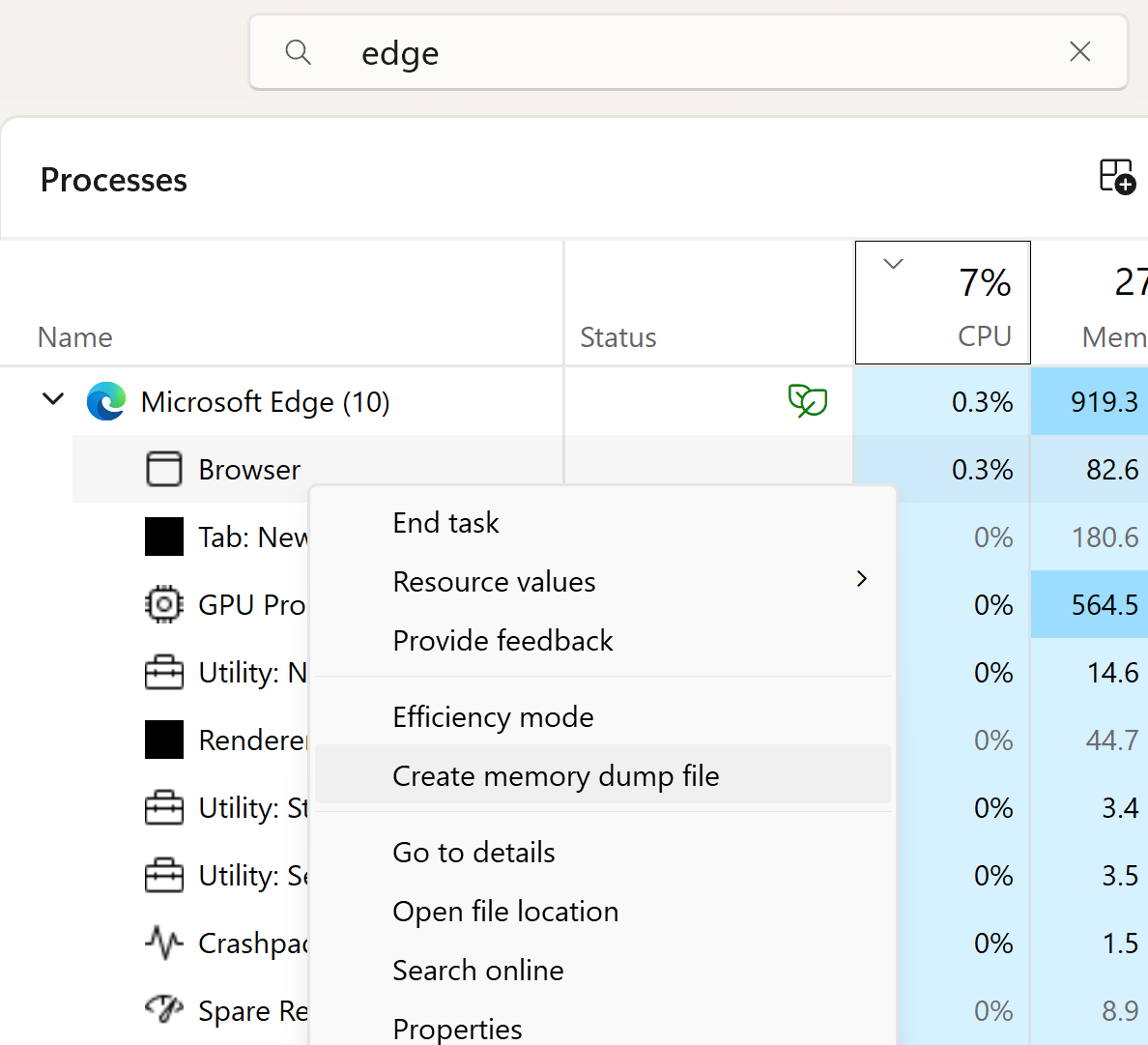
  • Open Edge.  Don't browse anywhere, just open it
  • Flip out to Task Manager, search for Edge, then expand that task
  • Highlight the "browser" sub-task, right click, and choose "Create Memory Dump"

Navigate to where the DMP file is stored.  

If you haven't used strings before, you're in for a treat.  Strings is of course just part of most Linux distros, but you can easily get a copy for Windows as part of MS Sysinternals, at https://learn.microsoft.com/en-us/sysinternals/downloads/strings


Now let's look for passwords!  You could use strings and look for known credentials, just search for a known password and you will certainly find it.  Or you can take advantage of the format of the saved data:

<url of the site><protocol>< ><userid>< >password>

So, searching for "<tld><protocol>", which in most cases is "comhttps" (no spaces) will find most of them, and they'll all be in one nicely formatted group no less.  The command for that will be:

strings -n 8 msedge.DMP | find "comhttps"

looking a bit down in the output (since comhttps does match more stuff in the memory dump than just the credential list), I see:
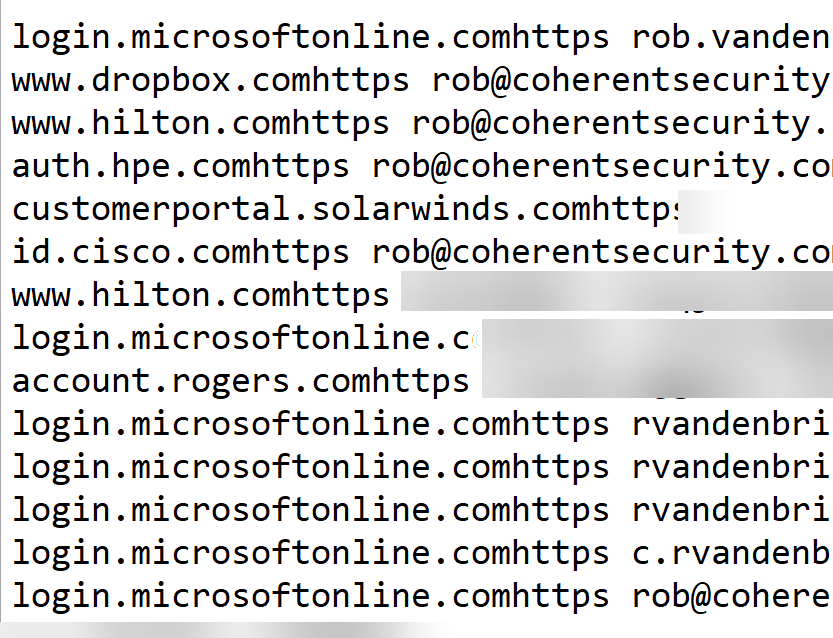
As you can see, Edge isn't  my primary browser, but I do use it a fair bit for Azure work.  And yes, this is a real session, so I cropped/blurred out sensitive accounts and of course passwords.

It really is that easy.

And the ironic thing?  To view these same credentials in the browser, there's a whole security theatre process where Edge wants your biometrics as proof before disclosing even the userid and site names - you know, "for security".  All the while, the whole shot is in clear text, free for the looking ..

Also as noted in the X post, Microsoft classifies this as "intended behaviour".  I'm not sure what manager or lawyer decided that, hopefully it wasn't anyone in their security team.

Anyway, if the intent of this is to get me to use Firefox or Chrome, it's working!!

Have you seen a similar "strong front door / open window" security example in your forensics, please share in the comments (keeping any NDA's etc in mind of course)

===============
Rob VandenBrink
[email protected]