





January 28, 2023
Years ago I wrote a Perl program on Windows using WxWidgets to give it a graphical user interface. The program is used by a customer of mine to check bills of materials (BOMs). However the latest version I had made earlier this week, using the PAR packager program to turn it into a self contained executable, didn't work on his computer.
I guessed that one or more DLLs were missing from the executable,
which did work on my development system: a Windows 10 virtual machine
running on a Mac mini late 2014. So, somehow the executable could find
the DLLs on my machine but not on his. How to see which DLLs are
loaded by an executing program and their location in the file system?
A Google search gave the answer: perfmon.exe.
Because the program stopped working on the customer's machine when I had added support for https I made the following minimal program to test:
use strict;
use warnings;

use LWP::UserAgent;
use LWP::Protocol::https;

print LWP::UserAgent->new()->get("https://www.google.com")->content;
while (1) {
    sleep 10;
}
It fetches the front page of Google using https and then keeps sleeping 10 seconds "forever". I turned this little Perl program into an executable using:
pp https.pl -o https.exe
Next, I started this program via the command prompt. In another
command prompt I ran perfmon to open the Resource Monitor as
follows:
C:\Windows\System32\perfmon.exe /res
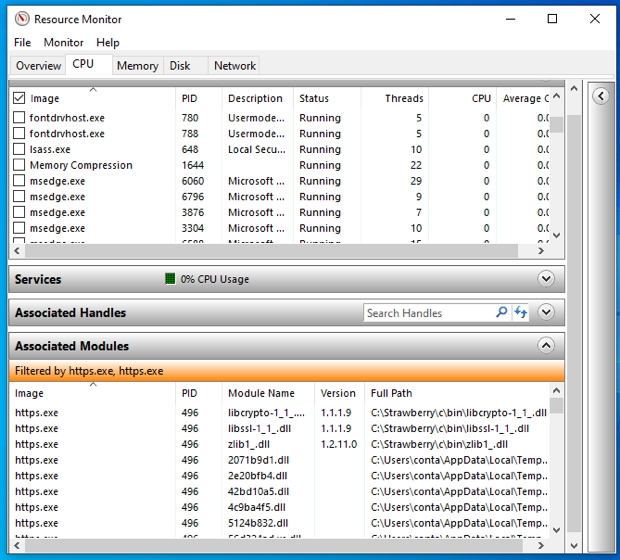
https.exe.
In the Resource Monitor I selected the CPU tab, located https.exe
and selected each version found. Next, I expanded the Associated
Modules pane and noticed that the following three modules where loaded
from the location of Strawberry Perl:
C:\Strawberry\c\bin\libcrypto-1_1_.dll
C:\Strawberry\c\bin\libssl-1_1_.dll
C:\Strawberry\c\bin\zlib1_.dll
I added those paths each with an -l switch to a text file I called
ppoptions_file.txt as follows. Note that each back slash has to be
replaced with a forward slash:
-l C:/Strawberry/c/bin/libcrypto-1_1_.dll
-l C:/Strawberry/c/bin/libssl-1_1_.dll
-l C:/Strawberry/c/bin/zlib1_.dll
And the mkexe.bat file I use to create the BOM checker executable
was changed to use this options file as follows:
call wxpar @ppoptions_file.txt --gui -o bomchecker.exe wcheckbill.pl
del bomchecker.wxparargs
Running mkexe.bat created a new bomchecker.exe which ran without
any problems on another Windows 10 virtual machine on which Strawberry
Perl had not been installed.