惯性聚合 高效追踪和阅读你感兴趣的博客、新闻、科技资讯
阅读原文 在惯性聚合中打开

推荐订阅源

Microsoft Security Blog
WordPress大学
WordPress大学
Stack Overflow Blog
Stack Overflow Blog
D
DataBreaches.Net
罗磊的独立博客
博客园 - 司徒正美
Last Week in AI
Last Week in AI
The Cloudflare Blog
大猫的无限游戏
大猫的无限游戏
Microsoft Azure Blog
B
Blog RSS Feed
The GitHub Blog
The GitHub Blog
宝玉的分享
宝玉的分享
Cyber Security Advisories - MS-ISAC
小众软件
小众软件
Jina AI
Jina AI
钛媒体:引领未来商业与生活新知
钛媒体:引领未来商业与生活新知
Hugging Face - Blog
Hugging Face - Blog
B
Blog
博客园 - 【当耐特】
V
V2EX
Apple Machine Learning Research
奇客Solidot–传递最新科技情报
奇客Solidot–传递最新科技情报
酷 壳 – CoolShell
酷 壳 – CoolShell

Iterm2 - 分类 - cywhat's blog

暂无文章

Iterm2/Mac自带终端工具快速ssh
cywhat · 2019-01-26 · via Iterm2 - 分类 - cywhat's blog

1、新建文件(最好在根目录)

下面就是脚本文件,比较low,大神勿喷,会更炫酷写法的小伙伴可以自己参考这个思路写,不会的/懒得写的直接复制就好

 1
 2
 3
 4
 5
 6
 7
 8
 9
10
11
12
   #!/usr/bin/expect -f
  set hostname [lindex $argv 0]
  set user [lindex $argv 1]
  set password [lindex $argv 2]
  set timeout 30
  spawn ssh -tt $user@$hostname;
  expect {
    "yes/no" { send "yes\r";exp_continue }
    "*password:" { send "$password\r";}
  }
  interact
  ~

2、安装expect

1
sudo yum install expect

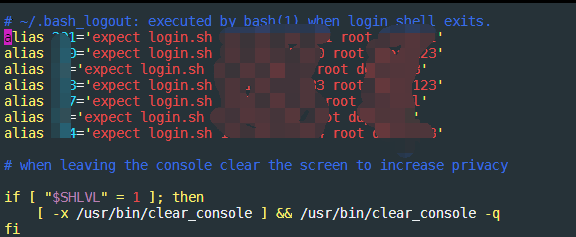
3、设置别名(快捷登录需要输入的名称)

1
2
3
vim bash_profile

alias 别名='expect login.sh 机器ip 登录账户 登录密码'

ps:别名就是你登陆终端之后输入这个别名就会自动登陆/或者操作你的指令!

https://img-blog.csdnimg.cn/img_convert/81b5757e6ba93a39660195244f1b4d1b.png    

关注一下再走吧

公众号 小程序

赞赏支持

微信打赏 支付宝打赏