前言
Linux版本:centos7.6
Java:Jdk11
SonarQube:8.2.0.32929
PostgreSQL:12
sonar-scanner:4.6.2.2472
1.安装Jdk
安装JDK
2.安装PostgreSQL
 1
 2
 3
 4
 5
 6
 7
 8
 9
10
11
12
13
14
15
16
|
1.安装镜像
sudo yum install -y https://download.postgresql.org/pub/repos/yum/reporpms/EL-7-x86_64/pgdg-redhat-repo-latest.noarch.rpm

2.安装PostgreSQL
sudo yum install -y postgresql12-server

3.加到系统自启动
sudo /usr/pgsql-12/bin/postgresql-12-setup initdb

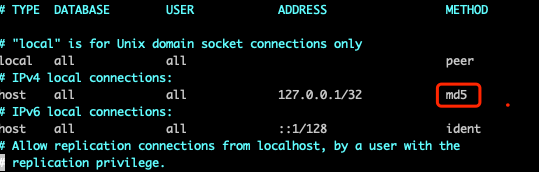
4.修改md5加密
vim /var/lib/pgsql/12/data/pg_hba.conf

5.启动
sudo systemctl enable postgresql-12

sudo systemctl start postgresql-12
|
3.安装SonarQube
1
2
3
4
5
6
7
8
|
1.下载SonarQube
wget https://binaries.sonarsource.com/Distribution/sonarqube/sonarqube-8.2.0.32929.zip

2.解压
unzip sonarqube-8.2.0.32929.zip

3.重命名
mv sonarqube-8.2.0.32929 /usr/local/sonarqube
|
4.添加用户
1
2
3
4
5
6
7
8
|
1.新增用户
sudo adduser sonar

2.设置密码
sudo passwd sonar

3.赋予权限
chmod -R sonar:sonar /usr/local/sonarqube
|
5.进入PostgreSQL配置数据库
 1
 2
 3
 4
 5
 6
 7
 8
 9
10
11
12
13
14
|
1.切换到postgre用户
sudo su - postgre

2.进入psql
psql -U postgres

3.创建库表结构等 #依次执行
CREATE DATABASE sonar;

CREATE USER sonar WITH ENCRYPTED PASSWORD '<sonar-password>';   #<> 里面是sonar用户的密码 可自定义

GRANT ALL PRIVILEGES ON DATABASE sonar TO sonar;

ALTER DATABASE sonar OWNER TO sonar;
|
6.修改sonarqube配置
 1
 2
 3
 4
 5
 6
 7
 8
 9
10
11
12
13
14
15
16
17
18
19
20
|
1.vim /usr/local/sonarqube/conf/sonar.properties   #加入如下配置

# DATABASE
sonar.jdbc.username=sonar
sonar.jdbc.password=<sonar-user-password>
sonar.jdbc.url=jdbc:postgresql://localhost/sonar
sonar.jdbc.maxActive=60
sonar.jdbc.maxIdle=5
sonar.jdbc.minIdle=2
sonar.jdbc.maxWait=5000
sonar.jdbc.minEvictableIdleTimeMillis=600000
sonar.jdbc.timeBetweenEvictionRunsMillis=30000
sonar.jdbc.removeAbandoned=true
sonar.jdbc.removeAbandonedTimeout=60

2.如需要自定义端口 需要更改端口 sonarqube默认为9000 search默认为9001 #根据自己需求,可不修改
sonar.web.port=9000    #修改sonarqube端口

sonar.search.port=9001  #修改search端口,如果端口冲突必须要更改噢
|
7.启动sonarqube
1
2
3
4
5
|
su sonar    #必须用非root启动

cd /usr/local/sonarqube/bin/linux-x86-64/

sh  sonar.sh start
|
8.安装sonar-scanner
下载sonar-scanner
提取码: qtd4
 1
 2
 3
 4
 5
 6
 7
 8
 9
10
|
1.上传到服务器

2.解压
unzip sonar-scanner-cli-4.6.2.2472-linux.zip

3.重命名
mv sonar-scanner-cli-4.6.2.2472-linux /usr/local/scanner

4.建立软链接
ln -s /usr/local/scanner/bin/sonar-scanner /usr/local/bin/scanner
|
PS:常见报错汇总
报错:
1
2
3
4
5
|
ERROR: [4] bootstrap checks failed
[1]: max file descriptors [4096] for elasticsearch process is too low, increase to at least [65536]
[2]: max number of threads [1024] for user [hadoop] is too low, increase to at least [2048]
[3]: max virtual memory areas vm.max_map_count [65530] is too low, increase to at least [262144]
[4]: system call filters failed to install; check the logs and fix your configuration or disable system call filters at your own risk
|
解决:
```bash
1.vim /etc/security/limits.conf    #修改后需要将用户sonar重新登入才生效

    #内容末尾加入
    sonar          soft    nofile  65536   #sonar是你在linux中设置的启动sonarqube的用户
    sonar          hard    nofile  100000
    sonar          soft    nproc   4096
    sonar          hard    nproc   4096

    ulimit -Hn    #查看硬限制是否生效

2.vim  /etc/sysctl.conf

  #内容末尾加入
  vm.max_map_count=655360

  保存修改后  sysctl -p

3.重启机器 **必须重启**
```
关注一下再走吧
 公众号
公众号
 小程序
小程序
赞赏支持
 微信打赏
微信打赏
 支付宝打赏
支付宝打赏







