惯性聚合 高效追踪和阅读你感兴趣的博客、新闻、科技资讯
阅读原文 在惯性聚合中打开

推荐订阅源

Martin Fowler
Martin Fowler
OSCHINA 社区最新新闻
OSCHINA 社区最新新闻
IT之家
IT之家
美团技术团队
酷 壳 – CoolShell
酷 壳 – CoolShell
Y
Y Combinator Blog
T
Tailwind CSS Blog
D
Docker
博客园 - Franky
freeCodeCamp Programming Tutorials: Python, JavaScript, Git & More
Google DeepMind News
腾讯CDC
Vercel News
Vercel News
Engineering at Meta
Engineering at Meta
U
Unit 42
The Cloudflare Blog
S
SegmentFault 最新的问题
WordPress大学
WordPress大学
爱范儿
爱范儿
Recent Announcements
博客园 - 聂微东
博客园 - 叶小钗
H
Help Net Security
MyScale Blog
MyScale Blog

Donghai's Blog

使用DBeaver连接Dynamics 365 Dataverse | Donghai C# 技术备忘 - LINQ | Donghai 为Astro站点添加Google Analytics | Donghai C# 技术备忘 - LINQ - Donghai’s Blog 20260819 说些什么 | Donghai Dynamics 365 interview questions | Donghai C# 技术备忘 (1) | Donghai Dynamics 365 事件框架、事件执行管道 | Donghai 马拉松配速表 | Donghai 马拉松赛事分级 | Donghai 抖音创作日志(2026年) | Donghai 2026年跑步日志(5月开始) | Donghai 2FA | Donghai 初尝Github Actions | Donghai AstroPaper主题添加Waline评论 | Donghai Dynamics 365集中视图/聚焦视图/Focused View | Donghai AstroPaper主题添加GitHub风格的Markdown警告框 | Donghai AstroPaper主题自定义记录 | Donghai 我日常收藏的优质网站资源导航(持续更新) | Donghai 如何从归档页批量获取URL并提交到Bing Webmaster Tools | Donghai PaperMod 使用 Zeoseven 自定义网页字体 | Donghai 我常用的Prompt | Donghai Hugo默认时区导致本地预览文章不显示 | Donghai 通过手动提交工单解决Bing不收录网站问题 | Donghai 如何访问 Power BI 管理门户(Power BI Admin Portal) | Donghai 还在手敲时间戳?Win11输入法一个技巧,秒输当前时间戳 | Donghai 工作术语备忘录(持续更新) | Donghai 使用XrmToolBox导出安全角色表级权限到Excel | Donghai 24年的年终总结 | Donghai World笔记 | Donghai
XrmToolBox设置用户默认时区 | Donghai
Donghai · 2025-08-28 · via Donghai's Blog

xrmtoolbox封面图

介绍如何在 XrmToolBox 中设置用户的默认时区

Table of contents

Open Table of contents
  • 详细步骤
    • 步骤一:XrmToolBox 安装并打开 User Settings Utility
    • 步骤二:加载用户信息
    • 步骤三:选择并勾选用户,选择时区,最后点击更新用户设置
  • 通过SQL查询用户目前使用的时区
    • SQL字段说明

详细步骤

详细步骤如下

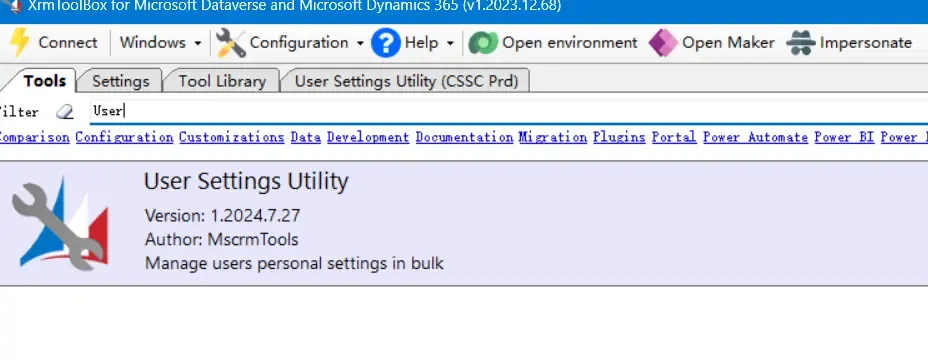
步骤一:XrmToolBox 安装并打开 User Settings Utility

Open User Settings Utility

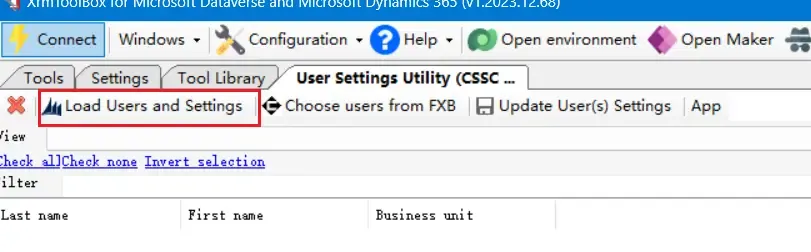
步骤二:加载用户信息

Load User Information

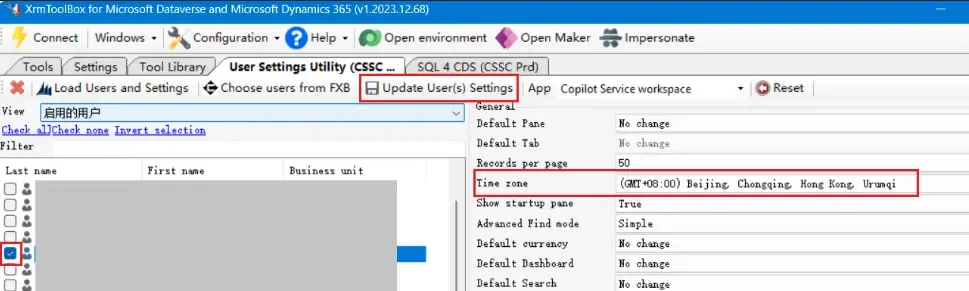
步骤三:选择并勾选用户,选择时区,最后点击更新用户设置

Update User Settings

通过SQL查询用户目前使用的时区

另外,还可以通过下面的SQL查询用户目前使用的时区:

SELECT s.fullname AS UserName,
       s.businessunitidname AS BusinessUnit,
       s.domainname AS Domain,
       us.timezonecode AS TimeZoneCode,
       tz.standardname AS TimeZoneName
FROM   systemuser AS s
       INNER JOIN
       usersettings AS us
       ON s.systemuserid = us.systemuserid
       INNER JOIN
       timezonedefinition AS tz
       ON us.timezonecode = tz.timezonecode
WHERE  s.isdisabled = 0;
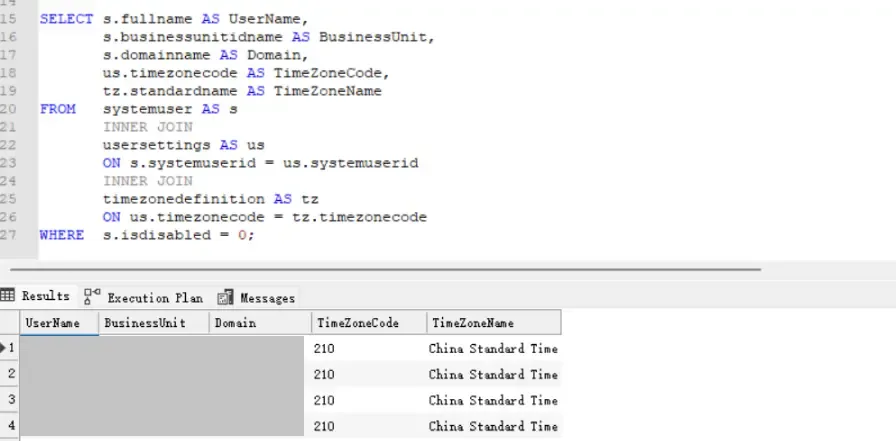
Query User Time Zone via SQL

SQL字段说明

#FieldDescription
1UserNameFull name of the user.
2BusinessUnitThe business unit to which the user belongs.
3DomainThe user’s domain account (e.g., contoso\johndoe).
4TimeZoneCodeThe numeric code that represents the time zone in Dynamics 365.
5TimeZoneNameThe standard name of the time zone (e.g., Pacific Standard Time).

(完)

如果这篇文章刚好帮到了你,欢迎请我喝杯咖啡