惯性聚合 高效追踪和阅读你感兴趣的博客、新闻、科技资讯
阅读原文 在惯性聚合中打开

推荐订阅源

S
Security Affairs
freeCodeCamp Programming Tutorials: Python, JavaScript, Git & More
CTFtime.org: upcoming CTF events
Jina AI
Jina AI
P
Palo Alto Networks Blog
GbyAI
GbyAI
大猫的无限游戏
大猫的无限游戏
A
Arctic Wolf
Hugging Face - Blog
Hugging Face - Blog
小众软件
小众软件
Y
Y Combinator Blog
T
The Blog of Author Tim Ferriss
Blog — PlanetScale
Blog — PlanetScale
S
Schneier on Security
V
Vulnerabilities – Threatpost
C
Cybersecurity and Infrastructure Security Agency CISA
雷峰网
雷峰网
T
Tenable Blog
人人都是产品经理
人人都是产品经理
T
Tor Project blog
C
Cyber Attacks, Cyber Crime and Cyber Security
AWS News Blog
AWS News Blog
Microsoft Security Blog
J
Java Code Geeks
Scott Helme
Scott Helme
SecWiki News
SecWiki News
C
CERT Recently Published Vulnerability Notes
Recorded Future
Recorded Future
I
InfoQ
Security Archives - TechRepublic
Help Net Security
Help Net Security
Cloudbric
Cloudbric
C
Check Point Blog
Engineering at Meta
Engineering at Meta
TaoSecurity Blog
TaoSecurity Blog
B
Blog
Cyber Security Advisories - MS-ISAC
博客园_首页
N
News and Events Feed by Topic
云风的 BLOG
云风的 BLOG
MyScale Blog
MyScale Blog
腾讯CDC
量子位
Application and Cybersecurity Blog
K
Kaspersky official blog
Vercel News
Vercel News
F
Full Disclosure
T
Troy Hunt's Blog
Forbes - Security
Forbes - Security
S
Security @ Cisco Blogs

WishMeLz - Vue

Electron 主进程起一个可用的 HTTPS 静态服务器 - WishMeLz van-nav-bar 页面宽度改动 placeholder占位元素未自动更新 - WishMeLz Vant UI van-search 键盘没有显示「搜索」按钮的解决方案 - WishMeLz el-upload beforeUpload 使用async无法拦截 ANSI 字体在前端展示 Jenkins日志 - WishMeLz 获取视频某一秒的截图 - WishMeLz elementui 动态生成的 el-form-item rules校验失效 vue中v-html - WishMeLz SSE(Server-Sent Events) - WishMeLz
Lodop、C-Lodop使用笔记 - WishMeLz
Wish · 2025-08-10 · via WishMeLz - Vue
Lodop(标音:劳道谱,俗称:露肚皮)是专业WEB控件,用它既可裁剪输出页面内容,又可用程序代码直接实现复杂打印。控件功能强大,却简单易用,所有调用如同JavaScript扩展语句件功能强大,却简单易用,所有调用如同JavaScript扩展语句

clodop打印机插件,其他语法与官网一样,只是简化注册步骤。目前兼容最低版本:6.2.2.6

官网:http://www.c-lodop.com/LodopDemo.html

npm:https://www.npmjs.com/package/clodop

Github:https://github.com/WishMelz/clodop

vue 项目中使用

npm i clodop
import { getLodop, initialize } from 'clodop'
// 初始化打印环境
initialize({
    token:"xxxxxx"
});

// 获取打印对象
const LODOP = getLodop();

if (LODOP) {
    // 使用打印功能
}

在main.ts 中初始化

initialize({
    mainJS:'CLodopfuncs.js',
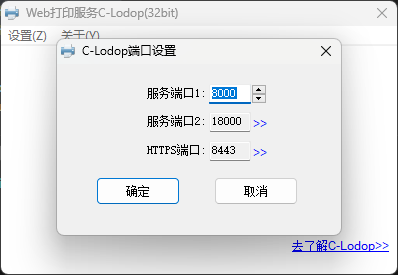
    wsPort1:8000,
    wsPort2:18000, 
    httpPort1:8000,
    httpPort2:18000,
    httpsPort:8443,
    token:"TOKEN"
})
参数名默认值说明
mainJSCLodopfuncs.js主进程文件名字
wsPort18000进程端口1
wsPort218000进程端口2
httpPort18000http端口1
httpPort218000http端口2
httpsPort8443HTTPS端口
tokenTOKEN密钥

不同的token对应不同的ip/域名。

2025-08-10T07:35:42.png

使用示例

最简单打印示例

const LODOP = getLodop()
const htmlstr = "<h1 style='color:red'> Lodop </h1>"
LODOP.PRINT_INIT(PrineCode) //任务号,随机生成即可
if (printerIndex) {
    //如果指定了打印机, 否则走电脑默认打印机
    LODOP.SET_PRINTER_INDEX(printerIndex)
}
LODOP.NewPage()
LODOP.SET_PRINT_STYLEA(0, 'ShowBarText', 2)
LODOP.ADD_PRINT_HTM('0mm', '0mm', '60mm', '35mm', htmlstr) // ADD_PRINT_TABLE(intTop,intLeft,intWidth,intHeight,strHtml)

LODOP.PRINT() //直接打印
// LODOP.PREVIEW() // 预览

获取打印机列表,指定打印机打印

const LODOP = getLodop()
const printList = []
let printount = LODOP.GET_PRINTER_COUNT() //打印机总数
for (let index = 0; index < printount; index++) {
    const element = LODOP.GET_PRINTER_NAME(index) //根据索引获取打印机名字
    printList.push({
        label: element,
        value: index,
    })
}

console.log('当前打印机列表', printList)
[
    {
        "label":"Zebra ZM400 (300 dpi) - ZPL",
        "value":0
    },
    {
        "label":"KONICA MINOLTA Universal PCL",
        "value":1
    }
]

指定打印机打印

LODOP.SET_PRINTER_INDEX(printerIndex) 传入具体的索引即可