惯性聚合 高效追踪和阅读你感兴趣的博客、新闻、科技资讯
阅读原文 在惯性聚合中打开

推荐订阅源

WordPress大学
WordPress大学
V
Visual Studio Blog
P
Privacy International News Feed
月光博客
月光博客
Threat Intelligence Blog | Flashpoint
L
Lohrmann on Cybersecurity
N
News and Events Feed by Topic
K
KPMG report finds enterprise disconnect between AI and its ROI | CIO
Apple Machine Learning Research
阮一峰的网络日志
阮一峰的网络日志
Webroot Blog
Webroot Blog
T
Threatpost
宝玉的分享
宝玉的分享
The Last Watchdog
The Last Watchdog
小众软件
小众软件
L
LINUX DO - 最新话题
C
Cisco Blogs
T
Troy Hunt's Blog
Schneier on Security
酷 壳 – CoolShell
酷 壳 – CoolShell
www.infosecurity-magazine.com
雷峰网
雷峰网
G
GRAHAM CLULEY
有赞技术团队
有赞技术团队
Know Your Adversary
Know Your Adversary
博客园 - 叶小钗
罗磊的独立博客
V
V2EX
博客园 - Franky
P
Proofpoint News Feed
SecWiki News
SecWiki News
腾讯CDC
cs.CL updates on arXiv.org
Jina AI
Jina AI
博客园 - 三生石上(FineUI控件)
S
Secure Thoughts
钛媒体:引领未来商业与生活新知
钛媒体:引领未来商业与生活新知
Google DeepMind News
Attack and Defense Labs
人人都是产品经理
人人都是产品经理
The Cloudflare Blog
PCI Perspectives
PCI Perspectives
V2EX - 技术
V2EX - 技术
Google DeepMind News
Last Week in AI
Last Week in AI
aimingoo的专栏
aimingoo的专栏
Cisco Talos Blog
Cisco Talos Blog
N
News and Events Feed by Topic
让小产品的独立变现更简单 - ezindie.com
S
SegmentFault 最新的问题

WishMeLz - JS

Electron 主进程起一个可用的 HTTPS 静态服务器 - WishMeLz 某x面板每月自动重置流量功能 - WishMeLz 获取视频某一秒的截图 - WishMeLz 金额大写 - WishMeLz markdown 编辑器 md编辑器 - WishMeLz 零宽非连接符 [ZWNJ] U+200C - WishMeLz SSE(Server-Sent Events) - WishMeLz 随机渐变背景 - WishMeLz 文件处理 - WishMeLz
ANSI 字体在前端展示 Jenkins日志 - WishMeLz
Wish · 2024-07-16 · via WishMeLz - JS

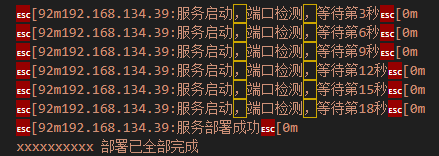
最近在做运维平台的开发,前端需要显示Jenkins的日志在前端,其中的ANSI字体就是如下示例。

192.168.134.39:服务启动,端口检测,等待第3秒
192.168.134.39:服务启动,端口检测,等待第6秒
192.168.134.39:服务启动,端口检测,等待第9秒
192.168.134.39:服务启动,端口检测,等待第12秒
192.168.134.39:服务启动,端口检测,等待第15秒
192.168.134.39:服务启动,端口检测,等待第18秒
192.168.134.39:服务部署成功
xxxxxxxxxx 部署已全部完成

2024-07-16T11:08:28.png

仓库地址: https://github.com/drudru/ansi_up#readme

使用

import { AnsiUp } from '@/utils/ansi_up.js'
const ansi_up = new AnsiUp();
this.consoleText = ansi_up.ansi_to_html(res.data.content);

2024-07-16T11:13:51.png


最后编辑时间为: July 16th , 2024 at 07:16 pm
本文由 Wish 创作,采用 知识共享署名 4.0 国际许可协议进行许可
可自由转载、引用,但需署名作者且注明文章出处

标签 : ANSI