惯性聚合 高效追踪和阅读你感兴趣的博客、新闻、科技资讯
阅读原文 在惯性聚合中打开

推荐订阅源

V
V2EX
W
WeLiveSecurity
IT之家
IT之家
A
About on SuperTechFans
B
Blog
L
LangChain Blog
H
Help Net Security
Engineering at Meta
Engineering at Meta
Recent Announcements
Google Online Security Blog
宝玉的分享
宝玉的分享
MyScale Blog
MyScale Blog
Exploit-DB.com RSS Feed
N
News and Events Feed by Topic
Schneier on Security
GbyAI
GbyAI
博客园 - 叶小钗
人人都是产品经理
人人都是产品经理
S
SegmentFault 最新的问题
Cloudbric
Cloudbric
WordPress大学
WordPress大学
K
KPMG report finds enterprise disconnect between AI and its ROI | CIO
奇客Solidot–传递最新科技情报
奇客Solidot–传递最新科技情报
Y
Y Combinator Blog
S
Security Affairs
The Last Watchdog
The Last Watchdog
H
Heimdal Security Blog
T
The Blog of Author Tim Ferriss
Last Week in AI
Last Week in AI
博客园 - 聂微东
H
Hackread – Cybersecurity News, Data Breaches, AI and More
P
Privacy & Cybersecurity Law Blog
V
Visual Studio Blog
H
Hacker News: Front Page
Recorded Future
Recorded Future
Cyberwarzone
Cyberwarzone
L
Lohrmann on Cybersecurity
Simon Willison's Weblog
P
Privacy International News Feed
博客园 - 三生石上(FineUI控件)
大猫的无限游戏
大猫的无限游戏
www.infosecurity-magazine.com
Blog — PlanetScale
Blog — PlanetScale
G
Google Developers Blog
aimingoo的专栏
aimingoo的专栏
C
Cybersecurity and Infrastructure Security Agency CISA
AWS News Blog
AWS News Blog
Jina AI
Jina AI
N
News | PayPal Newsroom
S
Schneier on Security

倾城于你

EasyNote:极简自托管记事本 - 倾城于你 哪吒面板数据库瘦身-从1.2G到6M - 倾城于你 最具颜值的VPS剩余价值计算器来了 - 倾城于你 Typecho字体插件ZFonts已开源 - 倾城于你 MS订阅自助管理系统CF-M365-Admin - 倾城于你 推荐一款小而美的Windows剪贴板利器ElegantClipboard - 倾城于你 CDT-Monitor:阿里云 CDT 流量监控与自动化熔断工具 - 倾城于你 ZenShellHub单文件脚本管理中心 - 倾城于你 xg-nav一个简洁、纯HTML静态的个人导航站 - 倾城于你 Newsnow实时热点&新闻 - 倾城于你 推荐一个轻量级、高性能的多功能程序HubProxy - 倾城于你 安利一款小说下载器so-novel - 倾城于你 本站的公益服务&API接口独立页面已开放 - 倾城于你
一键部署Poste.io邮件服务器指南 - 倾城于你
博主: 青柠 · 2025-12-06 · via 倾城于你
  • 发布时间:
  • 822 次浏览
  • 暂无评论
  • 2191字数
  • 分类: 开源推荐 实用脚本
  •  百度已收录
  1. 首页
  2. 开源推荐
  3. 正文  

Poste.io

一款很好用的自建邮局服务项目,本博客之前有一篇Maddy+Roundcube搭建自己的邮局系统,可能稍显复杂,这里给出更方便的一键部署Poste.io的教程。

一键脚本及配置细节

执行脚本

curl -sS -O https://raw.githubusercontent.com/woniu336/open_shell/main/poste_io.sh && chmod +x poste_io.sh && ./poste_io.sh

如果机器无法正常访问Github可使用下面命令

curl -sS -O https://gh.qninq.cn/https://raw.githubusercontent.com/woniu336/open_shell/main/poste_io.sh && chmod +x poste_io.sh && ./poste_io.sh

重要提示:请确保 25 端口可用,否则需更换服务器。脚本会自动检测并提示端口状态。不一定准确,最好先与你的服务器提供商确认端口已开放。

https://assets.qninq.cn/qning/uUgOf6J5.webp

配置DNS记录

脚本会输出需要配置的DNS记录,自行添加即可,具体可看本文开头的引用文章。二者的记录基本一致

例如:mail.123.com 作为邮箱域名

记录类型主机记录记录值
Amail1.1.1.1 (服务器 ip)
CNAMEimapmail.123.com
CNAMEpopmail.123.com
CNAMEsmtpmail.123.com
MX@mail.123.com
TXT@v=spf1 mx ~all
TXT_dmarcv=DMARC1; p=none; rua=mailto:admin@123.com
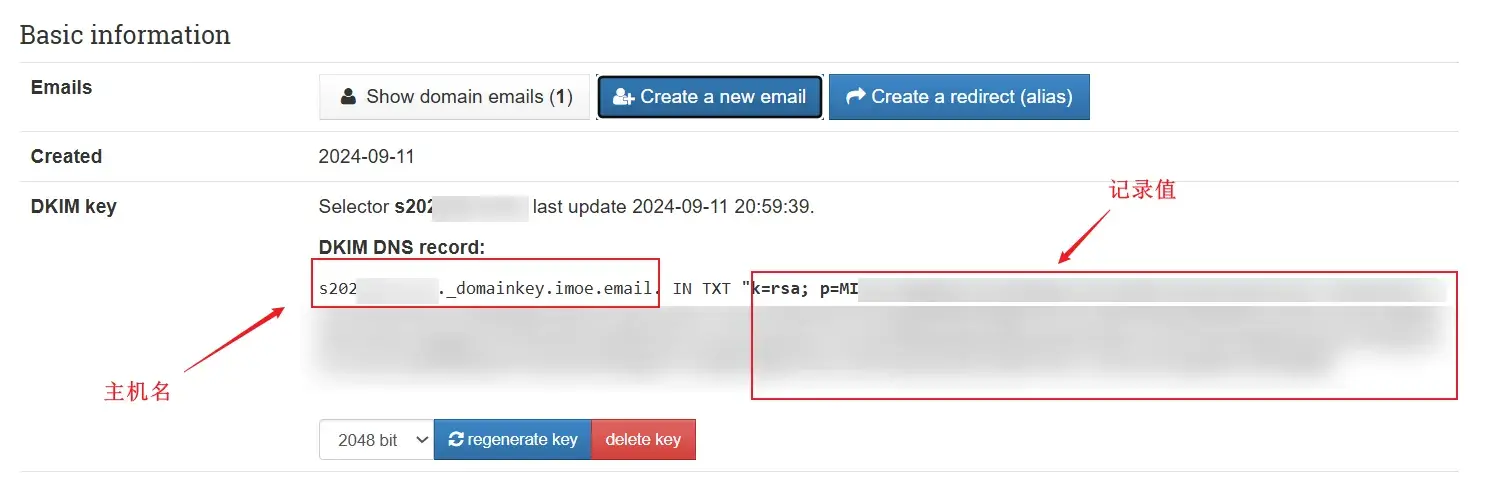
最后还有一个 TXT 记录是关于 DKIM 密钥的,需要在后台激活后看到,请继续往下看

反向代理与SSL

创建反向代理类型的网站,然后反代127.0.0.1:8808,并且配置SSL证书,开启强制HTTPS访问。此步骤不再赘述。

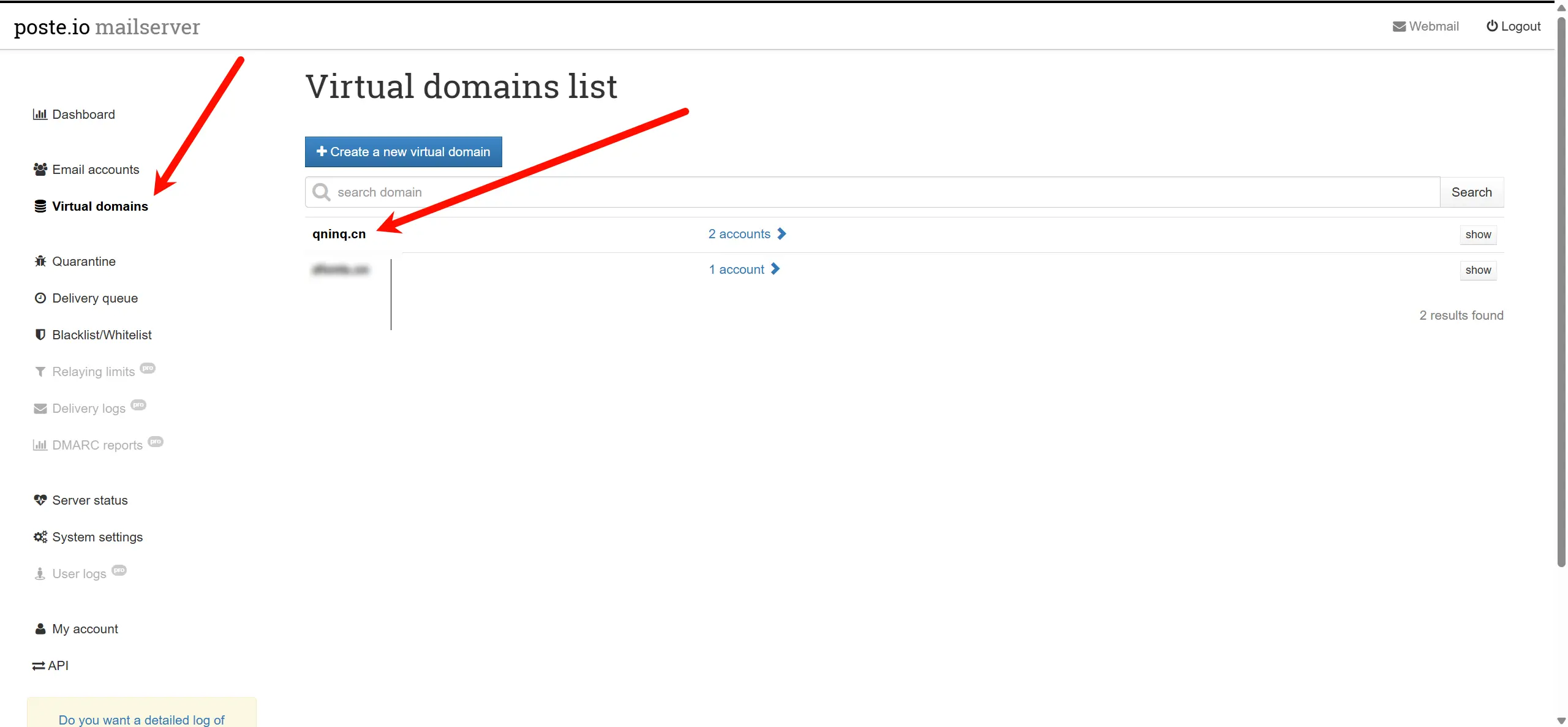
邮件服务器后台配置

访问:你的域名/admin,然后登陆,继续按照下图操作
https://assets.qninq.cn/qning/nu9CzoyA.webp

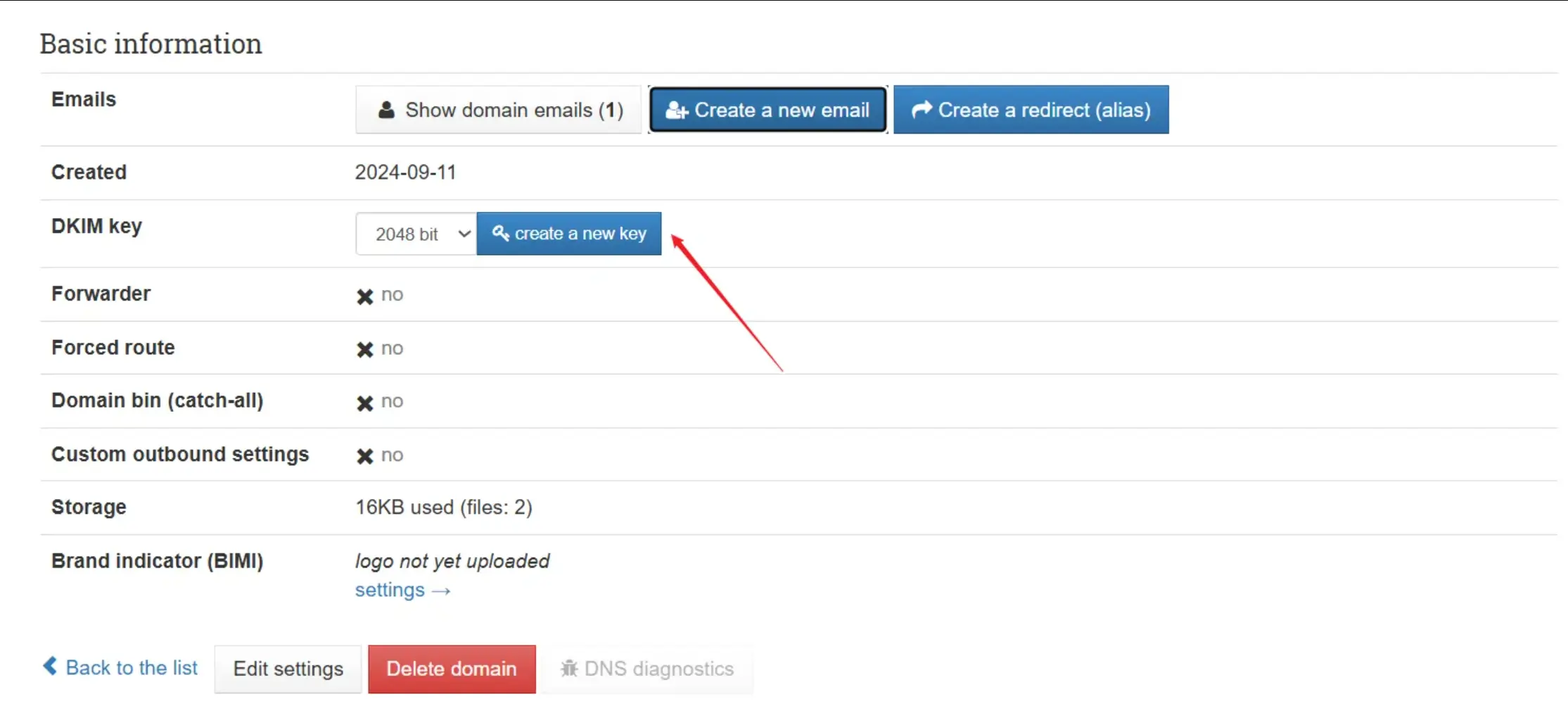
DKIM 配置

创建 DKIM 密钥

主机名格式例如:s20241127823._domainkey

添加 TXT 记录

复制完整的 DKIM 记录值
https://assets.qninq.cn/qning/sjZPGZHL.webp
Image

webmail 使用

点击右上角的 webmail,登录用户名和登录密码和管理后台一致。
https://assets.qninq.cn/qning/oEJYN3Y1.webp

第三方客户端

SMTP/IMAP/POP3 配置

协议服务器地址端口SSL
SMTPsmtp.your-domain.com25, 465, 587STARTTLS
IMAPmap.your-domain.com993, 143STARTTLS
POP3pop.your-domain.com995, 110STARTTLS

相关地址

https://poste.io/
https://blog.lufei.de/p/373/

🏷本文标签:Docker,️一键脚本,️Mail,️Poste.io,️WebMail

赞赏作者

如果觉得我的文章对你有用,请随意赞赏

一键部署Poste.io邮件服务器指南

 • 

*/