





NotebookLM's Video Overviews distill complex information into clear, digestible content, paired with a powerful, redesigned Studio panel.
Usama Bin Shafqat
Software Engineer, NotebookLM
Bullet points
- NotebookLM gets updates! "What’s new in NotebookLM: Video Overviews and an upgraded Studio" explains it all.
- Video Overviews are here! They're like narrated slides, great for understanding complex stuff visually.
- The Studio panel got a makeover! Now you can create multiple outputs of the same type.
- Make different versions of overviews! Tailor them to different languages, roles, or study chapters.
- Multitask in the Studio! Listen to audio while exploring mind maps for better productivity.
Summaries were generated by Google AI. Generative AI is experimental.
Basic explainer
NotebookLM has some cool new updates. It now makes video summaries with slides to help you learn. You can also make lots of different study tools like audio summaries and mind maps. This helps people understand and share information better.
Summaries were generated by Google AI. Generative AI is experimental.
Explore other styles:
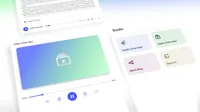
Today we’re introducing Video Overviews and new upgrades to the Studio panel in NotebookLM, your personalized AI research assistant. Here’s a closer look at how these updates make NotebookLM even more powerful and collaborative:
Now rolling out Video Overviews
Listening to an Audio Overview is a great way to absorb information while multitasking. But there are times when you might need a helpful visual aid to understand a complex concept.
First announced at I/O, Video Overviews are a new category of Studio outputs coming to NotebookLM. The first format we’re launching today takes the form of narrated slides. You can think of these as a visual alternative to Audio Overviews: the AI host creates new visuals to help illustrate points while also pulling in images, diagrams, quotes and numbers from your documents. This makes it uniquely effective for explaining data, demonstrating processes and making abstract concepts more tangible. We'll introduce additional formats as Video Overviews develop further.
In the same way you can customize your Audio Overviews, you’ll also have the option to cater Video Overview to your needs. You can specify topics to focus on, indicate your learning goals, describe the target audience and much more. You can ask generic questions like, "I know nothing about this topic; help me understand the diagrams in the paper" or get into specifics and ask, "I'm already an expert on X and my team works on Y; focus on Z."
Video Overviews are now rolling out to all users in English, and support for more languages is coming soon.
New upgrades to the Studio
Notebooks are already a great tool for turning complex material into digestible formats like Audio Overviews, Mind Maps and Study Guides. But until now, you could only create one of each per notebook, which could be limiting.
That's why today we’re giving the Studio panel a fresh new look and — most importantly — you can now create and store multiple studio outputs of the same type in a single notebook. This unlocks exciting new possibilities for how you learn, making NotebookLM even more comprehensive and useful in digesting information:
- Have a public notebook to share with the world? Create a set of Audio Overviews in different languages to make your content globally accessible.
- Managing a team notebook full of notes and documentation? Create Audio and Video Overviews tailored to different roles, significantly saving time and effort.
- Studying for a big exam? You can also create any outputs, like Mind Maps, or Video Overviews, each focusing on a different chapter of your course notes.
You'll now find four distinct tiles at the top of the Studio panel for creating Audio Overviews, Video Overviews, Mind Maps and Reports. All the content you create will appear conveniently in a list below these tiles. And to boost your productivity further, you can now multi-task within the Studio panel, letting you listen to an Audio Overview while simultaneously exploring a Mind Map or reviewing a Study Guide.
The new, redesigned Studio makes it easier than ever to take your source material and generate a whole collection of formats to understand and share. It will be rolling out to all users over the next few weeks.