



惯性聚合 高效追踪和阅读你感兴趣的博客、新闻、科技资讯
阅读原文 在惯性聚合中打开

推荐订阅源

爱范儿
爱范儿
钛媒体:引领未来商业与生活新知
钛媒体:引领未来商业与生活新知
G
GRAHAM CLULEY
www.infosecurity-magazine.com
V2EX - 技术
V2EX - 技术
The Last Watchdog
The Last Watchdog
S
Secure Thoughts
Webroot Blog
Webroot Blog
PCI Perspectives
PCI Perspectives
L
LINUX DO - 最新话题
Hacker News: Ask HN
Hacker News: Ask HN
N
News and Events Feed by Topic
H
Heimdal Security Blog
H
Help Net Security
T
The Blog of Author Tim Ferriss
P
Proofpoint News Feed
The GitHub Blog
The GitHub Blog
Jina AI
Jina AI
Recent Commits to openclaw:main
F
Full Disclosure
小众软件
小众软件
S
Securelist
罗磊的独立博客
NISL@THU
NISL@THU
D
Darknet – Hacking Tools, Hacker News & Cyber Security
C
Cisco Blogs
云风的 BLOG
云风的 BLOG
C
CERT Recently Published Vulnerability Notes
Cisco Talos Blog
Cisco Talos Blog
Know Your Adversary
Know Your Adversary
S
Schneier on Security
D
DataBreaches.Net
M
MIT News - Artificial intelligence
V
Vulnerabilities – Threatpost
N
News and Events Feed by Topic
有赞技术团队
有赞技术团队
F
Fortinet All Blogs
T
Tenable Blog
The Register - Security
C
Check Point Blog
AWS News Blog
AWS News Blog
Cloudbric
Cloudbric
C
CXSECURITY Database RSS Feed - CXSecurity.com
cs.AI updates on arXiv.org
C
Cyber Attacks, Cyber Crime and Cyber Security
Cyber Security Advisories - MS-ISAC
Google Online Security Blog
博客园 - 叶小钗
Hacker News - Newest:
Hacker News - Newest: "LLM"
博客园 - 司徒正美

WordPress.com News

How to Find WordPress Meetups and WordCamps Near You 7 Reasons to Attend WordCamp US 2026 in Phoenix Master SEO & AIO: A Free Course for the AI Search Era WordPress.com Changelog: A More Flexible Editor WordPress Studio Just Got Faster, the CLI is Now Dependency-Free, and Sonnet 5 Support What Is Agentic Commerce? What It Means for Your Store How to Choose a Web Host: 7 Factors to Consider WordPress.com Changelog: Shape Your Newsletter Signup and Get Domain Help in Chat Build your first plugin with WordPress Studio and Cursor Feature Clips: Turn Posts Into Social-Ready Video Customize What Newsletter Subscribers See | WordPress.com Your WordPress Expert, Now on Desktop: Studio Code Beta Jetpack Search 7.0: Find Products Faster in WooCommerce WordPress.com Changelog: Sharper Image Editing and a New Way to Multitask Meet Desktop Mode: Turn WordPress Admin Into a Desktop Workspace How to Make Your Website More Discoverable by AI | WordPress.com Develop Locally on Linux with WordPress Studio 10 New WordPress.com Features Just Landed WordPress.com Is Now Available in Stripe Projects WordCamp Europe 2026: Worth the Wait A Better Client Feedback Loop with Studio Code WordPress.com Changelog: WordPress 7.0 and Ways to Repurpose Your Written Content WordPress 7.0 Has Arrived: Here’s Everything You Need to Know WordPress 7.0 Has Arrived: Here’s Everything You Need to Know Now in the Reader: Bluesky, Mastodon, and the Fediverse Introducing Write: A New Way to Post, Built for Writers Meet WordCamp Agent: A Preview of the WordPress Memory Layer Turn Your Blog Posts Into Podcast Episodes WordPress.com Changelog: Launch a Podcast and Update Your Friends Blueprints Gallery Is Now Available in WordPress Studio Inside WordPress.com’s Security Response to the Essential Plugin Attack Achievement Unlocked: Your WordPress.com Milestones Now Have a Home Your Podcast Belongs With Your Blog and Newsletter Easy Site Editor – Coming Soon Easy Site Editor – Now in Beta Introducing Lately, now in beta Introducing WordPress Workspace for Mac WordPress.com Changelog: AI Assistant Opt-in on All Current Paid Plans and A New Way to Build Sites from Your Terminal Go From Idea to Live Ecommerce Store in One Hour A New Theme for Short-Form Blogging on WordPress.com WordPress.com Changelog: Try the WordPress 7.0 Beta and a One-Click Solution for Plugin Errors Spry Fox Has Been Making Games for 15 Years. Their Blog Still Matters. How to Build an Endless Stream of Content Ideas with WordPress and Claude How HealthPress.io Used WordPress.com to Power a Growing European Lifestyle Health Movement Murphy Levesque Co-Founded an Animal Rescue at 11. Her WordPress.com Site Helped Save Over 100 Animals. What We Learned (and Loved) at WordCamp Asia 2026 in Mumbai How to Choose Headless WordPress Hosting: A 2026 Checklist How Knockers Design Builds Complex Client Work on WordPress.com WordPress.com Changelog: A New Telegram Bot and Complimentary Newsletter Subscriptions The Top 10 Creative WordPress Themes with Real Personality Give Friends Free Access with Complimentary Subscriptions How WordPress 7.0 Is Building the Foundation for AI-Powered Sites New in WordPress Studio: Studio CLI on npm & phpMyAdmin Access Plugins, Global Styles, and More: Now on Every WordPress.com Paid Plan How Consultings Company Became Brazil’s First Automattic Partner by Betting on Owned Digital Top WordPress Design Trends for 2026: Interactivity, AI, and the Return to Ownership WordPress.com Changelog: Enabling AI Agents to Work on Your Site and More Control Over Newsletter Sending Barbara Kingsley Started TikTok at 77. Now She Has 100,000 Followers and a Website to Match.
Your WordPress Expert in the Terminal: Try the Studio Code Beta
Alexa Peduzz · 2026-04-28 · via WordPress.com News

Studio Code is now in beta, and you can try it today — even though we’re still actively building it.

That’s intentional. We wanted to get it into your hands early, gather feedback, and shape the next phase of development together rather than polish it in a vacuum and call it done. Consider this the beginning of that conversation.

To try it, install Studio CLI (either from the desktop app or directly from your terminal) and then run studio code.

What is Studio Code?

Studio Code is a CLI tool — your WordPress expert in the terminal. Think of it like having a senior WordPress developer available as a command: one that reads your codebase, edits files, runs commands, can spin up local sites, and knows WordPress best practices deeply.

It’s like Claude Code or Cursor CLI, but specifically for WordPress. In fact, we’re leveraging the incredible tech of Claude Code to make Studio Code a powerful WordPress coding tool.
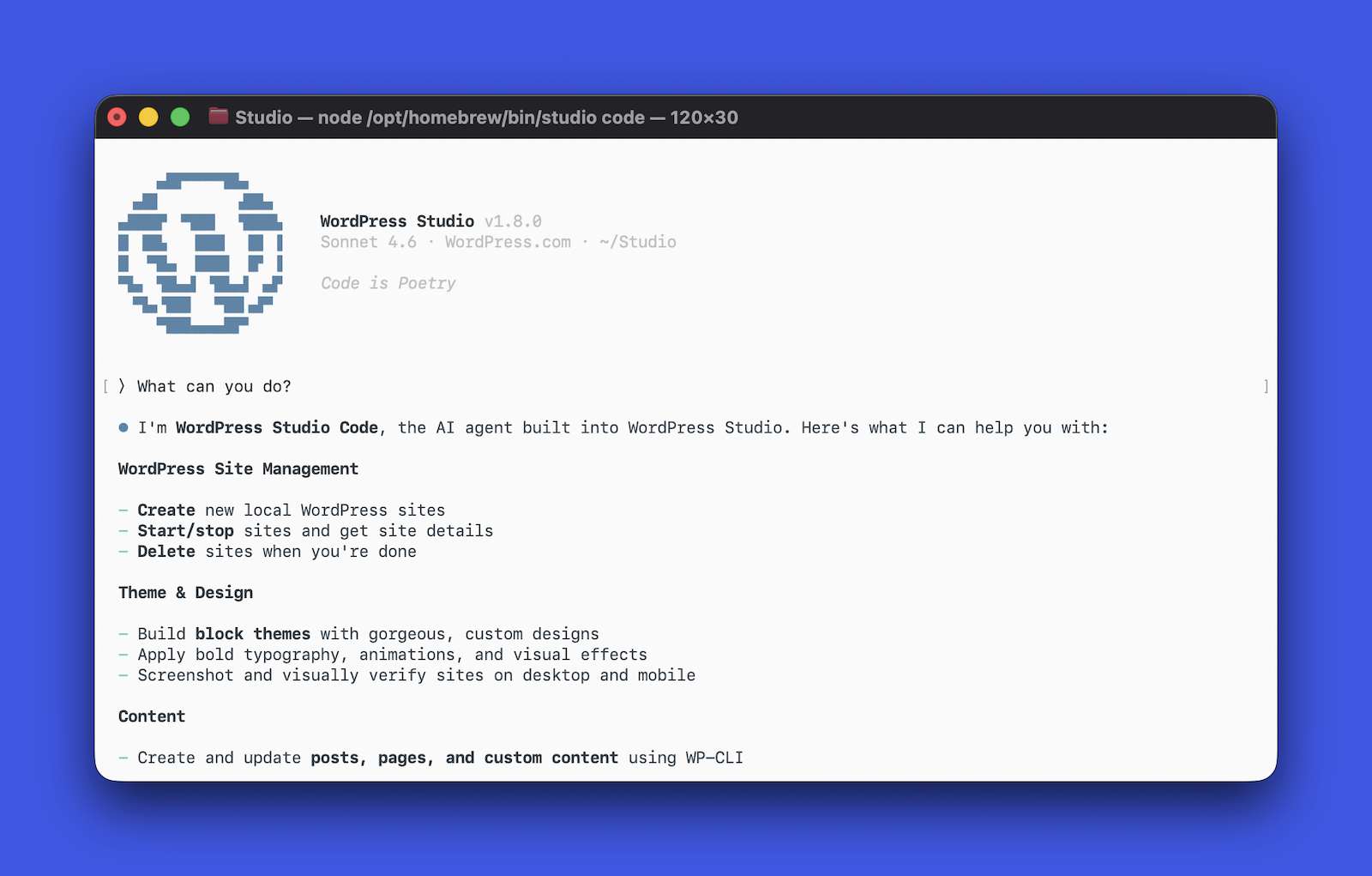
A terminal window with Studio Code open and a prompt saying "What can you do?" and the agent's response

General-purpose coding agents don’t have the tools to act on a WordPress site out of the box — they can’t spin up a local environment, run WP-CLI commands, validate block markup against the real editor, or screenshot the result to check their own work. 

Studio Code can. It’s purpose-built for WordPress: it understands block themes, knows WP-CLI inside and out, validates block markup against the real editor, and works the same feedback loop a developer would — run something, check the output, iterate until it looks right, and ship.

You describe what you want in natural language; Studio Code builds it.

What it can actually do

The honest answer: quite a lot, and it’s getting more abilities by the day.

Build a complete WordPress site from a description or reference. You give it a site concept — a bakery, a portfolio, a nonprofit landing page — or a reference URL, and it designs and builds a full block theme: layout, typography, color palette, and page content. It picks fonts, writes CSS, creates the pages, checks the visual output with a screenshot, and fixes what’s broken.

Manage your local WordPress sites. Create sites, start and stop them, install plugins, activate themes, set options, create posts and menus all through natural language. It uses WP-CLI under the hood, but you don’t have to.

Write and validate block content. Block markup has to be structurally valid or WordPress will reject it in the editor. Studio Code validates every block it generates against the real block editor before inserting it — running each block through its save() function in an actual browser.

Validate performance. Is your site fast? Run the /need-for-speed skill to run a performance audit on your local site, and you’ll get specific, actionable recommendations to speed it up.

Preview and publish to WordPress.com. Once you’re happy with your local build, you can generate a hosted preview site link and push to or pull from WordPress.com, where your site will be backed by fully managed hosting, built-in security, and 24/7 expert support.

Clean up your WordPress category taxonomy. Audit your existing categories, merge duplicates, retire dead ones, create missing ones, and re-categorize posts — all through natural language. It exports your content and applies AI-driven structure, but you don’t have to touch a single category setting yourself.
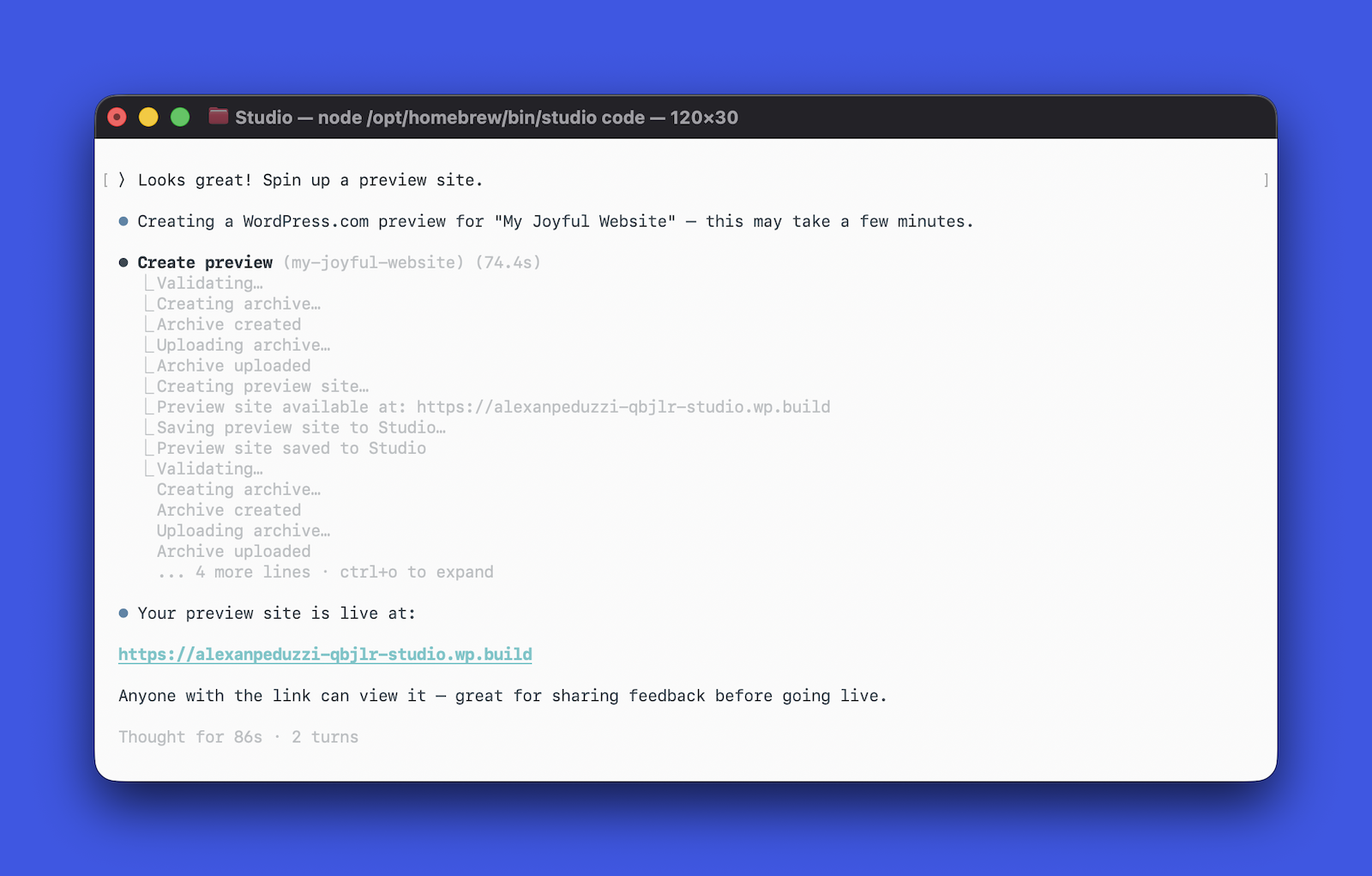
a terminal window asking Studio Code to create a preview site for a client

Why we’re shipping it now

We’re in the middle of building this, and we think that’s important to say out loud.

The core experience works. People are using it to build real sites, prototype ideas quickly, and skip the scaffolding work that eats time without adding value. We’ve seen it go from a brief description to a fully designed, content-filled WordPress site in a few minutes — start to finish.

But there’s more to build as AI gets better every day. We’re refining the design intelligence, improving how it handles complex layouts, and expanding what it can do with existing sites. So we’re doing the thing we believe in: shipping early, being honest about where it is, and building in public.

During the beta, we decided to keep the Studio Code experience free. That may change in the future, and we want your feedback before we can lock that in.

Give it a spin

Once you have the Studio CLI installed, simply run studio code to start using the beta.

We want to know what works, what doesn’t, and what you wish it could do. Open a GitHub issue with your thoughts, feedback, bug reports, and enhancement requests, and check out the documentation for more tips.